
How to Allow or Prevent Websites to Request Your Location in IE9, IE10, IE11, and Firefox
Information
Geolocation is a feature in new versions of web browsers. This allows websites to be able to keep a track of your physical location in order to provide custom localized services and search results. This may prove to be helpful sometimes, but could also compromise privacy.
This tutorial will show you how to allow or prevent websites to request your geolocation (physical location) in IE9, IE10, IE11, and Firefox.
This tutorial will show you how to allow or prevent websites to request your geolocation (physical location) in IE9, IE10, IE11, and Firefox.
Note
From: How to Turn Google Chrome Geolocation Off
The first time you visit a website that requests geolocation information, the browser should display the Google Location Service’s terms and conditions. You will have the option to allow or disallow the browser from sending your location data. The screenshot below is an example how a website asks for your location information.

What is sent to websites that requires location data?
Your IP address is sent to the website that requests the location information. If you are using a laptop or other wireless-enabled device, the MAC address and signal strength can be sent as well. The browser should not save location data, nor are any cookies generated by websites that request the location information. Other websites will not be able to retrieve it, but it’s recommended to regularly clean your temporary Internet files, browsing history and stored cookies.
OPTION ONE
Allow or Prevent Websites to Request your Location in IE9, IE10, and IE11
2. Open the Control Panel (icons view), click/tap on the Internet Options icon, and go to step 4 below.
3. In Internet Explorer, click/tap on Tools (Menu bar or gear icon) and Internet Options, and go to step 4 below.
4. Click/tap on the Privacy tab, and do step 5 or 6 below for what you would like to do. (see screenshot below)
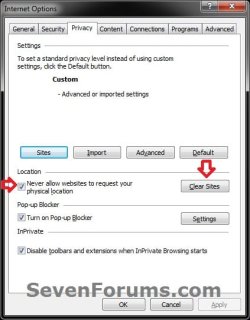
5. To Allow Websites to Request Your Location in IE9, IE10, and IE11 A) Uncheck the Never allow websites to request your physical location box, click/tap on OK, and go to step 7 below. (see screenshot above)
NOTE: This is the default setting.
6. To Prevent Websites to Request Your Location in IE9, IE10, and IE11 A) Check the Never allow websites to request your physical location box, click/tap on OK, and go to step 4 below. (see screenshot above)
7. Close and reopen Internet Explorer to apply.
OPTION TWO
Allow or Prevent Websites to Request Your Location in Firefox
2. Type about:config in the Firefox address bar, and press enter. (see screenshot below)
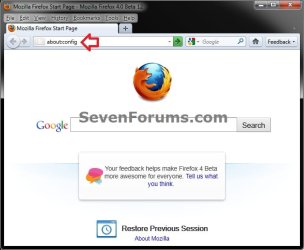
3. Click/tap on the I'll be careful, I promise button. (see screenshot below)

4. To Allow Websites to Request Your Location in Firefox

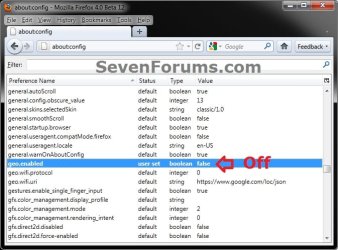
B) If listed, double click on geo.wifi.uri, type https://www.google.com/loc/json, and click on OK. (see screenshots below)

C) Firefox will now look like this. (see screenshot below)
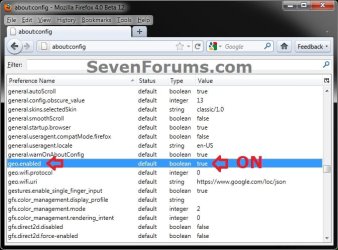
5. To Prevent Websites to Request Your Location in Firefox
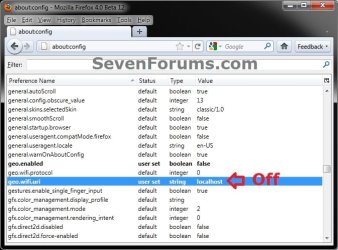
B) Double click/tap on the geo.wifi.uri. (see screenshot below)
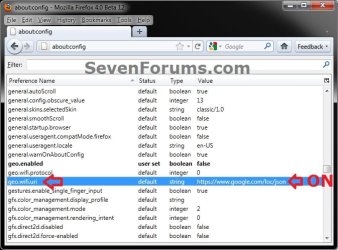
C) Type localhost, and click/tap on OK. (see screenshot below)
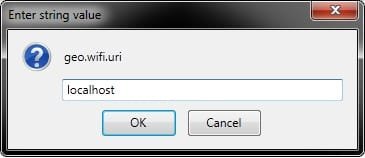
D) Firefox will now look like this. (see screenshot below)
That's it,
Shawn
Related Tutorials
- How to Turn On or Off Location Sharing in IE10 and IE11 in Windows 8 and 8.1
- How to Change the Region Home Location of your PC in Windows 8
- How to Enable or Disable DOM Storage "Cookies" in Internet Explorer and Firefox
- How to Allow or Block Cookies in Internet Explorer in Vista and Windows 7
- How to Turn SmartScreen Filter On or Off in Internet Explorer
- How to Turn InPrivate Filtering On or Off in Internet Explorer 8
- How to Turn Internet Explorer Pop-up Blocker On or Off in Internet Explorer
- How to Allow Pop-ups from a Website in Windows 7 Internet Explorer
- How to Turn Protected Mode On or Off in Internet Explorer
- How to Turn On or Off Enhanced Protected Mode in IE10 and IE11
- How to Turn "ActiveX Filtering" On or Off in IE9 and IE10
Last edited:


