
Windows 7 Forums Search
Welcome to Windows 7 Forums. Our forum is dedicated to helping you find solutions with any problems, errors or issues you are experiencing with Windows 7. The Windows 7 forum also covers news and updates and has an extensive Windows 7 tutorial section that covers a wide range of tips and tricks.


Windows 7 - Region and Language - Change


Region and Language - Change

How to change the default Format, Location and System Locale
Published by Orbital Shark
03-08-2011
Default Region and Language - Change

How to change your default Region and Language settings

information   Information
This will show you how to set your Regional and Language Format, Location and System Locale settings.

Note   Note
Following the steps outlined below has been known to solve issues such as Sky Player not showing up in Media Center, which is due to discrepencies in the region/language settings


Here's How:
1. Open the Control Panel(Category View), then click on Regional and Language. (See screenshot below)
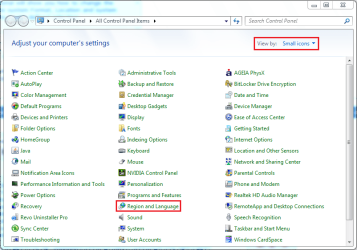
Region and Language - Change-control-panel-category-view.png
2. Click the 'Formats' tab (selected by default), then click the Format: dropdown and select the format you require (See screenshot below)
Region and Language - Change-region-language-formats-.png
3. Next, click the 'Location' tab and select your location from the dropdown (See screenshot below)
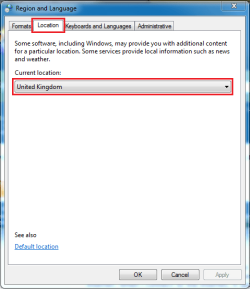
Region and Language - Change-region-language-location-.png
4. Next, click the 'Administrative' tab. You will notice 2 options (See screenshot below)
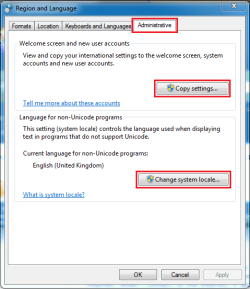
Region and Language - Change-region-language-administrative-.png
5. Next, click the 'Change system locale' button and select your location from the dropdown then click OK (See screenshot below)
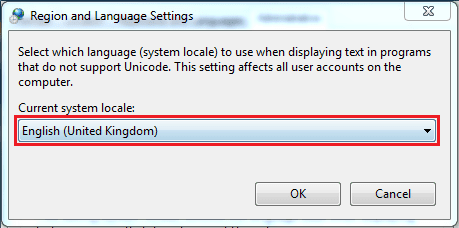
Region and Language - Change-region-language-administrative-change-locale-.png
6. Next, click the 'Copy Settings' button and put a check (tick) in the 2 boxes at the bottom then click OK (See screenshot below)
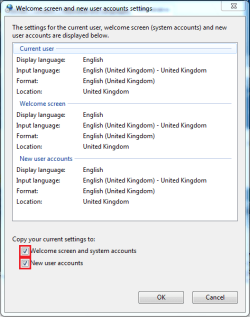
Region and Language - Change-region-language-administrative-copy-settings-.png

Note   Note
You may be prompted for a system restart after the final OK, just click the Restart Now button and allow the system to restart.
Tip   Tip
For those using language packs and user accounts in more than one language, step 6 is essential to assure all new user accounts are not only set to to desired location and keyboard layout, but it also determines in which language new accounts are created


That's all there is to it,

Jeff


Published by
Orbital Shark's Avatar
Senior Member

Join Date: Mar 2009
Location: Milton Keynes, United Kingdom
Posts: 6,494

Tutorial Tools
03-08-2011   #1
Kari


Very clear, easy to read tutorial. Thanks, Jeff.

For those using language packs and user accounts in more than one language, step 6 is essential to assure all new user accounts are not only set to to desired location and keyboard layout, but it also determines in which language new accounts are created.

Kari

EDIT: Sorry, I have to spread the rep before being able to rep you again

My System SpecsSystem Spec
03-08-2011   #2
Orbital Shark


Thanks Kari, added as a new tip
My System SpecsSystem Spec
03-26-2011   #3
RodTrevizan


Windows 7 Ultimate x64


Hi,
I would like to know if there any way to set this changes by any kind of command line.
Bat file or something just to double click

Last edited by RodTrevizan; 03-26-2011 at 07:23 PM..
My System SpecsSystem Spec
.


11-03-2011   #4
Britton30


Windows 7 Ultimate X86 SP1


Does this work on all versions of Windows 7? I see no mention of it being only for Pro, Ultimate and Enterprise.
My System SpecsSystem Spec
11-03-2011   #5
Kari


For language packs you need Ultimate or Enterprise, other than that the regional and language settings as told in this tutorial can be found and changed on all editions.

Kari
My System SpecsSystem Spec
11-04-2011   #6
Britton30


Windows 7 Ultimate X86 SP1


Thanks Kari.
My System SpecsSystem Spec
Comment

 Region and Language - Change problems?


Tutorial Tools


Similar Threads for: Region and Language - Change
Windows 7 Tutorial Category
Region and Language "Administrative" Tab - Add or Remove Tutorials
Region and Language "Formats" Tab - Add or Remove Tutorials
Region and Language "Location" Tab - Add or Remove Tutorials
Region and Language Settings - Copy to New Users and Welcome Screen Tutorials
Region and Language Shortcut - Create Tutorials


All times are GMT -5. The time now is 12:36 AM.


Windows 7 Forums is an independent web site and has not been authorized,
sponsored, or otherwise approved by Microsoft Corporation.
"Windows 7" and related materials are trademarks of Microsoft Corp.
© Designer Media Ltd
  

1 2 3 4 5 6 7 8 9 10 11 12 13 14 15 16 17 18 19 20 21 22 23 24 25 26 27 28 29 30