|
Welcome to Windows 7 Forums. Our forum is dedicated to helping you find solutions with any problems, errors or issues you are experiencing with Windows 7. The Windows 7 forum also covers news and updates and has an extensive Windows 7 tutorial section that covers a wide range of tips and tricks.
Windows 7 - Internet Explorer 9 Favorites Center - Pin and Unpin to Left Side Internet Explorer 9 Favorites Center - Pin and Unpin to Left Side How to Pin and Unpin the "Favorites Center" to the Left Side in Internet Explorer 9
Published by Brink
03-16-2011
| Internet Explorer 9 Favorites Center - Pin and Unpin to Left Side How to Pin and Unpin the "Favorites Center" to the Left Side in Internet Explorer 9  Information The Favorites Center in Internet Explorer 9 (IE9)allows you to quickly view your Favorites website links, Feeds, and viewed websites History.
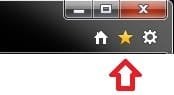
By default, you can open the Favorites Center on the right side of IE9 by clicking on the  icon at the top right corner of IE9.
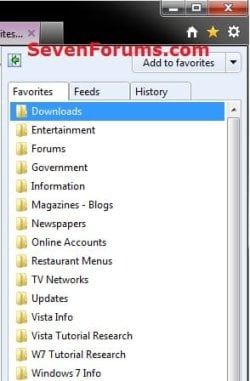
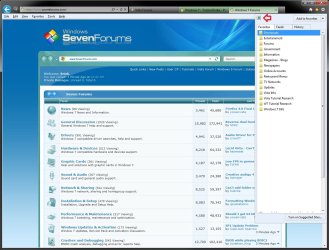
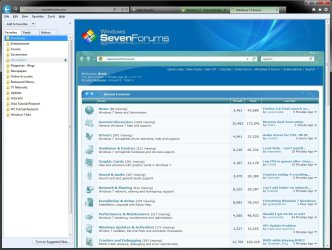
This will show you how to pin and unpin the Favorites Center to the left side in IE9. When you pin the Favorites Center to the left, it will stay there as long as you don't close the Favorites Center. You can close and reopen IE9 and the Favorites Center will still be on the left. Closing the Favorites Center on the left side will reset it's position back to the right side the next time you open the Favorites Center.  Note You can also open Favorites on the Menu bar in IE9 to see your favorite websites. EXAMPLE: IE9 Favorites Center Here's How:1. Open Internet Explorer 9. 2. To Pin Favorites Center to the Left Side of IE9A) Click on the star icon at the top right corner to open the Favorites Center. (see screenshot below) B) Click on the green arrow pointing to the left button. (see screenshot below) C) The Favorites Center will now be pinned to the left side of IE9 until you unpin it. (see screenshot below) NOTE: You can adjust the width of the pinned Favorites Center by moving the mouse pointer over the right border until it turns into a double arrow pointer, then left click and hold, and drag the right border to the left or right to adjust it's width. Release the left click when finished.
3. To Unpin Favorites Center from the Left Side of IE9A) Click on the X at the top right corner of the pinned Favorites Center. (see screenshot below) OR
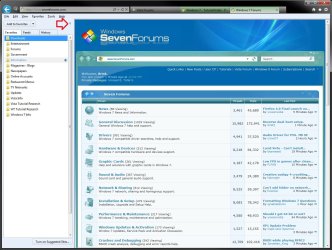
B) Click on the star icon at the top right corner once to unpin the Favorites Center. (see screenshot below) C) The Favorites Center will now be unpinned from the left side of IE9. That's it,
Shawn |  Published by | | Administrator Join Date: Oct 2008 Location: Texas Posts: 37,304 | |
 Tutorial Tools | | | | | | | | | |
03-16-2011
|
#1 | | Windows 7 Ultimate x64, XP Mode(VPC and VMLite), VM Player 4.02, W8 CPreview |
Staying on top of things I see!  This will be a great help as well as timely for those who are now just going for the new version of IE 9.
I had forgotten about finding the green arrow option for seeing the IE Favorites moved over to the left when running the RC until seeing the guide here. | My System Specs | | OS Windows 7 Ultimate x64, XP Mode(VPC and VMLite), VM Player 4.02, W8 CPreview CPU AMD Phenom II X4 Deneb 3.4 Motherboard Gigabyte GA-790XTA-UD4 Memory Kingston Hyper X DDR3 1600 8gb 1.5v Graphics Card MSI Radeon 5750 1gb Sound Card Creative Labs X-Fi XtremeGamer Monitor(s) Displays 2 x Acer P191W 19" widesscreen Screen Resolution 1440x900 native Keyboard Microsoft Recusa Razor Mouse MS Trackball Explorer PSU Corsair 750TX Case Antec 900-2 - SSD compatible Cooling Zalman CNPS9900A Hard Drives WD Black Edition 1tb Sata 6.0 = 2
WD Black Edition 1tb Sata 3.0 = 2 (OS drives)
WD 1tb Green Power sata = 2 1 external
usb flash drives = 15 Internet Speed 30mbps upgrade |
03-16-2011
|
#2 | | Vista and Windows7, sometimes Ubuntu and Fedora |
It did not take you long to do this fine tut. Thanks Shawn. Just today I was giving the people in my computer club first instructions about IE9. But that one I did not know. I will use it next Wednesday - with your permission. | My System Specs | | System Manufacturer/Model Number HP, Dell, Gateway - 2 laptops and 2 desktops OS Vista and Windows7, sometimes Ubuntu and Fedora CPU from 1.6GHz Duo to 2.5GHz Quad Monitor(s) Displays 2x HP w2207 Keyboard with trackball - no mices Mouse terrible devices, who wants them Hard Drives 5x HDD, 2x SSD, 6x Externals Internet Speed DSL 6000 |
03-16-2011
|
#3 | | Windows 7 Ultimate x64 SP1 |
Thank you guys. It was from helping another member with this issue that had me think that this would be helpful to others with the same issue. | My System Specs | | System Manufacturer/Model Number Self built custom OS Windows 7 Ultimate x64 SP1 CPU Intel i7-980X 3.3 Ghz (3.48 Ghz OC'd) Motherboard ASUS P6X58D Premium Memory 12 GB (2GBx6) DDR3 PC3-16000 2000 MHz Kingston HyperX Graphics Card Sapphire HD5870 Eyefinity 6 2GB Sound Card Realtek HD Audio ALC889 Integrated Chip Monitor(s) Displays 3x 27" Asus VE278Q Screen Resolution 1920x1080 Keyboard Logitech Cordless Desktop MX 5500 Revolution Mouse Logitech Cordless Desktop MX 5500 Revolution PSU OCZ Series Gold OCZZ1000M 1000W Case Corsair Obsidian 800D Cooling Thermalright Ultra 120 Extreme Copper CPU heat sink w/120 MM Hard Drives 160GB OCZ RevoDrive X2
** 2 x 1TB Samsung HDD HD154UI SATA Internet Speed 50 Mb/s Download and 2 Mb/s Upload Other Info Microsoft LifeCam Cinema
** Lite-On iHBS212 12x BD Writer
** Samsung CLX-3175FW Printer
** Netgear WNDR3800 Router
** Motorola SBG6580 Cable Modem
** 2x APC Back-UPS XS 1500 |
03-17-2011
|
#4 | | Windows 7 Ultimate x64, XP Mode(VPC and VMLite), VM Player 4.02, W8 CPreview |
The one thing you will be able to count on is people asking about the new version's change in layout with everything moved to the right side. This will be a useful reference to point them to in order to clear things for them. | My System Specs | | OS Windows 7 Ultimate x64, XP Mode(VPC and VMLite), VM Player 4.02, W8 CPreview CPU AMD Phenom II X4 Deneb 3.4 Motherboard Gigabyte GA-790XTA-UD4 Memory Kingston Hyper X DDR3 1600 8gb 1.5v Graphics Card MSI Radeon 5750 1gb Sound Card Creative Labs X-Fi XtremeGamer Monitor(s) Displays 2 x Acer P191W 19" widesscreen Screen Resolution 1440x900 native Keyboard Microsoft Recusa Razor Mouse MS Trackball Explorer PSU Corsair 750TX Case Antec 900-2 - SSD compatible Cooling Zalman CNPS9900A Hard Drives WD Black Edition 1tb Sata 6.0 = 2
WD Black Edition 1tb Sata 3.0 = 2 (OS drives)
WD 1tb Green Power sata = 2 1 external
usb flash drives = 15 Internet Speed 30mbps upgrade |
03-18-2011
|
#5 | | Vista and Windows7, sometimes Ubuntu and Fedora |
I like to propose a completely different solution to the problem that I use and found to be very practical:
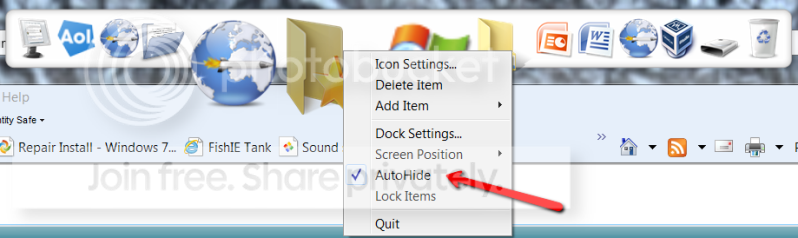
!. Install Rocket Dock, right click on the dock and autohide it. When you "bump" the cursor to the top of the screen, it will appear.
2. Place your Favorites folder into the Rocket Dock (just drag a folder shortcut from the desktop into the dock.). To get at the folder, type Favorites into start/search and it will show up. You can delete the shortcut on the desktop once it is in the dock.
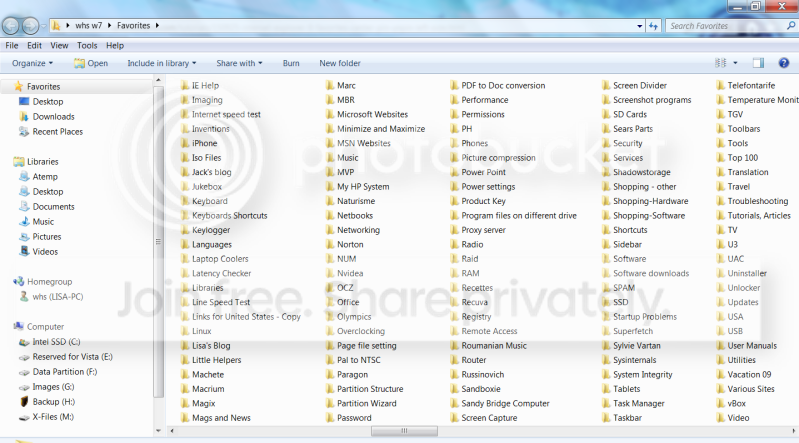
3. When you look for a website URL, open the Favorites folder from the dock. It is a lot easier to deal with that (set the folder view to List) than rolling the bar down - especially if you have a gezillion folders and files like me.
4. An added advantage is that you can search in the Favorites folder if you do not remember where you stuck the particular website that you are looking for. Many of my folders have up to 25 entries (subfolders and URLs) and I often forget where I put things.
Note: The Rocket Dock is particularily handy because you can always easily access it. But you can also put the Favorites folder shortcut into the taskbar, Toolbar or even the Start menu. But that always needs an additional click to get at it. | My System Specs | | System Manufacturer/Model Number HP, Dell, Gateway - 2 laptops and 2 desktops OS Vista and Windows7, sometimes Ubuntu and Fedora CPU from 1.6GHz Duo to 2.5GHz Quad Monitor(s) Displays 2x HP w2207 Keyboard with trackball - no mices Mouse terrible devices, who wants them Hard Drives 5x HDD, 2x SSD, 6x Externals Internet Speed DSL 6000 |
03-18-2011
|
#6 | | Windows 7 Ultimate x64 SP1 |
Hello Wolfgang,
Thank you, but I'm not sure what problem you are referring to though.
If it's with the Favorites Center, then I suppose that you could just use Favorites on the Menu bar in IE9 instead. | My System Specs | | System Manufacturer/Model Number Self built custom OS Windows 7 Ultimate x64 SP1 CPU Intel i7-980X 3.3 Ghz (3.48 Ghz OC'd) Motherboard ASUS P6X58D Premium Memory 12 GB (2GBx6) DDR3 PC3-16000 2000 MHz Kingston HyperX Graphics Card Sapphire HD5870 Eyefinity 6 2GB Sound Card Realtek HD Audio ALC889 Integrated Chip Monitor(s) Displays 3x 27" Asus VE278Q Screen Resolution 1920x1080 Keyboard Logitech Cordless Desktop MX 5500 Revolution Mouse Logitech Cordless Desktop MX 5500 Revolution PSU OCZ Series Gold OCZZ1000M 1000W Case Corsair Obsidian 800D Cooling Thermalright Ultra 120 Extreme Copper CPU heat sink w/120 MM Hard Drives 160GB OCZ RevoDrive X2
** 2 x 1TB Samsung HDD HD154UI SATA Internet Speed 50 Mb/s Download and 2 Mb/s Upload Other Info Microsoft LifeCam Cinema
** Lite-On iHBS212 12x BD Writer
** Samsung CLX-3175FW Printer
** Netgear WNDR3800 Router
** Motorola SBG6580 Cable Modem
** 2x APC Back-UPS XS 1500 |
03-18-2011
|
#7 | | Vista and Windows7, sometimes Ubuntu and Fedora |

Quote: Originally Posted by Brink Hello Wolfgang,
Thank you, but I'm not sure what problem you are referring to though.
If it's with the Favorites Center, then I suppose that you could just use Favorites on the Menu bar in IE9 instead. Attachment 144214 I am not referring to any particular problem. I was just following up on the left/right discussion for the favorites in IE9.
The way I describe my use of Favorites has the advantage that you see all your Favorites on one page and that you are able to search in the folder in case you do not remember where things are.
This may not apply to people who have few favorites or a good memory. But once you have over 1500 files in the folders, it is sure handy. And I never liked the way you search for a link in the IE Favorites - left or right.
PS; The favorites on the menu bar are the worst interface in my book. I hate those fly-outs. | My System Specs | | System Manufacturer/Model Number HP, Dell, Gateway - 2 laptops and 2 desktops OS Vista and Windows7, sometimes Ubuntu and Fedora CPU from 1.6GHz Duo to 2.5GHz Quad Monitor(s) Displays 2x HP w2207 Keyboard with trackball - no mices Mouse terrible devices, who wants them Hard Drives 5x HDD, 2x SSD, 6x Externals Internet Speed DSL 6000 |
03-18-2011
|
#8 | | Windows 7 Ultimate x64 SP1 |
Okey doke. | My System Specs | | System Manufacturer/Model Number Self built custom OS Windows 7 Ultimate x64 SP1 CPU Intel i7-980X 3.3 Ghz (3.48 Ghz OC'd) Motherboard ASUS P6X58D Premium Memory 12 GB (2GBx6) DDR3 PC3-16000 2000 MHz Kingston HyperX Graphics Card Sapphire HD5870 Eyefinity 6 2GB Sound Card Realtek HD Audio ALC889 Integrated Chip Monitor(s) Displays 3x 27" Asus VE278Q Screen Resolution 1920x1080 Keyboard Logitech Cordless Desktop MX 5500 Revolution Mouse Logitech Cordless Desktop MX 5500 Revolution PSU OCZ Series Gold OCZZ1000M 1000W Case Corsair Obsidian 800D Cooling Thermalright Ultra 120 Extreme Copper CPU heat sink w/120 MM Hard Drives 160GB OCZ RevoDrive X2
** 2 x 1TB Samsung HDD HD154UI SATA Internet Speed 50 Mb/s Download and 2 Mb/s Upload Other Info Microsoft LifeCam Cinema
** Lite-On iHBS212 12x BD Writer
** Samsung CLX-3175FW Printer
** Netgear WNDR3800 Router
** Motorola SBG6580 Cable Modem
** 2x APC Back-UPS XS 1500 |
03-18-2011
|
#9 | | Windows 7 Ultimate x64, XP Mode(VPC and VMLite), VM Player 4.02, W8 CPreview |
Instead of the need to pin any folder you can simply open the menu bar>View>explorer bars and click on the favorties item there to them open up on the left and stay open. Click the X or the Favorites icon to the right of the address bar to close.
That ends up being a three step process however. Plus not everyone runs RocketDock being a 3rd party addon. The guide here works for those who run without any addons. This shows how the Favorites work when using the Favorites icon itself.
Hey Shawn have you digg(ed) this and the other IE 9 guides you have ready? I meant to ask that one! | My System Specs | | OS Windows 7 Ultimate x64, XP Mode(VPC and VMLite), VM Player 4.02, W8 CPreview CPU AMD Phenom II X4 Deneb 3.4 Motherboard Gigabyte GA-790XTA-UD4 Memory Kingston Hyper X DDR3 1600 8gb 1.5v Graphics Card MSI Radeon 5750 1gb Sound Card Creative Labs X-Fi XtremeGamer Monitor(s) Displays 2 x Acer P191W 19" widesscreen Screen Resolution 1440x900 native Keyboard Microsoft Recusa Razor Mouse MS Trackball Explorer PSU Corsair 750TX Case Antec 900-2 - SSD compatible Cooling Zalman CNPS9900A Hard Drives WD Black Edition 1tb Sata 6.0 = 2
WD Black Edition 1tb Sata 3.0 = 2 (OS drives)
WD 1tb Green Power sata = 2 1 external
usb flash drives = 15 Internet Speed 30mbps upgrade Internet Explorer 9 Favorites Center - Pin and Unpin to Left Side problems? All times are GMT -5. The time now is 12:36 AM. |  |