| Windows 7: Internet Explorer Favorites Center - Pin and Unpin to Left Side |
16 Mar 2011
|
#9 | | 64-bit Windows 7 Ultimate SP1 & Windows 8 Enterprise Texas |
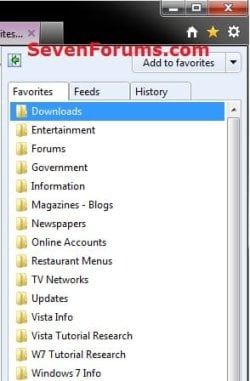
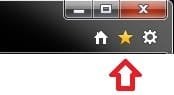
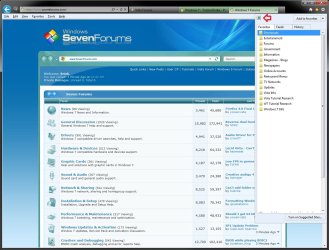
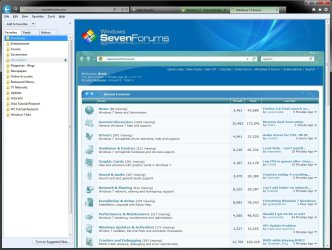
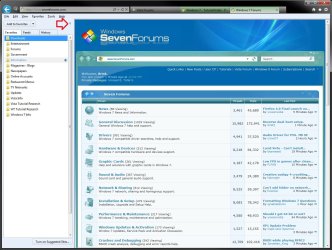
Internet Explorer Favorites Center - Pin and Unpin to Left Side How to Pin and Unpin"Favorites Center" to Left Side in IE9 and IE10
Last edited by Brink; 15 Mar 2013 at 11:44 AM..
| My System Specs |
| Computer type PC/Desktop System Manufacturer/Model Number Self built custom OS 64-bit Windows 7 Ultimate SP1 & Windows 8 Enterprise CPU Intel i7-3930K 3.2 Ghz (O/C 4 Ghz) Motherboard ASRock X79 Extreme11 Memory 32 GB (8GBx4) G.SKILL DDR3 Quad PC3-19200 2400MHz Graphics Card Sapphire HD5870 Eyefinity 6 2GB Sound Card SB Recon 3Di Integrated Chip Monitor(s) Displays 3x 27" Asus VE278Q Screen Resolution 1920x1080 Keyboard Logitech Cordless Desktop MX 5500 Revolution Mouse Logitech Cordless Desktop MX 5500 Revolution PSU OCZ Series Gold OCZZ1000M 1000W Case Thermaltake Level 10 GT Snow Edition Cooling Corsair Hydro H100 Hard Drives 256GB OCZ Vector
160GB OCZ RevoDrive X2
2 x 1TB Samsung HDD HD154UI SATA Internet Speed 50 Mb/s Download and 2 Mb/s Upload Other Info Microsoft LifeCam Cinema
Lite-On iHBS212 12x BD Writer
Samsung CLX-3175FW Printer
Netgear WNDR3800 Router
Motorola SBG6580 Cable Modem
2x APC Back-UPS XS 1500 |
18 Mar 2011
|
#10 | | Vista, Windows7, Mint Mate, Zorin, Windows 8 Florida in winter, Black Forest/Germany |
Night Hawk, this is perfect if you like the Fly-outs (which I hate) and have few favorites. But if you have 1500 files like me (sometimes stacked 4 deep), it is more cumbersome. And what do you do if you do not remember where you hid a particular website? That happens to me half of the time - and then I can search in the folder.
And the Rocket Dock I use because for one I have it anyhow (could not operate without it) and because it provides the fastest access to the Favorites folder. But you can stick the folder shortcut anywhere (Start, Toolbar, Taskbar). It only requires extra clicks to get there. | My System Specs |
| System Manufacturer/Model Number HP, Dell, Gateway, Toshiba - 4 laptops and 2 desktops OS Vista, Windows7, Mint Mate, Zorin, Windows 8 CPU from 1.6GHz Duo to i7 Monitor(s) Displays 2x HP w2207 Keyboard with trackball - no mices Mouse Trackball mice Hard Drives 5x HDD, 7x SSD, 12x Externals Internet Speed DSL 6000 |
18 Mar 2011
|
#11 | | Windows 7 Ultimate x64, XP Mode, W8 RP VM, Linux Mint Debian 2nd OS HD- 7 Pro x64 second case New England |
I would say I've had some experience with the RocketDock toolbar!  I may not have 1,500 links to go through but I still manage to collect a never ending amount as time goes on at the same time.
You run it! I run it! But... what about all those who don't? That's the purpose of having a guide like this to begin with.
I'm glad to see Shawn jumped on this one promptly when people were discussing how the Favorites are now seen opening up on the right side and how to see them pinned over to the left as seen with previous versions of IE since people often need a good reference when changes to "all too familiar" layout.
It's just an observation but a guide like this is intended to show how to use what already comes included in IE 9 not something you addon separately.
As for mounting folders on RocketDock and other mods a better place for that would be a new discussion thread under Customizations or Browsers & Mail since that involves a 3rd party app. A good title for that may be "how to mount your IE Favorites on the RocketDock toolbar" where you could go into details on how to do that. And considering writing a guide for that could be useful for previous versions of IE not just IE 9 only. | My System Specs | | OS Windows 7 Ultimate x64, XP Mode, W8 RP VM, Linux Mint Debian 2nd OS HD- 7 Pro x64 second case CPU AMD Phenom II X4 975 Deneb 3.6ghz - 965 on new mini tower Motherboard Gigabyte GA-790XTA-UD4 Memory Kingston Hyper X DDR3 1600 1.5v 16gb - Mushkin on 2nd build Graphics Card MSI HD Radeon 5750 1gb - MSI HD Radeon 6450 on mini tower Sound Card Creative Labs X-Fi XtremeGamer - Realtek onooard 2nd case Monitor(s) Displays 2 x Acer P191W 19" widesscreen - HP 20" widescreen mini towe Screen Resolution 1440x900 native - 1600x1024 on 7 Pro x64 build Keyboard Microsoft Recusa Razor - MS Comfort 3000 on second build Mouse MS Trackball Explorer - A4TECH dual scroll wheel trackball PSU Corsair 750TX - primary / Corsair CX600 - second Case Antec 900-2 - SSD compatible / NZXT Vulcan mini tower Cooling Zalman CNPS9900A Hard Drives Primary Ultimate x64 build-
WD Black Edition 1tb Sata 6.0 = 2
WD Black Edition 1tb Sata 3.0 = 2 (OS drives)
WD 1tb Green Power sata = 2 1 external
usb flash drives = 18
Second 7 Pro x64 mini tower-
WD Caviar SE 500gb sata II single drive presen Internet Speed 30mbps upgrade - primary hard wired - mini tower usb WiFi |
19 Mar 2011
|
#12 | | Vista, Windows7, Mint Mate, Zorin, Windows 8 Florida in winter, Black Forest/Germany |
Maybe we should open a new thread on "How to deal with the IE9 - tips and tricks" to keep this tutorial thread on topic. How to deal with IE9 - Tips and tricks With the IE9 we find that are
Last edited by Brink; 19 Mar 2011 at 10:29 AM..
Reason: added link
| My System Specs | | System Manufacturer/Model Number HP, Dell, Gateway, Toshiba - 4 laptops and 2 desktops OS Vista, Windows7, Mint Mate, Zorin, Windows 8 CPU from 1.6GHz Duo to i7 Monitor(s) Displays 2x HP w2207 Keyboard with trackball - no mices Mouse Trackball mice Hard Drives 5x HDD, 7x SSD, 12x Externals Internet Speed DSL 6000 |
19 Mar 2011
|
#13 | | |
The problem with the IE9 favourites center is that it can't be permanently pinned to the left side, if you want it on the left you have to keep it open, thus taking up desktop real estate, close the center on the left and it reverts back to the right hand side, which is kinda dumb, I'm sure there will be a registry hack to address this in time | My System Specs | | |
19 Mar 2011
|
#14 | | 64-bit Windows 7 Ultimate SP1 & Windows 8 Enterprise Texas |
Hello Nikev,
I'm not sure what you mean. The Favorites Center stays permanently pinned to the left side of IE9, even when you close and open IE9, until you close the Favorites Center. | My System Specs | | Computer type PC/Desktop System Manufacturer/Model Number Self built custom OS 64-bit Windows 7 Ultimate SP1 & Windows 8 Enterprise CPU Intel i7-3930K 3.2 Ghz (O/C 4 Ghz) Motherboard ASRock X79 Extreme11 Memory 32 GB (8GBx4) G.SKILL DDR3 Quad PC3-19200 2400MHz Graphics Card Sapphire HD5870 Eyefinity 6 2GB Sound Card SB Recon 3Di Integrated Chip Monitor(s) Displays 3x 27" Asus VE278Q Screen Resolution 1920x1080 Keyboard Logitech Cordless Desktop MX 5500 Revolution Mouse Logitech Cordless Desktop MX 5500 Revolution PSU OCZ Series Gold OCZZ1000M 1000W Case Thermaltake Level 10 GT Snow Edition Cooling Corsair Hydro H100 Hard Drives 256GB OCZ Vector
160GB OCZ RevoDrive X2
2 x 1TB Samsung HDD HD154UI SATA Internet Speed 50 Mb/s Download and 2 Mb/s Upload Other Info Microsoft LifeCam Cinema
Lite-On iHBS212 12x BD Writer
Samsung CLX-3175FW Printer
Netgear WNDR3800 Router
Motorola SBG6580 Cable Modem
2x APC Back-UPS XS 1500 |
19 Mar 2011
|
#15 | | |
Hi Brink what I mean is that when I close the favs center it reverts back to the right side of the screen. If I want to place the favs center on the left hand side of the screen permanently, ie open and close it from the left I can't. I think people who have been using their favourites column on the left hand side for many years will want this feature. | My System Specs | | |
19 Mar 2011
|
#16 | | 64-bit Windows 7 Ultimate SP1 & Windows 8 Enterprise Texas |

Quote: Originally Posted by nikev216 Hi Brink what I mean is that when I close the favs center it reverts back to the right side of the screen. If I want to place the favs center on the left hand side of the screen permanently, ie open and close it from the left I can't. I think people who have been using their favourites column on the left hand side for many years will want this feature. Nope can't do that.
You'll have to either leave it open for it to stay open on the left side, or get use to it on the right side. | My System Specs | | Computer type PC/Desktop System Manufacturer/Model Number Self built custom OS 64-bit Windows 7 Ultimate SP1 & Windows 8 Enterprise CPU Intel i7-3930K 3.2 Ghz (O/C 4 Ghz) Motherboard ASRock X79 Extreme11 Memory 32 GB (8GBx4) G.SKILL DDR3 Quad PC3-19200 2400MHz Graphics Card Sapphire HD5870 Eyefinity 6 2GB Sound Card SB Recon 3Di Integrated Chip Monitor(s) Displays 3x 27" Asus VE278Q Screen Resolution 1920x1080 Keyboard Logitech Cordless Desktop MX 5500 Revolution Mouse Logitech Cordless Desktop MX 5500 Revolution PSU OCZ Series Gold OCZZ1000M 1000W Case Thermaltake Level 10 GT Snow Edition Cooling Corsair Hydro H100 Hard Drives 256GB OCZ Vector
160GB OCZ RevoDrive X2
2 x 1TB Samsung HDD HD154UI SATA Internet Speed 50 Mb/s Download and 2 Mb/s Upload Other Info Microsoft LifeCam Cinema
Lite-On iHBS212 12x BD Writer
Samsung CLX-3175FW Printer
Netgear WNDR3800 Router
Motorola SBG6580 Cable Modem
2x APC Back-UPS XS 1500 |
19 Mar 2011
|
#17 | | |
it's only a minor annoyance, I found that if you have the menu bar displayed clicking on "favorites" opens them up on the left hand side | My System Specs | | |
19 Mar 2011
|
#18 | | Windows 7 Ultimate x64, XP Mode, W8 RP VM, Linux Mint Debian 2nd OS HD- 7 Pro x64 second case New England |
Well when clicking on the Favorites item on the menu bar it opens over towards the left but not all the way. When going into the View>explorer bars that will open it up on the far left but keep it open while unless you pin it to the left when using the star icon it will close as soon as you click the web page you are presently on at the time.
Minor annoyance? Yes! Major difficulty? Naaaa......!!!  Maybe at some point there will be a way to see the Favorites automatically open on the left with a workaround found possibly a reg mod. But for now the green arrow or one of the menu bar options will work. | My System Specs | | OS Windows 7 Ultimate x64, XP Mode, W8 RP VM, Linux Mint Debian 2nd OS HD- 7 Pro x64 second case CPU AMD Phenom II X4 975 Deneb 3.6ghz - 965 on new mini tower Motherboard Gigabyte GA-790XTA-UD4 Memory Kingston Hyper X DDR3 1600 1.5v 16gb - Mushkin on 2nd build Graphics Card MSI HD Radeon 5750 1gb - MSI HD Radeon 6450 on mini tower Sound Card Creative Labs X-Fi XtremeGamer - Realtek onooard 2nd case Monitor(s) Displays 2 x Acer P191W 19" widesscreen - HP 20" widescreen mini towe Screen Resolution 1440x900 native - 1600x1024 on 7 Pro x64 build Keyboard Microsoft Recusa Razor - MS Comfort 3000 on second build Mouse MS Trackball Explorer - A4TECH dual scroll wheel trackball PSU Corsair 750TX - primary / Corsair CX600 - second Case Antec 900-2 - SSD compatible / NZXT Vulcan mini tower Cooling Zalman CNPS9900A Hard Drives Primary Ultimate x64 build-
WD Black Edition 1tb Sata 6.0 = 2
WD Black Edition 1tb Sata 3.0 = 2 (OS drives)
WD 1tb Green Power sata = 2 1 external
usb flash drives = 18
Second 7 Pro x64 mini tower-
WD Caviar SE 500gb sata II single drive presen Internet Speed 30mbps upgrade - primary hard wired - mini tower usb WiFi |
21 Mar 2011
|
#19 | | Windows 7 Eternity based on Ver 6.1.7600 32 bit ... San Francisco |
Shawn,
Well, it doesn't stay pinned or act normal. Like when u click a fave, it just stays open - huh?
And anyway you close it unpins it.
What i'm looking is moving the Star itself back to the left with the ie8 behavior, eh?
Regards,
Max ^_~ | My System Specs | | System Manufacturer/Model Number Multi Sony, HP, & Dell Systems ... OS Windows 7 Eternity based on Ver 6.1.7600 32 bit ... CPU Various Pentium Motherboard Various Memory Various combinations Graphics Card Various ATI & Invidia Sound Card Audiophile 2496 & others Monitor(s) Displays Sony, HP, Viewsonic, & Visio PSU PC Power & Cooling, Antec & Mfg stock Case Mfg Stock & Antec Cooling All air ... Hard Drives Seagate & WD in various combinations Internet Explorer Favorites Center - Pin and Unpin to Left Side problems? All times are GMT -5. The time now is 11:26 PM. | |