| Windows 7: Product Key Number for Windows 7 - Find and See Product Key Number for Windows 7 - Find and See How to Find and See the Windows 7 Product Key Number
Published 29 Mar 2011
|  Published by | | |
 Featured Tutorial | | | How to Find and See the Windows 7 Product Key Number  Information The Windows 7 product key number is a sequence of 25 letters and numbers divided into 5 groups of 5 characters each (ex: XXXXX-XXXXX-XXXXX-XXXXX-XXXXX) that is used to activate either the 32-bit or 64-bit Windows 7 edition that you purchased and installed.
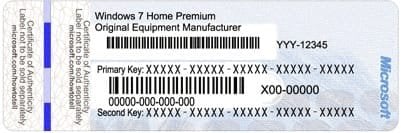
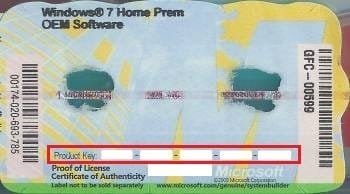
This will show you how to find and see your product key number in Windows 7 or on the retail or OEM product license key Certificate of Authenticity (COA) sticker.  Note - A Windows 7 product key number can only be used to activate the same edition of Windows 7 that it was for, and cannot be used to activate a different edition of Windows 7.
- A Family Pack Windows 7 product key number can be used to activate the Family Pack Windows 7 copy on up to 3 computers at any one time.
- A OEM Windows 7 product key number can only be used to activate a OEM Windows 7 copy on the same computer that it was first activated on, and no other computer.
- A retail Windows 7 product key number can be used to activate a retail Windows 7 copy on any computer, but only on up to one computer at any one time.
For more information on the license terms of Windows 7, see: License Terms
For more information about the product key number authenticity, see: How to Tell
 OPTION ONE 
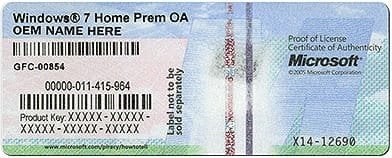
Find Windows 7 Product Key Number on Product Key Sticker
1. For a OEM Product Key on COA Sticker NOTE: These will be store bought computers that came with Windows 7 preinstalled on them. The product key sticker will usually be on the back of a desktop, and on the bottom or under the battery of a laptop and notebook. The sticker key number may be different than the key number reported in one of the programs below. If so, the key number on the sticker is the one that's unique to your computer, and that's the one you'll need to input should you ever clean install Windows. The different extracted key is just a master key used at the OEM factory.   2. For a Retail Product Key on COA Sticker NOTE: These will be computers that a retail copy of Windows 7 has been installed on. The product key sticker will be in the included paperwork in the retail Windows 7 box.
 OPTION TWO 
To Use "System Information for Windows" to See Product Key Number in Windows 7
NOTE: This option shows you how to use the free program System Information for Windows (SIW) to see what the product key number is from within a Windows 7 that it has already been entered in (ex: activated). SIW will not show the product key number for Windows 7 Enterprise though.1. Download, install, and run the System Information for Windows (SIW) freeware version program towards the bottom of the link. 2. In the left pane under Software, click on Licenses. You will see Windows Product Key in the right pane displaying the number.
 OPTION THREE 
To Use "Magical Jelly Bean Keyfinder" to See Product Key Number in Windows 7
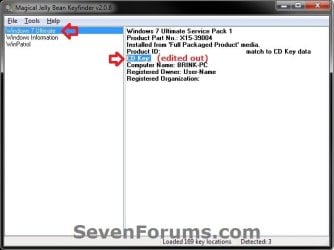
NOTE: This option shows you how to use the free program Magical Jelly Bean Keyfinder to see what the product key number is from within a Windows 7 that it has already been entered in (ex: activated). Magical Jelly Bean Keyfinder will not show the product key number for Windows 7 Enterprise though.1. Download and run the free Magical Jelly Bean Keyfinder program towards the bottom of the link. 2. In the left pane, click on Windows 7 (your edition). You will see CD Key in the right pane displaying the Windows 7 product key number.
 OPTION FOUR 
To Use "Speccy" to See Product Key Number in Windows 7
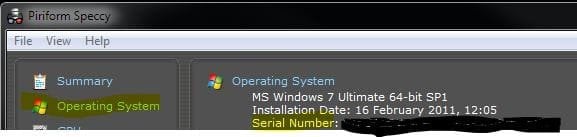
NOTE: This option shows you how to use the free program Speccy to see what the product key number is from within a Windows 7 that it has already been entered in (ex: activated). Speccy will not show the product key number for Windows 7 Enterprise though.1. Download, install, and run the free Speccy program. 2. In the left pane, click on Operating System. In the right pane, you will see the product key number to the right of Serial Number. 
 OPTION FIVE 
To Use "ProduKey" to See Product Key Number in Windows 7
NOTE: This option shows you how to use the free program ProduKey to see what the product key number is from within a Windows 7 that it has already been entered in (ex: activated). ProduKey will not show the product key number for Windows 7 Enterprise though.1. Download, extract, and run the free ProduKey program. 2. You will now see Windows product key listed.

 OPTION SIX 
To Use a VBS Download to See Product Key Number in Windows 7
 Note This option was provided by our member Konst at this link.
There you can see that the encrypted key is stored in registry key: HKLM\SOFTWARE\Microsoft\Windows NT\CurrentVersion\DigitalProductId
at Offset = 52
And that the key only includes this letters and numbers BCDFGHJKMPQRTVWXY2346789
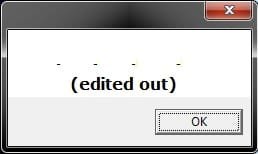
And no "AEILNOSUZ015 allowed. 1. Click on the Download button below to download the file below.See_Windows_Product_Key.vbs  2. Save the VBS file to your desktop, run it, and approve running it. NOTE: The .vbs file does not install anything on your computer. You can also right click on the .vbs file and click on Edit to see what the script contains. 3. You will now get a pop-up dialog box displaying the product key number used to activate your current Windows installation. Click on OK to close the pop-up when ready. (see screenshot below)
That's it,
Shawn | | | Need more help? Try searching our extensive help and support site.
Loading | |
29 Mar 2011
|
| | |
Piriforms Speccy will also show you the product key used under "Operating System". | My System Specs |
| System Manufacturer/Model Number Airbot 2.0 OS Windows 7 Ultimate x64 SP1 CPU Core i7 920 (D0) @ 4Ghz, *26c idle *65c full load on air Motherboard Asus P6X58D Premium - Sata 6Gb/s - USB 3.0 Memory 12GB DDR3 Corsair Dominator -CMD12GX3M6A1600C8 at 1600MHz Graphics Card EVGA GeForce GTX 480 -Aftermaket Accelero Xtreme Plus cooler Sound Card ASUS Xonar D2X Monitor(s) Displays 1 LG 24" Flatron W2453V-PF 1 Samsung 24" P2450H both 2ms RT Screen Resolution 1920x1080@60hz Keyboard Logitech Wireless MK700 Mouse Logitech Wireless MK700 PSU Corsair HX1000W Case Cooler Master HAF 932 Cooling Case Fans *3 230mm, *1 140mm/CPU - *Tuniq Tower 120 Extreme Hard Drives 1 OCZ Vertex2 180GB SSD
1 TB Samsung Spinpoint F1 7200RPM 32MB cache
2 500GB WD Caviar Blacks 7200RPM 32MB cache (WD5001AALS)
Pioneer DVD Burner DVR-S18M Internet Speed DL 15 Mbps UL 0.98 Mbps Antivirus None Browser Firefox Nightly Other Info Processor-7.7 *RAM- 7.9 *Graphics-7.9 *Gaming Graphics- 7.9 *SSD- 7.8 W.E.I final score= 7.7
*Phone- Samsung Galaxy Nexus |
29 Mar 2011
|
| | |
Thank you Aaron. I shall add it to the tut later today. | My System Specs | | Computer type PC/Desktop System Manufacturer/Model Number Self built custom OS 64-bit Windows 7 Ultimate SP1 & Windows 8 Enterprise CPU Intel i7-3930K 3.2 Ghz (O/C 4 Ghz) Motherboard ASRock X79 Extreme11 Memory 32 GB (8GBx4) G.SKILL DDR3 Quad PC3-19200 2400MHz Graphics Card Sapphire HD5870 Eyefinity 6 2GB Sound Card SB Recon 3Di Integrated Chip Monitor(s) Displays 3x 27" Asus VE278Q Screen Resolution 1920x1080 Keyboard Logitech Cordless Desktop MX 5500 Revolution Mouse Logitech Cordless Desktop MX 5500 Revolution PSU OCZ Series Gold OCZZ1000M 1000W Case Thermaltake Level 10 GT Snow Edition Cooling Corsair Hydro H100 Hard Drives 256GB OCZ Vector
160GB OCZ RevoDrive X2
2 x 1TB Samsung HDD HD154UI SATA Internet Speed 50 Mb/s Download and 2 Mb/s Upload Other Info Microsoft LifeCam Cinema
Lite-On iHBS212 12x BD Writer
Samsung CLX-3175FW Printer
Netgear WNDR3800 Router
Motorola SBG6580 Cable Modem
2x APC Back-UPS XS 1500 |
23 Apr 2011
|
| | |
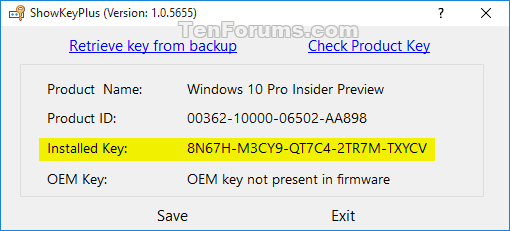
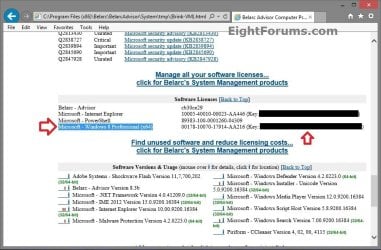
Another free system audit tool which shows product keys for Windows, Office and some other installed software is: Belarc Advisor - Free Personal PC Audit
After downloading and running the tool, it produces a report which displays in your browser. It also shows installed, and missing critical and important updates, and other software that is installed on your PC. | My System Specs | | System Manufacturer/Model Number Acer 7520, Packard Bell dot se, Acer travelmate 2423 OS Win 7 Ult + Starter, XP Pro +Home, 2kAS, Linux Mint 8, SuperOS CPU AMD 64 Athlon X2 , Intel Atom N450, Intel Celeron M 1.50 Ghz Motherboard Acer Fuquene Memory 2.5GB ; 1GB; 2GB Graphics Card Nvidia GeForce7000m; Intel; Intel Sound Card Realtek AC57 Monitor(s) Displays 17" ;10.1"; 19" Screen Resolution 1440x900;1024x600;1440x900; PSU 19v Case Laptop Cooling Air Hard Drives WD 80, WD 320; Internet Speed 9.7Mb/s down 0.99Mb/s up Other Info ISP VIRGINMEDIA 10M cable broadband - D-Link DIR615 wireless router, 3Com OfficeConnect ASDL router used as wireless extender switch |
05 Jul 2011
|
| | |
Hello Shawn -
Think I'm confused -again!  Found this thread about Product Keys and Default Product Keys. Install RTM, then activate w/ key in October?
I have a store bought Vaio pre-installed with 7 Pro x64. PK on OEM sticker (bottom of laptop) starts off with VYPxx -xxxxx etc. However, Speccy shows PK as H9Mxx-xxxxx etc. But Magical Jelly Bean makes no mention of a Product Key, just a Default PK (starting with H9Mxx-xxxxx etc - same as Speccy) and a Default PK2 (starting with HYFxx-xxxxx etc.) Neither Speccy nor MJB make any reference to PK on OEM sticker. To confuse matters more, SIW and Belarc both show HFYxx-xxxxx (the MJB Default PK2) as my Product Key.
If I ever need to reactivate, do I still use the PK on OEM sticker? And why two different Default PKs with no mention of OEM sticker PK? | My System Specs | | Computer type Laptop System Manufacturer/Model Number Sony Vaio VPCEB47GM Laptop OS Win 7 Pro 64-bit CPU Intel i5 2.4 Ghz Memory 8GB DDR3 Graphics Card Intel HD 3000 Sound Card IDT High Definition Monitor(s) Displays 15.6 WGXA Anti-Glare LED Screen Resolution 1280x800 Hard Drives 640Gb 7200rpm Antivirus MSE Browser Opera (primary) with IE9 backup |
05 Jul 2011
|
| | |
Hello Lee,
A OEM will use a volume license key to activate with to allow them to clone Windows 7 preactivated to make the factory installation process faster on the assembly line. This key is the same for all of the OEM computers with the same model number. This is the default product key used to activate Windows 7 from the factory.
The product key on the sticker on a OEM computer is provided by the OEM, and can only be used on that specific computer.
You could use either number to activate the Windows 7 with on that computer though. | My System Specs | | Computer type PC/Desktop System Manufacturer/Model Number Self built custom OS 64-bit Windows 7 Ultimate SP1 & Windows 8 Enterprise CPU Intel i7-3930K 3.2 Ghz (O/C 4 Ghz) Motherboard ASRock X79 Extreme11 Memory 32 GB (8GBx4) G.SKILL DDR3 Quad PC3-19200 2400MHz Graphics Card Sapphire HD5870 Eyefinity 6 2GB Sound Card SB Recon 3Di Integrated Chip Monitor(s) Displays 3x 27" Asus VE278Q Screen Resolution 1920x1080 Keyboard Logitech Cordless Desktop MX 5500 Revolution Mouse Logitech Cordless Desktop MX 5500 Revolution PSU OCZ Series Gold OCZZ1000M 1000W Case Thermaltake Level 10 GT Snow Edition Cooling Corsair Hydro H100 Hard Drives 256GB OCZ Vector
160GB OCZ RevoDrive X2
2 x 1TB Samsung HDD HD154UI SATA Internet Speed 50 Mb/s Download and 2 Mb/s Upload Other Info Microsoft LifeCam Cinema
Lite-On iHBS212 12x BD Writer
Samsung CLX-3175FW Printer
Netgear WNDR3800 Router
Motorola SBG6580 Cable Modem
2x APC Back-UPS XS 1500 |
05 Jul 2011
|
| | |
Ah-hah!  (Lightbulb becoming illuminated.) I completely forgot about mass production and VLKs. Thank you, Shawn. | My System Specs | | Computer type Laptop System Manufacturer/Model Number Sony Vaio VPCEB47GM Laptop OS Win 7 Pro 64-bit CPU Intel i5 2.4 Ghz Memory 8GB DDR3 Graphics Card Intel HD 3000 Sound Card IDT High Definition Monitor(s) Displays 15.6 WGXA Anti-Glare LED Screen Resolution 1280x800 Hard Drives 640Gb 7200rpm Antivirus MSE Browser Opera (primary) with IE9 backup |
05 Jul 2011
|
| | |
You're welcome mate. | My System Specs | | Computer type PC/Desktop System Manufacturer/Model Number Self built custom OS 64-bit Windows 7 Ultimate SP1 & Windows 8 Enterprise CPU Intel i7-3930K 3.2 Ghz (O/C 4 Ghz) Motherboard ASRock X79 Extreme11 Memory 32 GB (8GBx4) G.SKILL DDR3 Quad PC3-19200 2400MHz Graphics Card Sapphire HD5870 Eyefinity 6 2GB Sound Card SB Recon 3Di Integrated Chip Monitor(s) Displays 3x 27" Asus VE278Q Screen Resolution 1920x1080 Keyboard Logitech Cordless Desktop MX 5500 Revolution Mouse Logitech Cordless Desktop MX 5500 Revolution PSU OCZ Series Gold OCZZ1000M 1000W Case Thermaltake Level 10 GT Snow Edition Cooling Corsair Hydro H100 Hard Drives 256GB OCZ Vector
160GB OCZ RevoDrive X2
2 x 1TB Samsung HDD HD154UI SATA Internet Speed 50 Mb/s Download and 2 Mb/s Upload Other Info Microsoft LifeCam Cinema
Lite-On iHBS212 12x BD Writer
Samsung CLX-3175FW Printer
Netgear WNDR3800 Router
Motorola SBG6580 Cable Modem
2x APC Back-UPS XS 1500 |
05 Jul 2011
|
| | |
Shawn,
Here's another small, non-install program that I've grown fond of: ProduKey - Recover lost product key (CD-Key) of Windows/MS-Office/SQL Server
karl | My System Specs | | System Manufacturer/Model Number Toshiba Satellite S875D-S7239 laptop OS MS Windows 7 Ultimate SP1 64-bit CPU AMD A10-4600M Motherboard AMD Pumori (Socket FT1) Memory 6.00 GB Dual-Channel DDR3 @ 798MHz (11-11-12-28) Graphics Card AMD Radeon HD 7660G Sound Card High Definition Audio Device Monitor(s) Displays Generic PnP Monitor (1600x900@60Hz) Screen Resolution 1600x900@60Hz Keyboard Standard PS/2 Keyboard Mouse HP Wireless Optical Mobile Mouse Model FHA-3410 Hard Drives SSD 119GB Corsair CSSD-V128GB2 ATA Device Internet Speed What the local pub, local coffee shop offers. Other Info Optical Drive:MATSHITA BD-CMB UJ160B ATA Device
Also have an Asus ha1002xp netbook with Win 7 Ultimate installed. |
05 Jul 2011
|
| | |
Already in the list in the tutorial. | My System Specs | | System Manufacturer/Model Number Airbot 2.0 OS Windows 7 Ultimate x64 SP1 CPU Core i7 920 (D0) @ 4Ghz, *26c idle *65c full load on air Motherboard Asus P6X58D Premium - Sata 6Gb/s - USB 3.0 Memory 12GB DDR3 Corsair Dominator -CMD12GX3M6A1600C8 at 1600MHz Graphics Card EVGA GeForce GTX 480 -Aftermaket Accelero Xtreme Plus cooler Sound Card ASUS Xonar D2X Monitor(s) Displays 1 LG 24" Flatron W2453V-PF 1 Samsung 24" P2450H both 2ms RT Screen Resolution 1920x1080@60hz Keyboard Logitech Wireless MK700 Mouse Logitech Wireless MK700 PSU Corsair HX1000W Case Cooler Master HAF 932 Cooling Case Fans *3 230mm, *1 140mm/CPU - *Tuniq Tower 120 Extreme Hard Drives 1 OCZ Vertex2 180GB SSD
1 TB Samsung Spinpoint F1 7200RPM 32MB cache
2 500GB WD Caviar Blacks 7200RPM 32MB cache (WD5001AALS)
Pioneer DVD Burner DVR-S18M Internet Speed DL 15 Mbps UL 0.98 Mbps Antivirus None Browser Firefox Nightly Other Info Processor-7.7 *RAM- 7.9 *Graphics-7.9 *Gaming Graphics- 7.9 *SSD- 7.8 W.E.I final score= 7.7
*Phone- Samsung Galaxy Nexus Product Key Number for Windows 7 - Find and See problems? All times are GMT -5. The time now is 07:47 PM. | |