
SFC /SCANNOW Command - System File Checker

How to Repair Windows 7 System Files with System File Checker


   Information
The sfc /scannow command (System File Checker) scans the integrity of all protected Windows 7 system files and replaces incorrect corrupted, changed/modified, or damaged versions with the correct versions if possible.

   Tip
If you get the Windows Resource Protection Could Not Start the Repair Service error when trying to run SFC, then make sure that the Windows Modules Installer service is enabled, click on Start, and set to Manual.

Services - Start or Disable

OR

Copy and paste the command below in the elevated command prompt, and press Enter. After the Windows Modules Installer service has started, try running the SFC command again

net start trustedinstaller

   Note
The KB3022345, KB3035583, and KB3068708 updates will cause SFC to give you a false mismatch message in SFC for files related to these updates.

You can safely ignore these results in your SFC details since it will not affect SFC from being able to repair other system files.

   Warning
Be aware that if you have modified your system files as in theming explorer/system files, running sfc /scannow will revert the system files such as explorer.exe back to it's default state. Make the appropriate backups of your system files that you have modified for theming if you wish to save them before running sfc /scannow.


:note: For the updated Windows 10 tutorial, please see - SFC Command - Run in Windows 10 - Windows 10 Tutorials

CONTENTS:
  • Option One: To Run the SFC /SCANNOW Command at Boot
  • Option Two: To Run the SFC /SCANNOW Command in Windows 7
  • Option Three: How to See and Read Only the "SFC" Scan Results from the CBS.LOG


OPTION ONE

To Run the SFC /SCANNOW Command at Boot


1. For how, see METHOD TWO at this link: SFC /SCANNOW : Run in Command Prompt at Boot

   Note
Using OPTION TWO below is recommended if able.

If you would like to get help with your SFC issue, then be sure to upload and attach your sfcdetails.txt file from OPTION THREE below in your post.


OPTION TWO

To Run the SFC /SCANNOW Command in Windows 7


1. Open an elevated command prompt or an elevated PowerShell, and do step 2 or 3 below for what type of scan you would like to run.


2. To Scan and Repair System Files
NOTE: Scans the integrity of all protected system files and repairs the system files if needed. Please see red WARNING box at the top of this tutorial.
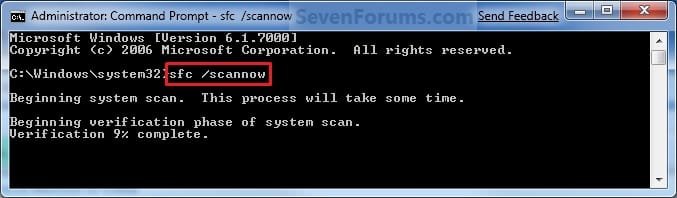
A) In the elevated command prompt, type sfc /scannow, press Enter, and go to step 4 below. (see screenshot below)
NOTE: This may take a little bit to finish.
Command-1.jpg
3. To Only Verify if the System Files are Corrupted
NOTE: Scans and only verifies the integrity of all proteced system files only. This command will not change your system files as in the red WARNING box at the top of this tutorial.
A) In the elevated command prompt, type sfc /verifyonly, press Enter, and go to step 4 below.
4. When the scan is complete, hopefully you will see all is ok like the screenshot below.

   Note

  • If SFC could not fix something, then run the command again to see if it may be able to the next time. Sometimes it may take running the sfc /scannow command 3 or more times to completely fix everything that it's able to.
  • If not, then download and run the 32-bit (x86) or 64-bit (x64) System Update Readiness Tool for your same installed 32-bit or 64-bit Windows 7, restart the PC afterwards, and try the sfc /scannow command again.
  • If still not, then try using OPTION ONE above to run the sfc /scannow command at boot.
  • If still not, then you can attempt to run a System Restore using a restore point dated before the bad file occured to fix it. You may need to repeat doing a System Restore until you find a older restore point that may work.
  • If still not, then you can use the steps in the TIP box in the OPTION THREE section below to manually replace the files that SFC could not fix if there are not to many fix.
  • If there are to many files to manually fix, or you prefer not to use OPTION THREE below, then you could do a repair install without losing anything.
If you would like to get help with your SFC issue, then be sure to upload and attach your sfcdetails.txt file from OPTION THREE below in your post.


Finished.jpg
5. When done, close the elevated command prompt.


OPTION THREE

How to See and Read Only the "SFC" Scan Results from the CBS.LOG


   Note
When SFC runs, it logs it's actions into the C:\Windows\Logs\CBS\CBS.log. The steps in this option will show you how to see only the specific SFC entries with the [SR] tags in this CBS.log. This can be helpful to show you what files SFC could not fix automatically if you wanted to try and manually replace them.

1. Open an "elevated command prompt" (right click -> Run as administrator).

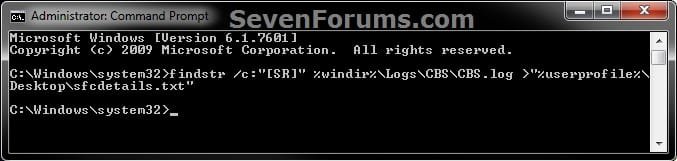
2. In the elevated command prompt, copy and paste the command below, and press Enter. (See screenshot below)
NOTE: This will place a sfcdetails.txt file on your desktop with only the SFC scan result details from the CBS.LOG in it.
Code:
findstr /c:"[SR]" %windir%\Logs\CBS\CBS.log >"%userprofile%\Desktop\sfcdetails.txt"
sfcdetails.jpg
3. Close the elevated command prompt.

4. Open the sfcdetails.txt file on your desktop to see the SFC scan details in the CBS.LOG.

5. You can safely delete the sfcdetails.txt file afterwards if you like.
   Tip
If you need to replace a corrupted system file that SFC cannot fix, then this will show you how to by extracting a new copy directly from your Windows 7 installation DVD.

Extract Files from Windows 7 Installation DVD


That's it,
Shawn


Last edited:
Thanks much, Brinks,
Iran sfc 7 times; BSOD'd first time; next two stopped at 49%; next two at 67% next two went to 100%.
As per your directions I generated the sfc details report - see attached file.
Again, thanks a million, and God bless.
Frank

Frank,

Try running the sfc /scannow command at boot in OPTION ONE to see if that may be able to fix them.

If not and you are having issues in Windows 7, then you might consider doing a repair install to fix them instead. If you are not having any problems in Windows 7 though, then I wouldn't worry about trying to fix the files then.
 
Last edited:

My Computer

Computer type
PC/Desktop
Computer Manufacturer/Model Number
Self built custom
OS
64-bit Windows 11 Pro for Workstations
CPU
Intel i7-8700K OC'd to 5 GHz
Motherboard
ASUS ROG Maximus XI Formula Z390
Memory
64 GB (4x16GB) G.SKILL TridentZ RGB DDR4 3600 MHz
Graphics Card(s)
ASUS ROG-STRIX-GTX1080TI-O11G-GAMING
Sound Card
Integrated
Monitor(s) Displays
2 x Samsung Odyssey G7 27"
Screen Resolution
2560x1440
Hard Drives
1TB Samsung 990 PRO M.2,
4TB Samsung 990 PRO PRO M.2,
TerraMaster F8 SSD Plus NAS
PSU
Seasonic Prime Titanium 850W
Case
Thermaltake Core P3
Cooling
Corsair Hydro H115i
Keyboard
Logitech wireless K800
Mouse
Logitech MX Master 4
Internet Speed
2 Gb/s Download and 100 Mb/s Upload
Antivirus
Malwarebyte Anti-Malware Premium
Browser
Google Chrome
Other Info
Logitech Z625 speaker system,
Logitech BRIO 4K Pro webcam,
HP Color LaserJet Pro MFP M477fdn,
APC SMART-UPS RT 1000 XL - SURT1000XLI,
Galaxy S23 Plus phone
That's what bothers me, Brink,
The fact that after our earlier discussions in this thread, last weekend I did a repair install on my machine, did not reinstall all the apps i previously had, and yet this 'corrupted system file' recurrence.
Is it possible that I am starting from a position of file corruption in my 'family pack' DVD?
Can I use a friend's Win7 Home Premium (same edition) to repair install my machine and use 'my license' to validate?
Or can I extract the system files from my friend's OS and use that to repair mine.
Will still try your suggestion of trying option one of your tutorial, though.
These are the problems I'm currently having with my machine:
1. Unable to create system image backups
2. Of late, unable to update Win 7
3. Repeated intermittent crashing of all browsers (IE, Chrome, Opera, Firefox)
4. Crashing Windows Explorer, Com Surrogate etc.
5. Intermittent BSOD's (like clicking on a link in open web-pages)
6. Repeated 'corruption' of system files.
Appreciate your advice
Frank
 

My Computer

Computer type
PC/Desktop
Computer Manufacturer/Model Number
LENOVO
OS
Microsoft Windows 7 Home Premium 64-bit
CPU
Intel(R) Core(TM) i3-2100 CPU @ 3.10GHz
Motherboard
LENOVO
Memory
6.00 GB Hyundai
Graphics Card(s)
Onboard Intel(R) HD Graphics
Sound Card
Onboard Realtek High Definition Audio
Monitor(s) Displays
32" Sony Bravia LCD TV, 19" LCD
Screen Resolution
1368 x 768 @60Hz (32bit)
Hard Drives
<Internal - 1.5Tb Hitachi>
<Externals -(2) 1TB Seagate Barracuda 7200.12 via NexStar eSATA HD Dock
160GB WD My Book (USB)
500GB Lacie (USB)
500GB Seagate (internal but not connected)
Keyboard
Logitech MK320 Wireless
Mouse
Logitech Wireless
Antivirus
Avira
Browser
Opera
Frank,

Sorry, I missed what we already did last week.

At this point, I would say that it may be time to consider doing a custom install of Windows 7 if you do not have backups, or a clean install if you do. It looks like your current installation is to corrupted to be repaired.
 

My Computer

Computer type
PC/Desktop
Computer Manufacturer/Model Number
Self built custom
OS
64-bit Windows 11 Pro for Workstations
CPU
Intel i7-8700K OC'd to 5 GHz
Motherboard
ASUS ROG Maximus XI Formula Z390
Memory
64 GB (4x16GB) G.SKILL TridentZ RGB DDR4 3600 MHz
Graphics Card(s)
ASUS ROG-STRIX-GTX1080TI-O11G-GAMING
Sound Card
Integrated
Monitor(s) Displays
2 x Samsung Odyssey G7 27"
Screen Resolution
2560x1440
Hard Drives
1TB Samsung 990 PRO M.2,
4TB Samsung 990 PRO PRO M.2,
TerraMaster F8 SSD Plus NAS
PSU
Seasonic Prime Titanium 850W
Case
Thermaltake Core P3
Cooling
Corsair Hydro H115i
Keyboard
Logitech wireless K800
Mouse
Logitech MX Master 4
Internet Speed
2 Gb/s Download and 100 Mb/s Upload
Antivirus
Malwarebyte Anti-Malware Premium
Browser
Google Chrome
Other Info
Logitech Z625 speaker system,
Logitech BRIO 4K Pro webcam,
HP Color LaserJet Pro MFP M477fdn,
APC SMART-UPS RT 1000 XL - SURT1000XLI,
Galaxy S23 Plus phone
Does anybody know what "PublicKeyToken = {l:8 b:31bf3856ad364e35}" is? Looking through Henfracar's attachment I noticed most of the troublesome files mention that particular item. I googled it, and it looks like it is tied into WMP and the Vista sidebar, but I don't really know what it is or what it does.
 

My Computer

Computer Manufacturer/Model Number
me / #1
OS
windows 7 x64 Home Premium
CPU
intel q6600
Motherboard
gigbyte ga ep45 ud3l
Memory
g.skill 8gb ddr2 1066 (pc2 8500)
Graphics Card(s)
evga geforce 9800 gtx 512 mb
Screen Resolution
1680 x 1050
Hard Drives
wd caviar black 500 gb
wd caviar black 1tb
wd elements 1tb external hd x2
PSU
raidmax 500w
Case
smilodon (yes, t'was the pretty blue lites that got me!)
Need help reading cbs.log

Hi,
Thanks for all the great info. I ran scannow a couple of times from within Windows 7 and twice more at the boot prompt. In all cases, scannow reported that it could not repair some of the files. I've extracted the cbs.log file to sfcdetails.txt as shown in the tutorial and was hoping someone more knowledgeable than me could help decipher it. BTW, I deleted all old entries in the file prior to today.

Thanks,
Mitchell
 

Attachments

My Computer

OS
Windows 7
Hello Mitchell,

Luckily, you only have the file below that needs to be replaced according to your CBS.log.

C:\Windows\System32\tcpmon.dll


If you have a retail copy Windows 7 installation DVD, then you can use the tutorial below to help extract the file above from the DVD to save it to your desktop. Afterwards replace the file above with the extracted copy as in the yellow TIP box at the bottom of the turtorial below.

http://www.sevenforums.com/tutorials/42776-extract-files-windows-7-installation-dvd.html


Hope this helps,
Shawn
 

My Computer

Computer type
PC/Desktop
Computer Manufacturer/Model Number
Self built custom
OS
64-bit Windows 11 Pro for Workstations
CPU
Intel i7-8700K OC'd to 5 GHz
Motherboard
ASUS ROG Maximus XI Formula Z390
Memory
64 GB (4x16GB) G.SKILL TridentZ RGB DDR4 3600 MHz
Graphics Card(s)
ASUS ROG-STRIX-GTX1080TI-O11G-GAMING
Sound Card
Integrated
Monitor(s) Displays
2 x Samsung Odyssey G7 27"
Screen Resolution
2560x1440
Hard Drives
1TB Samsung 990 PRO M.2,
4TB Samsung 990 PRO PRO M.2,
TerraMaster F8 SSD Plus NAS
PSU
Seasonic Prime Titanium 850W
Case
Thermaltake Core P3
Cooling
Corsair Hydro H115i
Keyboard
Logitech wireless K800
Mouse
Logitech MX Master 4
Internet Speed
2 Gb/s Download and 100 Mb/s Upload
Antivirus
Malwarebyte Anti-Malware Premium
Browser
Google Chrome
Other Info
Logitech Z625 speaker system,
Logitech BRIO 4K Pro webcam,
HP Color LaserJet Pro MFP M477fdn,
APC SMART-UPS RT 1000 XL - SURT1000XLI,
Galaxy S23 Plus phone
cbs.log - reinstalling file

Hey Shawn,

Thanks for the quick response.

I followed the instructions on the link you included and made it to step 12 (copying the file from desktop to system 32 folder). I restarted the computer in Safe Mode with command prompt and entered the appropriate command to copy the dll file. Unfortunately, I received an error message "access is denied" when I tried to copy the file from the desktop to the system32 folder. I tried copying the file to another location successfully, so this tells me the problem is the system 32 destination folder.

I'm probably doing something stupid, but any help would be appreciated it.

Thanks again,
Mitchell
 

My Computer

OS
Windows 7
Mitchell,

Did you take ownership and set permissions to "Allow" your account "Full Control" of the C:\Windows\System32\tcpmon.dll file in your current installation before you tried to replace it with the extracted and unblocked copy on your desktop?

After the above, were you not able to just copy the file on the desktop, then paste it directly into the C:\Windows\System32 folder from within Windows 7 to replace it?
 

My Computer

Computer type
PC/Desktop
Computer Manufacturer/Model Number
Self built custom
OS
64-bit Windows 11 Pro for Workstations
CPU
Intel i7-8700K OC'd to 5 GHz
Motherboard
ASUS ROG Maximus XI Formula Z390
Memory
64 GB (4x16GB) G.SKILL TridentZ RGB DDR4 3600 MHz
Graphics Card(s)
ASUS ROG-STRIX-GTX1080TI-O11G-GAMING
Sound Card
Integrated
Monitor(s) Displays
2 x Samsung Odyssey G7 27"
Screen Resolution
2560x1440
Hard Drives
1TB Samsung 990 PRO M.2,
4TB Samsung 990 PRO PRO M.2,
TerraMaster F8 SSD Plus NAS
PSU
Seasonic Prime Titanium 850W
Case
Thermaltake Core P3
Cooling
Corsair Hydro H115i
Keyboard
Logitech wireless K800
Mouse
Logitech MX Master 4
Internet Speed
2 Gb/s Download and 100 Mb/s Upload
Antivirus
Malwarebyte Anti-Malware Premium
Browser
Google Chrome
Other Info
Logitech Z625 speaker system,
Logitech BRIO 4K Pro webcam,
HP Color LaserJet Pro MFP M477fdn,
APC SMART-UPS RT 1000 XL - SURT1000XLI,
Galaxy S23 Plus phone
Stupidity is alive

Hi Shawn,

Well, I did take ownership and set permissions, but for the wrong file. I did it for the file I extracted--not the file I was replacing. Duh. So, I did it for the correct file and was able to copy it using the command prompt at boot. Scannow produced another error, but this time I was able to decipher it and found it to be tcpmon.ini, so I went through the copy procedure again and finally was able to run scannow with no errors. Yay! Again, thanks for all your help.

Mitchell
 

My Computer

OS
Windows 7
You're most welcome Mitchell. I'm happy to hear that there are no more errors showing in SFC. :)
 

My Computer

Computer type
PC/Desktop
Computer Manufacturer/Model Number
Self built custom
OS
64-bit Windows 11 Pro for Workstations
CPU
Intel i7-8700K OC'd to 5 GHz
Motherboard
ASUS ROG Maximus XI Formula Z390
Memory
64 GB (4x16GB) G.SKILL TridentZ RGB DDR4 3600 MHz
Graphics Card(s)
ASUS ROG-STRIX-GTX1080TI-O11G-GAMING
Sound Card
Integrated
Monitor(s) Displays
2 x Samsung Odyssey G7 27"
Screen Resolution
2560x1440
Hard Drives
1TB Samsung 990 PRO M.2,
4TB Samsung 990 PRO PRO M.2,
TerraMaster F8 SSD Plus NAS
PSU
Seasonic Prime Titanium 850W
Case
Thermaltake Core P3
Cooling
Corsair Hydro H115i
Keyboard
Logitech wireless K800
Mouse
Logitech MX Master 4
Internet Speed
2 Gb/s Download and 100 Mb/s Upload
Antivirus
Malwarebyte Anti-Malware Premium
Browser
Google Chrome
Other Info
Logitech Z625 speaker system,
Logitech BRIO 4K Pro webcam,
HP Color LaserJet Pro MFP M477fdn,
APC SMART-UPS RT 1000 XL - SURT1000XLI,
Galaxy S23 Plus phone
Hi again, Brink,
Thought I'd keep you 'in the ring' on this one;
Microsoft Support has finally acknowledged that my problems are rooted in a faulty Win7 Home Premium 32Bit DVD, and has advised that I seek a replacement from the seller.
I have a few questions posed to them and those are:
(1) should I try the 64Bit version included in the 'family pack'
(2) does trying the 64 bit version affect the software's EULA as far as my rights are concerned (I don't particularly want to go 64 Bit at this time, unless someone can convince me that it's the way to go) and can I revert to the 32 Bit version when my DVD replacement arrives.
(3) can I use someone else's 32 Bit software with "my license" in the interim until I procure the replacement pack from the retailer
I would also like to thank you guys for the very informed interchanges we've shared, and to let you know that I've learned a lot from interfacing with you'all.
Great Forum
Frank
 

My Computer

Computer type
PC/Desktop
Computer Manufacturer/Model Number
LENOVO
OS
Microsoft Windows 7 Home Premium 64-bit
CPU
Intel(R) Core(TM) i3-2100 CPU @ 3.10GHz
Motherboard
LENOVO
Memory
6.00 GB Hyundai
Graphics Card(s)
Onboard Intel(R) HD Graphics
Sound Card
Onboard Realtek High Definition Audio
Monitor(s) Displays
32" Sony Bravia LCD TV, 19" LCD
Screen Resolution
1368 x 768 @60Hz (32bit)
Hard Drives
<Internal - 1.5Tb Hitachi>
<Externals -(2) 1TB Seagate Barracuda 7200.12 via NexStar eSATA HD Dock
160GB WD My Book (USB)
500GB Lacie (USB)
500GB Seagate (internal but not connected)
Keyboard
Logitech MK320 Wireless
Mouse
Logitech Wireless
Antivirus
Avira
Browser
Opera
Does anybody know what "PublicKeyToken = {l:8 b:31bf3856ad364e35}" is? Looking through Henfracar's attachment I noticed most of the troublesome files mention that particular item. I googled it, and it looks like it is tied into WMP and the Vista sidebar, but I don't really know what it is or what it does.

Hello!

I am a bit late! lol. Anyway, see this link about Public Key Tokens: Dot net blog: Public keys and public key tokens

Richard

P.S. It doesn't really link the file together in any way, as that Public Key Token is the most commonly circulated one at the moment.
 

My Computer

Computer Manufacturer/Model Number
Dell XPS 420
OS
Vista Home Premium x86 SP2
CPU
Intel Core 2 Quad Q9300 2.50GHz
Motherboard
Stock Dell 0TP406
Memory
4 gb (DDR2 800) 400MHz
Graphics Card(s)
ATI Radeon HD 3870 (512 MBytes)
Monitor(s) Displays
1 x Dell 2007FP and 1 x (old) Sonic flat screen
Screen Resolution
1600 x 1200 and 1280 x 1204
Hard Drives
1 x 640Gb (SATA 300) Western Digital: WDC WD6400AAKS-75A7B0 1 x 1Tb (SATA 600) Western Digital: Caviar Black, SATA 6GB/S, 64Mb cache, 8ms Western Digital: WDC WD1002FAEX-00Z3A0 ATA Device
Case
Dell XPS 420
Cooling
Stock Fan
Keyboard
Dell Bluetooth
Mouse
Advent Optical ADE-WG01 (colour change light up)
Internet Speed
Varies from 10kb/s to 170kb/s. So unreliable it is not funny
Other Info
ASUS USB 3.0 5Gbps/SATA 6Gbps - PCI-Express Combo Controller Card (U3S6)
Hi again, Brink,
Thought I'd keep you 'in the ring' on this one;
Microsoft Support has finally acknowledged that my problems are rooted in a faulty Win7 Home Premium 32Bit DVD, and has advised that I seek a replacement from the seller.
I have a few questions posed to them and those are:
(1) should I try the 64Bit version included in the 'family pack'
(2) does trying the 64 bit version affect the software's EULA as far as my rights are concerned (I don't particularly want to go 64 Bit at this time, unless someone can convince me that it's the way to go) and can I revert to the 32 Bit version when my DVD replacement arrives.
(3) can I use someone else's 32 Bit software with "my license" in the interim until I procure the replacement pack from the retailer
I would also like to thank you guys for the very informed interchanges we've shared, and to let you know that I've learned a lot from interfacing with you'all.
Great Forum
Frank

Hello Frank,

Q1) It wouldn't hurt anything to try using the 64-bit disc to just run the sfc /scannow with at boot.

Q2) Not at all.

Q3) Yes, you should be able to use a friends retail copy of Windows 7 to boot to a command prompt with and run the sfc /scannow command.
 

My Computer

Computer type
PC/Desktop
Computer Manufacturer/Model Number
Self built custom
OS
64-bit Windows 11 Pro for Workstations
CPU
Intel i7-8700K OC'd to 5 GHz
Motherboard
ASUS ROG Maximus XI Formula Z390
Memory
64 GB (4x16GB) G.SKILL TridentZ RGB DDR4 3600 MHz
Graphics Card(s)
ASUS ROG-STRIX-GTX1080TI-O11G-GAMING
Sound Card
Integrated
Monitor(s) Displays
2 x Samsung Odyssey G7 27"
Screen Resolution
2560x1440
Hard Drives
1TB Samsung 990 PRO M.2,
4TB Samsung 990 PRO PRO M.2,
TerraMaster F8 SSD Plus NAS
PSU
Seasonic Prime Titanium 850W
Case
Thermaltake Core P3
Cooling
Corsair Hydro H115i
Keyboard
Logitech wireless K800
Mouse
Logitech MX Master 4
Internet Speed
2 Gb/s Download and 100 Mb/s Upload
Antivirus
Malwarebyte Anti-Malware Premium
Browser
Google Chrome
Other Info
Logitech Z625 speaker system,
Logitech BRIO 4K Pro webcam,
HP Color LaserJet Pro MFP M477fdn,
APC SMART-UPS RT 1000 XL - SURT1000XLI,
Galaxy S23 Plus phone
Try this one, Brink,
This may surprise you; attempt #1 at installing Win7 Home Premium 64 Bit version BSOD'ed; attempt #2 went to the first break when the "Press any key to boot from CD/DVD" came on and stalled there; attempt #3 BSOD'ed again; and attempt #4 was a repeat of #2.
At this point I gave up and went back to my tried & trusted XPSP2, from where I'm currently penning this note.
I shall not be going back/forward to Win7, unless something serious happens to XP, or until I can obtain the replacement DVD with SP1 already appended.
Until then I shall continue 'browsing' the WindowsSeven Forums periodically to keep abreast of all these very informative articles.
Thanks again for your inputs.
Frank
 

My Computer

Computer type
PC/Desktop
Computer Manufacturer/Model Number
LENOVO
OS
Microsoft Windows 7 Home Premium 64-bit
CPU
Intel(R) Core(TM) i3-2100 CPU @ 3.10GHz
Motherboard
LENOVO
Memory
6.00 GB Hyundai
Graphics Card(s)
Onboard Intel(R) HD Graphics
Sound Card
Onboard Realtek High Definition Audio
Monitor(s) Displays
32" Sony Bravia LCD TV, 19" LCD
Screen Resolution
1368 x 768 @60Hz (32bit)
Hard Drives
<Internal - 1.5Tb Hitachi>
<Externals -(2) 1TB Seagate Barracuda 7200.12 via NexStar eSATA HD Dock
160GB WD My Book (USB)
500GB Lacie (USB)
500GB Seagate (internal but not connected)
Keyboard
Logitech MK320 Wireless
Mouse
Logitech Wireless
Antivirus
Avira
Browser
Opera
Frank,

Hopefully you'll get your replacement DVD soon.
 

My Computer

Computer type
PC/Desktop
Computer Manufacturer/Model Number
Self built custom
OS
64-bit Windows 11 Pro for Workstations
CPU
Intel i7-8700K OC'd to 5 GHz
Motherboard
ASUS ROG Maximus XI Formula Z390
Memory
64 GB (4x16GB) G.SKILL TridentZ RGB DDR4 3600 MHz
Graphics Card(s)
ASUS ROG-STRIX-GTX1080TI-O11G-GAMING
Sound Card
Integrated
Monitor(s) Displays
2 x Samsung Odyssey G7 27"
Screen Resolution
2560x1440
Hard Drives
1TB Samsung 990 PRO M.2,
4TB Samsung 990 PRO PRO M.2,
TerraMaster F8 SSD Plus NAS
PSU
Seasonic Prime Titanium 850W
Case
Thermaltake Core P3
Cooling
Corsair Hydro H115i
Keyboard
Logitech wireless K800
Mouse
Logitech MX Master 4
Internet Speed
2 Gb/s Download and 100 Mb/s Upload
Antivirus
Malwarebyte Anti-Malware Premium
Browser
Google Chrome
Other Info
Logitech Z625 speaker system,
Logitech BRIO 4K Pro webcam,
HP Color LaserJet Pro MFP M477fdn,
APC SMART-UPS RT 1000 XL - SURT1000XLI,
Galaxy S23 Plus phone

My Computer

Computer type
Laptop
Computer Manufacturer/Model Number
Sony Vaio VPCEB47GM Laptop
OS
Win 7 Pro 64-bit
CPU
Intel i5 2.4 Ghz
Memory
8GB DDR3
Graphics Card(s)
Intel HD 3000
Sound Card
IDT High Definition
Monitor(s) Displays
15.6 WGXA Anti-Glare LED
Screen Resolution
1280x800
Hard Drives
640Gb 7200rpm
Antivirus
MSE
Browser
Opera (primary) with IE9 backup
Good advice, Marsimar,
That's just what I did first thing after installing my AV.
Frank
 

My Computer

Computer type
PC/Desktop
Computer Manufacturer/Model Number
LENOVO
OS
Microsoft Windows 7 Home Premium 64-bit
CPU
Intel(R) Core(TM) i3-2100 CPU @ 3.10GHz
Motherboard
LENOVO
Memory
6.00 GB Hyundai
Graphics Card(s)
Onboard Intel(R) HD Graphics
Sound Card
Onboard Realtek High Definition Audio
Monitor(s) Displays
32" Sony Bravia LCD TV, 19" LCD
Screen Resolution
1368 x 768 @60Hz (32bit)
Hard Drives
<Internal - 1.5Tb Hitachi>
<Externals -(2) 1TB Seagate Barracuda 7200.12 via NexStar eSATA HD Dock
160GB WD My Book (USB)
500GB Lacie (USB)
500GB Seagate (internal but not connected)
Keyboard
Logitech MK320 Wireless
Mouse
Logitech Wireless
Antivirus
Avira
Browser
Opera

My Computer

Computer type
Laptop
Computer Manufacturer/Model Number
Sony Vaio VPCEB47GM Laptop
OS
Win 7 Pro 64-bit
CPU
Intel i5 2.4 Ghz
Memory
8GB DDR3
Graphics Card(s)
Intel HD 3000
Sound Card
IDT High Definition
Monitor(s) Displays
15.6 WGXA Anti-Glare LED
Screen Resolution
1280x800
Hard Drives
640Gb 7200rpm
Antivirus
MSE
Browser
Opera (primary) with IE9 backup
I've noticed that as soon as I've run sfc /scannow (and it goes through it's process) once it reaches 100%, the dialog box disappears quickly, not allowing me to read the results.

That never happened on XP before. Anybody know what's causing that? :huh:
 

My Computer

Computer type
PC/Desktop
OS
Windows 7 Professional x64
Hello GWT,

That is strange. I've never had that happen to me before running it in a elevater command prompt inside Windows 7. I'm not sure what the cause may be, but you could do OPTION THREE to read the results instead.
 

My Computer

Computer type
PC/Desktop
Computer Manufacturer/Model Number
Self built custom
OS
64-bit Windows 11 Pro for Workstations
CPU
Intel i7-8700K OC'd to 5 GHz
Motherboard
ASUS ROG Maximus XI Formula Z390
Memory
64 GB (4x16GB) G.SKILL TridentZ RGB DDR4 3600 MHz
Graphics Card(s)
ASUS ROG-STRIX-GTX1080TI-O11G-GAMING
Sound Card
Integrated
Monitor(s) Displays
2 x Samsung Odyssey G7 27"
Screen Resolution
2560x1440
Hard Drives
1TB Samsung 990 PRO M.2,
4TB Samsung 990 PRO PRO M.2,
TerraMaster F8 SSD Plus NAS
PSU
Seasonic Prime Titanium 850W
Case
Thermaltake Core P3
Cooling
Corsair Hydro H115i
Keyboard
Logitech wireless K800
Mouse
Logitech MX Master 4
Internet Speed
2 Gb/s Download and 100 Mb/s Upload
Antivirus
Malwarebyte Anti-Malware Premium
Browser
Google Chrome
Other Info
Logitech Z625 speaker system,
Logitech BRIO 4K Pro webcam,
HP Color LaserJet Pro MFP M477fdn,
APC SMART-UPS RT 1000 XL - SURT1000XLI,
Galaxy S23 Plus phone
Back
Top