| Windows 7: SFC /SCANNOW Command - System File Checker |
09 Jan 2009
|
#79 | | 64-bit Windows 7 Ultimate SP1 & Windows 8 Enterprise Texas |
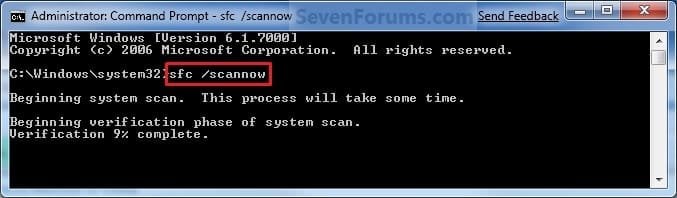
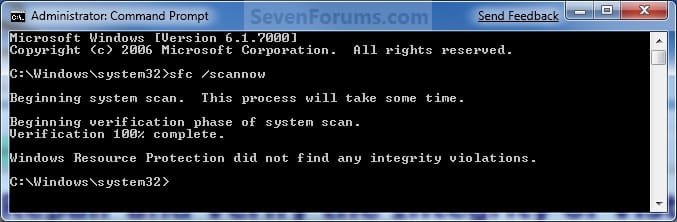
SFC /SCANNOW Command - System File Checker How to Repair Windows 7 System Files with System File Checker
Last edited by Brink; 02 Feb 2013 at 10:38 AM..
| My System Specs |
| Computer type PC/Desktop System Manufacturer/Model Number Self built custom OS 64-bit Windows 7 Ultimate SP1 & Windows 8 Enterprise CPU Intel i7-3930K 3.2 Ghz (O/C 4 Ghz) Motherboard ASRock X79 Extreme11 Memory 32 GB (8GBx4) G.SKILL DDR3 Quad PC3-19200 2400MHz Graphics Card Sapphire HD5870 Eyefinity 6 2GB Sound Card SB Recon 3Di Integrated Chip Monitor(s) Displays 3x 27" Asus VE278Q Screen Resolution 1920x1080 Keyboard Logitech Cordless Desktop MX 5500 Revolution Mouse Logitech Cordless Desktop MX 5500 Revolution PSU OCZ Series Gold OCZZ1000M 1000W Case Thermaltake Level 10 GT Snow Edition Cooling Corsair Hydro H100 Hard Drives 256GB OCZ Vector
160GB OCZ RevoDrive X2
2 x 1TB Samsung HDD HD154UI SATA Internet Speed 50 Mb/s Download and 2 Mb/s Upload Other Info Microsoft LifeCam Cinema
Lite-On iHBS212 12x BD Writer
Samsung CLX-3175FW Printer
Netgear WNDR3800 Router
Motorola SBG6580 Cable Modem
2x APC Back-UPS XS 1500 |
24 Mar 2011
|
#80 | | 64-bit Windows 7 Ultimate SP1 & Windows 8 Enterprise Texas |

Quote: Originally Posted by Henfracar Thanks much, Brinks,
Iran sfc 7 times; BSOD'd first time; next two stopped at 49%; next two at 67% next two went to 100%.
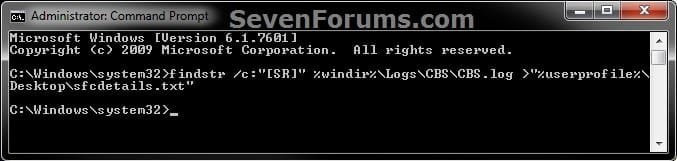
As per your directions I generated the sfc details report - see attached file.
Again, thanks a million, and God bless.
Frank Frank,
Try running the sfc /scannow command at boot in OPTION ONE to see if that may be able to fix them.
If not and you are having issues in Windows 7, then you might consider doing a repair install to fix them instead. If you are not having any problems in Windows 7 though, then I wouldn't worry about trying to fix the files then.
Last edited by Brink; 24 Mar 2011 at 11:39 AM..
Reason: added quote
| My System Specs |
| Computer type PC/Desktop System Manufacturer/Model Number Self built custom OS 64-bit Windows 7 Ultimate SP1 & Windows 8 Enterprise CPU Intel i7-3930K 3.2 Ghz (O/C 4 Ghz) Motherboard ASRock X79 Extreme11 Memory 32 GB (8GBx4) G.SKILL DDR3 Quad PC3-19200 2400MHz Graphics Card Sapphire HD5870 Eyefinity 6 2GB Sound Card SB Recon 3Di Integrated Chip Monitor(s) Displays 3x 27" Asus VE278Q Screen Resolution 1920x1080 Keyboard Logitech Cordless Desktop MX 5500 Revolution Mouse Logitech Cordless Desktop MX 5500 Revolution PSU OCZ Series Gold OCZZ1000M 1000W Case Thermaltake Level 10 GT Snow Edition Cooling Corsair Hydro H100 Hard Drives 256GB OCZ Vector
160GB OCZ RevoDrive X2
2 x 1TB Samsung HDD HD154UI SATA Internet Speed 50 Mb/s Download and 2 Mb/s Upload Other Info Microsoft LifeCam Cinema
Lite-On iHBS212 12x BD Writer
Samsung CLX-3175FW Printer
Netgear WNDR3800 Router
Motorola SBG6580 Cable Modem
2x APC Back-UPS XS 1500 |
24 Mar 2011
|
#81 | | Win7 Premium Home Edition Media Center 6.01.7600 (32bit) |
That's what bothers me, Brink,
The fact that after our earlier discussions in this thread, last weekend I did a repair install on my machine, did not reinstall all the apps i previously had, and yet this 'corrupted system file' recurrence.
Is it possible that I am starting from a position of file corruption in my 'family pack' DVD?
Can I use a friend's Windows 7 Home Premium (same edition) to repair install my machine and use 'my license' to validate?
Or can I extract the system files from my friend's OS and use that to repair mine.
Will still try your suggestion of trying option one of your tutorial, though.
These are the problems I'm currently having with my machine:
1. Unable to create system image backups
2. Of late, unable to update Win 7
3. Repeated intermittent crashing of all browsers (IE, Chrome, Opera, Firefox)
4. Crashing Windows Explorer, Com Surrogate etc.
5. Intermittent BSOD's (like clicking on a link in open web-pages)
6. Repeated 'corruption' of system files.
Appreciate your advice
Frank | My System Specs | | System Manufacturer/Model Number Local Build OS Win7 Premium Home Edition Media Center 6.01.7600 (32bit) CPU AMD Phenom X3 8650 @ 2.31GHz Motherboard Asrock N68-S Memory 4Gb (2x2Gb DDR2 (PC2-6400) Princeton) Graphics Card Onboard nVIDIA GeForce 7025 / mForce 630a Sound Card Onboard VIA High Definition Audio Monitor(s) Displays 32" Sony Bravia LCD TV, 19" LCD Screen Resolution 1368 x 768 @60Hz (32bit) Keyboard Standard PS2 Mouse Microsoft PS2 Hard Drives <Internal - 320Gb Hitachi>
<Externals -(2) 1TB Seagate Barracuda 7200.12 via NexStar eSATA HD Dock
160GB WD My Book (USB)
500GB Lacie (USB) |
24 Mar 2011
|
#82 | | 64-bit Windows 7 Ultimate SP1 & Windows 8 Enterprise Texas |
Frank,
Sorry, I missed what we already did last week.
At this point, I would say that it may be time to consider doing a custom install of Windows 7 if you do not have backups, or a clean install if you do. It looks like your current installation is to corrupted to be repaired. | My System Specs | | Computer type PC/Desktop System Manufacturer/Model Number Self built custom OS 64-bit Windows 7 Ultimate SP1 & Windows 8 Enterprise CPU Intel i7-3930K 3.2 Ghz (O/C 4 Ghz) Motherboard ASRock X79 Extreme11 Memory 32 GB (8GBx4) G.SKILL DDR3 Quad PC3-19200 2400MHz Graphics Card Sapphire HD5870 Eyefinity 6 2GB Sound Card SB Recon 3Di Integrated Chip Monitor(s) Displays 3x 27" Asus VE278Q Screen Resolution 1920x1080 Keyboard Logitech Cordless Desktop MX 5500 Revolution Mouse Logitech Cordless Desktop MX 5500 Revolution PSU OCZ Series Gold OCZZ1000M 1000W Case Thermaltake Level 10 GT Snow Edition Cooling Corsair Hydro H100 Hard Drives 256GB OCZ Vector
160GB OCZ RevoDrive X2
2 x 1TB Samsung HDD HD154UI SATA Internet Speed 50 Mb/s Download and 2 Mb/s Upload Other Info Microsoft LifeCam Cinema
Lite-On iHBS212 12x BD Writer
Samsung CLX-3175FW Printer
Netgear WNDR3800 Router
Motorola SBG6580 Cable Modem
2x APC Back-UPS XS 1500 |
24 Mar 2011
|
#83 | | windows 7 x64 Home Premium manasquan, nj |
Does anybody know what "PublicKeyToken = {l:8 b:31bf3856ad364e35}" is? Looking through Henfracar's attachment I noticed most of the troublesome files mention that particular item. I googled it, and it looks like it is tied into WMP and the Vista sidebar, but I don't really know what it is or what it does. | My System Specs | | System Manufacturer/Model Number me / #1 OS windows 7 x64 Home Premium CPU intel q6600 Motherboard gigbyte ga ep45 ud3l Memory g.skill 8gb ddr2 1066 (pc2 8500) Graphics Card evga geforce 9800 gtx 512 mb Screen Resolution 1680 x 1050 PSU raidmax 500w Case smilodon (yes, t'was the pretty blue lites that got me!) Hard Drives wd caviar black 500 gb
wd caviar black 1tb
wd elements 1tb external hd x2 |
26 Mar 2011
|
#84 | | |
Need help reading cbs.log Hi,
Thanks for all the great info. I ran scannow a couple of times from within Windows 7 and twice more at the boot prompt. In all cases, scannow reported that it could not repair some of the files. I've extracted the cbs.log file to sfcdetails.txt as shown in the tutorial and was hoping someone more knowledgeable than me could help decipher it. BTW, I deleted all old entries in the file prior to today.
Thanks,
Mitchell | My System Specs | | |
26 Mar 2011
|
#85 | | 64-bit Windows 7 Ultimate SP1 & Windows 8 Enterprise Texas |
Hello Mitchell,
Luckily, you only have the file below that needs to be replaced according to your CBS.log. C:\Windows\System32\tcpmon.dll
If you have a retail copy Windows 7 installation DVD, then you can use the tutorial below to help extract the file above from the DVD to save it to your desktop. Afterwards replace the file above with the extracted copy as in the yellow TIP box at the bottom of the turtorial below. Extract Files from Windows 7 Installation DVD
Hope this helps,
Shawn | My System Specs | | Computer type PC/Desktop System Manufacturer/Model Number Self built custom OS 64-bit Windows 7 Ultimate SP1 & Windows 8 Enterprise CPU Intel i7-3930K 3.2 Ghz (O/C 4 Ghz) Motherboard ASRock X79 Extreme11 Memory 32 GB (8GBx4) G.SKILL DDR3 Quad PC3-19200 2400MHz Graphics Card Sapphire HD5870 Eyefinity 6 2GB Sound Card SB Recon 3Di Integrated Chip Monitor(s) Displays 3x 27" Asus VE278Q Screen Resolution 1920x1080 Keyboard Logitech Cordless Desktop MX 5500 Revolution Mouse Logitech Cordless Desktop MX 5500 Revolution PSU OCZ Series Gold OCZZ1000M 1000W Case Thermaltake Level 10 GT Snow Edition Cooling Corsair Hydro H100 Hard Drives 256GB OCZ Vector
160GB OCZ RevoDrive X2
2 x 1TB Samsung HDD HD154UI SATA Internet Speed 50 Mb/s Download and 2 Mb/s Upload Other Info Microsoft LifeCam Cinema
Lite-On iHBS212 12x BD Writer
Samsung CLX-3175FW Printer
Netgear WNDR3800 Router
Motorola SBG6580 Cable Modem
2x APC Back-UPS XS 1500 |
26 Mar 2011
|
#86 | | |
cbs.log - reinstalling file Hey Shawn,
Thanks for the quick response.
I followed the instructions on the link you included and made it to step 12 (copying the file from desktop to system 32 folder). I restarted the computer in Safe Mode with command prompt and entered the appropriate command to copy the dll file. Unfortunately, I received an error message "access is denied" when I tried to copy the file from the desktop to the system32 folder. I tried copying the file to another location successfully, so this tells me the problem is the system 32 destination folder.
I'm probably doing something stupid, but any help would be appreciated it.
Thanks again,
Mitchell | My System Specs | | |
26 Mar 2011
|
#87 | | 64-bit Windows 7 Ultimate SP1 & Windows 8 Enterprise Texas |
Mitchell,
Did you take ownership and set permissions to "Allow" your account "Full Control" of the C:\Windows\System32\tcpmon.dll file in your current installation before you tried to replace it with the extracted and unblocked copy on your desktop?
After the above, were you not able to just copy the file on the desktop, then paste it directly into the C:\Windows\System32 folder from within Windows 7 to replace it? | My System Specs | | Computer type PC/Desktop System Manufacturer/Model Number Self built custom OS 64-bit Windows 7 Ultimate SP1 & Windows 8 Enterprise CPU Intel i7-3930K 3.2 Ghz (O/C 4 Ghz) Motherboard ASRock X79 Extreme11 Memory 32 GB (8GBx4) G.SKILL DDR3 Quad PC3-19200 2400MHz Graphics Card Sapphire HD5870 Eyefinity 6 2GB Sound Card SB Recon 3Di Integrated Chip Monitor(s) Displays 3x 27" Asus VE278Q Screen Resolution 1920x1080 Keyboard Logitech Cordless Desktop MX 5500 Revolution Mouse Logitech Cordless Desktop MX 5500 Revolution PSU OCZ Series Gold OCZZ1000M 1000W Case Thermaltake Level 10 GT Snow Edition Cooling Corsair Hydro H100 Hard Drives 256GB OCZ Vector
160GB OCZ RevoDrive X2
2 x 1TB Samsung HDD HD154UI SATA Internet Speed 50 Mb/s Download and 2 Mb/s Upload Other Info Microsoft LifeCam Cinema
Lite-On iHBS212 12x BD Writer
Samsung CLX-3175FW Printer
Netgear WNDR3800 Router
Motorola SBG6580 Cable Modem
2x APC Back-UPS XS 1500 |
27 Mar 2011
|
#88 | | |
Stupidity is alive Hi Shawn,
Well, I did take ownership and set permissions, but for the wrong file. I did it for the file I extracted--not the file I was replacing. Duh. So, I did it for the correct file and was able to copy it using the command prompt at boot. Scannow produced another error, but this time I was able to decipher it and found it to be tcpmon.ini, so I went through the copy procedure again and finally was able to run scannow with no errors. Yay! Again, thanks for all your help.
Mitchell | My System Specs | | |
27 Mar 2011
|
#89 | | 64-bit Windows 7 Ultimate SP1 & Windows 8 Enterprise Texas |
You're most welcome Mitchell. I'm happy to hear that there are no more errors showing in SFC. | My System Specs | | Computer type PC/Desktop System Manufacturer/Model Number Self built custom OS 64-bit Windows 7 Ultimate SP1 & Windows 8 Enterprise CPU Intel i7-3930K 3.2 Ghz (O/C 4 Ghz) Motherboard ASRock X79 Extreme11 Memory 32 GB (8GBx4) G.SKILL DDR3 Quad PC3-19200 2400MHz Graphics Card Sapphire HD5870 Eyefinity 6 2GB Sound Card SB Recon 3Di Integrated Chip Monitor(s) Displays 3x 27" Asus VE278Q Screen Resolution 1920x1080 Keyboard Logitech Cordless Desktop MX 5500 Revolution Mouse Logitech Cordless Desktop MX 5500 Revolution PSU OCZ Series Gold OCZZ1000M 1000W Case Thermaltake Level 10 GT Snow Edition Cooling Corsair Hydro H100 Hard Drives 256GB OCZ Vector
160GB OCZ RevoDrive X2
2 x 1TB Samsung HDD HD154UI SATA Internet Speed 50 Mb/s Download and 2 Mb/s Upload Other Info Microsoft LifeCam Cinema
Lite-On iHBS212 12x BD Writer
Samsung CLX-3175FW Printer
Netgear WNDR3800 Router
Motorola SBG6580 Cable Modem
2x APC Back-UPS XS 1500 SFC /SCANNOW Command - System File Checker problems? All times are GMT -5. The time now is 11:20 AM. | |