
SFC /SCANNOW Command - System File Checker

How to Repair Windows 7 System Files with System File Checker


   Information
The sfc /scannow command (System File Checker) scans the integrity of all protected Windows 7 system files and replaces incorrect corrupted, changed/modified, or damaged versions with the correct versions if possible.

   Tip
If you get the Windows Resource Protection Could Not Start the Repair Service error when trying to run SFC, then make sure that the Windows Modules Installer service is enabled, click on Start, and set to Manual.

Services - Start or Disable

OR

Copy and paste the command below in the elevated command prompt, and press Enter. After the Windows Modules Installer service has started, try running the SFC command again

net start trustedinstaller

   Note
The KB3022345, KB3035583, and KB3068708 updates will cause SFC to give you a false mismatch message in SFC for files related to these updates.

You can safely ignore these results in your SFC details since it will not affect SFC from being able to repair other system files.

   Warning
Be aware that if you have modified your system files as in theming explorer/system files, running sfc /scannow will revert the system files such as explorer.exe back to it's default state. Make the appropriate backups of your system files that you have modified for theming if you wish to save them before running sfc /scannow.


:note: For the updated Windows 10 tutorial, please see - SFC Command - Run in Windows 10 - Windows 10 Tutorials

CONTENTS:
  • Option One: To Run the SFC /SCANNOW Command at Boot
  • Option Two: To Run the SFC /SCANNOW Command in Windows 7
  • Option Three: How to See and Read Only the "SFC" Scan Results from the CBS.LOG


OPTION ONE

To Run the SFC /SCANNOW Command at Boot


1. For how, see METHOD TWO at this link: SFC /SCANNOW : Run in Command Prompt at Boot

   Note
Using OPTION TWO below is recommended if able.

If you would like to get help with your SFC issue, then be sure to upload and attach your sfcdetails.txt file from OPTION THREE below in your post.


OPTION TWO

To Run the SFC /SCANNOW Command in Windows 7


1. Open an elevated command prompt or an elevated PowerShell, and do step 2 or 3 below for what type of scan you would like to run.


2. To Scan and Repair System Files
NOTE: Scans the integrity of all protected system files and repairs the system files if needed. Please see red WARNING box at the top of this tutorial.
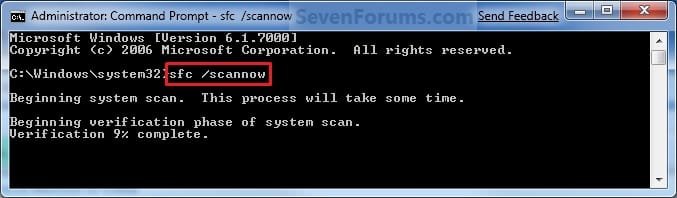
A) In the elevated command prompt, type sfc /scannow, press Enter, and go to step 4 below. (see screenshot below)
NOTE: This may take a little bit to finish.
Command-1.jpg
3. To Only Verify if the System Files are Corrupted
NOTE: Scans and only verifies the integrity of all proteced system files only. This command will not change your system files as in the red WARNING box at the top of this tutorial.
A) In the elevated command prompt, type sfc /verifyonly, press Enter, and go to step 4 below.
4. When the scan is complete, hopefully you will see all is ok like the screenshot below.

   Note

  • If SFC could not fix something, then run the command again to see if it may be able to the next time. Sometimes it may take running the sfc /scannow command 3 or more times to completely fix everything that it's able to.
  • If not, then download and run the 32-bit (x86) or 64-bit (x64) System Update Readiness Tool for your same installed 32-bit or 64-bit Windows 7, restart the PC afterwards, and try the sfc /scannow command again.
  • If still not, then try using OPTION ONE above to run the sfc /scannow command at boot.
  • If still not, then you can attempt to run a System Restore using a restore point dated before the bad file occured to fix it. You may need to repeat doing a System Restore until you find a older restore point that may work.
  • If still not, then you can use the steps in the TIP box in the OPTION THREE section below to manually replace the files that SFC could not fix if there are not to many fix.
  • If there are to many files to manually fix, or you prefer not to use OPTION THREE below, then you could do a repair install without losing anything.
If you would like to get help with your SFC issue, then be sure to upload and attach your sfcdetails.txt file from OPTION THREE below in your post.


Finished.jpg
5. When done, close the elevated command prompt.


OPTION THREE

How to See and Read Only the "SFC" Scan Results from the CBS.LOG


   Note
When SFC runs, it logs it's actions into the C:\Windows\Logs\CBS\CBS.log. The steps in this option will show you how to see only the specific SFC entries with the [SR] tags in this CBS.log. This can be helpful to show you what files SFC could not fix automatically if you wanted to try and manually replace them.

1. Open an "elevated command prompt" (right click -> Run as administrator).

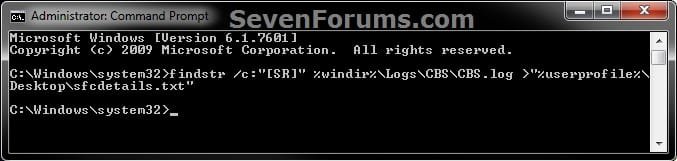
2. In the elevated command prompt, copy and paste the command below, and press Enter. (See screenshot below)
NOTE: This will place a sfcdetails.txt file on your desktop with only the SFC scan result details from the CBS.LOG in it.
Code:
findstr /c:"[SR]" %windir%\Logs\CBS\CBS.log >"%userprofile%\Desktop\sfcdetails.txt"
sfcdetails.jpg
3. Close the elevated command prompt.

4. Open the sfcdetails.txt file on your desktop to see the SFC scan details in the CBS.LOG.

5. You can safely delete the sfcdetails.txt file afterwards if you like.
   Tip
If you need to replace a corrupted system file that SFC cannot fix, then this will show you how to by extracting a new copy directly from your Windows 7 installation DVD.

Extract Files from Windows 7 Installation DVD


That's it,
Shawn


Last edited:
You can run it from the GUI (Option 1 of previous link) or command prompt (Option 2).
 

My Computer

Computer type
Laptop
Computer Manufacturer/Model Number
Sony Vaio VPCEB47GM Laptop
OS
Win 7 Pro 64-bit
CPU
Intel i5 2.4 Ghz
Memory
8GB DDR3
Graphics Card(s)
Intel HD 3000
Sound Card
IDT High Definition
Monitor(s) Displays
15.6 WGXA Anti-Glare LED
Screen Resolution
1280x800
Hard Drives
640Gb 7200rpm
Antivirus
MSE
Browser
Opera (primary) with IE9 backup
question...
sfc flags a file - where do you get a new file from? you would think install.wim, but what if a hotfix replaced the file with a newer one? how do you know?
 

My Computer

OS
7 Home Premium x64

My Computer

Computer type
PC/Desktop
Computer Manufacturer/Model Number
Self built custom
OS
64-bit Windows 11 Pro for Workstations
CPU
Intel i7-8700K OC'd to 5 GHz
Motherboard
ASUS ROG Maximus XI Formula Z390
Memory
64 GB (4x16GB) G.SKILL TridentZ RGB DDR4 3600 MHz
Graphics Card(s)
ASUS ROG-STRIX-GTX1080TI-O11G-GAMING
Sound Card
Integrated
Monitor(s) Displays
2 x Samsung Odyssey G7 27"
Screen Resolution
2560x1440
Hard Drives
1TB Samsung 990 PRO M.2,
4TB Samsung 990 PRO PRO M.2,
TerraMaster F8 SSD Plus NAS
PSU
Seasonic Prime Titanium 850W
Case
Thermaltake Core P3
Cooling
Corsair Hydro H115i
Keyboard
Logitech wireless K800
Mouse
Logitech MX Master 4
Internet Speed
2 Gb/s Download and 100 Mb/s Upload
Antivirus
Malwarebyte Anti-Malware Premium
Browser
Google Chrome
Other Info
Logitech Z625 speaker system,
Logitech BRIO 4K Pro webcam,
HP Color LaserJet Pro MFP M477fdn,
APC SMART-UPS RT 1000 XL - SURT1000XLI,
Galaxy S23 Plus phone
hi Brink - i know how to extract the files. my question is how do you know the file you're extracting is the right version?

for instance, if a hotfix replaced explorer.exe, and maybe i hack explorer and ruin it, obviously replacing explorer.exe from setup/install.wim would replace the wrong version. what is to prevent this? i guess what i'm looking for a list of all files replaced by all hotfixes - just haven't found it yet
 

My Computer

OS
7 Home Premium x64
The only true way to know what the file versions are is to check the "Details" tab in the file's properties page to see if both the extracted and the one in the installation are the same or not.

The best way to avoid this is to create a restore point or system image before modifying any system files. This way you could easily use it to restore the file if something bad happens to it.


If you look up the KB number of the hotfix in the search box at the top of Microsoft Support, it will give you a complete list of files that it will effect. For example, KB2448827 for a IE9 update.
 

My Computer

Computer type
PC/Desktop
Computer Manufacturer/Model Number
Self built custom
OS
64-bit Windows 11 Pro for Workstations
CPU
Intel i7-8700K OC'd to 5 GHz
Motherboard
ASUS ROG Maximus XI Formula Z390
Memory
64 GB (4x16GB) G.SKILL TridentZ RGB DDR4 3600 MHz
Graphics Card(s)
ASUS ROG-STRIX-GTX1080TI-O11G-GAMING
Sound Card
Integrated
Monitor(s) Displays
2 x Samsung Odyssey G7 27"
Screen Resolution
2560x1440
Hard Drives
1TB Samsung 990 PRO M.2,
4TB Samsung 990 PRO PRO M.2,
TerraMaster F8 SSD Plus NAS
PSU
Seasonic Prime Titanium 850W
Case
Thermaltake Core P3
Cooling
Corsair Hydro H115i
Keyboard
Logitech wireless K800
Mouse
Logitech MX Master 4
Internet Speed
2 Gb/s Download and 100 Mb/s Upload
Antivirus
Malwarebyte Anti-Malware Premium
Browser
Google Chrome
Other Info
Logitech Z625 speaker system,
Logitech BRIO 4K Pro webcam,
HP Color LaserJet Pro MFP M477fdn,
APC SMART-UPS RT 1000 XL - SURT1000XLI,
Galaxy S23 Plus phone
Hi Brink,

Another good tutorial. I just noticed a small typo in the Note box for Option 1:

If snot, then you can attempt to run....


You probably had a cold that day that you wrote it.....:D

Regards,
Golden
 

My Computer

Computer type
PC/Desktop
Computer Manufacturer/Model Number
Golden Mk. I.4
OS
Windows 10 Pro x64 ; Xubuntu x64
CPU
Intel i7 860 @ 2.80 GHz O/C'ed to 4.0GHz
Motherboard
Gigabyte P55A-UD3R Rev.1. Award BIOS F13
Memory
16GB Corsair Vengance DDR3 @ 661 MHz Dual Channel (9-9-9-24)
Graphics Card(s)
EVGA NVidia GTX 560 1024MB
Sound Card
Realtek Integrated
Monitor(s) Displays
Dual Samsung SyncMaster 2494HS
Screen Resolution
1920*1080 and 1920*1080
Hard Drives
1*Samsung 840 EVO 120GB SSD;
1*OCZ Vertex 2 60GB SSD;
2*Samsung F3 SpinPoint 1TB in RAID0;
1*Samsung F1 SpinPoint 1TB;
2*Western Digital 1TB External USB 3.0
1*Western Digital 500GB External USB 3.0
1*Seagate 500GB External USB 2.0
PSU
Thermaltake ToughPower QFan 750W
Case
Thermaltake Element S VK60001W2Z
Cooling
Corsair H60 Water Cooling, 2*230mm and 2*80mm case fans
Keyboard
Logitech G110
Mouse
Logitech MX518
Thank you Golden.

LOL, oops. Corrected.
 

My Computer

Computer type
PC/Desktop
Computer Manufacturer/Model Number
Self built custom
OS
64-bit Windows 11 Pro for Workstations
CPU
Intel i7-8700K OC'd to 5 GHz
Motherboard
ASUS ROG Maximus XI Formula Z390
Memory
64 GB (4x16GB) G.SKILL TridentZ RGB DDR4 3600 MHz
Graphics Card(s)
ASUS ROG-STRIX-GTX1080TI-O11G-GAMING
Sound Card
Integrated
Monitor(s) Displays
2 x Samsung Odyssey G7 27"
Screen Resolution
2560x1440
Hard Drives
1TB Samsung 990 PRO M.2,
4TB Samsung 990 PRO PRO M.2,
TerraMaster F8 SSD Plus NAS
PSU
Seasonic Prime Titanium 850W
Case
Thermaltake Core P3
Cooling
Corsair Hydro H115i
Keyboard
Logitech wireless K800
Mouse
Logitech MX Master 4
Internet Speed
2 Gb/s Download and 100 Mb/s Upload
Antivirus
Malwarebyte Anti-Malware Premium
Browser
Google Chrome
Other Info
Logitech Z625 speaker system,
Logitech BRIO 4K Pro webcam,
HP Color LaserJet Pro MFP M477fdn,
APC SMART-UPS RT 1000 XL - SURT1000XLI,
Galaxy S23 Plus phone
Hi Brink,
Tried sfc /scannow and sfc /verifyonly; at 19% both times I got this "Windows Resource Protection could not perform the requested operation".
Any suggestions?
 

My Computer

Computer type
PC/Desktop
Computer Manufacturer/Model Number
LENOVO
OS
Microsoft Windows 7 Home Premium 64-bit
CPU
Intel(R) Core(TM) i3-2100 CPU @ 3.10GHz
Motherboard
LENOVO
Memory
6.00 GB Hyundai
Graphics Card(s)
Onboard Intel(R) HD Graphics
Sound Card
Onboard Realtek High Definition Audio
Monitor(s) Displays
32" Sony Bravia LCD TV, 19" LCD
Screen Resolution
1368 x 768 @60Hz (32bit)
Hard Drives
<Internal - 1.5Tb Hitachi>
<Externals -(2) 1TB Seagate Barracuda 7200.12 via NexStar eSATA HD Dock
160GB WD My Book (USB)
500GB Lacie (USB)
500GB Seagate (internal but not connected)
Keyboard
Logitech MK320 Wireless
Mouse
Logitech Wireless
Antivirus
Avira
Browser
Opera
Hello Henfracar, and welcome to Seven Forums.

Run a chkdsk C: /F command to see if you may have any bad sectors on the Windows 7 C: drive, then see if you may be able to run the sfc /scannow command afterwards.

If not, then you might see if you may be able to run sfc /scannow at boot or in safe mode.

Hope this helps,
Shawn
 

My Computer

Computer type
PC/Desktop
Computer Manufacturer/Model Number
Self built custom
OS
64-bit Windows 11 Pro for Workstations
CPU
Intel i7-8700K OC'd to 5 GHz
Motherboard
ASUS ROG Maximus XI Formula Z390
Memory
64 GB (4x16GB) G.SKILL TridentZ RGB DDR4 3600 MHz
Graphics Card(s)
ASUS ROG-STRIX-GTX1080TI-O11G-GAMING
Sound Card
Integrated
Monitor(s) Displays
2 x Samsung Odyssey G7 27"
Screen Resolution
2560x1440
Hard Drives
1TB Samsung 990 PRO M.2,
4TB Samsung 990 PRO PRO M.2,
TerraMaster F8 SSD Plus NAS
PSU
Seasonic Prime Titanium 850W
Case
Thermaltake Core P3
Cooling
Corsair Hydro H115i
Keyboard
Logitech wireless K800
Mouse
Logitech MX Master 4
Internet Speed
2 Gb/s Download and 100 Mb/s Upload
Antivirus
Malwarebyte Anti-Malware Premium
Browser
Google Chrome
Other Info
Logitech Z625 speaker system,
Logitech BRIO 4K Pro webcam,
HP Color LaserJet Pro MFP M477fdn,
APC SMART-UPS RT 1000 XL - SURT1000XLI,
Galaxy S23 Plus phone

My Computer

Computer type
Laptop
Computer Manufacturer/Model Number
Sony Vaio VPCEB47GM Laptop
OS
Win 7 Pro 64-bit
CPU
Intel i5 2.4 Ghz
Memory
8GB DDR3
Graphics Card(s)
Intel HD 3000
Sound Card
IDT High Definition
Monitor(s) Displays
15.6 WGXA Anti-Glare LED
Screen Resolution
1280x800
Hard Drives
640Gb 7200rpm
Antivirus
MSE
Browser
Opera (primary) with IE9 backup
Thanks for your prompt response, Guys,
Tried again this morning to run sfcscannow from both command and elevated commands but received "Cannot determine file system of drive C".
I recently re-installed Win7; my thought was that I had corrupted system files, but that did not change squat.
Hope this forum is more successful.
Thanks again
Frank
 

My Computer

Computer type
PC/Desktop
Computer Manufacturer/Model Number
LENOVO
OS
Microsoft Windows 7 Home Premium 64-bit
CPU
Intel(R) Core(TM) i3-2100 CPU @ 3.10GHz
Motherboard
LENOVO
Memory
6.00 GB Hyundai
Graphics Card(s)
Onboard Intel(R) HD Graphics
Sound Card
Onboard Realtek High Definition Audio
Monitor(s) Displays
32" Sony Bravia LCD TV, 19" LCD
Screen Resolution
1368 x 768 @60Hz (32bit)
Hard Drives
<Internal - 1.5Tb Hitachi>
<Externals -(2) 1TB Seagate Barracuda 7200.12 via NexStar eSATA HD Dock
160GB WD My Book (USB)
500GB Lacie (USB)
500GB Seagate (internal but not connected)
Keyboard
Logitech MK320 Wireless
Mouse
Logitech Wireless
Antivirus
Avira
Browser
Opera
You might consider a repair install of the OS if you have a retail installation disk. You will not be able to use an OEM Windows 7 Factory Restore/Recoverytype of installation disk that came with or was created from a store bought computer to do a repair install with. These can only be used do a clean install instead. A repair install will not affect your user accounts, data, programs, system drivers, etc.

http://www.sevenforums.com/tutorials/3413-repair-install.html
 

My Computer

Computer type
Laptop
Computer Manufacturer/Model Number
Sony Vaio VPCEB47GM Laptop
OS
Win 7 Pro 64-bit
CPU
Intel i5 2.4 Ghz
Memory
8GB DDR3
Graphics Card(s)
Intel HD 3000
Sound Card
IDT High Definition
Monitor(s) Displays
15.6 WGXA Anti-Glare LED
Screen Resolution
1280x800
Hard Drives
640Gb 7200rpm
Antivirus
MSE
Browser
Opera (primary) with IE9 backup
Hi and thanks again for your prompt responses,
Just got through trying safe mode; puter aborted twice after loading Drivers \Class PnP.SYS; tried running "startup Repair"; something strange hit me; in the Startup Repair Window.
Windows Directory = F:\Windows; but I don't have an F partition on my HD: I have a 100MB Reserved, C 50GB(System), D 20Gb(Apps) and E 230GB(DATA). F & G are my optical drives.
As above, recently did a repair install but no change in stated problem. Is there something I missed or should I format C and then reinstall? I have recently bought the family pack Win7 Home Premium DVD.
Any ideas?
Frank
 

My Computer

Computer type
PC/Desktop
Computer Manufacturer/Model Number
LENOVO
OS
Microsoft Windows 7 Home Premium 64-bit
CPU
Intel(R) Core(TM) i3-2100 CPU @ 3.10GHz
Motherboard
LENOVO
Memory
6.00 GB Hyundai
Graphics Card(s)
Onboard Intel(R) HD Graphics
Sound Card
Onboard Realtek High Definition Audio
Monitor(s) Displays
32" Sony Bravia LCD TV, 19" LCD
Screen Resolution
1368 x 768 @60Hz (32bit)
Hard Drives
<Internal - 1.5Tb Hitachi>
<Externals -(2) 1TB Seagate Barracuda 7200.12 via NexStar eSATA HD Dock
160GB WD My Book (USB)
500GB Lacie (USB)
500GB Seagate (internal but not connected)
Keyboard
Logitech MK320 Wireless
Mouse
Logitech Wireless
Antivirus
Avira
Browser
Opera
Great Tut, Brink,
Just one little thing will clean it up a bit for Noobs like me; in step two "Notes" #4 "If still not, then you can use the TIP in and with OPTION TWO below to manually replace the files that SFC could not fix." seems to point to Option two below, but the option below is #3.
Should that be " use the TIP in OPTION TWO above"?
Just asking
Thanks for a helpful Tut, never the less.
Frank
 

My Computer

Computer type
PC/Desktop
Computer Manufacturer/Model Number
LENOVO
OS
Microsoft Windows 7 Home Premium 64-bit
CPU
Intel(R) Core(TM) i3-2100 CPU @ 3.10GHz
Motherboard
LENOVO
Memory
6.00 GB Hyundai
Graphics Card(s)
Onboard Intel(R) HD Graphics
Sound Card
Onboard Realtek High Definition Audio
Monitor(s) Displays
32" Sony Bravia LCD TV, 19" LCD
Screen Resolution
1368 x 768 @60Hz (32bit)
Hard Drives
<Internal - 1.5Tb Hitachi>
<Externals -(2) 1TB Seagate Barracuda 7200.12 via NexStar eSATA HD Dock
160GB WD My Book (USB)
500GB Lacie (USB)
500GB Seagate (internal but not connected)
Keyboard
Logitech MK320 Wireless
Mouse
Logitech Wireless
Antivirus
Avira
Browser
Opera
Hello Frank, and welcome to Seven Forums.

Thank you. I updated the note. :)

From your description, it may be best to start fresh with a clean install of Windows 7.
 

My Computer

Computer type
PC/Desktop
Computer Manufacturer/Model Number
Self built custom
OS
64-bit Windows 11 Pro for Workstations
CPU
Intel i7-8700K OC'd to 5 GHz
Motherboard
ASUS ROG Maximus XI Formula Z390
Memory
64 GB (4x16GB) G.SKILL TridentZ RGB DDR4 3600 MHz
Graphics Card(s)
ASUS ROG-STRIX-GTX1080TI-O11G-GAMING
Sound Card
Integrated
Monitor(s) Displays
2 x Samsung Odyssey G7 27"
Screen Resolution
2560x1440
Hard Drives
1TB Samsung 990 PRO M.2,
4TB Samsung 990 PRO PRO M.2,
TerraMaster F8 SSD Plus NAS
PSU
Seasonic Prime Titanium 850W
Case
Thermaltake Core P3
Cooling
Corsair Hydro H115i
Keyboard
Logitech wireless K800
Mouse
Logitech MX Master 4
Internet Speed
2 Gb/s Download and 100 Mb/s Upload
Antivirus
Malwarebyte Anti-Malware Premium
Browser
Google Chrome
Other Info
Logitech Z625 speaker system,
Logitech BRIO 4K Pro webcam,
HP Color LaserJet Pro MFP M477fdn,
APC SMART-UPS RT 1000 XL - SURT1000XLI,
Galaxy S23 Plus phone
this is what i got
when in cmd type sfc /?
 

Attachments

  • Knipsel.PNG
    Knipsel.PNG
    78.3 KB · Views: 1,533

My Computer

Computer Manufacturer/Model Number
acer aspire 6920g
OS
win 7 64bit
CPU
t8300
Memory
4gb
Graphics Card(s)
9500m
Monitor(s) Displays
full hd
Screen Resolution
1920-1080
Internet Speed
100mb
Hello Locoelbario,

The sfc /? command will only give you the details about the SFC command. If you wanted to run SFC, then you would need to use the sfc /scannow command instead.

If I misunderstood what you meant, then please let me know. :)

Hope this helps,
Shawn
 

My Computer

Computer type
PC/Desktop
Computer Manufacturer/Model Number
Self built custom
OS
64-bit Windows 11 Pro for Workstations
CPU
Intel i7-8700K OC'd to 5 GHz
Motherboard
ASUS ROG Maximus XI Formula Z390
Memory
64 GB (4x16GB) G.SKILL TridentZ RGB DDR4 3600 MHz
Graphics Card(s)
ASUS ROG-STRIX-GTX1080TI-O11G-GAMING
Sound Card
Integrated
Monitor(s) Displays
2 x Samsung Odyssey G7 27"
Screen Resolution
2560x1440
Hard Drives
1TB Samsung 990 PRO M.2,
4TB Samsung 990 PRO PRO M.2,
TerraMaster F8 SSD Plus NAS
PSU
Seasonic Prime Titanium 850W
Case
Thermaltake Core P3
Cooling
Corsair Hydro H115i
Keyboard
Logitech wireless K800
Mouse
Logitech MX Master 4
Internet Speed
2 Gb/s Download and 100 Mb/s Upload
Antivirus
Malwarebyte Anti-Malware Premium
Browser
Google Chrome
Other Info
Logitech Z625 speaker system,
Logitech BRIO 4K Pro webcam,
HP Color LaserJet Pro MFP M477fdn,
APC SMART-UPS RT 1000 XL - SURT1000XLI,
Galaxy S23 Plus phone
Another strange one for you, Brink; or at least for me,
After a repair install, ran sfc /scannow twice; crashes to BSOD at about 48% first time; rebooted and the second run went to 100%. Showed some corruption which could not be handled.
Any thoughts?
Frank
 

Attachments

  • SFC Scannow results.jpg
    SFC Scannow results.jpg
    245.7 KB · Views: 491

My Computer

Computer type
PC/Desktop
Computer Manufacturer/Model Number
LENOVO
OS
Microsoft Windows 7 Home Premium 64-bit
CPU
Intel(R) Core(TM) i3-2100 CPU @ 3.10GHz
Motherboard
LENOVO
Memory
6.00 GB Hyundai
Graphics Card(s)
Onboard Intel(R) HD Graphics
Sound Card
Onboard Realtek High Definition Audio
Monitor(s) Displays
32" Sony Bravia LCD TV, 19" LCD
Screen Resolution
1368 x 768 @60Hz (32bit)
Hard Drives
<Internal - 1.5Tb Hitachi>
<Externals -(2) 1TB Seagate Barracuda 7200.12 via NexStar eSATA HD Dock
160GB WD My Book (USB)
500GB Lacie (USB)
500GB Seagate (internal but not connected)
Keyboard
Logitech MK320 Wireless
Mouse
Logitech Wireless
Antivirus
Avira
Browser
Opera
Hello Henfracar,

You might run the sfc command a few more times to see if it may be able to fix them during this. If not, then do OPTION THREE in the tutorial to get your sfcdetails.txt file and upload it in a reply. I'll be happy to take a look at it to see what files it says it was unable to fix, and help with having you to manually replace them if needed. :)
 

My Computer

Computer type
PC/Desktop
Computer Manufacturer/Model Number
Self built custom
OS
64-bit Windows 11 Pro for Workstations
CPU
Intel i7-8700K OC'd to 5 GHz
Motherboard
ASUS ROG Maximus XI Formula Z390
Memory
64 GB (4x16GB) G.SKILL TridentZ RGB DDR4 3600 MHz
Graphics Card(s)
ASUS ROG-STRIX-GTX1080TI-O11G-GAMING
Sound Card
Integrated
Monitor(s) Displays
2 x Samsung Odyssey G7 27"
Screen Resolution
2560x1440
Hard Drives
1TB Samsung 990 PRO M.2,
4TB Samsung 990 PRO PRO M.2,
TerraMaster F8 SSD Plus NAS
PSU
Seasonic Prime Titanium 850W
Case
Thermaltake Core P3
Cooling
Corsair Hydro H115i
Keyboard
Logitech wireless K800
Mouse
Logitech MX Master 4
Internet Speed
2 Gb/s Download and 100 Mb/s Upload
Antivirus
Malwarebyte Anti-Malware Premium
Browser
Google Chrome
Other Info
Logitech Z625 speaker system,
Logitech BRIO 4K Pro webcam,
HP Color LaserJet Pro MFP M477fdn,
APC SMART-UPS RT 1000 XL - SURT1000XLI,
Galaxy S23 Plus phone
Thanks much, Brinks,
Iran sfc 7 times; BSOD'd first time; next two stopped at 49%; next two at 67% next two went to 100%.
As per your directions I generated the sfc details report - see attached file.
Again, thanks a million, and God bless.
Frank
 

Attachments

My Computer

Computer type
PC/Desktop
Computer Manufacturer/Model Number
LENOVO
OS
Microsoft Windows 7 Home Premium 64-bit
CPU
Intel(R) Core(TM) i3-2100 CPU @ 3.10GHz
Motherboard
LENOVO
Memory
6.00 GB Hyundai
Graphics Card(s)
Onboard Intel(R) HD Graphics
Sound Card
Onboard Realtek High Definition Audio
Monitor(s) Displays
32" Sony Bravia LCD TV, 19" LCD
Screen Resolution
1368 x 768 @60Hz (32bit)
Hard Drives
<Internal - 1.5Tb Hitachi>
<Externals -(2) 1TB Seagate Barracuda 7200.12 via NexStar eSATA HD Dock
160GB WD My Book (USB)
500GB Lacie (USB)
500GB Seagate (internal but not connected)
Keyboard
Logitech MK320 Wireless
Mouse
Logitech Wireless
Antivirus
Avira
Browser
Opera
Back
Top