Windows 7 Forums Search
Welcome to Windows 7 Forums. Our forum is dedicated to helping you find solutions with any problems, errors or issues you are experiencing with Windows 7. The Windows 7 forum also covers news and updates and has an extensive Windows 7 tutorial section that covers a wide range of tips and tricks.


Windows 7 - Internet Explorer 9 - View and Track Downloads


Internet Explorer 9 - View and Track Downloads

How to View and Track Downloads in Internet Explorer 9
Published by Brink
04-04-2011
Default Internet Explorer 9 - View and Track Downloads

How to View and Track Downloads in Internet Explorer 9

information   Information
This will show how to view and track your downloads using View Downloads in Internet Explorer 9 (IE9).


Here's How:
1. Open Internet Explorer 9, and ......
A) Press CTRL + J.

OR

B) Click on the gear icon (tools) in the upper right corner, then click on View downloads. (see screenshot below)
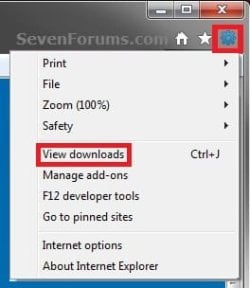
Name:  Gear.jpg
Views: 30504
Size:  26.1 KB
OR

C) Once a download begins or finishes, click on the View Downloads button in the pop-up message bar at the bottom of IE9. (see screenshot below)
Internet Explorer 9 - View and Track Downloads-bottom_ie9.jpg
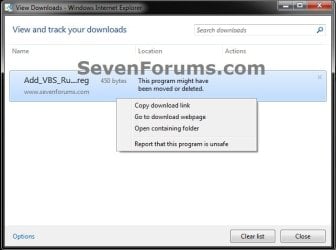
2. You will now see a list of all the files that you have downloaded in IE9. Select a downloaded file and right click on it. (see screenshots below)
Internet Explorer 9 - View and Track Downloads-example.jpgInternet Explorer 9 - View and Track Downloads-moved.jpg
3. Click on the option that you want to do with the selected downloaded file. (see screenshots above)
NOTE: If an option is grayed out or missing, then it is not available for the selected downloaded file. This is usually do to the file being deleted or moved from the default download location.
  • Delete program - This will delete the downloaded file from the default download location if still there.
  • Copy download link - This will copy the website download link for the file to the clipboard so that you are able to paste it from the clipboard.
  • Go to download webpage - This will take you to the website's download page of the file in IE9.
  • Open containing folder - This will open the default download location folder in Windows Explorer only if the file is still there.
  • Report that this program is unsafe - Opens Internet Explorer SmartScreen Filter to Report a Unsafe Website.
  • Rerun security checks on this program - Scans the downloaded file again.
4. Repeat steps 2 and 3 for any other downloaded file if you like.

5. When finished, click on Close. (see screenshots below step 2)
That's it,
Shawn


Published by
Brink's Avatar
Administrator

Join Date: Oct 2008
Location: Texas
Posts: 37,304

Tutorial Tools
08-23-2011   #1
dwpalm1


windows 7 64bit professional


view & track downloads... unless you can't.

so I appreciate that if you do what the instructions say, you can track your downloads - unless they don't work
If I click "view downloads" on the tool menu - nothing happens
If I click "view downloads" during the download - nothing happens
if I use Ctrl-J - nothing happens

I have no idea where my downloads are going

if I type the title of the file into search - nothing is found for that file

My System SpecsSystem Spec
08-23-2011   #2
Brink


Windows 7 Ultimate x64 SP1


Hello DW, and welcome to Seven Forums.

You might see if completely resetting IE9 may be able to help. If not, then you might see if uninstalling IE9 and reinstalling IE9 may help.

Hope this helps,
Shawn
My System SpecsSystem Spec
08-24-2011   #3
dwpalm1


windows 7 64bit professional


IE9

Thanx Shaun,

interestingly, IE9 32bit opens web pdf files just fine - 64bit makes them unavailable.
My System SpecsSystem Spec
.


08-24-2011   #4
Brink


Windows 7 Ultimate x64 SP1


You're welcome DW.

Yeah, you may need to save the PDF file to the desktop if able to and open it from there instead in IE9 (64-bit).
My System SpecsSystem Spec
08-24-2011   #5
dwpalm1


windows 7 64bit professional


Shawn,
Thanx, some sites don't seem to let me "save as" otherwise I would. That's what prompted my attempt to discover why & where the files are "downloading" to. I'll do the reset after I catch up on business this morning.
My System SpecsSystem Spec
08-24-2011   #6
Brink


Windows 7 Ultimate x64 SP1


Resetting IE9 (64-bit) will not do any good in this case though since there's not a 64-bit PDF viewer addon available that I know of. It only works in IE9 (32-bit), or other 32-bit browsers.
My System SpecsSystem Spec
Comment

 Internet Explorer 9 - View and Track Downloads problems?


Tutorial Tools


Similar Threads for: Internet Explorer 9 - View and Track Downloads
Windows 7 Tutorial Category
View downloads doesn't work-Internet Explorer 9 Browsers & Mail
Veiw downloads is all that shows when Internet Explorer 9 starts Browsers & Mail
View and Track downloads - hung download Browsers & Mail
Solved Explorer (v9) opens View and Track Downloads every time General Discussion
Internet Explorer 9 (IE9) Tops 15 Million Downloads News


All times are GMT -5. The time now is 12:37 AM.


Windows 7 Forums is an independent web site and has not been authorized,
sponsored, or otherwise approved by Microsoft Corporation.
"Windows 7" and related materials are trademarks of Microsoft Corp.
© Designer Media Ltd
  

1 2 3 4 5 6 7 8 9 10 11 12 13 14 15 16 17 18 19 20 21 22 23 24 25 26 27 28 29 30