How to Use "Open in New Process" Context Menu Item With or Without Shift+Right Click
Information
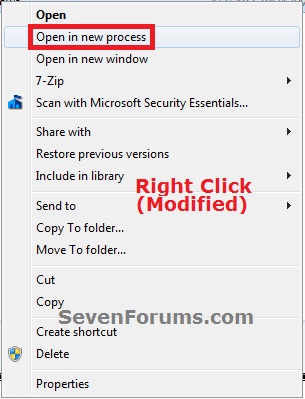
This will show you how to be able to use the Open in New Process context menu item with or without Shift+Right Click on a folder or drive for all users in Windows 7 and Windows 8.
You must be logged in as an administrator to be able to do this tutorial.
EXAMPLE: "Open in new process" with or withoutShift+Right Clickin the Context Menu
Here's How:
1. Shift+Right Click"Open in new process" in the Context Menu NOTE:This is the default setting.
A) Click/tap on the Download button below to download the file below, and go to step 3 below.
Shift+Right-Click_Open_in_New_Process.reg
2. Right Click "Open in new process" in the Context Menu
A) Click/tap on the Download button below to download the file below, and go to step 3 below.
Right-Click_Open_in_New_Process.reg
3.Save the .reg file to the desktop.
4. Double click/tap on the downloaded .reg file to merge it.
5. Click/tap on Run, Yes (UAC), Yes, and OK when prompted.
6. If open, close and reopen Windows Explorer to see the change.
7. When finished, you can delete the downloaded .reg file if you like.
Computer type PC/Desktop System Manufacturer/Model Number [May-Dec-2012] - New Mid-tower - (is done!) OS Windows 7 Professional SP1 - x64 CPU Ivy Bridge Core i5 K Motherboard Asus H77 Chipset (ATX) Memory G.Skill DDR3 PC3-12800 (16Gb) Graphics Card Sapphire HD 7770 Vapor-X Oc Sound Card SBXi-Fi Xtreme Audio (w/5.1 sound system) Monitor(s) Displays Asus Led 21,5" Screen Resolution 16/9
Keyboard Razer + Razer gamepad Mouse Razer PSU 700w 80+ Gold (ErP 6 ready) Case Cooler Master Silencio 550-v2 (modded) Cooling Gelid Solutions (PWM Push/pull Fans) Hard Drives Internal:
500Go Sata 6Gb/s (x2)
500Go Sata 3Gb/s (x2)
SSD 60Go Sata 6Gb/s Antivirus MSE 4.2 Browser IE10 Rtm
Yes indeed!
As it had been said in "How to Add "Select all" to the Context Menu in Windows 7" tutorial already...i quit love right-click menu for my laziest purposes!
Computer type PC/Desktop System Manufacturer/Model Number [May-Dec-2012] - New Mid-tower - (is done!) OS Windows 7 Professional SP1 - x64 CPU Ivy Bridge Core i5 K Motherboard Asus H77 Chipset (ATX) Memory G.Skill DDR3 PC3-12800 (16Gb) Graphics Card Sapphire HD 7770 Vapor-X Oc Sound Card SBXi-Fi Xtreme Audio (w/5.1 sound system) Monitor(s) Displays Asus Led 21,5" Screen Resolution 16/9
Keyboard Razer + Razer gamepad Mouse Razer PSU 700w 80+ Gold (ErP 6 ready) Case Cooler Master Silencio 550-v2 (modded) Cooling Gelid Solutions (PWM Push/pull Fans) Hard Drives Internal:
500Go Sata 6Gb/s (x2)
500Go Sata 3Gb/s (x2)
SSD 60Go Sata 6Gb/s Antivirus MSE 4.2 Browser IE10 Rtm
System Manufacturer/Model Number Home Built OS Windows 7 Professional 64-bit SP1 CPU Intel E8400 Motherboard MSI P35 Neo Memory 4GB Crucial Ballistix Graphics Card ATI ASUS Radeon HD 4830 Sound Card Realtek ALC888 on Board Monitor(s) Displays Asus 22-inch VH226H Widescreen Screen Resolution 1920 x 1080
Keyboard Saitek Eclipse Mouse Razer PSU Hiper HPU-4M 530W Case Thermaltake Tsunami Dream Black Cooling Air/Fans Hard Drives Two Western Digital 500GB Internet Speed Sky Broadband Other Info USB Hub/Card Reader - 2 Pen Drives, 1 Phone Dock