
How to View Previous Shutdown and Restart Details in Windows
Information
This will show you how to view the date, time, and user details of all shutdown (power off) computer events in Event Viewer in Vista, Windows 7, and Windows 8.
You must be logged in as an administrator to be able to do this tutorial.
You must be logged in as an administrator to be able to do this tutorial.
Here's How:
1. Press the Windows + R keys to open the Run dialog, type eventvwr.msc, and press Enter.
2. If prompted by UAC, then click/tap on Yes (Windows 7/8) or Continue (Vista).
3. In the left pane of Event Viewer, double click/tap on Windows Logs to expand it, click on System to select it, then right click on System, and click/tap on Filter Current Log. (see screenshot below)
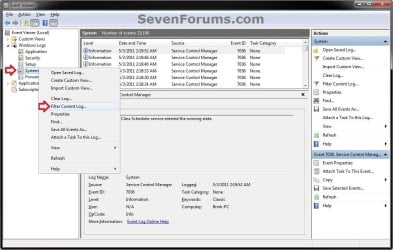
4. Do either step 5 or 6 below for what shutdown events you would like to see.
5. To See the Dates and Times of All User Shut Downs of the Computer
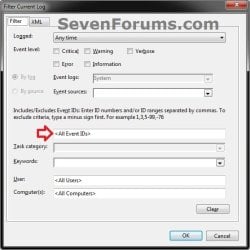
A) Click/tap on the drop down arrow to the right of Event sources, check the USER32 box, and click/tap in the <All Event IDs> field. (see screenshots below)
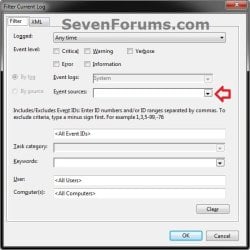
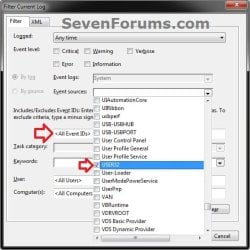
B) In the <All Event IDs> field, type 1074, then click/tap on OK. (see screenshot below)
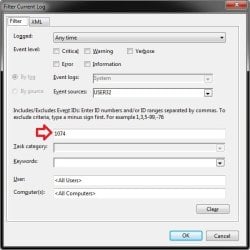
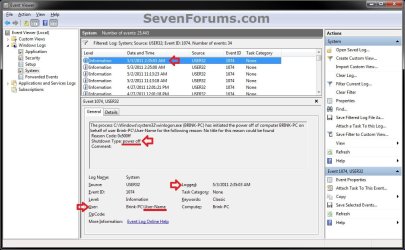
C) This will give you a list of power off (shutdown) and restart Shutdown Type of events at the top of the middle pane in Event Viewer.
D) You can scroll through these listed events to find the events with power off as the Shutdown Type. You will notice the date and time, and what user was responsible for shutting down the computer per power off event listed. (see screenshot below)
NOTE: The user is listed as Computer Name/User Name, such as Brink-PC\User-name for example.
E) Go to step 7.
6. To See the Dates and Times of All Unexpected Shut Downs of the Computer
A) In the <All Event IDs> field, type 6008, then click/tap on OK. (see screenshots below)
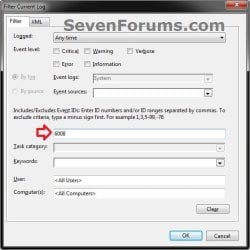
B) This will give you a list of unexpected shutdown events at the top of the middle pane in Event Viewer. You can scroll through these listed events to see the the date and time of each one. (see screenshot below)

7. When finished, you can close Event Viewer.
That's it,
Shawn
Related Tutorials
- How to See What Woke Up Your Computer Last
- How to Read the Wake Source Log in Event Viewer for Windows 7 and Vista
- How to See What the System "Up Time" is in Vista and Windows 7
- How to Allow or Prevent Users and Groups to Shut Down the Computer
- How to Change the Default Action of the Windows 7 Alt+F4 Shut Down Window
- How to Speed Up the Shut Down Time in Windows 7
- How to Create a Shut Down Windows Shortcut in Windows 7
- How to Create a Shut Down Computer Shortcut in Windows
- How to Create a Task that will Shut Down the PC Automatically
- How to Enable or Disable Shut Down without Having to Log On
- How to Change the "Shutting down..." Text Message at Shut Down in Windows 7 and Vista
- How to Add or Remove the Shut Down, Restart, Sleep, and Hibernate Commands in Windows 7
- How to See Windows 7 Reliability and Problem History with Reliability Monitor
- How to Review Your Windows 7 Reliability and Problems History
- Create Event Viewer Log Entries when Users Log in or Log off or Manipulate User Accounts in Windows 8
- How to View and Override Power Availability Requests in Windows
- How to Perform an Emergency Restart in Vista, Windows 7, and Windows 8
- How to Enable or Disable to Display Highly Detailed Status Messages in Windows 8 and 8.1
Last edited:


