

Add or Remove "Next desktop background" from Desktop Context Menu in Windows 7 and Windows 8
InformationA desktop slideshow is a slideshow of wallpaper images (pictures) of your choice on your desktop.
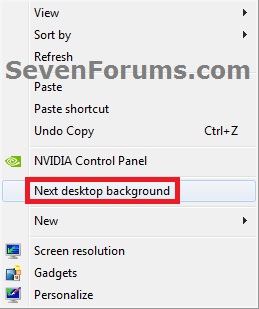
When a desktop slideshow is being used in Windows 7 or Windows 8, Windows automatically adds Next desktop background to your desktop context menu.
This tutorial will show you how to add or remove Next desktop background from the desktop context menu of all users when a user is using a desktop slideshow in Windows 7 and Windows 8.
The Windows 7 Starter and Home Basic editions do not have this feature included in them.
You must be logged in as an administrator to be able to apply this tutorial.
EXAMPLE: "Next desktop background" in Desktop Context Menu
NOTE: The keyboard shortcut for this is Shift+F10 and press N.
Here's How:
1. To Add (Restore) "Next desktop background" to the Desktop Context MenuThat's it,A) Click/tap on the Download button below to download the file below, and go to step 3 below.2. To Remove "Next desktop background" to the Desktop Context MenuAdd_Next_desktop_background.regB) Go to step 3.A) Click/tap on the Download button below to download the file below, and go to step 3 below.3. Save the .reg file to your desktop.Remove_Next_desktop_background.reg
4. Double click/tap on the downloaded .reg file to merge it.
5. If prompted, click/tap on Run, Yes (UAC), Yes, and OK to approve the merge.
6. When finished, you can delete the downloaded .reg file if you like.
Shawn
Next Desktop Background - Add or Remove from Desktop Context Menu
Next Desktop Background - Add or Remove from Desktop Context Menu
Add or Remove "Next desktop background" from Desktop Context Menu in Windows 7 and Windows 8Published by Brink

Related Discussions