
| Windows 7: USB Driver - General Fix for Problems USB Driver - General Fix for Problems General Fix for USB Driver Problems
Published 27 May 2011
|  Published by | | |
 Featured Tutorial | | | General Fix for USB Driver Problems I recommend using a wired mouse and keyboard, removing all USB devices and in the section where it says Uninstall all the faded entries. take that as reading uninstall everything USB, if you cannot get hold of a wired mouse then you will have to follow the tutorial as written. After going through this tutorial You may need to reinstall some USB device drivers!! After a USB device is installed and then removed Windows hides the driver, this first part makes all hidden drivers visible. 1. Unplug all USB devices except mouse and keyboard.
2. Click on Start orb, Type Advanced System settings in the search box and Click on View Advanced System Settings to go there.
3. Click on Advanced tab, Click on Environment Variables. 
4. Under the window "System variables" Click on New.  5. Type devmgr_show_nonpresent_devices as the variable name and type 1 as the value. 
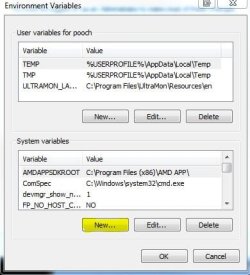
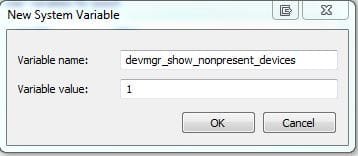
6. Click OK 3 times to close the windows.
7. Click on Start orb, Type Device Manager in the search box and Click on Device Manager in the list to go there. 8. Click on View, then Show hidden devices. 
9. You will now notice that you have a list of USB devices and that some lines appear to be faded. Uninstall all the faded entries.  The INFCACHE.1 file is used to store information about USB drivers, the information in this file may have become corrupted and may cause windows to load the wrong driver or cause a driver not found message to be generated. Deleting this file will force windows to generate a new INFCACHE.1 file. 1. Right Click on Start orb and Click on Open Windows Explorer.
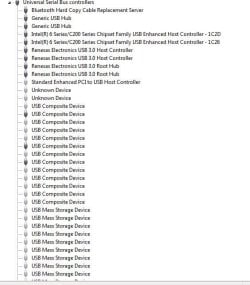
2. Select Computer in the navigation pane, and search for INFCACHE.1 
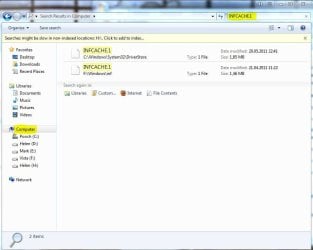
3. Right Click on the file INFCACHE.1 (if you have more instances of Windows installed only do this for INFCACHE.1 C:\Windows\System32\Driver Store)
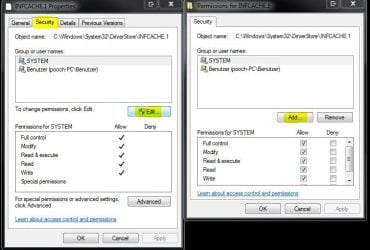
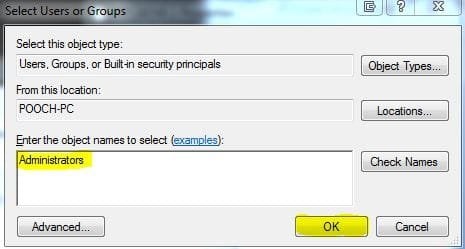
4. Click on Properties, Click on Security tab, Click on Edit, Click on Add.  5. Type Administrators in the window with the blinking cursor, Click OK. 
6. Delete the INFCACHE.1 file.
7. Connect a USB device, but not the one you were having trouble with this will make a new INFCACHE.1
8. New Start the PC and try your device again.
NOTE... It may, in a few cases be necessary to go through this Tutorial two or even three times to get this to work. | | | Need more help? Try searching our extensive help and support site.
Loading | |
07 Jun 2011
|
#1 | | |
Hi there, thanks for the tutorial.
I've been having some BSOD probs (accompanied by the message 'BUGCODE_USB_DRIVER'), and I was directed here by another forum user.
However, I couldn't follow you tutorial entirely. Step 9 of the first part says 'Now uninstall all USB devices.' Does this mean I should uninstall everything in the device list (and the sub-lists) that plugs in to my usb ports?
also, step 6 of part 2 says 'Delete the INFCACHE.1 file.' Even after following your previous instructions, the computer still tells me I need special permission to do this - and won't allow me to delete the file.
If you could fill in the blanks for me on this one I would be so grateful!
Thanks | My System Specs |
| System Manufacturer/Model Number Dell Inspiron 1764 OS 64 Bit Windows 7 Home Premium (SP1) CPU Intel Core i5 2.27 GHz Motherboard Manufacturer: Dell, Model no: 0TKV96 Memory 4 GB |
08 Jun 2011
|
#2 | | |
Hello CAGW Welcome to the forum,
Before looking at my answer I would advise you to make sure that all drivers on your PC are up to date I have heard of this problem being caused by the Nvidia Graphic driver conflicting with old USB device drivers.
Yes you should uninstall everything, bear in mind that some USB drivers may not be included in Windows and may need to be reinstalled afterwards ie Printer Drivers or in my case I have Renesas USB3 drivers installed.
Are you absolutely sure you have followed the Tutorial with the Infcache.1?? Have a look here; Take Ownership Shortcut Take good heed of the warnings!! | My System Specs | | System Manufacturer/Model Number Something I threw together OS Windows 7 Ultimate x64 CPU Intel Core i7-2600K Motherboard Asus P8P67 Memory 16 GB G Skill F3-10666 CL9D-4GBRL Graphics Card ATI Radeon HD 6870 Sound Card ATI Radeon HDMI / Realtek ALC892 Monitor(s) Displays 2 x 22" standard monitors / LG32LC56v TV to watch films Screen Resolution 1920 x1080 Keyboard Microsoft Comfort Curve Keyboard 2000 Mouse Hama M3110 / Logitech M305 PSU Thermaltake Toughpower Cable Management 750W Case Antec 300 Cooling Noctua NH-U12P SE2 and 5 120mm Case fans Hard Drives 2 x OCZ Vertex2 111.79GB
3 x Samsung103SJ
1 x Samsung103UJ
1 x WD3200BEVT
1 x Hitachi5K320-160 Internet Speed 16000 Other Info I have also used Fedora, Suse, Ubuntu Linux
And all other Windows from 95 to date except ME |
08 Jun 2011
|
#3 | | |
hi pooch
thanks for the advice.
i used the 'take ownership' programme to delete the INFCACHE.1 file.
ive also updated all my drivers - and there were a few that needed updating.
i haven't deleted the usb devices yet (i'm short on time!) but thanks for your response on that too.
bearing in mind some of my drivers needed updating, would it be best to wait to see if bsod strikes again before deleting the usb devices?
thanks! | My System Specs | | System Manufacturer/Model Number Dell Inspiron 1764 OS 64 Bit Windows 7 Home Premium (SP1) CPU Intel Core i5 2.27 GHz Motherboard Manufacturer: Dell, Model no: 0TKV96 Memory 4 GB |
08 Jun 2011
|
#4 | | |
The tutorial should be done in one go and in order lol or it cannot work and may possibly cause you problems.
Insert a USB device to make a new infcache.
Wait to see if you get any more problems, if yes, go through the tutorial again, completely!!
I hope this helps you and that your problem gets sorted | My System Specs | | System Manufacturer/Model Number Something I threw together OS Windows 7 Ultimate x64 CPU Intel Core i7-2600K Motherboard Asus P8P67 Memory 16 GB G Skill F3-10666 CL9D-4GBRL Graphics Card ATI Radeon HD 6870 Sound Card ATI Radeon HDMI / Realtek ALC892 Monitor(s) Displays 2 x 22" standard monitors / LG32LC56v TV to watch films Screen Resolution 1920 x1080 Keyboard Microsoft Comfort Curve Keyboard 2000 Mouse Hama M3110 / Logitech M305 PSU Thermaltake Toughpower Cable Management 750W Case Antec 300 Cooling Noctua NH-U12P SE2 and 5 120mm Case fans Hard Drives 2 x OCZ Vertex2 111.79GB
3 x Samsung103SJ
1 x Samsung103UJ
1 x WD3200BEVT
1 x Hitachi5K320-160 Internet Speed 16000 Other Info I have also used Fedora, Suse, Ubuntu Linux
And all other Windows from 95 to date except ME |
18 Jul 2011
|
#6 | | |
Hi.
When I came to the most last go tru, where to delete the infcache.1 file, I cannot do it due to priveliges. Ho to solve this ?. | My System Specs | | System Manufacturer/Model Number Homemade OS Windows 7 Ultimate CPU FX4100 Motherboard ASRock 970 Extreme3 Memory 8G Corsair Graphics Card HD5400 Sound Card N/A Monitor(s) Displays Acer Screen Resolution 1600x1200 Keyboard Logitech Mouse HP PSU Seasonic Case ATX Cooling FAN Hard Drives Seagate ST1000DL002-9TT153 Internet Speed 20/1 |
18 Jul 2011
|
#7 | | |

Quote: Originally Posted by darkhorse Hi.
When I came to the most last go tru, where to delete the infcache.1 file, I cannot do it due to priveliges. Ho to solve this ?. Look at the post directly under the tutorial | My System Specs | | System Manufacturer/Model Number Something I threw together OS Windows 7 Ultimate x64 CPU Intel Core i7-2600K Motherboard Asus P8P67 Memory 16 GB G Skill F3-10666 CL9D-4GBRL Graphics Card ATI Radeon HD 6870 Sound Card ATI Radeon HDMI / Realtek ALC892 Monitor(s) Displays 2 x 22" standard monitors / LG32LC56v TV to watch films Screen Resolution 1920 x1080 Keyboard Microsoft Comfort Curve Keyboard 2000 Mouse Hama M3110 / Logitech M305 PSU Thermaltake Toughpower Cable Management 750W Case Antec 300 Cooling Noctua NH-U12P SE2 and 5 120mm Case fans Hard Drives 2 x OCZ Vertex2 111.79GB
3 x Samsung103SJ
1 x Samsung103UJ
1 x WD3200BEVT
1 x Hitachi5K320-160 Internet Speed 16000 Other Info I have also used Fedora, Suse, Ubuntu Linux
And all other Windows from 95 to date except ME |
18 Jul 2011
|
#8 | | |
hi pooch,
do you mind including or linking the solution i posted for the 'BUGCODE_USB_DRIVER' BSOD in your post? it's probably the correct solution for CAGW's problem.
i assume this specific BSOD will be fairly popular the next few months, because it's related to win 7 sp1 installation.
thanks
Last edited by bens888; 18 Jul 2011 at 07:00 PM..
Reason: reasoning
| My System Specs | | |
19 Jul 2011
|
#9 | | |

Quote: Originally Posted by pooch 
Quote: Originally Posted by darkhorse Hi.
When I came to the most last go tru, where to delete the infcache.1 file, I cannot do it due to priveliges. Ho to solve this ?. Look at the post directly under the tutorial Got it, thank you | My System Specs | | System Manufacturer/Model Number Homemade OS Windows 7 Ultimate CPU FX4100 Motherboard ASRock 970 Extreme3 Memory 8G Corsair Graphics Card HD5400 Sound Card N/A Monitor(s) Displays Acer Screen Resolution 1600x1200 Keyboard Logitech Mouse HP PSU Seasonic Case ATX Cooling FAN Hard Drives Seagate ST1000DL002-9TT153 Internet Speed 20/1 USB Driver - General Fix for Problems problems? All times are GMT -5. The time now is 01:58 AM. | |