Windows 7 Forums


Windows 7: DVD ISO build Method by Microsoft


DVD ISO build Method by Microsoft

Published 18 Jul 2009
Published by

Featured Tutorial

Troubleshooting Windows 7 Failure to Boot


Screen Capture and Video Editing in High Quality


Peppermint3 - Create Live CD/DVD/USB To Use For Emergency Backup

How to Perform an Emergency Data Backup When Windows 7 Will Not Boot

Chrome GPU Hardware Acceleration - Turn On or Off

How to Turn GPU "Hardware Acceleration" On or Off in Chrome

Bootmgr - Move to C:\ with EasyBCD

How to Move Bootmgr to C:\ with EasyBCD

Microsoft Account "Two-step Verification" - Turn On or Off

How to Turn "Two-step Verification" On or Off for your Microsoft Account
Hi @ all,

here is the official build way (by Microsoft) to create a bootable Windows 7 DVD.

I´m using build 7600.16385 64 Bit for this How To.

Extract the files to C:\7600.16385

Download and install WAIK from Microsoft:

Download details: Windows® AIK for Windows ® 7 RC

Open a cmd (Start > Run > cmd) and go into this folder:

cd C:\Program Files\Windows AIK\Tools\amd64

run this command, now:

oscdimg -u2 -m -h -b"C:\7600.16385\boot\etfsboot.com" "C:\7600.16385" "C:\7600.16385\7600.16385.090713-1255_x64fre_client_en-us_Retail_Ultimate-GRMCULXFRER_EN_DVD.iso" -lGRMCULXFRER_EN_DVD

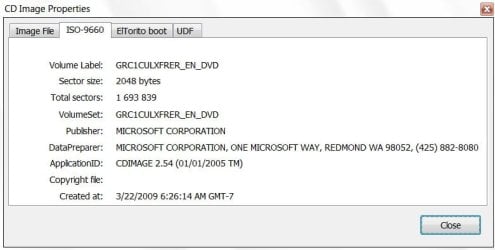
This will create a bootable "untouched" dvd iso like from microsoft. (see screenshot)


Need more help? Try searching our extensive help and support site.
Loading
18 Jul 2009   #1
SIW2

Vista x64 / 7 X64


Hi Chris,

Nice tutorial.

MS use an app. called cdimage.exe.

DVD ISO build Method by Microsoft-iso-4-2009-05-06_010835.jpg

In the tutorial , you are using oscdimg.exe - in terms of what you are doing here, it does the same job.

oscdimg.zip

It is probably easiest to put oscdimg in system 32 - so when you open a cmd prompt, you are right there.


oscdimg.exe -u2 -m -b[path to bootable image file] -h[path to windows files] [path and filename to create]

-u2 Creates UDF file system 1.02

-m Allows creation of image file larger than 700mb CD limit

-b Indicates the location of the boot image

-h Includes hidden files

-l Sets volume label of DVD, if you like. -l[Disc name or label]

-t Sets the date and time , if you like. -t[MM/DD/YYYY:HH:MM]


Note: Space before each command switch. No space between switch and path. Do not include the brackets in the path. If the path includes spaces, enclose it in "".

Last edited by SIW2; 18 Jul 2009 at 08:37 PM..
My System SpecsSystem Spec

18 Jul 2009   #2
stasio

Windows 7
Malaysia


With cdimage.exe ver.2.52(108 KB):

-Place your folder Windows 7 in your C:\ drive.
-Place your cdimage.exe in your C:\ drive.
-Run Command Prompt "as Administrator".
-When Command Prompt appear, type "cd\” without the quotes to change to C drive.
Type (copy/paste this) the command cdimage -m -u2 -bC:\Windows 7\boot\etfsboot.com C:\Windows 7 C:\Windows 7.iso and you will see that it’s creating Windows 7 ISO image.
My System SpecsSystem Spec
18 Jul 2009   #3
Brink

64-bit Windows 7 Ultimate SP1 & Windows 8 Enterprise
Texas


Hello,

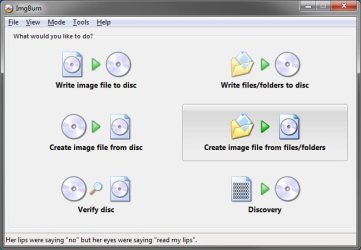
Couldn't you just use a program like ImgBurn to do the same thing much easier, or am I missing something again?

DVD ISO build Method by Microsoft-imgburn.jpg
My System SpecsSystem Spec
.


18 Jul 2009   #4
SIW2

Vista x64 / 7 X64


Hi Shawn,

The ETFSBOOT.COM program creates the CD boot sector.

Some 3rd party burning apps. do not seem keen to accept it as a valid boot image.

I haven't tried ImgBurn to do it - you may need a number of manual settings to get it work.

Give it a go if you have the time and see if you can get it to work.

To avoid using command line tools - the easiest is Vlite.

Just run as admin on the vlite.exe. Click Install Wimfltr>next.

Tick Bootable.iso>next. Browse to Windows Files>next. Select Create Image>next. Select a place to put the .iso>next. That's it.

To avoid any extra downloads , it's worth getting hold of vlite v1.1.6
My System SpecsSystem Spec
18 Jul 2009   #5
7echno7im

Windows 7 7600.16384 x64


Quote   Quote: Originally Posted by Brink View Post
Hello,

Couldn't you just use a program like ImgBurn to do the same thing much easier, or am I missing something again?

Attachment 18851

Hi brink. I attempted this method before and I does not work because it does not have the boot sector info.
My System SpecsSystem Spec
18 Jul 2009   #6
Brink

64-bit Windows 7 Ultimate SP1 & Windows 8 Enterprise
Texas


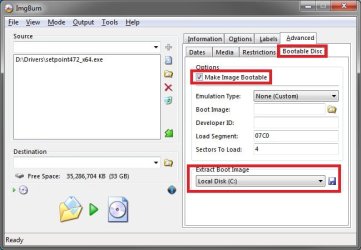
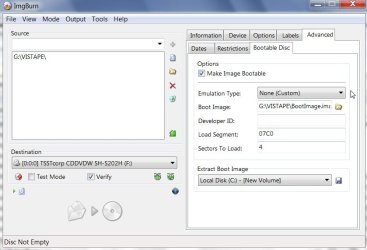
Ah, I see now. I haven't messed with it any in Windows 7, but ImgBurn does have an option to do something similiar to this that may work as well.

DVD ISO build Method by Microsoft-bootable.jpg
My System SpecsSystem Spec
18 Jul 2009   #7
SIW2

Vista x64 / 7 X64


Haven't tried it - but you might get ImgBurn to work if you extract the boot image from a dvd and save it somewhere ( Build mode - at the bottom right).

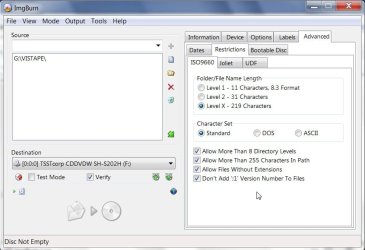
Then go to Advanced >ISO9660 and check the box about Don't add the ;1 Version number. ( Inexplicably, EFTFSBOOT.COM doesn't set the filename up in the expected ISO standard - that may overcome the problem).

Last edited by SIW2; 18 Jul 2009 at 07:59 PM..
My System SpecsSystem Spec
18 Jul 2009   #8
SIW2

Vista x64 / 7 X64


I got it to work .

a) Either use ImgBurn to extract the bootimage from a bootable dvd. Imgburn labels it .ima.

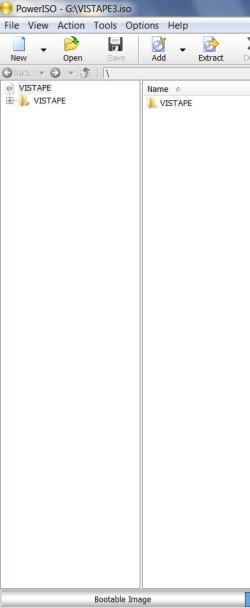
b) Or extract the boot image from an iso on the HD using PowerIso/Ultraiso, it will saved with .bif.

c) Or browse to etfsboot.com in the windows files - it is in the Boot folder.


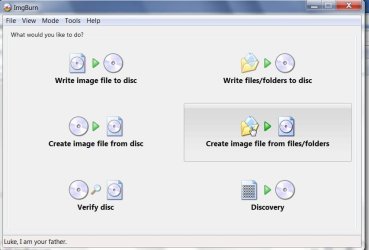
DVD ISO build Method by Microsoft-img-1-2009-07-18_222943.jpg

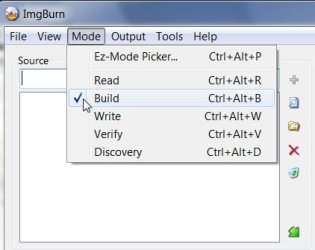
Under Mode tab, Select Build mode:

DVD ISO build Method by Microsoft-imgburn-12-2009-07-19_013022.jpg

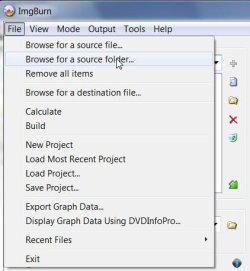
Select File >browse to the windows installation files folder ( I was using vista pe I wanted to make bootable)

DVD ISO build Method by Microsoft-imgburn-13-2009-07-19_013102.jpg

Follow these settings under Advanced> ISO9660 Tab:

DVD ISO build Method by Microsoft-img-2-2009-07-18_223116.jpg

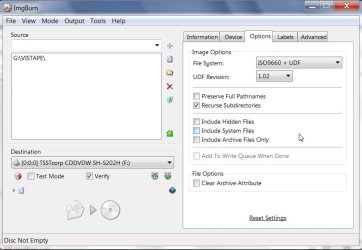
Follow these settings under the Options Tab:

DVD ISO build Method by Microsoft-img-3-2009-07-18_223147.jpg

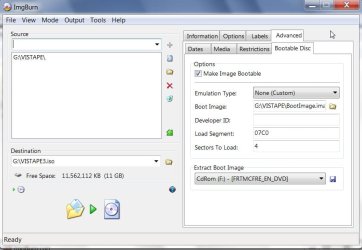
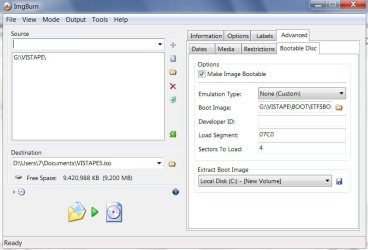
Follow these settings under Advanced> Bootable Disc Tab :

Browse to boot image - either the one you extracted from dvd or .iso

DVD ISO build Method by Microsoft-img-5-2009-07-18_223801.jpg

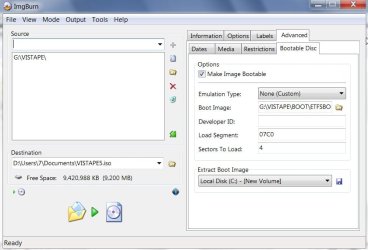
OR select etfsboot.com in the windows files Boot folder:

DVD ISO build Method by Microsoft-imgburn-10-2009-07-19_012850.jpg

Select Destination:

DVD ISO build Method by Microsoft-img-6-2009-07-18_224126.jpg

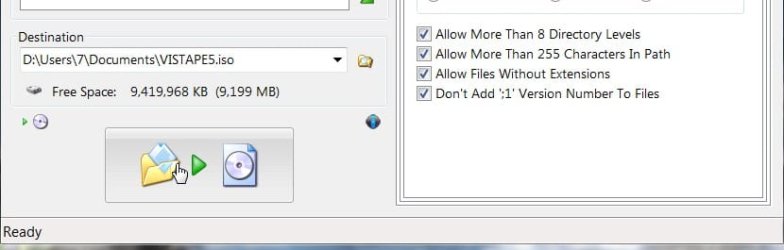
Click the Build button:

DVD ISO build Method by Microsoft-imgburn-14-2009-07-19_013337.jpg

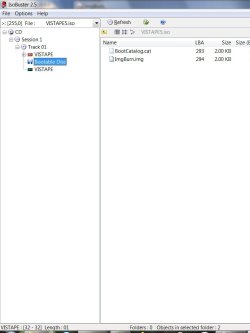
There you have a bootable .iso :

DVD ISO build Method by Microsoft-imgburn-7-2009-07-18_224350.jpg

Last edited by SIW2; 18 Jul 2009 at 08:04 PM..
My System SpecsSystem Spec
18 Jul 2009   #9
Brink

64-bit Windows 7 Ultimate SP1 & Windows 8 Enterprise
Texas


Very nice SIW2.
My System SpecsSystem Spec
Comment

 DVD ISO build Method by Microsoft problems?


Tutorial Tools


Similar help and support threads for: DVD ISO build Method by Microsoft
Windows 7 Tutorial Category
Solved Microsoft ACPI Compliant Control Method Battery is MISSING Drivers
Microsoft ACPI Compliant Control Method Battery is gone! Drivers
Microsoft ACPI Compliant Control Method Battery - Not doing much! Drivers
Can Microsoft really build a better browser? News
The method of using another build LP? General Discussion


All times are GMT -5. The time now is 03:46 PM.


Seven Forums Android App Seven Forums IOS App Follow us on Facebook

Windows 7 Forums is an independent web site and has not been authorized,
sponsored, or otherwise approved by Microsoft Corporation.
"Windows 7" and related materials are trademarks of Microsoft Corp.
© Designer Media Ltd
  

1 2 3 4 5 6 7 8 9 10 11 12 13 14 15 16 17 18 19 20 21 22 23 24 25 26 27 28 29 30 31 32