|
Welcome to Windows 7 Forums. Our forum is dedicated to helping you find solutions with any problems, errors or issues you are experiencing with Windows 7. The Windows 7 forum also covers news and updates and has an extensive Windows 7 tutorial section that covers a wide range of tips and tricks.
Windows 7 - Office 2010 - Slipstream with Service Pack 1 Office 2010 - Slipstream with Service Pack 1 How to Slipstream Office 2010 with Service Pack 1 (SP1)
Published by Brink
07-01-2011
| Office 2010 - Slipstream with Service Pack 1 How to Slipstream Office 2010 with Service Pack 1 (SP1)  Information By default the Office 2010 RTM installation DVD can be installed on both the 32-bit (x86) and 64-bit (x64) Windows.
This will show you how to slipstream Office 2010 and both the 32-bit (x86) and 64-bit (x64) Service Pack 1 (SP1) to be able to create a Office 2010 with SP1 installation DVD or USB that will also install on either a 32-bit or 64-bit Windows.
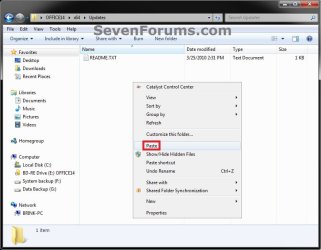
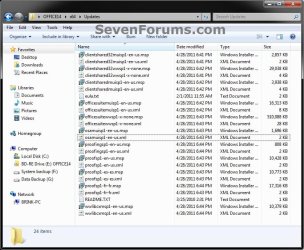
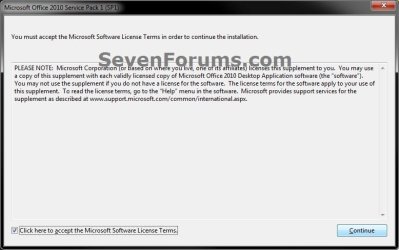
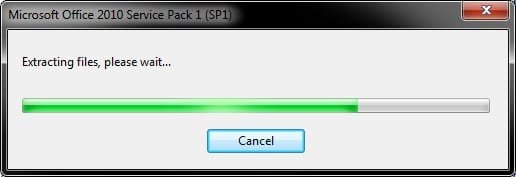
You will need to be logged in as an administrator to be able to do this tutorial.  Note OPTION ONE If you have a Office 2010 RTM Installation DVD NOTE: You would want to use this option if your Office 2010 RTM installation DVD includes both installers for the 32-bit (x86) and 64-bit (x64) version of the Office 2010 suite. 1. Download and save both the Office 2010 Service Pack 1 32-Bit (x86) and Office 2010 Service Pack 1 64-Bit (x64) exe files to your desktop. 2. Insert your Office 2010 RTM installation DVD into the DVD drive. Open the Computer window (Start Menu -> Computer), right click on the Office DVD drive, click on Copy, then right click on your desktop and click on Paste. When finished, you can remove the Office 2010 RTM installation DVD from the DVD drive. (see screenshot below) NOTE: For example, this created a OFFICE14 folder on my desktop with the contents of the Office 2010 RTM installation DVD in it. 3. Open a command prompt, copy and paste the command below into the command prompt, and press Enter. (see screenshot below) NOTE: This will extract the contents of the 32-bit Service Pack 1 exe file into a sp1-32 folder on your desktop. Code: %userprofile%\Desktop\officesuite2010sp1-kb2460049-x86-fullfile-en-us.exe /extract:%userprofile%\Desktop\sp1-32  4. If prompted by UAC, then click on Yes (Windows 7) or Continue (Vista). 5. Check the accept EULA box, and click on Continue. (see screenshot below) 6. When finished extracting, click on OK. (see screenshots below) 7. In the same command prompt from step 3, copy and paste the command below into the command prompt, and press Enter. (see screenshot below) NOTE: This will extract the contents of the 64-bit Service Pack 1 exe file into a sp1-64 folder on your desktop.
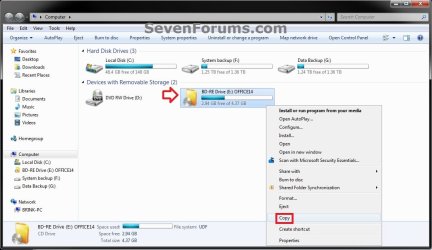
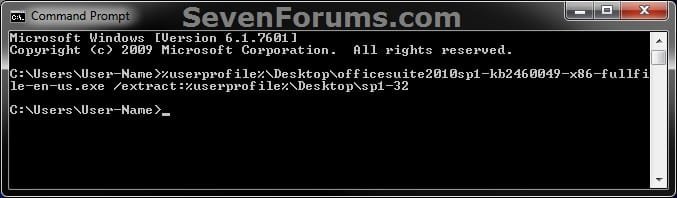
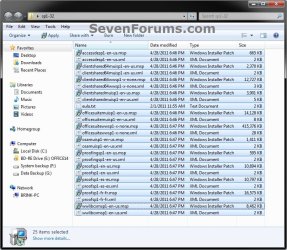
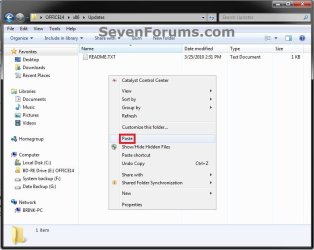
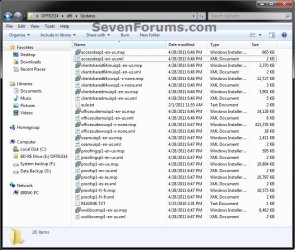
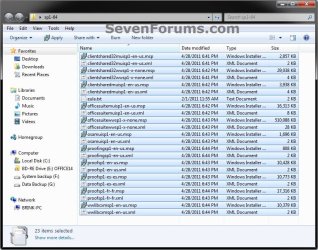
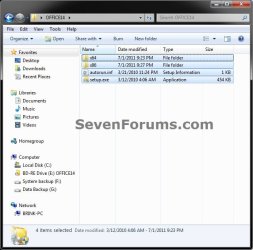
Code: %userprofile%\Desktop\officesuite2010sp1-kb2460049-x64-fullfile-en-us.exe /extract:%userprofile%\Desktop\sp1-64  8. Repeat steps 4-6, close the command prompt, then continue on to step 9. 9. Open the sp1-32 folder on the desktop, select all files, right click on them, click on Copy, then close the sp1-32 folder. (see screenshot below) NOTE: Only copy the contents inside the sp1-32 folder, and not the sp1-32 folder itself. 10. Open the OFFICE14 (name may vary for you) folder on the desktop from step 2, open the x86 folder, open the Updates folder, right click on a empty area, and click on Paste. (see screenshots below) NOTE: This is to copy the contents inside the sp1-32 folder into the OFFICE14\x86\Updates folder on the desktop.  11. Open the sp1-64 folder on the desktop, select all files, right click on them, click on Copy, then close the sp1-64 folder. (see screenshot below) NOTE: Only copy the contents inside the sp1-64 folder, and not the sp1-64 folder itself. 12. Open the OFFICE14 (name may vary for you) folder on the desktop from step 2, open the x64 folder, open the Updates folder, right click on a empty area, and click on Paste. (see screenshots below) NOTE: This is to copy the contents inside the sp1-64 folder into the OFFICE14\x64\Updates folder on the desktop.  13. You can now copy the contents inside the OFFICE14 (name may vary for you) folder on the desktop from step 2 to a blank DVD or USB flash key. (see screenshot below) NOTE: Only copy/burn the contents inside the OFFICE14 folder, and not the OFFICE14 folder itself. 14. You now have a Office 2010 with SP1 installation DVD or USB. OPTION TWO If you have a Office 2010 EXE File NOTE: You would want to use this option if you have a Office 2010 EXE file to install only either the 32-bit (x86) or 64-bit (x64) version of the Office 2010 suite.1. If you have a 32-bit (x86) Office 2010 EXE Installation FileA) Copy the Office 2010 exe file to your desktop.
B) Download and save the Office 2010 Service Pack 1 32-Bit (x86) exe file to your desktop.
C) Open a command prompt, copy and paste the command below into the command prompt, and press Enter. (see screenshot below) NOTE: This will extract the contents of the 32-bit Service Pack 1 exe file into a sp1-32 folder on your desktop. Code: %userprofile%\Desktop\officesuite2010sp1-kb2460049-x86-fullfile-en-us.exe /extract:%userprofile%\Desktop\sp1-32 
D) If prompted by UAC, then click on Yes (Windows 7) or Continue (Vista).
E) Check the accept EULA box, and click on Continue. (see screenshot below) F) When finished extracting, click on OK. (see screenshots below) G) Go to step 3. 2. If you have a 64-bit (x64) Office 2010 EXE Installation FileA) Copy the Office 2010 exe file to your desktop.
B) Download and save the Office 2010 Service Pack 1 64-Bit (x64) exe file to your desktop.
C) Open a command prompt, copy and paste the command below into the command prompt, and press Enter. (see screenshot below) NOTE: This will extract the contents of the 64-bit Service Pack 1 exe file into a sp1-64 folder on your desktop. Code: %userprofile%\Desktop\officesuite2010sp1-kb2460049-x64-fullfile-en-us.exe /extract:%userprofile%\Desktop\sp1-64  D) Repeat steps 1D to 1F.
E) Continue on to step 3. 3. In the same command prompt from step 1 or 2, type the command below into the command prompt for your Office 2010 EXE installation file, and press Enter. NOTE: Substitute File-Name in the command below with the actual name of the Office 2010 EXE file including the .exe file extension. This will extract the contents of the Office 2010 EXE installation file into a Office folder on your desktop. Code: %userprofile%\Desktop\File-Name.exe /extract:%userprofile%\Desktop\Office For example:
If my Office 2010 EXE file was named en_office_professional_plus_2010_x64_515489.exe, I would type this command below and press enter.
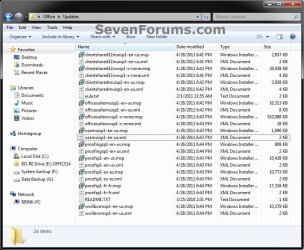
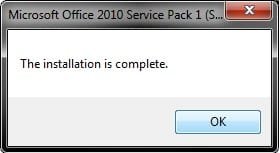
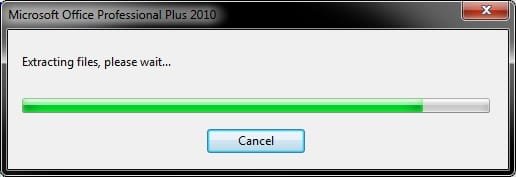
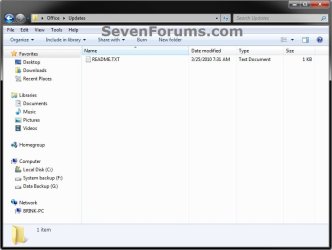
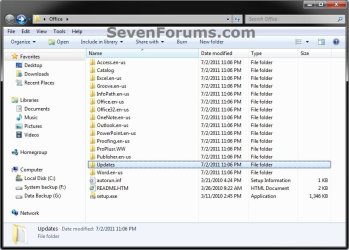
Code: %userprofile%\Desktop\en_office_professional_plus_2010_x64_515489.exe /extract:%userprofile%\Desktop\Office 4. If prompted by UAC, then click on Yes (Windows 7) or Continue (Vista). 5. When it's finished extracting the Office 2010 EXE file, click on OK, and close the command prompt. (see screenshots below)  6. Open either the sp1-32 or sp1-64 folder on the desktop, select all files, right click on them, click on Copy, then close the folder. (see screenshots below) NOTE: Only copy the contents inside the folder, and not the folder itself.  7. Open the Office folder on the desktop from step 3, open the Updates folder, right click on a empty area, and click on Paste. (see screenshots below) NOTE: This is to copy the contents inside either the sp1-32 or sp1-64 folder into the Office\Updates folder on the desktop.  8. You can now copy the contents inside the Office folder on the desktop to a blank DVD or USB flash key. (see screenshot below) NOTE: Only copy/burn the contents inside the Office folder, and not the Office folder itself. 9. You now have a Office 2010 with SP1 installation DVD or USB That's it,
Shawn |  Published by | | Administrator Join Date: Oct 2008 Location: Texas Posts: 37,304 | |
 Tutorial Tools | | | | | | | | | |
07-02-2011
|
#1 | | Windows 7 Ultimate x64 SP1, LinuxMint 9 LTS x64, Debian 6, Ubuntu 10.04 LTS x64 |
Nice Brink. Is this still workable if you don't have an actual DVD? For example, I have a single executable (x16-32250.exe). If I run that, it installs MsOffice for me.
So, how do I integrate the SP1.exe and the x16-32250.exe? Presumably but burning a bootable DVD with these?
Regards,
Golden
| My System Specs | | System Manufacturer/Model Number Golden Mk. I.3 OS Windows 7 Ultimate x64 SP1, LinuxMint 9 LTS x64, Debian 6, Ubuntu 10.04 LTS x64 CPU Intel i7 860 @ 2.80 GHz Motherboard Gigabyte P55A-UD3R Rev.1. Award BIOS F13 Memory 16GB Corsair Vengance DDR3 @ 661 MHz Dual Channel (9-9-9-24) Graphics Card EVGA NVidia GTX 560 1024MB Sound Card Realtek Integrated Monitor(s) Displays Dual Samsung SyncMaster 2494HS Screen Resolution 1920*1080 and 1920*1080 Keyboard Logitech G110 Mouse Logitech MX518 PSU Thermaltake ToughPower QFan 750W Case Thermaltake Element S VK60001W2Z Cooling Corsair H60 Water Cooling, 2*230mm and 2*80mm case fans Hard Drives 1*OCZ Vertex 2 60GB SSD;
2*Samsung F3 SpinPoint 1TB in RAID0;
2*Samsung F1 SpinPoint 1TB in RAID1;
1*Western Digital WD10EARS 1TB
1*Western Digital 500GB External USB 3.0
1*Seagate 500GB External USB 2.0 Internet Speed Not fast enough!!! |
07-02-2011
|
#2 | | Windows 7 Ultimate x64 SP1 |
Hello Golden,
You would use the same type of command as in step 3 and 7 in the tutorial to extract your x16-32250.exe file, but using the x16-32250.exe file name instead. %userprofile%\Desktop\x16-32250.exe /extract:%userprofile%\Desktop\Office
Is the exe for both 32-bit and 64-bit, or just one of them?
If just one, then you will only have the Updates folder, and not a x86 or x64 folder in the Office folder once extracted. Plus, you would only add the one 32-bit or 64-bit that the exe is for in the Updates folder.
Hope this helps. | My System Specs | | System Manufacturer/Model Number Self built custom OS Windows 7 Ultimate x64 SP1 CPU Intel i7-980X 3.3 Ghz (3.48 Ghz OC'd) Motherboard ASUS P6X58D Premium Memory 12 GB (2GBx6) DDR3 PC3-16000 2000 MHz Kingston HyperX Graphics Card Sapphire HD5870 Eyefinity 6 2GB Sound Card Realtek HD Audio ALC889 Integrated Chip Monitor(s) Displays 3x 27" Asus VE278Q Screen Resolution 1920x1080 Keyboard Logitech Cordless Desktop MX 5500 Revolution Mouse Logitech Cordless Desktop MX 5500 Revolution PSU OCZ Series Gold OCZZ1000M 1000W Case Corsair Obsidian 800D Cooling Thermalright Ultra 120 Extreme Copper CPU heat sink w/120 MM Hard Drives 160GB OCZ RevoDrive X2
** 2 x 1TB Samsung HDD HD154UI SATA Internet Speed 50 Mb/s Download and 2 Mb/s Upload Other Info Microsoft LifeCam Cinema
** Lite-On iHBS212 12x BD Writer
** Samsung CLX-3175FW Printer
** Netgear WNDR3800 Router
** Motorola SBG6580 Cable Modem
** 2x APC Back-UPS XS 1500 |
07-02-2011
|
#3 | | Windows 7 Ultimate x64 SP1, LinuxMint 9 LTS x64, Debian 6, Ubuntu 10.04 LTS x64 |
Cheers Brink - yes, I only have the x86 so its only the Update folder.
Thanks,
Golden | My System Specs | | System Manufacturer/Model Number Golden Mk. I.3 OS Windows 7 Ultimate x64 SP1, LinuxMint 9 LTS x64, Debian 6, Ubuntu 10.04 LTS x64 CPU Intel i7 860 @ 2.80 GHz Motherboard Gigabyte P55A-UD3R Rev.1. Award BIOS F13 Memory 16GB Corsair Vengance DDR3 @ 661 MHz Dual Channel (9-9-9-24) Graphics Card EVGA NVidia GTX 560 1024MB Sound Card Realtek Integrated Monitor(s) Displays Dual Samsung SyncMaster 2494HS Screen Resolution 1920*1080 and 1920*1080 Keyboard Logitech G110 Mouse Logitech MX518 PSU Thermaltake ToughPower QFan 750W Case Thermaltake Element S VK60001W2Z Cooling Corsair H60 Water Cooling, 2*230mm and 2*80mm case fans Hard Drives 1*OCZ Vertex 2 60GB SSD;
2*Samsung F3 SpinPoint 1TB in RAID0;
2*Samsung F1 SpinPoint 1TB in RAID1;
1*Western Digital WD10EARS 1TB
1*Western Digital 500GB External USB 3.0
1*Seagate 500GB External USB 2.0 Internet Speed Not fast enough!!! |
07-02-2011
|
#4 | | Windows 7 Ultimate x64 SP1 |
You're welcome.
That, and you would only add the extracted 32-bit service pack sp1-32 folder contents into the Updates folder, and skip the 64-bit one. | My System Specs | | System Manufacturer/Model Number Self built custom OS Windows 7 Ultimate x64 SP1 CPU Intel i7-980X 3.3 Ghz (3.48 Ghz OC'd) Motherboard ASUS P6X58D Premium Memory 12 GB (2GBx6) DDR3 PC3-16000 2000 MHz Kingston HyperX Graphics Card Sapphire HD5870 Eyefinity 6 2GB Sound Card Realtek HD Audio ALC889 Integrated Chip Monitor(s) Displays 3x 27" Asus VE278Q Screen Resolution 1920x1080 Keyboard Logitech Cordless Desktop MX 5500 Revolution Mouse Logitech Cordless Desktop MX 5500 Revolution PSU OCZ Series Gold OCZZ1000M 1000W Case Corsair Obsidian 800D Cooling Thermalright Ultra 120 Extreme Copper CPU heat sink w/120 MM Hard Drives 160GB OCZ RevoDrive X2
** 2 x 1TB Samsung HDD HD154UI SATA Internet Speed 50 Mb/s Download and 2 Mb/s Upload Other Info Microsoft LifeCam Cinema
** Lite-On iHBS212 12x BD Writer
** Samsung CLX-3175FW Printer
** Netgear WNDR3800 Router
** Motorola SBG6580 Cable Modem
** 2x APC Back-UPS XS 1500 |
07-02-2011
|
#5 | | Windows 7 Ultimate x64 SP1 |
Good guide, I saw you changed my link in the SP1 thread with this | My System Specs | | System Manufacturer/Model Number Acer Aspire 5742 OS Windows 7 Ultimate x64 SP1 CPU Intel Core i3-370M @ 2.4GHz Motherboard Mobile Intel HM55 Express Chipset Memory 6GB 1333MHz DDR3 Graphics Card Intel GMA HD Monitor(s) Displays 15.6" HD Acer CineCrystal LED LCD Screen Resolution 1366×768 Mouse Microsoft Wireless Optical Mouse 3000 PSU 65W Hard Drives 320GB (5400 RPM) SATA Internet Speed 6Mbps Other Info WEI Score: 4.6 |
07-02-2011
|
#6 | | Windows 7 Ultimate x64 SP1 |
Thank you Gilly.
LOL, yeah, in house tutorial links are always best since we can make sure they stay updated. | My System Specs | | System Manufacturer/Model Number Self built custom OS Windows 7 Ultimate x64 SP1 CPU Intel i7-980X 3.3 Ghz (3.48 Ghz OC'd) Motherboard ASUS P6X58D Premium Memory 12 GB (2GBx6) DDR3 PC3-16000 2000 MHz Kingston HyperX Graphics Card Sapphire HD5870 Eyefinity 6 2GB Sound Card Realtek HD Audio ALC889 Integrated Chip Monitor(s) Displays 3x 27" Asus VE278Q Screen Resolution 1920x1080 Keyboard Logitech Cordless Desktop MX 5500 Revolution Mouse Logitech Cordless Desktop MX 5500 Revolution PSU OCZ Series Gold OCZZ1000M 1000W Case Corsair Obsidian 800D Cooling Thermalright Ultra 120 Extreme Copper CPU heat sink w/120 MM Hard Drives 160GB OCZ RevoDrive X2
** 2 x 1TB Samsung HDD HD154UI SATA Internet Speed 50 Mb/s Download and 2 Mb/s Upload Other Info Microsoft LifeCam Cinema
** Lite-On iHBS212 12x BD Writer
** Samsung CLX-3175FW Printer
** Netgear WNDR3800 Router
** Motorola SBG6580 Cable Modem
** 2x APC Back-UPS XS 1500 |
07-02-2011
|
#7 | | Windows 7 ultimate SP1 RTM x64 |
My disc has only 32 bit editions..will it work? | My System Specs | | System Manufacturer/Model Number aspire 5920 OS Windows 7 ultimate SP1 RTM x64 CPU core 2 duo T5550 Memory 4 GB Graphics Card GMA X3100 Hard Drives 160 GB + 320 GB Internet Speed 2 mbps |
07-02-2011
|
#8 | | Windows 7 Ultimate x64 SP1, LinuxMint 9 LTS x64, Debian 6, Ubuntu 10.04 LTS x64 |

Quote: Originally Posted by bagavan My disc has only 32 bit editions..will it work? Yep - it works. | My System Specs | | System Manufacturer/Model Number Golden Mk. I.3 OS Windows 7 Ultimate x64 SP1, LinuxMint 9 LTS x64, Debian 6, Ubuntu 10.04 LTS x64 CPU Intel i7 860 @ 2.80 GHz Motherboard Gigabyte P55A-UD3R Rev.1. Award BIOS F13 Memory 16GB Corsair Vengance DDR3 @ 661 MHz Dual Channel (9-9-9-24) Graphics Card EVGA NVidia GTX 560 1024MB Sound Card Realtek Integrated Monitor(s) Displays Dual Samsung SyncMaster 2494HS Screen Resolution 1920*1080 and 1920*1080 Keyboard Logitech G110 Mouse Logitech MX518 PSU Thermaltake ToughPower QFan 750W Case Thermaltake Element S VK60001W2Z Cooling Corsair H60 Water Cooling, 2*230mm and 2*80mm case fans Hard Drives 1*OCZ Vertex 2 60GB SSD;
2*Samsung F3 SpinPoint 1TB in RAID0;
2*Samsung F1 SpinPoint 1TB in RAID1;
1*Western Digital WD10EARS 1TB
1*Western Digital 500GB External USB 3.0
1*Seagate 500GB External USB 2.0 Internet Speed Not fast enough!!! |
07-02-2011
|
#9 | | Windows 7 Ultimate x64 SP1 |
Updated the tutorial to include OPTION TWO for when you have either a 32-bit (x86) or 64-bit (x64) Office 2010 EXE installation file instead of a Office 2010 installation DVD. | My System Specs | | System Manufacturer/Model Number Self built custom OS Windows 7 Ultimate x64 SP1 CPU Intel i7-980X 3.3 Ghz (3.48 Ghz OC'd) Motherboard ASUS P6X58D Premium Memory 12 GB (2GBx6) DDR3 PC3-16000 2000 MHz Kingston HyperX Graphics Card Sapphire HD5870 Eyefinity 6 2GB Sound Card Realtek HD Audio ALC889 Integrated Chip Monitor(s) Displays 3x 27" Asus VE278Q Screen Resolution 1920x1080 Keyboard Logitech Cordless Desktop MX 5500 Revolution Mouse Logitech Cordless Desktop MX 5500 Revolution PSU OCZ Series Gold OCZZ1000M 1000W Case Corsair Obsidian 800D Cooling Thermalright Ultra 120 Extreme Copper CPU heat sink w/120 MM Hard Drives 160GB OCZ RevoDrive X2
** 2 x 1TB Samsung HDD HD154UI SATA Internet Speed 50 Mb/s Download and 2 Mb/s Upload Other Info Microsoft LifeCam Cinema
** Lite-On iHBS212 12x BD Writer
** Samsung CLX-3175FW Printer
** Netgear WNDR3800 Router
** Motorola SBG6580 Cable Modem
** 2x APC Back-UPS XS 1500 Office 2010 - Slipstream with Service Pack 1 problems? All times are GMT -5. The time now is 01:33 AM. |  |