How to Clean Install Windows 7 without the Factory Added Bloatware
Most all factory built PCs today come with many programs and applications added by the PC manufacturer that have little or no use in everyday life, they tend to take up space and in some instances cause performance issues and using Windows to uninstall these progs/apps may result in startup and / or shutdown issues; here is a way to get a fresh, clean installation of Windows without all the factory added software; this method also works for Windows Vista.
Warning
Some of the methods outlined below will completely over-write any and all data on the entire Hard Disk Drive / Solid State Drive depending on the method you use. Doing a clean install of Windows will over-write the "old" factory installed Windows and may void any factory warranty the PC came with.
You will have to reinstall all the programs/apps that you use as they integrate themselves into the Windows registry and are not moveable from one Windows installation to another so be sure to save the program installers and the product activation keys where applicable.
Note
It would be a good idea to copy out or make backups of any data you need to save to the external media of your choice before you start this; also be sure to create the set of Factory Restore disks if you haven't already so you have a path back if need be.
You may also choose to create and store externally an image of the entire HDD / SSD so the PC can be restored to factory condition if the need ever arises, have a look at this tutorial.
More than likely your factory built PC didn't come with a Windows 7 installation DVD so you will need to borrow or download installation media of the exact same Windows 7 version the PC shipped with so you can do a clean installusing the Windows activation key on the Certificate of Authenticity (COA) sticker attached to the PC though it may require a robo-call to MS to sort the OEM batch-key; the factory COA sticker MS Windows activation key will be similar to this one below, 5 groups of 5 letters / numbers.
Windows 7 / Vista is version specific and not bit-rate specific, i.e. a Home Premium COA Windows activation key will activate either the 32-bit or the 64-bit Windows Home Premium Operating System.
After you have made backups of everything you care to save to external media, the best method forward is to do a complete wipe secure erase of the entire HDD / SSD first, it over-writes everything, all the old Windows code including all the old hardware drivers and installed programs and any and all old personal data, giving you the best possible space to do a clean installation of Windows 7 to.
If you have any questions or comments, please feel free to post to this same tutorial using the orange "Post Reply" button and someone will be glad to help.
System Manufacturer/Model Number HP Pavilion Elite 495UK OS Windows 7 Ultimate SP1 64-Bit CPU Intel Core i7 870 @ 2.93GHz Motherboard MSI 2A9C (CPU1) Memory 8Gb Dual-Channel DDR3 @ 664MHz Graphics Card nVidia GeForce GTX 460 1024MB dedicated RAM Sound Card Realtek HD Audio Monitor(s) Displays HP2310i Screen Resolution 1920 x 1080
Keyboard Logitech K750 solar-powered keyboard Mouse Logitech Wireless M180 mouse PSU 460W Case HP Elite Cooling Air cooled Hard Drives 1x1954GB Hitachi HDS22020ALA 330 (RAID), 1x1954GB Hitachi External for backup and storage Internet Speed 2Mb Other Info Pure Avanti Flow Internet Radio with iPod Dock, 64Gb iPod, HP USB Speakers, Sony MDR-V500 Headphones, Sony Vaio F-Series Laptop
System Manufacturer/Model Number "WartHog Wonder" OS Windows 7 Ultimate x64 SP1 CPU AMD Phenom II X4, 945, Quad Core, 3.0 GHz Motherboard Gigabyte MA785GM-US2H Memory 8GB G.Skill PI Black PC2 6400 * 4-4-4-12 @1.9v Graphics Card NVIDIA 512MB 9600GT Sound Card Realtek ALC889A Chipset (onboard) Monitor(s) Displays 2 x 22" Hans-G LCD Screen Resolution 1680x1050
Keyboard Dell SK-8115 Mouse Microsoft Comfort Optical Mouse 3000 PSU OCZ 700w GameXstream Case Cooler Master CM 690 Midtower Cooling Xigmatek Gaia SD1283 CPU Cooler, Assorted 120mm case fans Hard Drives 650GB 7200RPM WD Caviar Black Other Info Liteon iHAS 424-98B 24x DVD/CD Writer
Computer type PC/Desktop System Manufacturer/Model Number Golden Mk. I.3 OS Windows 7 Ultimate SP1 (x64) CPU Intel i7 860 @ 2.80 GHz Motherboard Gigabyte P55A-UD3R Rev.1. Award BIOS F13 Memory 16GB Corsair Vengance DDR3 @ 661 MHz Dual Channel (9-9-9-24) Graphics Card EVGA NVidia GTX 560 1024MB Sound Card Realtek Integrated Monitor(s) Displays Dual Samsung SyncMaster 2494HS Screen Resolution 1920*1080 and 1920*1080
Keyboard Logitech G110 Mouse Logitech MX518 PSU Thermaltake ToughPower QFan 750W Case Thermaltake Element S VK60001W2Z Cooling Corsair H60 Water Cooling, 2*230mm and 2*80mm case fans Hard Drives 1*OCZ Vertex 2 60GB SSD;
2*Samsung F3 SpinPoint 1TB in RAID0;
3*Samsung F1 SpinPoint 1TB in RAID5;
1*Western Digital 500GB External USB 3.0
1*Seagate 500GB External USB 2.0 Internet Speed Not fast enough!!! Antivirus MSE and Malwarebytes Pro Browser Chrome Version 25 Other Info Laptop: ASUS X54C, Intel Core i3-2330M @ 2.0Ghz, 4GB RAM, Intel HD on-board graphics, Windows 7 Professional SP1 (x64), LinuxMint 14 (x64), PepperMint 3 (x86)
The Windows Vista "all versions" aspect of the Vista installation media is not locked as it is in Windows 7 and does not need to be 'unlocked' as it does in Windows 7 and is very easy to access during the Vista clean installation process; though the ei.cfg file doesn't have to be dealt with to access "all versions" in Vista the information in this tutorial can be used to combine the 32-bit and 64-bit installers into a single installer, see #3.3 below.
After the Vista installation process completes you will need to activate Windows Vista using the "phone" method outlined at Step Two in the tutorial at this link below.
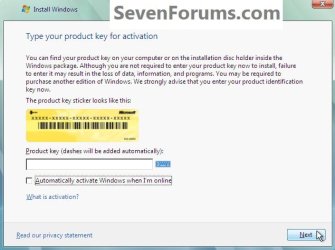
1) Starting at step #5 in this tutorial do not add an activation key and remove the check (tick) from the "Automatically activate ... " box when presented with this installation dialog box and click Next.
click an image to enlarge
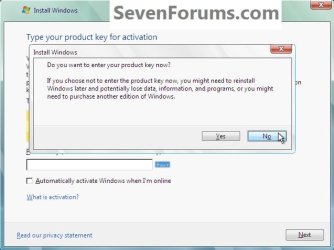
2) Then click No when presented with this "Do you want ... " dialog box.
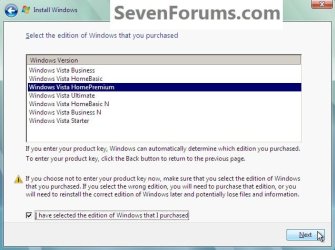
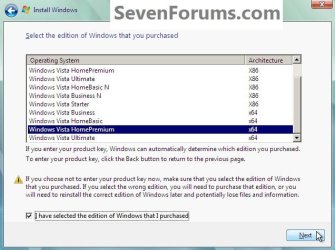
3) Then put a check mark (tick) at the "I have selected ... " box and click to highlight / select the Vista version that corresponds to the Windows activation key on the COA sticker attached to the PC, you will not be able to activate any other version except the Vista version that matches the COA key, the version the PC came with.
That's all; now continue the Vista installation process as usual.
1. This is the 32-bit
2. This is the 64-bit
3. Created All Versions
Last edited by Bare Foot Kid; 17 Jul 2011 at 04:11 PM..
Reason: Fine tuning! ;)
How does one tell helpful and great people like yourself, 'Ah dude, hold on! Do u realize what you're saying'? I find it interesting that many links here on sevenforums (and elsewhere) often require one to actually link somewhere else, which in turn asks you to link somewhere else etc. and is so doing a few things happen: -1- confusion -2- a feeling of being overwhelmed with both information overload and 'What should I do?" and realizing that the info given as a whole, (link A + link B) suddenly may not be do-able. Would it not (in some cases at least), instead of providing links just cut and paste the info directly related to whatever it is your advising on? Consider this post "How to Clean Install Windows 7...Bloatware" (which in my case is a link from How to Clean Reinstall a Factory OEM Windows 7) which says, "After you have made backups of everything you care to save to external media, the best method forward is to do a complete wipe secure erase of the entire HDD" OK so one links there, since this is suggested and it makes sense. And once on the link to another link or vice versa bla bla bla and end up on "to look at method 2" on "Secure Erase/Wipe-and the Basic Methods". And here one is told, "Warning--This method will completely overwrite any Partition or entire Hard Disk Drive...that it's pointed at, it's known as a secure erase ....." Does anyone get the picture yet? My intention is to do a clean install of Windows where, following the root of links, what I am now being told is to "completely overwrite a partition" which can't be done since the partition that was suggested for me to wipe clean is the one where my OS is currently sitting on. This is not what it says in the 1st post of course but link A which connected me to link B which connected me to link C etc. did exactly that. What is happening is the same thing as happens, as you did in elementary school or high school when you were given a sentence and asked to whisper it to a 2nd person who in turn whispered it to 1 3d person etc. until at the very end what came out was nothing close to the initial sentence. So wonderful people, who are indeed so with a love of helping, may I suggest this: Do take this in mind: When and if you can, do avoid links. In its place just quote (cut and paste) the info that is directly related to what your are advising on, and should this part you are borrowing, this quote, have a link as well then in turn go to that link and quote from there. Once done do consider re-reading your own post if it now makes sense. Having said this I can never thank you guys enough in this forum I would not know where I would be without you.
System Manufacturer/Model Number OEM OS Windows 7 Home Premium 64 CPU Intel Core i5 760 @ 2800MHz Motherboard Asus P7P55D-E LX Memory 12288MB Graphics Card ATI Radeon HD 5770 Sound Card ASUSTeK Computer 5 Series/3400 Series HD -- MSI EG JUNIPER Monitor(s) Displays ViewSonic HDMI 1080p Full HD