
How to Prevent Users from Bypassing SmartScreen Filter Warnings in Internet Explorer
Information
The SmartScreen Filter prevents users from navigating to or downloading from sites known to host malicious content. SmartScreen Filter also prevents the execution of files determined to be malicious.
This tutorial will show you how to allow or prevent all or specific users from being able to ignore and bypass SmartScreen Filter warning in IE8, IE9, and IE10.
You must be logged in as an administrator to be able to do this tutorial.
This tutorial will show you how to allow or prevent all or specific users from being able to ignore and bypass SmartScreen Filter warning in IE8, IE9, and IE10.
You must be logged in as an administrator to be able to do this tutorial.
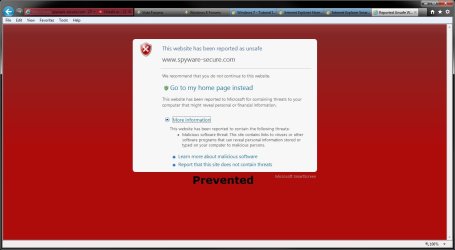
EXAMPLE: SmartScreen Filter Warning
NOTE: Notice how the option to Disregard and continue is removed when set to prevent this in the right screenshot below.

OPTION ONE
Using a REG File Download
NOTE: This option will affect all users on the computer.
1. To Allow Bypassing SmartScreen Filter Warnings in Internet Explorer
NOTE: This is the default setting.
A) Click/tap on the Download button below to download the file below.
Allow_Bypassing_IE_SmartScreen_Filter_Warnings.reg
Download
B) Go to step 3.
2. To Prevent Bypassing SmartScreen Filter Warnings in Internet Explorer
A) Click/tap on the Download button below to download the file below.
Prevent_Bypassing_IE_SmartScreen_Filter_Warnings.reg
Download
3. Save the .reg file to the desktop.
4. Double click/tap on the downloaded .reg file to merge it.
5. Click/tap on Run, Yes (UAC-Windows 7/8) or Continue (UAC-Vista), Yes, and OK when prompted.
6. Log off and log on, or restart the computer to apply.
7. When done, you can delete the downloaded .reg file if you like.
OPTION TWO
Through the Local Group Policy Editor
1. Open the all users, specific users or groups, or all users except administrators Local Group Policy Editor for how you want this policy applied.
2. In the left pane, click/tap on to expand User Configuration, Administrative Templates, Windows Components, and Internet Explorer. (see screenshot below)

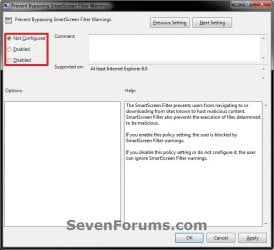
3. In the right pane of Internet Explorer, double click/tap on Prevent Bypassing SmartScreen Filter Warnings to edit it. (See screenshot above)
4. To Allow Bypassing SmartScreen Filter Warnings in Internet Explorer
A) Select (dot) either Not Configured or Disabled. (see screenshot below step 6)
NOTE: Not Configured is the default setting.
B) Go to step 6.
5. To Prevent Bypassing SmartScreen Filter Warnings in Internet Explorer
A) Select (dot) Enabled. (see screenshot below step 6)
6. Click/tap on OK. (see screenshot below)
7. Close the Local Group Policy Editor window.
That's it,
Shawn
Attachments
Last edited:
