
How to Add or Remove Index Locations in Windows 7 and Windows 8
Information
The Index keeps track of the files on your computer and stores information about the files, including the file name, date modified, and properties like author, tags, and rating. The index is used to make searching for files in Windows much faster. Instead of looking through your entire hard disk for a file name or file property, Windows scans the index, which allows most results to appear in a small fraction of the time that a search without the index would take.
This tutorial will show you how to add or remove folder locations to be included in the index search results in Windows 7 and Windows 8.
This tutorial will show you how to add or remove folder locations to be included in the index search results in Windows 7 and Windows 8.
Note
You will not be able to add removable locations to be included in the index. For example, USB flash drives or memory cards.
Warning
If you make the index too large by including the entire hard drive, or to many folders, then your searches will slow down and take longer for the search results to display. You will also find your hard drive running longer and more often in the background while the index updates itself for changes made to the included folder locations. For the best results, it is recommended that you only add folders that you search frequently to be included in the index.
The index will not include search results from any drive or partition with the A and B drive letters, even if you add their location to the index. This is because the A and B drive letters are reserved for floppy drives. Since a floppy drive is considered to be a removable device, it will not be indexed. Even if this is a hard drive you assigned with the A or B drive letter, it will still be treated the same.
The index will not include search results from any drive or partition with the A and B drive letters, even if you add their location to the index. This is because the A and B drive letters are reserved for floppy drives. Since a floppy drive is considered to be a removable device, it will not be indexed. Even if this is a hard drive you assigned with the A or B drive letter, it will still be treated the same.
Here's How:
1. Open the Control Panel (icons view) in Windows 7 or Windows 8, and double click on the Indexing Options icon.
2. Click/tap on the Modify button. (See screenshot below)
NOTE: You will notice a quick preview of included folder locations in the index here. These are the default locations.
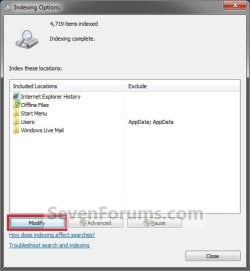
3. If You Don't See All Locations on Your Computer in the List A) Click/tap on the Show all locations button. (See screenshot below)

B) If prompted by UAC, then either click/tap on Yes or provide the Administrator password.
4. To Add Folder Location to be Included in Index Search Results A) Continue to click on the arrows to the right of the check box to expand the folder tree until you reach the location of the folder you want to add, and select it. (See screenshot below)
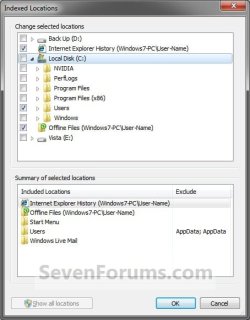
B) Check the selected folder's box. (See screenshot above)
5. To Remove Folder Location from being Included in Index Search Results A) Continue to click on the arrows to the right of the check box to expand the folder tree until you reach the location of the folder you want to remove, and select it. (See screenshot below step 4A)
B) Uncheck the selected folder's box. (See screenshot below step 4A)
6. Repeat steps 4 and 5 until you have finished adding or removing folder locations to be included in the index.
7. When finished, click/tap on OK. (See screenshot below step 4A)
8. Click/tap on the Close button. (See screenshot below step 2)
Tip
You may need to rebuild the index afterwards to force an update of the index before your changes are reflected in search results.
That's it,
Shawn
Related Tutorials
- How to Search in Windows 7
- How to Add or Remove a File Type from Index in Windows 7 and Windows 8
- How to Change Location Where Index is Stored in Windows 7 and Windows 8
- How to Pause Indexing in Windows 7 and Windows 8
- How to Rebuild the Index in Windows 7 and Windows 8
- How to Change or Restore the Default Windows 7 Search Options
- How to Create a Search Shortcut in Windows 7
- How to Create a Indexing Options Shortcut in Windows 7
- How to Create a Search and Indexing Troubleshoot Shortcut in Windows 7
- How to Enable or Disable the Search Index in Vista and Windows 7
- How to Have More Accurate Search Results in Windows 7 and Vista
Last edited:


