
Index Locations - Add or Remove

How to Add or Remove Index Locations in Windows 7 and Windows 8


   Information
The Index keeps track of the files on your computer and stores information about the files, including the file name, date modified, and properties like author, tags, and rating. The index is used to make searching for files in Windows much faster. Instead of looking through your entire hard disk for a file name or file property, Windows scans the index, which allows most results to appear in a small fraction of the time that a search without the index would take.

This tutorial will show you how to add or remove folder locations to be included in the index search results in Windows 7 and Windows 8.

   Note
You will not be able to add removable locations to be included in the index. For example, USB flash drives or memory cards.
   Warning
If you make the index too large by including the entire hard drive, or to many folders, then your searches will slow down and take longer for the search results to display. You will also find your hard drive running longer and more often in the background while the index updates itself for changes made to the included folder locations. For the best results, it is recommended that you only add folders that you search frequently to be included in the index.

The index will not include search results from any drive or partition with the A and B drive letters, even if you add their location to the index. This is because the A and B drive letters are reserved for floppy drives. Since a floppy drive is considered to be a removable device, it will not be indexed. Even if this is a hard drive you assigned with the A or B drive letter, it will still be treated the same.


Here's How:
1. Open the Control Panel (icons view) in Windows 7 or Windows 8, and double click on the Indexing Options icon.

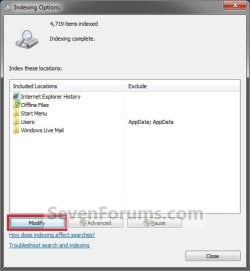
2. Click/tap on the Modify button. (See screenshot below)
NOTE: You will notice a quick preview of included folder locations in the index here. These are the default locations. Step1.jpg
3. If You Don't See All Locations on Your Computer in the List A) Click/tap on the Show all locations button. (See screenshot below) Step2.jpg
B) If prompted by UAC, then either click/tap on Yes or provide the Administrator password.
4. To Add Folder Location to be Included in Index Search Results A) Continue to click on the arrows to the right of the check box to expand the folder tree until you reach the location of the folder you want to add, and select it. (See screenshot below) Step3.jpg
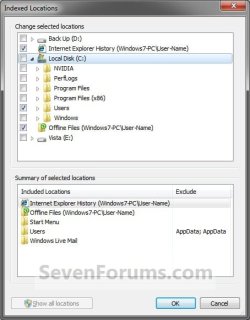
B) Check the selected folder's box. (See screenshot above)
5. To Remove Folder Location from being Included in Index Search Results A) Continue to click on the arrows to the right of the check box to expand the folder tree until you reach the location of the folder you want to remove, and select it. (See screenshot below step 4A)

B) Uncheck the selected folder's box. (See screenshot below step 4A)
6. Repeat steps 4 and 5 until you have finished adding or removing folder locations to be included in the index.

7. When finished, click/tap on OK. (See screenshot below step 4A)

8. Click/tap on the Close button. (See screenshot below step 2)

   Tip
You may need to rebuild the index afterwards to force an update of the index before your changes are reflected in search results.


That's it,
Shawn


Last edited:
Searching Win7 Solved

Thank you, Thank you!
I have been trying for a week to solve this and it was the little warning on this page re Drive letters A or B that did it. I had assigned a partition as Drive A and no matter what I did in Indexing Options searching did not happen. Reassigned the partition as F and BINGO! It would have been so LOGICAL for Indexing Options to pop up and tell me it was not going to do what I was asking, but no such alert.
 

My Computer

Computer type
PC/Desktop
Computer Manufacturer/Model Number
Lenovo All-In-One
OS
Win7 Pro 64bit SP1
CPU
Pentium G640
Memory
2 GB
Hard Drives
500 GB
Antivirus
Panda
Browser
Chrome
I'm glad it could help GrumpyGranpa, and welcome to Seven Forums. :)
 

My Computer

Computer type
PC/Desktop
Computer Manufacturer/Model Number
Self built custom
OS
64-bit Windows 11 Pro for Workstations
CPU
Intel i7-8700K OC'd to 5 GHz
Motherboard
ASUS ROG Maximus XI Formula Z390
Memory
64 GB (4x16GB) G.SKILL TridentZ RGB DDR4 3600 MHz
Graphics Card(s)
ASUS ROG-STRIX-GTX1080TI-O11G-GAMING
Sound Card
Integrated
Monitor(s) Displays
2 x Samsung Odyssey G7 27"
Screen Resolution
2560x1440
Hard Drives
1TB Samsung 990 PRO M.2,
4TB Samsung 990 PRO PRO M.2,
TerraMaster F8 SSD Plus NAS
PSU
Seasonic Prime Titanium 850W
Case
Thermaltake Core P3
Cooling
Corsair Hydro H115i
Keyboard
Logitech wireless K800
Mouse
Logitech MX Master 4
Internet Speed
2 Gb/s Download and 100 Mb/s Upload
Antivirus
Malwarebyte Anti-Malware Premium
Browser
Google Chrome
Other Info
Logitech Z625 speaker system,
Logitech BRIO 4K Pro webcam,
HP Color LaserJet Pro MFP M477fdn,
APC SMART-UPS RT 1000 XL - SURT1000XLI,
Galaxy S23 Plus phone
I've been trying to find a way to *prevent* Windows from indexing connected, external drives. Perhaps it's a misconception on my part, but as much as I've come to rely on Windows Key + F to search and will continue to do so to find stuff in the C drive, I feel that the added indexing of external drives is slowing down this vintage, but still functioning Core2duo.
 

My Computer

Computer type
PC/Desktop
Computer Manufacturer/Model Number
Dell Optiplex 780
OS
Windows 7 Home Premium 64-bit
CPU
2.33 Core2 Duo Processor
Memory
4GB DDR2
Graphics Card(s)
Intel Graphics Media Accelerator 4500
Hard Drives
250GB 7200RPM SATA
Antivirus
Avant
Browser
Firefox, Chrome
Last edited:

My Computer

Computer type
PC/Desktop
Computer Manufacturer/Model Number
Self built custom
OS
64-bit Windows 11 Pro for Workstations
CPU
Intel i7-8700K OC'd to 5 GHz
Motherboard
ASUS ROG Maximus XI Formula Z390
Memory
64 GB (4x16GB) G.SKILL TridentZ RGB DDR4 3600 MHz
Graphics Card(s)
ASUS ROG-STRIX-GTX1080TI-O11G-GAMING
Sound Card
Integrated
Monitor(s) Displays
2 x Samsung Odyssey G7 27"
Screen Resolution
2560x1440
Hard Drives
1TB Samsung 990 PRO M.2,
4TB Samsung 990 PRO PRO M.2,
TerraMaster F8 SSD Plus NAS
PSU
Seasonic Prime Titanium 850W
Case
Thermaltake Core P3
Cooling
Corsair Hydro H115i
Keyboard
Logitech wireless K800
Mouse
Logitech MX Master 4
Internet Speed
2 Gb/s Download and 100 Mb/s Upload
Antivirus
Malwarebyte Anti-Malware Premium
Browser
Google Chrome
Other Info
Logitech Z625 speaker system,
Logitech BRIO 4K Pro webcam,
HP Color LaserJet Pro MFP M477fdn,
APC SMART-UPS RT 1000 XL - SURT1000XLI,
Galaxy S23 Plus phone
Thanks for the prompt and pertinent reply, Brink. I know for a fact that Group Policy isn't available with my particular version of W7. With that in mind I'm leaning towards disabling indexing altogether, relying instead on a couple of utilities (SwiftSearch & UltraFileSearch) mentioned in a different thread here.

grazie
 

My Computer

Computer type
PC/Desktop
Computer Manufacturer/Model Number
Dell Optiplex 780
OS
Windows 7 Home Premium 64-bit
CPU
2.33 Core2 Duo Processor
Memory
4GB DDR2
Graphics Card(s)
Intel Graphics Media Accelerator 4500
Hard Drives
250GB 7200RPM SATA
Antivirus
Avant
Browser
Firefox, Chrome
Personally, I disable the index. It takes a bit longer for search results, but you don't have to worry about if the index is currently up to date yet or not.
 

My Computer

Computer type
PC/Desktop
Computer Manufacturer/Model Number
Self built custom
OS
64-bit Windows 11 Pro for Workstations
CPU
Intel i7-8700K OC'd to 5 GHz
Motherboard
ASUS ROG Maximus XI Formula Z390
Memory
64 GB (4x16GB) G.SKILL TridentZ RGB DDR4 3600 MHz
Graphics Card(s)
ASUS ROG-STRIX-GTX1080TI-O11G-GAMING
Sound Card
Integrated
Monitor(s) Displays
2 x Samsung Odyssey G7 27"
Screen Resolution
2560x1440
Hard Drives
1TB Samsung 990 PRO M.2,
4TB Samsung 990 PRO PRO M.2,
TerraMaster F8 SSD Plus NAS
PSU
Seasonic Prime Titanium 850W
Case
Thermaltake Core P3
Cooling
Corsair Hydro H115i
Keyboard
Logitech wireless K800
Mouse
Logitech MX Master 4
Internet Speed
2 Gb/s Download and 100 Mb/s Upload
Antivirus
Malwarebyte Anti-Malware Premium
Browser
Google Chrome
Other Info
Logitech Z625 speaker system,
Logitech BRIO 4K Pro webcam,
HP Color LaserJet Pro MFP M477fdn,
APC SMART-UPS RT 1000 XL - SURT1000XLI,
Galaxy S23 Plus phone
One more question if I may, Brink---what, if any, consequences will the disabling indexing in Windows 7 have on future attempts to use Windows + F key?
 

My Computer

Computer type
PC/Desktop
Computer Manufacturer/Model Number
Dell Optiplex 780
OS
Windows 7 Home Premium 64-bit
CPU
2.33 Core2 Duo Processor
Memory
4GB DDR2
Graphics Card(s)
Intel Graphics Media Accelerator 4500
Hard Drives
250GB 7200RPM SATA
Antivirus
Avant
Browser
Firefox, Chrome
It'll have no effect other than taking longer to search.
 

My Computer

Computer type
PC/Desktop
Computer Manufacturer/Model Number
Self built custom
OS
64-bit Windows 11 Pro for Workstations
CPU
Intel i7-8700K OC'd to 5 GHz
Motherboard
ASUS ROG Maximus XI Formula Z390
Memory
64 GB (4x16GB) G.SKILL TridentZ RGB DDR4 3600 MHz
Graphics Card(s)
ASUS ROG-STRIX-GTX1080TI-O11G-GAMING
Sound Card
Integrated
Monitor(s) Displays
2 x Samsung Odyssey G7 27"
Screen Resolution
2560x1440
Hard Drives
1TB Samsung 990 PRO M.2,
4TB Samsung 990 PRO PRO M.2,
TerraMaster F8 SSD Plus NAS
PSU
Seasonic Prime Titanium 850W
Case
Thermaltake Core P3
Cooling
Corsair Hydro H115i
Keyboard
Logitech wireless K800
Mouse
Logitech MX Master 4
Internet Speed
2 Gb/s Download and 100 Mb/s Upload
Antivirus
Malwarebyte Anti-Malware Premium
Browser
Google Chrome
Other Info
Logitech Z625 speaker system,
Logitech BRIO 4K Pro webcam,
HP Color LaserJet Pro MFP M477fdn,
APC SMART-UPS RT 1000 XL - SURT1000XLI,
Galaxy S23 Plus phone
Back
Top