Windows 7 Forums


Windows 7: SATA drivers - Load in Windows System Image Recovery


SATA drivers - Load in Windows System Image Recovery

How to Load SATA Drivers in Windows System Image Recovery
Published 15 Aug 2011
Published by

Featured Tutorial

Microsoft Account "Two-step Verification" - Turn On or Off

How to Turn "Two-step Verification" On or Off for your Microsoft Account

Secunia ONLINE Software Inspector

How to Scan for Common Software Vulnerabilities

Peppermint3 - Create Live CD/DVD/USB To Use For Emergency Backup

How to Perform an Emergency Data Backup When Windows 7 Will Not Boot

Bootmgr - Move to C:\ with EasyBCD

How to Move Bootmgr to C:\ with EasyBCD

Emergency Kit - save your files from a dead OS

How to Create and Use a Linux Mint Mate USB Flash Drive to Recover your Files

Portable OS - Carry your OS on an External Drive

How to Create a Portable OS on an External Drive
How to Load SATA Drivers in Windows System Image Recovery


information   Information
This will show you how to load the SATA drivers in System Image Recovery in Windows 7.


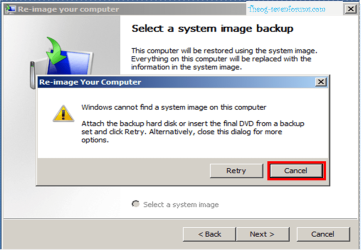
When you try to Re-Image in Windows 7 , Re-Image can not find your Backup Hard Drive.


SATA drivers - Load in Windows System Image Recovery-imagerecovery013.png

1) Copy your SATA driver to a disk. (Floppy, CD, USB)
NOTE: Keep this disk in a safe place.
NOTE: for this example, I am using a Floppy disk.
SATA drivers - Load in Windows System Image Recovery-imagerecovery001.png

2) Click Cancel

SATA drivers - Load in Windows System Image Recovery-imagerecovery002.png

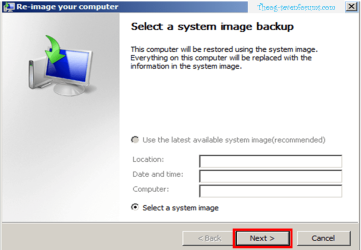
3) Click Next

SATA drivers - Load in Windows System Image Recovery-imagerecovery003.png

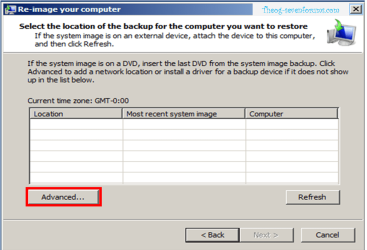
4) Click Advanced

SATA drivers - Load in Windows System Image Recovery-imagerecovery004.png

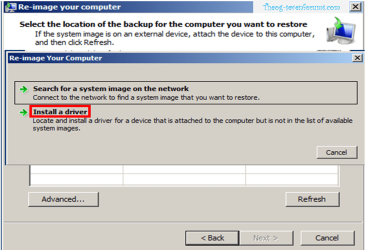
5) Click Install a Driver

SATA drivers - Load in Windows System Image Recovery-imagerecovery005.png

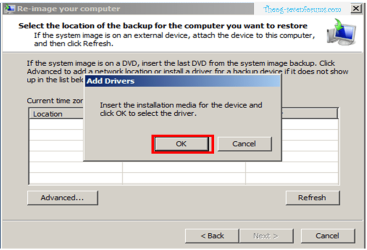
6) Click OK

SATA drivers - Load in Windows System Image Recovery-imagerecovery006.png

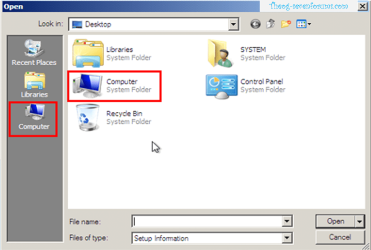
7) Click Computer.

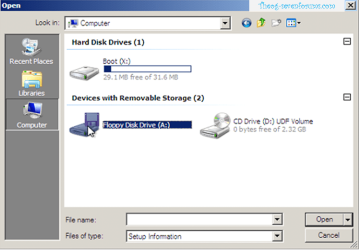
SATA drivers - Load in Windows System Image Recovery-imagerecovery007.png SATA drivers - Load in Windows System Image Recovery-imagerecovery008.png

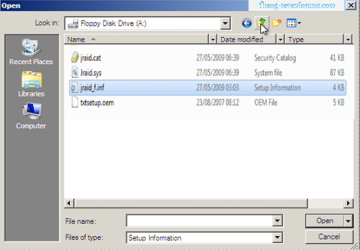
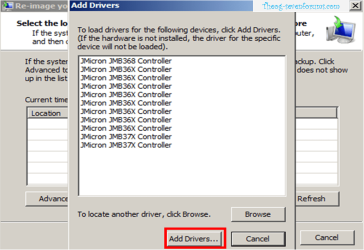
8) Choose your Sata Controller. Double Click on setup inf file.
NOTE: for this example, I am using JMicron JMB36X SATA/RAID Controller card.
SATA drivers - Load in Windows System Image Recovery-imagerecovery009.png SATA drivers - Load in Windows System Image Recovery-imagerecovery010.png

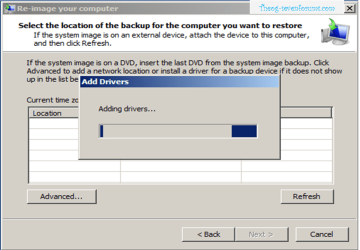
9) Choose your Sata Controller. Click Add drivers.
SATA drivers - Load in Windows System Image Recovery-imagerecovery011.png

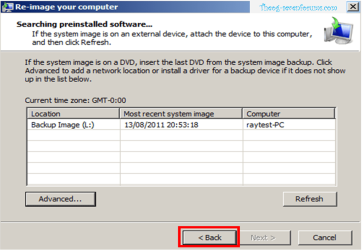
10) Click Back

SATA drivers - Load in Windows System Image Recovery-imagerecovery012.png

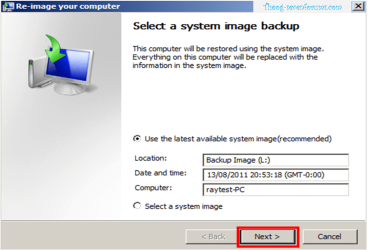
11) Click Next & Continue with Re-imaging.


Need more help? Try searching our extensive help and support site.
Loading
16 Aug 2011   #1
Bare Foot Kid

W 7 64-bit Ultimate
The Lowcountry


Hello Ray.


This looks good, I'm sure it'll come in handy, thanks!

My System SpecsSystem Spec

16 Aug 2011   #2
severedsolo

Windows 7 Ultimate X64 SP1
Cromer Norfolk UK


What a bloody good idea. I would rep, but need to spread... so have a thumbsup instead
My System SpecsSystem Spec
17 Aug 2011   #3
theog

ME/XP/Vista/Win7
uk Hampshire


Thank you, Bare Foot Kid & severedsolo.
My System SpecsSystem Spec
.


Comment

 SATA drivers - Load in Windows System Image Recovery problems?


Tutorial Tools


Similar help and support threads for: SATA drivers - Load in Windows System Image Recovery
Windows 7 Tutorial Category
SATA Drivers - Load in Windows XP Setup on Dual Boot Tutorials
New SATA Controller Card, Windows wont boot, how to load drivers? Installation & Setup
SATA Drivers - Load in Windows Recovery Options Tutorials
Windows will not load, Continuous boot to System Recovery partition. BSOD Help and Support
SATA Drivers - Load Using Shift+F10 to Open CMD Tutorials


All times are GMT -5. The time now is 12:02 AM.


Seven Forums Android App Seven Forums IOS App Follow us on Facebook

Windows 7 Forums is an independent web site and has not been authorized,
sponsored, or otherwise approved by Microsoft Corporation.
"Windows 7" and related materials are trademarks of Microsoft Corp.
© Designer Media Ltd
  

1 2 3 4 5 6 7 8 9 10 11 12 13 14 15 16 17 18 19 20 21 22 23 24 25 26 27 28 29 30 31 32