
How to "Pin to Taskbar" Transparent Invisible Icons for Programs in Windows 7
Information
This will show you how to have a transparent invisible icon for any installed program of your choice pinned to the taskbar in Windows 7.
This way you could have hidden pinned programs on your taskbar.
This way you could have hidden pinned programs on your taskbar.
Here's How:
1. Either create a new shortcut or copy a shortcut of the program (ex: CCleaner) that you want to pin to the taskbar to your desktop.
NOTE: If you already have this program pinned to the taskbar, then you will need to unpin it before doing step 2.
2. Right click on the new shortcut (ex: CCleaner) on the desktop, and click on Properties. (see screenshot below)
3. In the Shortcut tab, click on the Change Icon button. (see screenshot below)
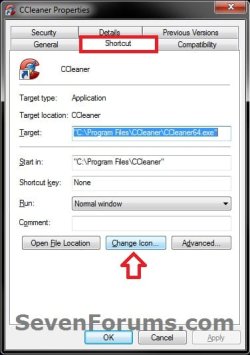
4. In the field under "Look for icons in this file", copy and paste the location below and press Enter. (see screenshot below)
%SystemRoot%\System32\imageres.dll
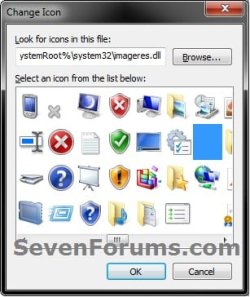
5. Select the blank transparent icon highlighted in blue above and click on OK. (see screenshot above)
6. Click on OK. (see screenshot below)
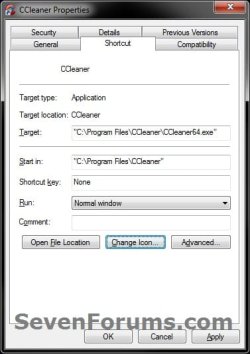
7. Right click on the shortcut (ex: CCleaner) with the new blank icon on the desktop, and click on Pin to Taskbar. (see screenshot below)

8. Delete the shortcut (ex: CCleaner) on the desktop.
9. The invisible program icon is now pinned to the taskbar. Here is how it will look on your taskbar under the conditions below.
A) Invisible program icon pinned to the taskbar, and not opened or without the mouse pointer hovered on it.

B) Invisible program icon pinned to the taskbar, and not opened with the mouse pointer hovered on it.
NOTE: This is handy to know what program the pinned invisible icon is for.

C) Invisible program icon pinned to the taskbar, and opened with the window active.

D) Invisible program icon pinned to the taskbar, and opened with the window not active.

E) Invisible program icon pinned to the taskbar, and opened with the thumbnail preview displaying on the taskbar.
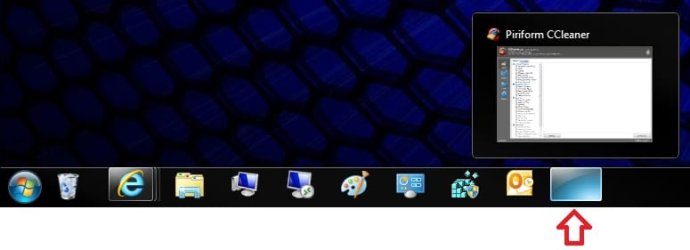
F) Invisible program icon pinned to the taskbar, and opened without grouping taskbar buttons "Always combine, hide labels" selected.
NOTE: When not opened, it looks the same as in steps 9A and 9B.

That's it,
Shawn
Last edited:


