Logon Screen - Fix Showing Only "Other User" and Last Logged On User
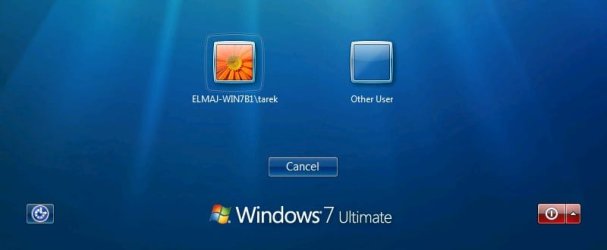
EXAMPLE: Windows 7 Logon, Welcome, or Switch User Screen
NOTE: Image from here.
Here's How:
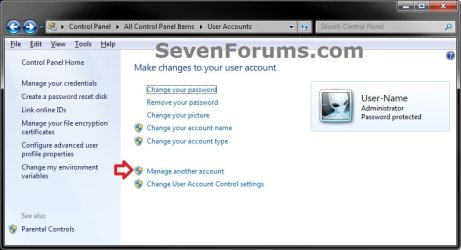
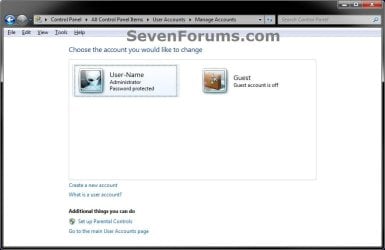
1. Open the Control Panel (icons view), click on the User Accounts icon, and click on the Manage another account link. (see screenshot below)
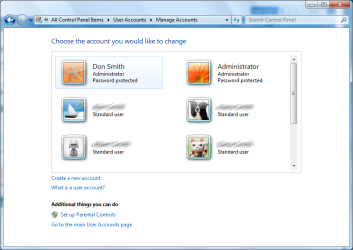
2. Make note of the user names for all user accounts that you have created in Windows 7 for the steps below. (see screenshot below)
NOTE: In addition to any name (ex: User-Name) of user accounts that you created, you will also have a Guest and the built-in Administrator (if enabled) accounts by default.
3. In the Start Menu, type regedit in the search box and press Enter.
4. If prompted by UAC, then click on Yes.
5. In regedit, navigate to the location below. (see screenshot below step 6)
6. If you have a .DEFAULT key in the left pane as a subkey under the ProfileList key, then right click on .DEFAULT, and click on Delete. (see screenshot below)

A) Click on Yes to confirm to delete. (see screenshot below)

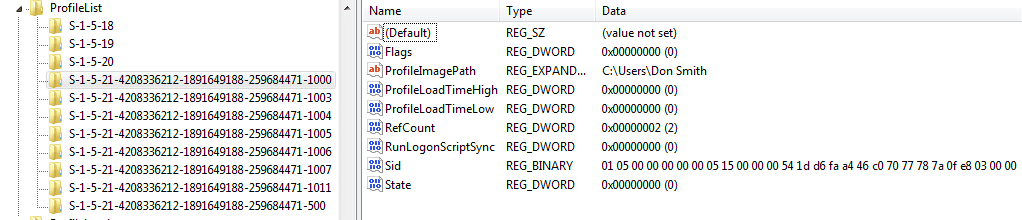
7. In the left pane under the ProfileList key, you will need to select and look at each S-1-5-xx subkey one at a time for the following items below.
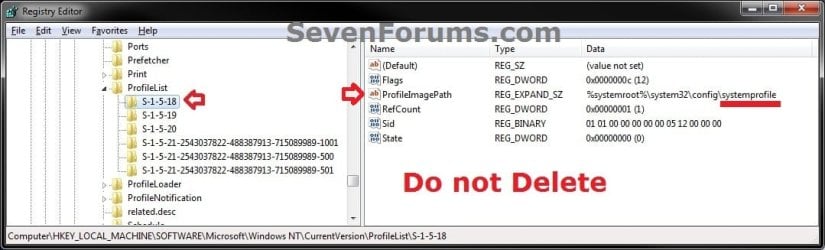
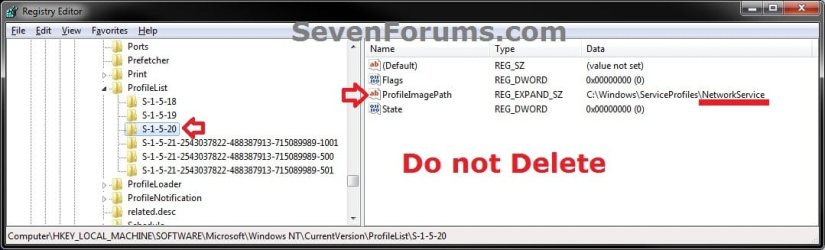
A) Do not delete S-1-5-xx subkeys in the left pane that have systemprofile, LocalService, and NetworkService names in the ProfileImagePath value in the right pane.
NOTE: These are system accounts used by Windows 7. (see screenshots below)

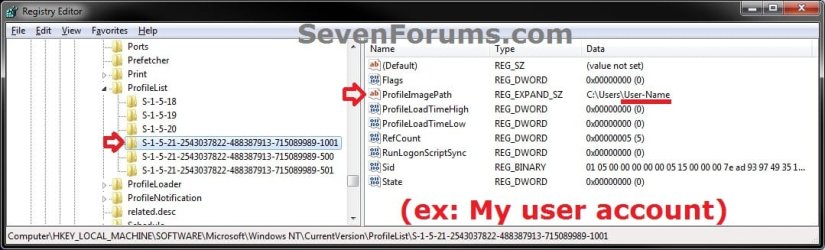
B) Do not delete S-1-5-xx subkeys in the left pane that have Guest, Administrator, or names of user accounts (ex: User-Name) in the ProfileImagePath value in the right pane from step 2 that you created in Windows 7. (see screenshots below)
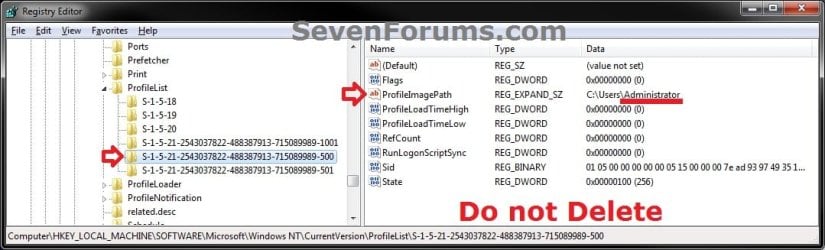
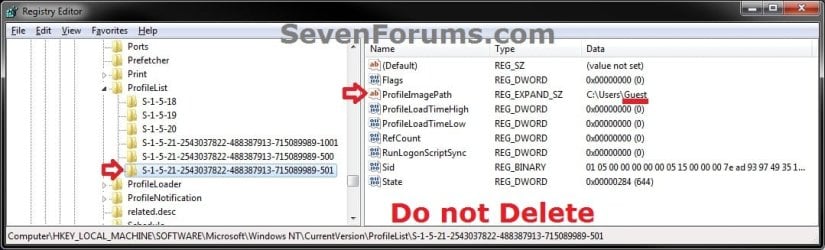
C) If a selected S-1-5-xx subkey in the left pane has a user name in the ProfileImagePath value in the right pane that is not a user account that you have created in Windows 7 from step 2 or from step 7B, then right click on the S-1-5-xx subkey, click on Delete, and Yes to confirm.
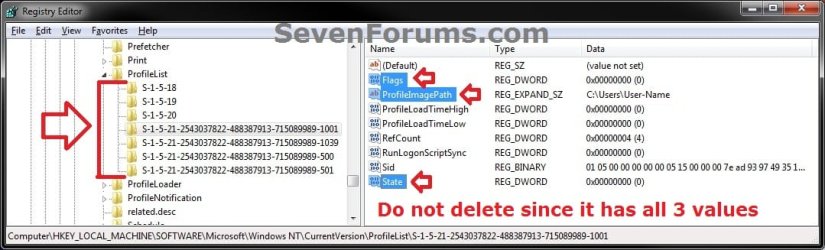
D) If any selected S-1-5-xx subkey in the left pane does not have at least all 3 of the default Flags, ProfileImagePath, and State values in it's right pane, then right click on the S-1-5-xx subkey, click on Delete, and Yes to confirm. (see screenshot below)
8. When finished, close regedit and User Accounts windows.
9. Log off or Switch User to test and see if the logon screen is now back to normal again with all user icons displayed.
That's it,
Shawn
How to Fix Windows 7 Logon Screen Showing Only "Other User" and Last Logged On User Icon
Information
If your Windows 7 login, welcome, or switch user screen only displays the last user that was logged on and Other User icons instead of the icons of all users created on the computer, then this tutorial will show you how to fix this.
You must be logged in as an administrator to be able to do the steps in this tutorial.
You must be logged in as an administrator to be able to do the steps in this tutorial.
Warning
It is highly recommended that you create a restore point before doing this tutorial. This way if you make a mistake that leaves Windows 7 unbootable or messed up, you would be able to easily do a system restore and select the restore point to undo and fix the mistake.
EXAMPLE: Windows 7 Logon, Welcome, or Switch User Screen
NOTE: Image from here.
Here's How:
Note
Before getting started, if you have Windows set to automatically log on to a user account at startup, then do step 5 in Option One of the tutorial linked below to redo the settings to make sure that the correct user is selected and that the correct password is entered for the selected user.
How to Automatically Log On a User Account at Windows 7 Startup
How to Automatically Log On a User Account at Windows 7 Startup
1. Open the Control Panel (icons view), click on the User Accounts icon, and click on the Manage another account link. (see screenshot below)
2. Make note of the user names for all user accounts that you have created in Windows 7 for the steps below. (see screenshot below)
NOTE: In addition to any name (ex: User-Name) of user accounts that you created, you will also have a Guest and the built-in Administrator (if enabled) accounts by default.
3. In the Start Menu, type regedit in the search box and press Enter.
4. If prompted by UAC, then click on Yes.
5. In regedit, navigate to the location below. (see screenshot below step 6)
Code:
HKEY_LOCAL_MACHINE\SOFTWARE\Microsoft\Windows NT\CurrentVersion\ProfileList6. If you have a .DEFAULT key in the left pane as a subkey under the ProfileList key, then right click on .DEFAULT, and click on Delete. (see screenshot below)
A) Click on Yes to confirm to delete. (see screenshot below)
7. In the left pane under the ProfileList key, you will need to select and look at each S-1-5-xx subkey one at a time for the following items below.
Warning
Please review each item listed below before deleting any S-1-5-xx subkey. You would only want to delete a S-1-5-xx subkey if you need to as outlined below.
A) Do not delete S-1-5-xx subkeys in the left pane that have systemprofile, LocalService, and NetworkService names in the ProfileImagePath value in the right pane.
NOTE: These are system accounts used by Windows 7. (see screenshots below)
B) Do not delete S-1-5-xx subkeys in the left pane that have Guest, Administrator, or names of user accounts (ex: User-Name) in the ProfileImagePath value in the right pane from step 2 that you created in Windows 7. (see screenshots below)
C) If a selected S-1-5-xx subkey in the left pane has a user name in the ProfileImagePath value in the right pane that is not a user account that you have created in Windows 7 from step 2 or from step 7B, then right click on the S-1-5-xx subkey, click on Delete, and Yes to confirm.
D) If any selected S-1-5-xx subkey in the left pane does not have at least all 3 of the default Flags, ProfileImagePath, and State values in it's right pane, then right click on the S-1-5-xx subkey, click on Delete, and Yes to confirm. (see screenshot below)
8. When finished, close regedit and User Accounts windows.
9. Log off or Switch User to test and see if the logon screen is now back to normal again with all user icons displayed.
That's it,
Shawn
Related Tutorials
- How to Make Windows 7 Require a User Name and Password at Log On
- How to Fix the Error "Your user profile was not loaded correctly! You have been logged on with a temporary profile."
- Fix "The User Profile Service failed the logon. User profile cannot be loaded." Error in Windows 7
- How to Display Information About Previous Logons During User Logon in Vista and Windows 7
- How to Automatically Log On a User Account at Windows 7 Startup
- How to Change the Windows 7 Log On Screen Background
- How to Change the Windows 7 Log On Screen Text Shadow
- How to Enable or Disable Secure Log on CTRL+ALT+DELETE in Windows 7
- How To Change or Remove the Windows 7 Log On Screen Text Branding
- How to Change the Font on the Log On Screen in Windows 7
Last edited: