Windows 7 Forums Search
Welcome to Windows 7 Forums. Our forum is dedicated to helping you find solutions with any problems, errors or issues you are experiencing with Windows 7. The Windows 7 forum also covers news and updates and has an extensive Windows 7 tutorial section that covers a wide range of tips and tricks.


Windows 7 - User Folder - Create Your Own Special Folders


User Folder - Create Your Own Special Folders

How to Create Your Own Special User Folder
Published by SquonkSC
07-28-2009
Default User Folder - Create Your Own Special Folders

How to Create Your Own Special User Folder


I am dutch but for this tutorial I set my mui to English to make it easier on you.

Here I have a folder called "Installatie" (that's dutch for Installation)
User Folder - Create Your Own Special Folders-real-folder.png
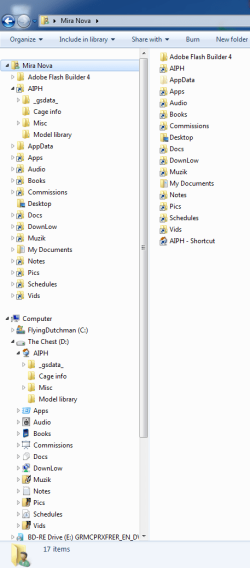
I want to make a special folder in my username (in this case Michel on the left pane), that I will call "Installatie" also, for easy reference.


Here's How:
1. Open a elevated command prompt.
By default it will open in C:\Windows\System32 even if you are on x64 windows.
2. Type cd\users\username (in my case username is Michel)
The prompt will now show "c:\users\username>

We will now use the "MKLINK" command.
3. Type mklink /d Installatie d:\Installatie and press enter.
Explanation:
mklink /d is the command means, link to folder

where I typed Installatie, you have to type the name you want to give to your special folder.

where I typed d:\Installatie, you have to type the location of the folder you want to point to.

If you did it right, you should get an output saying:
symbolic link created for Installatie <<===>> d:\installatie

See the screenshot.
User Folder - Create Your Own Special Folders-output.png

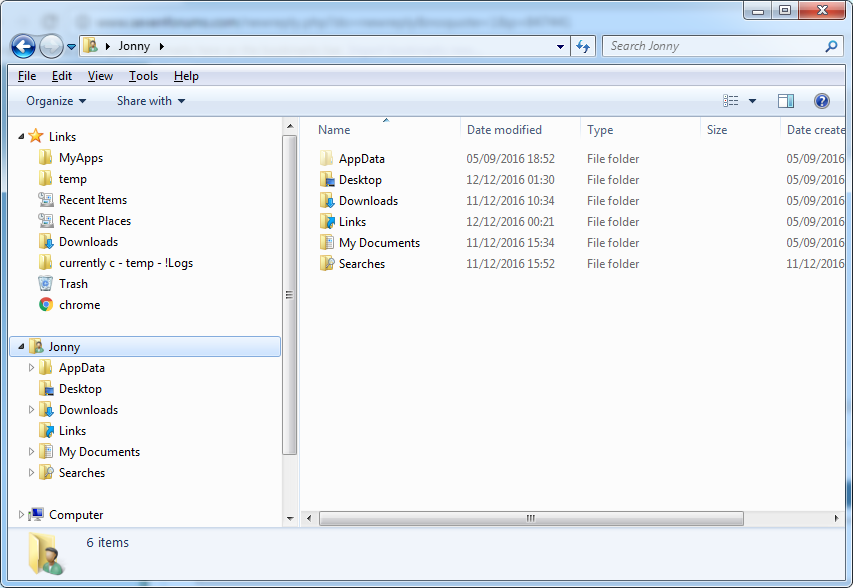
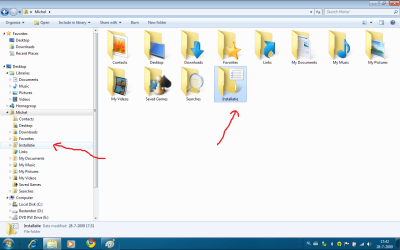
Now in the explorer you will see the following.
User Folder - Create Your Own Special Folders-finished.png

I gave the folder another icon, through the properties-> customize->change icon.
Warning!! for chosing a icon don't use shell32.dll because the icons will show up to small in the right pane, browse to \windows\system32\imageres.dll instead and chose an icon from there.

You might also notice that your folder has an shortcut arrow and mine doesn't.

For getting rid of the shortcut arrows, you can go to this great tutorial of our esteemed colleague "Brink":
http://www.sevenforums.com/tutorials...e-restore.html
Good luck.


Published by
Expelled
Join Date: Jul 2009
Location: Netherlands
Posts: 2,115
SquonkSC is an unknown quantity at this point

Tutorial Tools
08-07-2009   #1
pacinitaly


windows 7 professional & ultimate 64bit laptops


folder created, can't access it

I tried this on my vista 32bit laptop.
sorry, it does not work.
It created the folder, I choose the icon from the .dll, then I tried to open it and got the attached error


Last edited by pacinitaly; 09-02-2010 at 07:43 AM..
My System SpecsSystem Spec
08-07-2009   #2
mickey megabyte


ultimate 64 sp1


it's a tutorial for window 7
My System SpecsSystem Spec
08-07-2009   #3
SquonkSC


Win7 Build 7600 x86


Quote   Quote: Originally Posted by pacinitaly View Post
I tried this on my vista 32bit laptop.
sorry, it does not work.
It created the folder, I choose the icon from the .dll, then I tried to open it and got the attached error
Should work for Vista also.


The screenshot's error message tells you what's wrong.

Your link is pointing to a location that does not exist, or the location is not accessible. (user rights)

But for now, I assume you mistyped the location, or made a mistake in the mklink syntax.

Just read the tutorial thoroughly and try it again, and pay attention to spaces and other details.

Good luck

edit: Make sure you use your own location names, not the ones I typed.
they serve merely as example.
My System SpecsSystem Spec
.


08-07-2009   #4
pacinitaly


windows 7 professional & ultimate 64bit laptops


forget it...

thanks anyway, it just won't work. I took ownership of my profile folder too.
It's cool, I can create a folder in the links folder as I've done B4

the folder is there, I'm able to change icon but can't open it. everytime I click the folder, I get this:


C:\Users\carmine\2review\2review\2review\2review\2review\2review\2review\2review\2review\2review\2re view\2review\2review\2review\2review\2review\2review\2review\2review\2review\2review\2review\2review \2review\2review\2review\2review\2review\2review\2review

Last edited by pacinitaly; 09-02-2010 at 07:43 AM..
My System SpecsSystem Spec
08-07-2009   #5
SquonkSC


Win7 Build 7600 x86


Quote   Quote: Originally Posted by pacinitaly View Post
forget it...

thanks anyway, it just won't work. I took ownership of my profile folder too.
It's cool, I can create a folder in the links folder as I've done B4
Good,

That "links folder" makes the mklink kind of obsolete anyway.


note:
the mklink dates back to win2000 and works on xp, vista and Windows 7.

Don't know why it won't work for you, but Iam sure it has something to do with your security settings.

But I'm glad you found a (better) alternative.

greetz
My System SpecsSystem Spec
08-07-2009   #6
pacinitaly


windows 7 professional & ultimate 64bit laptops


thank you, stay well
My System SpecsSystem Spec
01-07-2010   #7
lucazav


Windows 7


Where is the "Location" tab?

Hi,

I create my special folder as you explain on Windows 7. It works great! But when I right-click on this new folder, I can't see the "Location" tab... Is there something I miss?
Thank you.
My System SpecsSystem Spec
04-23-2010   #8
psikofunkster


Windows 7 32 bits.


Thanks for your tutorial SquonkSC.
My System SpecsSystem Spec
07-17-2010   #9
jberghem


Windows 7 Ultimate


Bogus Tutorial

This is not creating a "special folder"

This is simply the old DOS way of making a shortcut.

cd\users\username = change directory to \users\username the same as just hitting the "username" link in your start menu.
mklink /d Installatie d:\Installatie = make a link (synonym to shortcut) to the directory d:\Installatie and call it Installatie and this is just the same command the windows GUI sends when you right click in the folder than go to new -> shortcut.

That is also why you get the shortcut arrow. Sorry no special folder at all!!

Please do not write tutorials if you're not really sure of what you're doing!

Is there no moderator in this forum that checks these tutorials?

BTW: if you want a "special folder" (which is actually just a regular folder in your user directory) and have it appear in the favorites list in the left panel, just create a folder, name it and drag and drop it to the favorites list.
My System SpecsSystem Spec
Comment

User Folder - Create Your Own Special Folders problems?


Tutorial Tools


Similar Threads for: User Folder - Create Your Own Special Folders
Windows 7 Tutorial Category
Removing unwanted folders from the user folder General Discussion
powershell script to create user folders and set permissions Software
How do I recreate the special "My Videos" user folder? General Discussion
PrintHood shortcut folder in User Folders? Customization
Cant create new folders in program files folder General Discussion


All times are GMT -5. The time now is 05:54 AM.


Windows 7 Forums is an independent web site and has not been authorized,
sponsored, or otherwise approved by Microsoft Corporation.
"Windows 7" and related materials are trademarks of Microsoft Corp.
© Designer Media Ltd
  

1 2 3 4 5 6 7 8 9 10 11 12 13 14 15 16 17 18 19 20 21 22 23 24 25 26 27 28 29 30