
How to Restore Default Location of User Folders in Windows 7 and Windows 8
Information
This will show you how to restore the default location of all or a single user folder of your choice in Windows 7 and Windows 8.
Note
If you have duplicate user folders instead, then you will need to backup the contents of the duplicate user folders, do OPTION TWO below, delete the duplicate folders, then you may need to restart the computer a couple of times first before the default location is restored.
Windows 8.1 Update released on April 8th 2014 via Windows Update, renamed SkyDrive to OneDrive.
Windows 8.1 Update released on April 8th 2014 via Windows Update, renamed SkyDrive to OneDrive.
CONTENTS:
- Option One: To Restore Default Location of User Folders in Properties
- Option Two: To Restore Default Location of User Folders using a BAT file
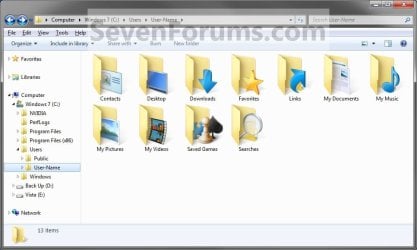
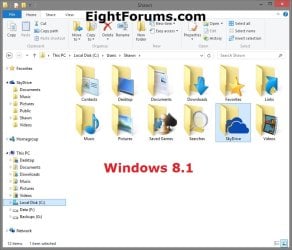
EXAMPLE: User folders
NOTE: This is at the default C:\Users\(user-name) location.
OPTION ONE
To Restore Default Location of User Folders in Properties
NOTE: If using this option does not restore the user folder back to the default location, then use OPTION TWO below instead.
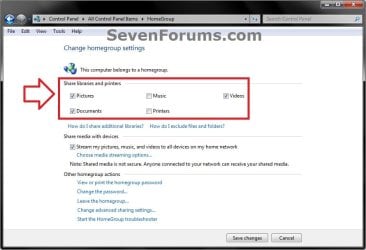
1. If you are in a homegroup, then you will need to change the homegroup settings to no longer share the user folder (ex: My Music) that you want to move first by unchecking the folder and clicking on Save Changes. (see screenshot below)
NOTE: This is so the user folder (ex: My Music) will not be shared on the homegroup anymore.
2. Press the Windows+R keys to open the Run dialog, type shell:UsersFilesFolder, and press enter.
NOTE: This will open your C:\Users\(user-name) folder.
3. Right click or press and hold on the user folder (ex: My Music) that you want to restore the default location for, and click/tap on Properties.
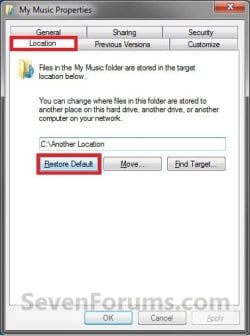
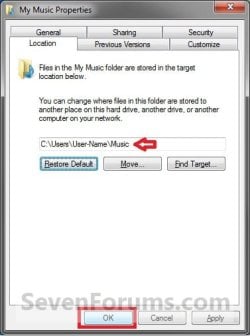
4. Click/tap on the Location tab, and Restore Default button. (See screenshot below)
5. Click/tap on OK. (See screenshot below)
NOTE: Notice that the location has changed to the default C:\Users\(user-name) location.
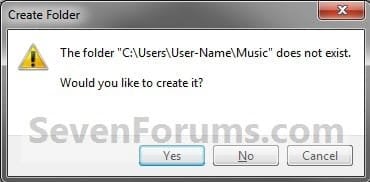
6. Click/tap on Yes. (See screenshot below)
Note
If you have a folder in the default location named for the user folder already, then you will not see this dialog box.
Windows 8 will not have the "My" in front of the user folder name anymore.
User Folder
|
Folder Name
Contacts
|Contacts
Desktop |Desktop
My Documents |Documents
Downloads |Downloads
Favorites |Favorites
Links |Links
My Music |Music
My Pictures |Pictures
OneDrive (Windows 8.1 Update)|OneDrive
Saved Games |Saved Games
Searches |Searches
SkyDrive (Windows 8.1)|SkyDrive
My Videos |Videos
Windows 8 will not have the "My" in front of the user folder name anymore.
Desktop |Desktop
My Documents |Documents
Downloads |Downloads
Favorites |Favorites
Links |Links
My Music |Music
My Pictures |Pictures
OneDrive (Windows 8.1 Update)|OneDrive
Saved Games |Saved Games
Searches |Searches
SkyDrive (Windows 8.1)|SkyDrive
My Videos |Videos
7. Click/tap on Yes. (See screenshot below)
WARNING: If you do not click/tap on Yes, then you will have two copies of this user folder at the C:\Users\(user-name) location. One will be a normal folder (same name) with the contents and the other as the now restored user folder. It is recommended that you click/tap on YES.
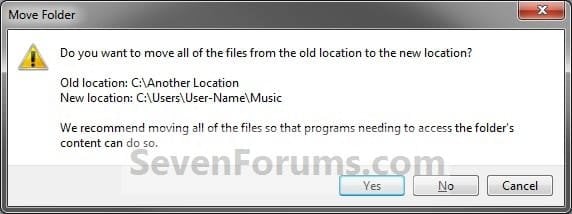
8. After a few seconds when the location has been restored, the Properties window (screenshot under step 5) will then close.
9. If you are in a homegroup, then you can now change the homegroup settings back to share the user folder (ex: My Music) again if you like by checking the folder and clicking on Save Changes. (see screenshot below)
OPTION TWO
To Restore Default Location of User Folders using a BAT file
Note
This is an example of the contents of the .bat files below. The parts in red are what will vary per .bat file based on what user folder it is for.
Code:
@echo off

taskkill /f /im explorer.exe

timeout /t 2 /nobreak >nul

if not exist "%UserProfile%\[B][COLOR=red]Pictures[/COLOR][/B]" mkdir "%UserProfile%\[COLOR=red][B]Pictures[/B][/COLOR]"

reg add "HKCU\Software\Microsoft\Windows\CurrentVersion\Explorer\Shell Folders" /v "[COLOR=red][B]My Pictures[/B][/COLOR]" /t REG_SZ /d "C:\Users\%USERNAME%\[COLOR=red][B]Pictures[/B][/COLOR]" /f

reg add "HKCU\Software\Microsoft\Windows\CurrentVersion\Explorer\User Shell Folders" /v "[COLOR=red][B]My Pictures[/B][/COLOR]" /t REG_EXPAND_SZ /d %%USERPROFILE%%"\[COLOR=red][B]Pictures[/B][/COLOR]" /f

attrib +r -s -h "%USERPROFILE%\[COLOR=red][B]Pictures[/B][/COLOR]" /S /D

timeout /t 1 /nobreak >nul

start explorer.exe
1. Do step 2 to 13 below for what user folder you need to restore the default location of.
2. To Restore the Default Contacts Folder Location
A) Click/tap on the download button below to download the file below, and go to step 14 below.
Restore_Contacts_Default_Location.bat
Download
3. To Restore the Default Desktop Folder Location
A) Click/tap on the download button below to download the file below, and go to step 14 below.
Restore_Desktop_Default_Location.bat
Download
4. To Restore the Default My Documents Folder Location
A) Click/tap on the download button below to download the file below, and go to step 14 below.
Restore_Documents_Default_Location.bat
Download
5. To Restore the Default Downloads Folder Location
A) Click/tap on the download button below to download the file below, and go to step 14 below.
Restore_Downloads_Default_Location.bat
Download
6. To Restore the Default Favorites Folder Location
A) Click/tap on the download button below to download the file below, and go to step 14 below.
Restore_Favorites_Default_Location.bat
Download
7. To Restore the Default Links Folder Location
A) Click/tap on the download button below to download the file below, and go to step 14 below.
Restore_Links_Default_Location.bat
Download
8. To Restore the Default My Music Folder Location
A) Click/tap on the download button below to download the file below, and go to step 14 below.
Restore_Music_Default_Location.bat
Download
9. To Restore Default OneDrive Folder Location in Windows 8.1 Update
A) Click/tap on the download button below to download the file below, and go to step 14 below.
Restore_OneDrive_Default_Location.bat
Download
10. To Restore the Default My Pictures Folder Location
A) Click/tap on the download button below to download the file below, and go to step 14 below.
Restore_Pictures_Default_Location.bat
Download
11. To Restore the Default Saved Games Folder Location
A) Click/tap on the download button below to download the file below, and go to step 14 below.
Restore_Saved_Games_Default_Location.bat
Download
12. To Restore the Default Searches Folder Location
A) Click/tap on the download button below to download the file below, and go to step 14 below.
Restore_Searches_Default_Location.bat
Download
13. To Restore the Default My Videos Folder Location
A) Click/tap on the download button below to download the file below, and go to step 14 below.
Restore_Videos_Default_Location.bat
Download
14. Save the .bat file to your Desktop.
15. Unblock the downloaded .bat file(s).
16. Double click/tap on the downloaded .bat file to run it.
17. The .bat file will now kill explorer causing your screen to go blank, then open a command prompt to quickly restore the default location of the folder in the registry, restore the default attributes of the folder, restart explorer, and close the command prompt.
18. Repeat step 1 above for any other user folder you need to restore the default location of.
19. When finished, check the user folder(s) to verify that they have been restored to their default location.
20. If the user folder(s) still have not been restored to their default locations, then restart the computer and check again.
21. When restored, copy your files from the old folder location back into your now restored default folder location in "C:\Users\(user-name)".
That's it,
Shawn
Related Tutorials
- How to Change the Default Location of User Folders in Windows 7 and Windows 8
- How to Customize Default User Profile in Audit Mode
- How to Change the Default "Screenshots" Folder Location in Windows 8
- How to Change the Windows 7 Default User Folder Icons
- How to Pin Your User Files Folder to the Windows 7 Taskbar
- How to Create Your Own Special User Folder
- How to Restore Windows 7 Default User Folder Icons
- How to Add or Remove your User Folder from the Windows 7 Navigation Pane
- How to Restore the Windows 7 Public Folders
- How to Allow or Prevent Users to Move their User Folders to a New Location
- How to Change the Default Location of a User Profile in Windows 7 and Vista
- How to Create User Accounts on another Partition or Disk During Windows 7 Installation
- How to Change the Name of "My Documents" without Renaming the Folder
- How to Change the User Folder Name of a User Profile in Windows 7
- How to Restore Default Junction Points in Windows
Attachments
-
Restore_Contacts_Default_Location.bat767 bytes · Views: 10,728
-
Restore_Desktop_Default_Location.bat700 bytes · Views: 16,986
-
Restore_Documents_Default_Location.bat712 bytes · Views: 33,489
-
Restore_Downloads_Default_Location.bat772 bytes · Views: 25,955
-
Restore_Favorites_Default_Location.bat714 bytes · Views: 9,960
-
Restore_Links_Default_Location.bat752 bytes · Views: 9,513
-
Restore_Music_Default_Location.bat692 bytes · Views: 11,948
-
Restore_OneDrive_Default_Location.bat767 bytes · Views: 4,606
-
Restore_Pictures_Default_Location.bat713 bytes · Views: 13,506
-
Restore_Saved_Games_Default_Location.bat782 bytes · Views: 5,841
-
Restore_Searches_Default_Location.bat767 bytes · Views: 5,345
-
Restore_Videos_Default_Location.bat697 bytes · Views: 10,687
Last edited:


 ).
).
