
User Profile Service failed the logon. User profile cannot be loaded.

Fix "The User Profile Service failed the logon. User profile cannot be loaded." Error in Windows 7

   Information
A user profile is a collection of settings that make the computer look and work the way you want it to for a user account. It contains the account's settings for desktop backgrounds, screen savers, pointer preferences, sound settings, and other features. User profiles ensure that your personal preferences are used whenever you sign in to Windows.

A user profile is different from a user account, which you use to sign in to Windows. Each user account has at least one user profile associated with it.

This tutorial will show you how to fix when you log on to Windows 7 using a temporary profile, and get the following error message:

The User Profile Service failed the logon. User profile cannot be loaded.

This tutorial was updated from our Vista Forums tutorial created 02-10-2008:
The User Profile Service failed the logon. User profile cannot be loaded. - Vista Forums

For additional details on this user profile error, see also:
Error message: "The User Profile Service failed the logon. User profile cannot be loaded

   Note
Known Causes:
  • The C:\Users\(user-name) user profile folder was manually deleted instead of properly deleting the user account through User Accounts in the Control Panel. A user profile that is manually deleted does not remove the security identifier (SID) from the profile list in the registry. Since the SID is still present, Windows 7 will still try to load the profile by using the ProfileImagePath that points to a nonexistent path. Therefore, the profile cannot be loaded.
  • The C:\Users\(user-name) user profile folder itself was manually renamed, instead of using the proper method in this tutorial.
  • An unknown issue with the user profile entering into a backup state occurred.
  • Corrupted user profile.
  • Occasionally, Windows 7 might not read your user profile correctly, for example, if your antivirus software is scanning your computer while you try to log on. Try restarting your computer and logging on with your user account again to resolve the issue before following the options below.


In Preparation:

Log On to an Administrator Account


NOTE: You must be logged on to another administrator account using either step below before you will be able to move on to either OPTION ONEor OPTION TWO below.
1. To Log on to another Administrator account.
NOTE: If you do not have another Administrator account, then proceed to step 2.
A) Log off, and log on to an available administrator account that doesn't have this error.

B) Go to either OPTION ONEor OPTION TWO below for what you would like to do.
OR

2. To Boot into "Safe Mode" and Use the built-in Administrator account
A) Using your "retail" Windows 7 installation disc or a created system repair disc, boot into Safe Mode.

B) Do either step C or D below depending if Safe Mode booted into the built-in Administrator account by default or not.
NOTE: If this user account with the user profile error was the only administrator account you had created or enabled, then Safe Mode may automatically boot into the built-in Administrator account.

C) If Safe Mode did not boot into the built-in Administrator account by default, then enable the built-in Administrator account, log off in Safe Mode, and log on to the built-in Administrator account to logon to that account in Safe Mode.

D) If Safe Mode did boot into the built-in Administrator account by default, then go to either OPTION ONE or OPTION TWO below for what you would like to do.
OR

3. To Enable the Built-in Administrator account at Boot
A) For how, see: How to Enable the Built-in Elevated "Administrator" Account from WinRE

B) When enabled, log in to the built-in Administrator account, and go to either OPTION ONE or OPTION TWO below for what you would like to do


OPTION ONE

To Fix the User Account Profile


1. Before starting, it is highly recommended that you create a system restore point in case you make a mistake while in the registry. This way you will easily be able to do a system restore to use the created restore point to undo the mistake.

2. Open the Start Menu, type regedit in the search box, and press Enter.

3. If prompted by UAC, then click on Yes.

4. In regedit, navigate to the location below. (see screenshot below step 5A)
Code:
HKEY_LOCAL_MACHINE\SOFTWARE\Microsoft\Windows NT\CurrentVersion\ProfileList
5. In the left pane, click on a S-1-5 (SID) key with a long number.
A) In the right pane of the selected S-1-5 (SID) key, look at the Data value of ProfileImagePath to see if it is the user account (ex: Moderator) with the error.
SID_Reg.jpg
B) If not, then repeat steps 5 and 5A until you have the correct S-1-5 (SID) key with a long number selected.

C) If it is, then continue on to step 6 or step 7 depending on if you have either one or two S-1-5 (SID) keys listed with the exact same long number. One without .bak, and one with .bak at the end.
6. If you have Two S-1-5 (SID) keys with the Same Long Numbers
NOTE: This is if you have two S-1-5 folders (SID key) with the exact same long numbers, but the second one has .bak at the end of the long numbers and the first one doesn't.
A) In the left pane, right click on the first (top) S-1-5..... folder (SID key) that does not have .bak at the end of the numbers and click Rename. (see screenshot below)
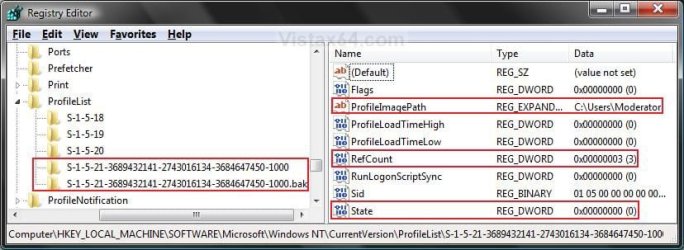
Repair.jpg
B) Add .bk to the end of the numbers. (see screenshot below)
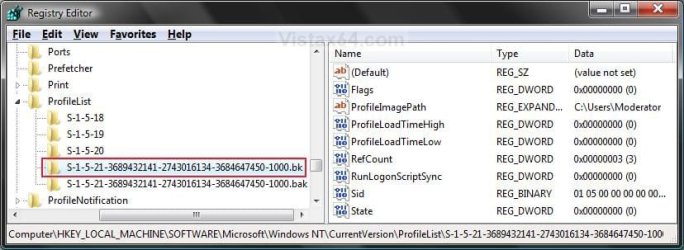
Repair_bk.jpg
C) In the left pane, right click on the second S-1-5..... folder (SID key) with .bak at the end of the numbers and click Rename. (see screenshot below step 6B)

D) Remove only .bak from the end of the numbers and press Enter. (see screenshot below step 6B)

E) Now go back and Rename the first one with .bk to .bak now at the end of the numbers and press Enter. (see screenshot below)
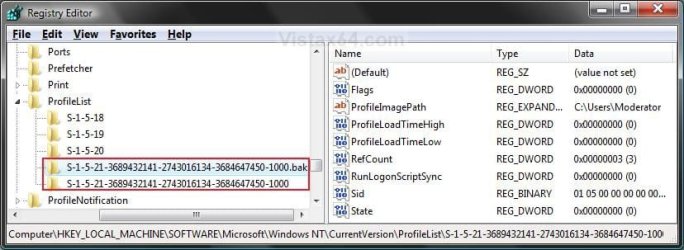
Repar_bak.jpg
F) Go to step 8.
7. If you have Only One S-1-5 (SID) key with .bak
NOTE: This is if you have only one S-1-5 folder (SID key) with long numbers and ended with .bak.
A) In the left pane, right click on the S-1-5..... folder (SID key) with .bak at the end of the numbers and click Rename. (see screenshot below step 7B)

B) Remove only .bak at the end of the numbers and press Enter. (see screenshot below and below step 10)
Repair_Reg2.jpg
8. In the right pane of the one without .bak now, right click on RefCount and click on Modify. (see screenshot below step 10)
NOTE: If you do not have RefCount, then right click on a empty space in the right pane and click New and DWORD (32 bit) Value, then type RefCount and press Enter. This value for this entry will reset and return back to the original value after you have restarted the computer and logged on to the account.
A) Type 0 (number) and click on OK. (see screenshot below)
Modify_RefCount.jpg
9. In the right pane of the one without .bak now, right click on State and click on Modify. (see screenshot below step 10)
NOTE: This value for this entry will reset and return back to the original value after you have restarted the computer and logged on to the account.
A) Type 0 (number) and click on OK. (see screenshot below)
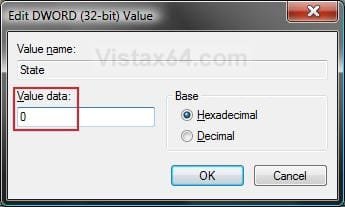
Modify_State.jpg
10. The registry will now look like this for the one without .bak now. (see screenshot below)
Repair_Reg2.jpg
11. Close regedit, and restart the computer.

12. See if you are able to log on to the use account now without getting this error.

   Tip
If this still does not help, then either try:


OPTION TWO

To Delete the User Account and Create a New User Account


NOTE: This option is only if you do not care about losing the user account with this error and possibly all contents of it's C:\Users\(user-name) user profile folder. Your programs will still be installed and unaffected.
1. Before starting, it is highly recommended that you create a system restore point in case you make a mistake while in the registry. This way you will easily be able to do a system restore to use the created restore point to undo the mistake.

2. Create a new user account that is the same type (standard or administrator) as the user account with this error.

3. If you are able to, you could copy the contents of the user folders from the old user account's C:\Users\(user-name) user profile folder with the error into the new account's (step 2) C:\Users\(user-name) user profile folder. Be sure to also copy any shortcuts in the Start Menu from the old user account into the new user account as well.

4. In User Accounts from the Control Panel, delete the user account with the error.

5. Open the Start Menu, type regedit in the search box, and press Enter.

6. If prompted by UAC, then click on Yes.

7. In regedit, navigate to the location below. (see screenshot below step 8A)
Code:
HKEY_LOCAL_MACHINE\SOFTWARE\Microsoft\Windows NT\CurrentVersion\ProfileList
8. In the left pane, click on a S-1-5 (SID) key with a long number.
A) In the right pane of the selected S-1-5 (SID) key, look at the Data value of ProfileImagePath to see if it is the user account (ex: Moderator) with the error.
SID_Reg.jpg
B) If not, then repeat steps 8 and 8A until you have the correct S-1-5 (SID) key with a long number selected.

C) If it is, then continue on to step 9.
9. Right click on the selected SID key with the long number, and click on Delete.

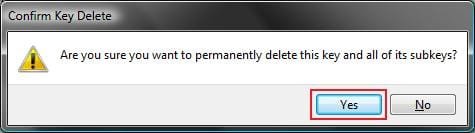
10. Click on Yes to confirm deletion. (see screenshot below)
Confirm.jpg
11. If there is another SID key directly below the selected SID key (step 9) with the exact same long number with .bak at the end, then right click on this same SID key with .bak on it, and click on Delete. (see screenshot below)
Repair.jpg

A) Click on Yes to confirm deletion. (see screenshot below)
Confirm.jpg
12. When finished, close regedit.

13. Restart the computer, and log on to your new account.


That's it,
Shawn


Last edited:
Optional cause

I work in an IT department in a school district, and we've run across this error message in conjunction with a full hard drive. We have software we didn't realize was dumping 300 megs of data into each new user profile, and after hundreds of students had logged in, the machines completely ran out of space.

I don't know how common this issue would be for home users, but for all those school districts out there this could be handy to know.
 

My Computer

OS
Windows 7 Enterprise x64
Hello Parslip, and welcome to Seven Forums. Thank you for the addition. :)
 

My Computer

Computer type
PC/Desktop
Computer Manufacturer/Model Number
Self built custom
OS
64-bit Windows 11 Pro for Workstations
CPU
Intel i7-8700K OC'd to 5 GHz
Motherboard
ASUS ROG Maximus XI Formula Z390
Memory
64 GB (4x16GB) G.SKILL TridentZ RGB DDR4 3600 MHz
Graphics Card(s)
ASUS ROG-STRIX-GTX1080TI-O11G-GAMING
Sound Card
Integrated
Monitor(s) Displays
2 x Samsung Odyssey G7 27"
Screen Resolution
2560x1440
Hard Drives
1TB Samsung 990 PRO M.2,
4TB Samsung 990 PRO PRO M.2,
TerraMaster F8 SSD Plus NAS
PSU
Seasonic Prime Titanium 850W
Case
Thermaltake Core P3
Cooling
Corsair Hydro H115i
Keyboard
Logitech wireless K800
Mouse
Logitech MX Master 4
Internet Speed
2 Gb/s Download and 100 Mb/s Upload
Antivirus
Malwarebyte Anti-Malware Premium
Browser
Google Chrome
Other Info
Logitech Z625 speaker system,
Logitech BRIO 4K Pro webcam,
HP Color LaserJet Pro MFP M477fdn,
APC SMART-UPS RT 1000 XL - SURT1000XLI,
Galaxy S23 Plus phone
I get this message when I only have one Admin account and I go into the User creation under the control panel and create a new one and try to log into it, any help?
 

My Computer

OS
Windows 7 Home Premium 32bit SP1
CPU
AMD Phenom II X4 955
Motherboard
ASUSTeK Computer INC. M4A79XTD EVO (AM3)
Hello Batroo,

If this just started to happen recently, then you might see if doing a system restore at boot using a restore point (if available) dated before this started may help.
 

My Computer

Computer type
PC/Desktop
Computer Manufacturer/Model Number
Self built custom
OS
64-bit Windows 11 Pro for Workstations
CPU
Intel i7-8700K OC'd to 5 GHz
Motherboard
ASUS ROG Maximus XI Formula Z390
Memory
64 GB (4x16GB) G.SKILL TridentZ RGB DDR4 3600 MHz
Graphics Card(s)
ASUS ROG-STRIX-GTX1080TI-O11G-GAMING
Sound Card
Integrated
Monitor(s) Displays
2 x Samsung Odyssey G7 27"
Screen Resolution
2560x1440
Hard Drives
1TB Samsung 990 PRO M.2,
4TB Samsung 990 PRO PRO M.2,
TerraMaster F8 SSD Plus NAS
PSU
Seasonic Prime Titanium 850W
Case
Thermaltake Core P3
Cooling
Corsair Hydro H115i
Keyboard
Logitech wireless K800
Mouse
Logitech MX Master 4
Internet Speed
2 Gb/s Download and 100 Mb/s Upload
Antivirus
Malwarebyte Anti-Malware Premium
Browser
Google Chrome
Other Info
Logitech Z625 speaker system,
Logitech BRIO 4K Pro webcam,
HP Color LaserJet Pro MFP M477fdn,
APC SMART-UPS RT 1000 XL - SURT1000XLI,
Galaxy S23 Plus phone
Hello Batroo,

If this just started to happen recently, then you might see if doing a system restore at boot using a restore point (if available) dated before this started may help.

Before I do the System restore, I do have a question. Could what Parslip said be what's happening, I have a 1.5TB HDD with about 800gigs of that filled, and if I'm understanding what he's saying, when I open the new account, I'm basically doubling that to 1.6TB's which I do not have enough space for.

Also this is the first time I've tried creating a new User account, so I don't know of a restore point that would help.
 
Last edited:

My Computer

OS
Windows 7 Home Premium 32bit SP1
CPU
AMD Phenom II X4 955
Motherboard
ASUSTeK Computer INC. M4A79XTD EVO (AM3)
Simply creating a new user account wouldn't double your HDD space at all. A new user account may add around 50 MB plus whatever you save in it's C:\Users\(user-name) folders.
 

My Computer

Computer type
PC/Desktop
Computer Manufacturer/Model Number
Self built custom
OS
64-bit Windows 11 Pro for Workstations
CPU
Intel i7-8700K OC'd to 5 GHz
Motherboard
ASUS ROG Maximus XI Formula Z390
Memory
64 GB (4x16GB) G.SKILL TridentZ RGB DDR4 3600 MHz
Graphics Card(s)
ASUS ROG-STRIX-GTX1080TI-O11G-GAMING
Sound Card
Integrated
Monitor(s) Displays
2 x Samsung Odyssey G7 27"
Screen Resolution
2560x1440
Hard Drives
1TB Samsung 990 PRO M.2,
4TB Samsung 990 PRO PRO M.2,
TerraMaster F8 SSD Plus NAS
PSU
Seasonic Prime Titanium 850W
Case
Thermaltake Core P3
Cooling
Corsair Hydro H115i
Keyboard
Logitech wireless K800
Mouse
Logitech MX Master 4
Internet Speed
2 Gb/s Download and 100 Mb/s Upload
Antivirus
Malwarebyte Anti-Malware Premium
Browser
Google Chrome
Other Info
Logitech Z625 speaker system,
Logitech BRIO 4K Pro webcam,
HP Color LaserJet Pro MFP M477fdn,
APC SMART-UPS RT 1000 XL - SURT1000XLI,
Galaxy S23 Plus phone
Simply creating a new user account wouldn't double your HDD space at all. A new user account may add around 50 MB plus whatever you save in it's C:\Users\(user-name) folders.

Ah ok, I was looking through the Event Viewer to see if it had anything that could help and the error it gave me was Event ID 1500

"Windows cannot log you on because your profile cannot be loaded. Check that you are connected to the network, and that your network is functioning correctly.

DETAIL - The system cannot find the file specified."

And Event ID 1511

"Windows cannot find the local profile and is logging you on with a temporary profile. Changes you make to this profile will be lost when you log off."
 

My Computer

OS
Windows 7 Home Premium 32bit SP1
CPU
AMD Phenom II X4 955
Motherboard
ASUSTeK Computer INC. M4A79XTD EVO (AM3)
Simple solution for me hope it works for you

After 48 hours struggling with this probem of the new user profile failing to load and visiting forums for vista everywhere and fiddling with my registry as described above, which led me to hell and back, I finally found a little paragraph somewhere in a blog. It said switch off windows defender - restart computer and then switch off every bit of Norton Security...then create the new user profile and load it, then put your Norton and Windows defender back on. IT WORKED.
 

My Computer

OS
vista 32
I've tried the registry fix shown with no luck. System won't allow me change the entries. Plus, I've got 4 long S-1-5 strings. One ends in .ba, one in .bak, the other two just a number. Any ideas?? This is my 2nd registry fix on a 6 month old computer. Little frustrated. The store that sold it says $200 to replace OS.
 

My Computer

OS
Windows 7
Have you tried what I described in my last post?, i.e. switching off Windows Defender, restart your computer and then turn off whatever security system you have ( all of it). Then create the new user account and then reinstate your security. It worked for me and I didn't need to fiddle with the registry, though I had originally tweaked it and then put it back to what it was when it didn't solve the problem. I did first of all create the windows Vista own unique built in administrator account as described in Brink's reply, but neither that one nor my own administrator user account was able to create another user profile until after I had done as I describe above. The new user profile just loaded without further problem after doing that
 

My Computer

OS
vista 32
I've tried the registry fix shown with no luck. System won't allow me change the entries. Plus, I've got 4 long S-1-5 strings. One ends in .ba, one in .bak, the other two just a number. Any ideas?? This is my 2nd registry fix on a 6 month old computer. Little frustrated. The store that sold it says $200 to replace OS.

Hello Bobbio, and welcome to Seven Forums.

If you have not already, doing a system restore at boot using a restore point (if available) dated before this error may help?
 

My Computer

Computer type
PC/Desktop
Computer Manufacturer/Model Number
Self built custom
OS
64-bit Windows 11 Pro for Workstations
CPU
Intel i7-8700K OC'd to 5 GHz
Motherboard
ASUS ROG Maximus XI Formula Z390
Memory
64 GB (4x16GB) G.SKILL TridentZ RGB DDR4 3600 MHz
Graphics Card(s)
ASUS ROG-STRIX-GTX1080TI-O11G-GAMING
Sound Card
Integrated
Monitor(s) Displays
2 x Samsung Odyssey G7 27"
Screen Resolution
2560x1440
Hard Drives
1TB Samsung 990 PRO M.2,
4TB Samsung 990 PRO PRO M.2,
TerraMaster F8 SSD Plus NAS
PSU
Seasonic Prime Titanium 850W
Case
Thermaltake Core P3
Cooling
Corsair Hydro H115i
Keyboard
Logitech wireless K800
Mouse
Logitech MX Master 4
Internet Speed
2 Gb/s Download and 100 Mb/s Upload
Antivirus
Malwarebyte Anti-Malware Premium
Browser
Google Chrome
Other Info
Logitech Z625 speaker system,
Logitech BRIO 4K Pro webcam,
HP Color LaserJet Pro MFP M477fdn,
APC SMART-UPS RT 1000 XL - SURT1000XLI,
Galaxy S23 Plus phone
Related Logon Problem

Related to this issue I have just encountered the problem described below and wondered if anybody can throw any light on this one:

I have several hard drives, Win7 and Programs on a SSD (Drive C, User Profile on a HDD (Drive A) and 2 other HDDs for data (Drives B and D)
I don’t use drive D any longer and wanted to remove it to use elsewhere.

Disk numbers in Disk Management do not apparently relate to SATA port numbers (so I read on this forum) so I set about disconnecting HDDs one at a time and rebooting in order to identify the one I wanted to remove.

On the first attempt Windows booted but I got the message “User Profile Service failed the logon. User profile cannot be loaded.” I was given the option to logon as a different user so I tried “Administrator” as there is no other account on my PC. This resulted in the message “Account suspended” or words to that effect. (I can’t remember the exact phrase.)
So assuming that I had disconnected Drive A containing my User Profile, I reconnected it thinking that this would resolve the problem. It didn’t! The same state of affairs described above persisted.
I ended up doing a system restore from a system image created only a few hours earlier. This cured the problem.

So what I would like to know is
  • Why did this happen?
and
  • How do I go about removing Drive D without causing this problem again particularly as I cannot identify which disk this is?
 

My Computer

OS
Windows 7 64 bit
CPU
i7 920
Motherboard
Gigabyte GA-EX58-UD3R
Memory
Corsair Vengeance 1600 12GB
Graphics Card(s)
Nvidia GeForce GT240
Monitor(s) Displays
Samsung Syncmaster 2443BW
Hard Drives
Samsung HD103SJ 1TB
Samsung HD103SJ 1TB
Samsung HD204UI 2TB
PSU
Coolermaster 600W Pro M Modular
Case
Coolermaster Elite 330
Cooling
Akasa Nero AK967 Silent
Hello Peter,

Not sure what happened, but I would recommend to restore your user profile back to C: to avoid any more issues like that again.
http://www.sevenforums.com/tutorials/87555-user-profile-change-default-location.html
If you are just wanting to save HDD space from the files in your user folders, then you might consider this below to be able to access the files from your libraries with the files actually located where you like instead. This way you will not have to worry about any potential issues that come with moving user folder locations.
Hope this helps, :)
Shawn
 

My Computer

Computer type
PC/Desktop
Computer Manufacturer/Model Number
Self built custom
OS
64-bit Windows 11 Pro for Workstations
CPU
Intel i7-8700K OC'd to 5 GHz
Motherboard
ASUS ROG Maximus XI Formula Z390
Memory
64 GB (4x16GB) G.SKILL TridentZ RGB DDR4 3600 MHz
Graphics Card(s)
ASUS ROG-STRIX-GTX1080TI-O11G-GAMING
Sound Card
Integrated
Monitor(s) Displays
2 x Samsung Odyssey G7 27"
Screen Resolution
2560x1440
Hard Drives
1TB Samsung 990 PRO M.2,
4TB Samsung 990 PRO PRO M.2,
TerraMaster F8 SSD Plus NAS
PSU
Seasonic Prime Titanium 850W
Case
Thermaltake Core P3
Cooling
Corsair Hydro H115i
Keyboard
Logitech wireless K800
Mouse
Logitech MX Master 4
Internet Speed
2 Gb/s Download and 100 Mb/s Upload
Antivirus
Malwarebyte Anti-Malware Premium
Browser
Google Chrome
Other Info
Logitech Z625 speaker system,
Logitech BRIO 4K Pro webcam,
HP Color LaserJet Pro MFP M477fdn,
APC SMART-UPS RT 1000 XL - SURT1000XLI,
Galaxy S23 Plus phone
An impressivley fast response, thanks.

The reason I don't have my User Profile on Drive C is that it is a 120 GB SSD and does not have the room for all my data as well as Windows and Programs. Also it was recommended to avoid unnecessary writes to the SSD so I followed the tuorial in this forum to move my account to another drive when I installed the SSD and cloned my system onto it.

Is what you suggest contrary to what I have read about SSDs?
 

My Computer

OS
Windows 7 64 bit
CPU
i7 920
Motherboard
Gigabyte GA-EX58-UD3R
Memory
Corsair Vengeance 1600 12GB
Graphics Card(s)
Nvidia GeForce GT240
Monitor(s) Displays
Samsung Syncmaster 2443BW
Hard Drives
Samsung HD103SJ 1TB
Samsung HD103SJ 1TB
Samsung HD204UI 2TB
PSU
Coolermaster 600W Pro M Modular
Case
Coolermaster Elite 330
Cooling
Akasa Nero AK967 Silent
With the newer SSDs, you don't need to worry about read/writes anymore. :)

Either way, using libraries instead would serve the same purpose since the files would still be saved wherever you like, but also be accessable and referenced from the library on C.
 

My Computer

Computer type
PC/Desktop
Computer Manufacturer/Model Number
Self built custom
OS
64-bit Windows 11 Pro for Workstations
CPU
Intel i7-8700K OC'd to 5 GHz
Motherboard
ASUS ROG Maximus XI Formula Z390
Memory
64 GB (4x16GB) G.SKILL TridentZ RGB DDR4 3600 MHz
Graphics Card(s)
ASUS ROG-STRIX-GTX1080TI-O11G-GAMING
Sound Card
Integrated
Monitor(s) Displays
2 x Samsung Odyssey G7 27"
Screen Resolution
2560x1440
Hard Drives
1TB Samsung 990 PRO M.2,
4TB Samsung 990 PRO PRO M.2,
TerraMaster F8 SSD Plus NAS
PSU
Seasonic Prime Titanium 850W
Case
Thermaltake Core P3
Cooling
Corsair Hydro H115i
Keyboard
Logitech wireless K800
Mouse
Logitech MX Master 4
Internet Speed
2 Gb/s Download and 100 Mb/s Upload
Antivirus
Malwarebyte Anti-Malware Premium
Browser
Google Chrome
Other Info
Logitech Z625 speaker system,
Logitech BRIO 4K Pro webcam,
HP Color LaserJet Pro MFP M477fdn,
APC SMART-UPS RT 1000 XL - SURT1000XLI,
Galaxy S23 Plus phone
Many Thanks!

Thanks for your advice. I will do what you suggested then try to remove that pesky drive!
 

My Computer

OS
Windows 7 64 bit
CPU
i7 920
Motherboard
Gigabyte GA-EX58-UD3R
Memory
Corsair Vengeance 1600 12GB
Graphics Card(s)
Nvidia GeForce GT240
Monitor(s) Displays
Samsung Syncmaster 2443BW
Hard Drives
Samsung HD103SJ 1TB
Samsung HD103SJ 1TB
Samsung HD204UI 2TB
PSU
Coolermaster 600W Pro M Modular
Case
Coolermaster Elite 330
Cooling
Akasa Nero AK967 Silent
You're welcome. I hope it goes smoothly for you.
 

My Computer

Computer type
PC/Desktop
Computer Manufacturer/Model Number
Self built custom
OS
64-bit Windows 11 Pro for Workstations
CPU
Intel i7-8700K OC'd to 5 GHz
Motherboard
ASUS ROG Maximus XI Formula Z390
Memory
64 GB (4x16GB) G.SKILL TridentZ RGB DDR4 3600 MHz
Graphics Card(s)
ASUS ROG-STRIX-GTX1080TI-O11G-GAMING
Sound Card
Integrated
Monitor(s) Displays
2 x Samsung Odyssey G7 27"
Screen Resolution
2560x1440
Hard Drives
1TB Samsung 990 PRO M.2,
4TB Samsung 990 PRO PRO M.2,
TerraMaster F8 SSD Plus NAS
PSU
Seasonic Prime Titanium 850W
Case
Thermaltake Core P3
Cooling
Corsair Hydro H115i
Keyboard
Logitech wireless K800
Mouse
Logitech MX Master 4
Internet Speed
2 Gb/s Download and 100 Mb/s Upload
Antivirus
Malwarebyte Anti-Malware Premium
Browser
Google Chrome
Other Info
Logitech Z625 speaker system,
Logitech BRIO 4K Pro webcam,
HP Color LaserJet Pro MFP M477fdn,
APC SMART-UPS RT 1000 XL - SURT1000XLI,
Galaxy S23 Plus phone
Hi,

I have had 2 accounts on my laptop. One administrator and the other a guest account. I recently got the error message after my laptop froze and restarted itself.

The User Profile Service failed the logon. User profile cannot be loaded.

I went ahead and searched for this error and came across this thread. I followed the steps in trying to rename the file in my guest account as I am not able to log into my administrator account due to the error message, but I am not able to rename the file because the guest account is a read-only account with documents and files.

I do not want to re-install windows if my files on my admin account will be deleted. Is there a way to fix this without having to loose my files and/or admin account? What are options for me in this kind of situation? Thank you in advance.
 

My Computer

OS
Windows 7 Home Premium 32bit
Hello graffized, and welcome to Seven Forums.

You will need to do step 2 in the In Preparation section to boot into Safe Mode and enable the built-in Administrator. :)

Hope this helps,
Shawn
 

My Computer

Computer type
PC/Desktop
Computer Manufacturer/Model Number
Self built custom
OS
64-bit Windows 11 Pro for Workstations
CPU
Intel i7-8700K OC'd to 5 GHz
Motherboard
ASUS ROG Maximus XI Formula Z390
Memory
64 GB (4x16GB) G.SKILL TridentZ RGB DDR4 3600 MHz
Graphics Card(s)
ASUS ROG-STRIX-GTX1080TI-O11G-GAMING
Sound Card
Integrated
Monitor(s) Displays
2 x Samsung Odyssey G7 27"
Screen Resolution
2560x1440
Hard Drives
1TB Samsung 990 PRO M.2,
4TB Samsung 990 PRO PRO M.2,
TerraMaster F8 SSD Plus NAS
PSU
Seasonic Prime Titanium 850W
Case
Thermaltake Core P3
Cooling
Corsair Hydro H115i
Keyboard
Logitech wireless K800
Mouse
Logitech MX Master 4
Internet Speed
2 Gb/s Download and 100 Mb/s Upload
Antivirus
Malwarebyte Anti-Malware Premium
Browser
Google Chrome
Other Info
Logitech Z625 speaker system,
Logitech BRIO 4K Pro webcam,
HP Color LaserJet Pro MFP M477fdn,
APC SMART-UPS RT 1000 XL - SURT1000XLI,
Galaxy S23 Plus phone
Back
Top