
How to Install Windows 7 Using the "Unified Extensible Firmware Interface" (UEFI)
Information
This method can also be used for the UEFI installation of Windows 8, Windows Server 2008 SP1, Windows Server 2008 R2, and Windows Vista SP1.In addition to better interoperability, UEFI firmware provides several technical advantages:
Two of the most notable Windows features for UEFI systems are the following:
- Compatibility with operating systems that support only BIOS
- Ability to boot from large disks
- CPU-independent architecture
- CPU-independent drivers
- Flexible pre-OS environment
- Modular design
The rich UEFI interface provides ample room for innovation in the development of operating system features. Along with the other members of the Unified EFI Forum, Microsoft is investigating the following:
- Multicast deployment, which enables large scale network-based image deployment in manufacturing and enterprise settings.
- Fast boot and resume from hibernation, which improves user experience.
-Microsoft Corporation
- Rootkit prevention
- Network authentication
Note
You will need to satisfy the following requirements in order to proceed:
- A Windows 7 compatible system
- A Windows 7 x64-bit installation media. 32-bit is not supported.
- A UEFI v2.0+ compliant PC. Check your chipset manufacturer/firmware documentation.
- A blank, partition-free, hard disk for installation.
Warning
- Disabling UEFI will make the system unbootable as there is no MBR on the disks.
- You CANNOT make a sector-by-sector copy of GPT disks. The Disk and Partition GUIDs will no longer be unique. This must never happen. You can make a sector-by-sector copy of the contents of ESP or basic data partitions.
- Disable secure boot before installing Windows 7.
Here's How:
1. Do step 2 or 3 below depending on what installation Media you are using.
2. If using a Retail 64-bit Windows 7 Installation DVD A) Insert the DVD, restart the computer, and go to step 4 below.
3. If using a 64-bit Windows 7 Installation USB Flash Drive with UEFI A) If you have not already, you will need to create a Windows 7 installation bootable USB flash drive for UEFI from either a Windows 7 installation ISO or DVD.
B) Connect the USB, restart the computer, and go to step 4 below.
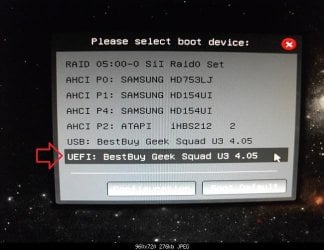
4. Press whatever key (ex: F11) it shows to boot to your motherboard's boot menu, and select to boot from the DVD or UEFI USB. (see screenshot below)
5. Do steps 3 to 7 in the tutorial link below. http://www.sevenforums.com/tutorials/1649-clean-install-windows-7-a.html
6. Delete all partitions/volumes on the disk # (ex: Disk 0) that you want to install Windows 7 as UEFI on until that disk # shows as unallocated space. (see screenshot below)
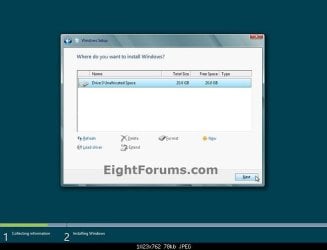
7. When you are finished, click/tap on New, Apply (for full size of disk), and OK. (see screenshot above)
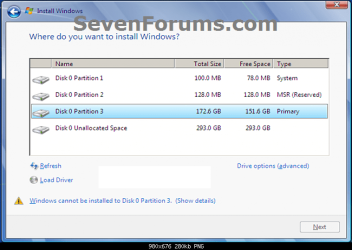
8. You will notice that the disk has now been formatted as GPT with 3 partitions. Select the "Primary" partition 3, and click/tap on Next. (see screenshot below)
NOTE: You might receive a "Windows can't be installed on drive 0" warning, but as long as you can click on the Next button, you're fine.
Note
The 3 partitions are:
- Partition 1 - System - The EFI System partition that contains the NTLDR, HAL, Boot.txt, and other files that are needed to boot the system, such as drivers.
- Partition 2 - MSR - The Microsoft Reserved (MSR) partition that reserves space on each disk drive for subsequent use by operating system software.
- Partition 3 - Primary - Where Windows is to be installed to.
It is imperative that these 3 partitions remain in the exact order as they are
9. You can now finish doing the steps in either tutorial below.
- Pick up at step 9 here - http://www.sevenforums.com/tutorials/1649-clean-install-windows-7-a.html
- Same as picking up at step 9 above, but also pick up at step 2 in any of the OPTIONs here - http://www.sevenforums.com/tutorials/31402-clean-install-upgrade-windows-7-version.html
Related Tutorials
- How to Downgrade Windows 8 to Windows 7
- How to Create a Bootable UEFI USB Flash Drive for Installing Windows 7 and Windows 8
- http://www.sevenforums.com/tutorials/2432-usb-windows-7-installation-key-drive-create.html
- http://www.sevenforums.com/tutorials/1649-clean-install-windows-7-a.html
- How to Clean Install Windows on a MSATA (SSD) Drive
- http://www.sevenforums.com/tutorials/31402-clean-install-upgrade-windows-7-version.html
- http://www.sevenforums.com/tutorials/26193-convert-mbr-disk-gpt-disk.html
- How to Convert a GPT Disk to a MBR Disk
- How to Enable or Disable Secure Boot in UEFI
- How to Check if Windows is Booted in UEFI or Legacy BIOS Mode
External Links:
Windows and GPT FAQ
Unified Extensible Firmware Interface - Wikipedia, the free encyclopedia
UEFI and Windows
Last edited by a moderator:


