
ROBOCOPY - Create Backup Script

How to Create a Backup Script using ROBOCOPY Command


   Information
There are many paid and free software solutions available to backup critical data and files on a computer system. Many users, however, are unaware of an inbuilt Windows 7 command called ROBOCOPY (Robust File Copy) that allows users to create simple or highly advanced backup strategies.


In its simplist form, ROBOCOPY can be likened to an extension of XCOPY on steroids. Some of the more important features that make ROBOCOPY an attractive backup alternative are:
  • multi-threaded copying
  • mirroring or synchronisation mode between the destination and source
  • automatic retry and copy resumption
The examples shown below are primarily geared towards less experienced users, especially those that are unfamilar with batch file creation and running. More experienced users, however, are welcome to explore some of the advanced functionality offered by ROBOCOPY here:

http://technet.microsoft.com/en-us/library/cc733145(WS.10).aspx

and also here:

http://www.theether.net/download/Microsoft/Utilities/robocopy.pdf

or by simply typing robocopy /? at a cmd window prompt.


   Note
ROBOCOPY is a FOLDER copier, not a FILE copier - the source and destination syntax arguments in ROBOCOPY can only be folder names.


:note: Creating a BACKUP strategy

The easiest way to use the ROBOCOPY command to create a backup strategy is by creating a batch (.BAT) file. A batch file is a simple text file, that when executed, runs several commands one after the other.

Step 1

Click :orb: and in the search box, type notepad. Select Notepad to open up a new blank Notepad document.


Step 2

Type the ROBOCOPY commands into the Notepad document, save it as a .BAT file, and then execute it.

In the example below, I have 3 folders (Data1, Data2, and Data3) containing some data that I wish to backup. One folder is located on E: drive and the other two are located on F: drive. I wish to back these up as follows:

Data1 folder on E: backup to a folder called Backups on G: (external USB drive)
Data2 folder on F: backup to a folder called Backups on G: (external USB drive)
Data3 folder on F: backup to a folder called Backups on Q: (network storage drive)

The general format of the ROBOCOPY command is:

Code:
robocopy <source> <destination> <options>
In the empty Notepad document, the simplist form of the command would look like this:

Code:
robocopy E:\Data1 G:\Backups\Data1
robocopy F:\Data2 G:\Backups\Data2
robocopy F:\Data3 Q:\Backups\Data3
pause
   Tip
If source or destination paths contain spaces in them, enclose these in double quotes e.g. "C:\My Data\My Music"


Only the source
  • E:\Data1
  • F:\Data2
  • F:\Data3
and the destination
  • G:\Backups\Data1
  • G:\Backups\Data2
  • Q:\Backups\Data3
are mandatory inputs into the ROBOCOPY command.

   Tip
The PAUSE command at the bottom of the .BAT file allows the cmd window to stay open after it has completed to allow me to see the output from ROBOCOPY.


If I save the .BAT file to my Desktop, and run it by double-clicking it, then a cmd window is opened and the .BAT file executes the three ROBOCOPY commands as shown below.
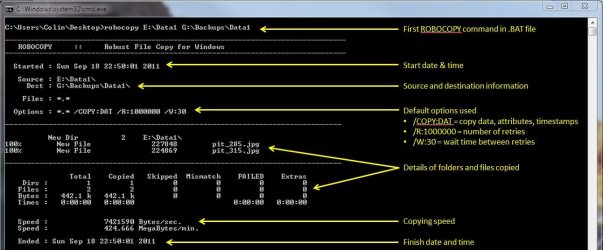
R1.JPG

The same information is repeated for every ROBOCOPY line in the .BAT file.


In order to utilise some of the powerful functionality in ROBOCOPY, I need to utilise some options in the ROBOCOPY command line. In this next example I want to edit my existing backup strategy such that:
  1. All sub-folders within my data folders are backed up, even if they are empty.
  2. The backup only copies newer files to my existing backup - this means a faster backup time.
  3. The percentage progress counter for copying is not shown - this neatens the overall appearance of the ROBOCOPY information, and creates a smaller log file.
  4. The information normally echoed to the cmd window is saved to a log file that I can examine at a later stage.
In order to do this, I need to specify some additional options in my ROBOCOPY commands like this:

Code:
robocopy E:\Data1 G:\Backups\Data1 [B][COLOR=red]/e /mir /np /log:backup_log.txt[/COLOR][/B]
robocopy F:\Data2 G:\Backups\Data2 [B][COLOR=red]/e /mir /np /log+:backup_log.txt[/COLOR][/B]
robocopy F:\Data3 Q:\Backups\Data3 [B][COLOR=red]/e /mir /np /log+:backup_log.txt[/COLOR][/B]
pause
Where:
/e = copy all sub-folders, even empty ones
/mir = mirror (check the files in the destination, and only copy newer files)
/np = no progress counter
/log: = create a logfile

   Tip

Note the use of the /log+: option in the 2nd and 3rd line of the .BAT file. This option ensures that the results of the 2nd and 3rd ROBOCOPY are appended to the log file created in the 1st ROBOCOPY line, meaning I only need one log file to capture all the information I backup.

The log file is always saved to the same folder as the .BAT file - in my case, the folder is saved to my Desktop.


Since the output from ROBOCOPY is written to the log file, the cmd window will not display the output from ROBOCOPY. If I wish to have this information written to both the log file and the cmd window for visual tracking of the backup process, then I can add the /tee option to each line in the .BAT file, as shown below.

Code:
robocopy E:\Data1 G:\Backups\Data1 /e /mir /np [B][COLOR=red]/te[/COLOR][COLOR=red]e[/COLOR][/B] /log:backup_log.txt
robocopy F:\Data2 G:\Backups\Data2 /e /mir /np [COLOR=red][B]/tee[/B][/COLOR] /log+:backup_log.txt
robocopy F:\Data3 Q:\Backups\Data3 /e /mir /np[COLOR=red][B] /tee[/B][/COLOR] /log+:backup_log.txt
pause
This is an example of the typical output to the the log file - it looks exactly the same as what is echoed to the cmd window.

Code:
-------------------------------------------------------------------------------
   ROBOCOPY     ::     Robust File Copy for Windows                              
-------------------------------------------------------------------------------
  Started : Sun Sep 18 23:35:01 2011
   Source : E:\Data1\
     Dest : G:\Backups\Data1\
    Files : *.*
 
  Options : *.* /S /E /COPY:DAT /PURGE /MIR /R:1000000 /W:30 
------------------------------------------------------------------------------
                    2 E:\Data1\
------------------------------------------------------------------------------
               Total    Copied   Skipped  Mismatch    FAILED    Extras
    Dirs :         1         0         1         0         0         0
   Files :         2         0         2         0         0         0
   Bytes :   442.1 k         0   442.1 k         0         0         0
   Times :   0:00:00   0:00:00                       0:00:00   0:00:00
   Ended : Sun Sep 18 23:35:01 2011
Since one of the data folders I am backing up is being copied across a network, I want to ensure that any possible network outages do not cause some critical files to be skipped in the backup. To do this, I can make use of the /z option in the 3rd line of my .BAT file (backup to my network storage) as shown below.

Code:
robocopy E:\Data1 G:\Backups\Data1 /e /mir /np /tee /log:backup_log.txt
robocopy F:\Data2 G:\Backups\Data2 /e /mir /np /tee /log+:backup_log.txt
robocopy F:\Data3 Q:\Backups\Data3 /e /mir /np [B][COLOR=red]/z[/COLOR][/B] /tee /log+:backup_log.txt
This option implements a "retry" for the copying. If I were part way through the copying process, and I lost connection with the network, then ROBOCOPY would automatically restart the copying at the point of failure once the network connection was re-established. It would retrying a million times every 30 seconds (the default settings shown in the image above). The only drawback with this option, is that it can significantly increase the backup time.

ROBOCOPY also has the ability to perform faster multi-threaded copying by simply using the option /mt. I can choose the number of threads to use by specifying a number between 1 and 128 after the /mt option, or if I just specify /mt without a number then the it will use 8 threads by default. In the example below, I use 4 threads to copy to my USB drive, and 8 threads (no number) to copy to my network drive.

Code:
robocopy E:\Data1 G:\Backups\Data1 /e /mir /np /tee [B][COLOR=red]/mt:4[/COLOR][/B] /log:backup_log.txt
robocopy F:\Data2 G:\Backups\Data2 /e /mir /np /tee [COLOR=red][B]/mt:4[/B][/COLOR] /log+:backup_log.txt
robocopy F:\Data3 Q:\Backups\Data3 /e /mir /np [COLOR=black]/z[/COLOR] /tee [COLOR=red][B]/mt[/B][/COLOR] /log+:backup_log.txt
Below is a template that you can use to create your own backup strategy using ROBOCOPY. Simply copy and paste the lines into a blank text document, and then edit as appropriate.

Code:
rem --- Edit the lines below to create your own backup strategy
rem --- The /mir option has been left out for safety sake
rem --- Add more lines for each new folder requiring backup
rem --- Specified 4 threads to use for multi-threaded copying
rem --- The results of the backup can be found in my_backup_log.txt 
robocopy <source> <destination> /e /np /tee /mt:4 /log:my_backup_log.txt
robocopy <source> <destination> /e /np /tee /mt:4 /log+:my_backup_log.txt
pause
   Tip

The can automate your backup's by using the Windows 7 Task Scheduler to run the .BAT file at specific times.

For more information please refer to this tutorial by Orbital Shark:
http://www.sevenforums.com/tutorials/12444-task-scheduler-create-new-task.html


I hope this brief tutorial helps you access the power and simplicity of ROBOCOPY to create some effective backup strategies.

Regards,
Golden
 
Last edited by a moderator:
It is indeed :D
 

My Computer

Computer type
PC/Desktop
Computer Manufacturer/Model Number
Self Built
OS
Windows 8.1 Pro x64
CPU
Intel Core i5-2500K @ 3.30GHz - S1155
Motherboard
Asus P8P67 LE Rev3, Intel P67, S115
Memory
8GB Corsair DDR3 XMS3, PC3-12800
Graphics Card(s)
NVIDIA GeForce GTX 650
Sound Card
On-Board
Monitor(s) Displays
3 x 24" {Extended Display}
Screen Resolution
1920 x 1080
Hard Drives
300GB Seagate Barracuda 7200
PSU
550W Coolermaster GX550
Case
Silverstone Precision PS04B
Cooling
Stock
Keyboard
Logitech K120
Mouse
World of Warcraft Cataclysm MMO Gaming Mouse
Internet Speed
80 MB
Antivirus
MSE / Windows Defender
Browser
Chrome
Thanks again! :thumbsup:
 

My Computer

Computer type
PC/Desktop
Computer Manufacturer/Model Number
Custom Build
OS
Win 7 Ultimate, Win 8.1 Pro, Linux Mint 19 Cinnamon (All 64-Bit)
CPU
Intel i5 4690K
Motherboard
Gigabyte Z97X-UD3H
Memory
Corsair Vengeance LP 32GB DDR3
Graphics Card(s)
MSI GTX 1060 GAMING X 6GB
Sound Card
Onboard
Hard Drives
Samsung 850 EVO 250GB SSD (x2)
Samsung 860 EVO 1TB SSD (x2)
Crucial MX300 525GB SSD
WD Blue 2TB 5400rpm Intellipark Disabled (x2)
PSU
Corsair HX750i
Case
Phanteks Enthoo Pro
Cooling
CM Hyper 212 EVO on CPU, Noctua Redux NF-P14S 1500rpm (x6)
Keyboard
Corsair K70 RGB LUX
Mouse
Corsair Sabre RGB
Antivirus
Avast Free, MalwareBytes, SAS & CryptoPrevent
Browser
Chrome
Other Info
StarTech PEXESAT322I 2 Port PCI-E SATA Card
ASUS PCE-AC56 Dual-band AC1300 Wireless Card
Akasa FC.Six Manual Fan Controller
And a Partridge in a Pear Tree!
i would put some retry option in just encase there was an issue accessing the destination drive during the copy:

e.g.
Code:
/Z /R:10 /W:20

this way the copy shouldn't fail but wait 20 seconds and try again (the retry enables it to carry on from where it stopped rather than starting it all over again.)

Hi,

FYI, if you don't specify any retry options, then ROBOCOPY automatically uses these values:

R:1000000 and W:30

Regards,
Golden
 

My Computer

Computer type
PC/Desktop
Computer Manufacturer/Model Number
Golden Mk. I.4
OS
Windows 10 Pro x64 ; Xubuntu x64
CPU
Intel i7 860 @ 2.80 GHz O/C'ed to 4.0GHz
Motherboard
Gigabyte P55A-UD3R Rev.1. Award BIOS F13
Memory
16GB Corsair Vengance DDR3 @ 661 MHz Dual Channel (9-9-9-24)
Graphics Card(s)
EVGA NVidia GTX 560 1024MB
Sound Card
Realtek Integrated
Monitor(s) Displays
Dual Samsung SyncMaster 2494HS
Screen Resolution
1920*1080 and 1920*1080
Hard Drives
1*Samsung 840 EVO 120GB SSD;
1*OCZ Vertex 2 60GB SSD;
2*Samsung F3 SpinPoint 1TB in RAID0;
1*Samsung F1 SpinPoint 1TB;
2*Western Digital 1TB External USB 3.0
1*Western Digital 500GB External USB 3.0
1*Seagate 500GB External USB 2.0
PSU
Thermaltake ToughPower QFan 750W
Case
Thermaltake Element S VK60001W2Z
Cooling
Corsair H60 Water Cooling, 2*230mm and 2*80mm case fans
Keyboard
Logitech G110
Mouse
Logitech MX518
Thanks for the extra info Golden!
Is the retry option set to a million by default then? :what:
 

My Computer

Computer type
PC/Desktop
Computer Manufacturer/Model Number
Custom Build
OS
Win 7 Ultimate, Win 8.1 Pro, Linux Mint 19 Cinnamon (All 64-Bit)
CPU
Intel i5 4690K
Motherboard
Gigabyte Z97X-UD3H
Memory
Corsair Vengeance LP 32GB DDR3
Graphics Card(s)
MSI GTX 1060 GAMING X 6GB
Sound Card
Onboard
Hard Drives
Samsung 850 EVO 250GB SSD (x2)
Samsung 860 EVO 1TB SSD (x2)
Crucial MX300 525GB SSD
WD Blue 2TB 5400rpm Intellipark Disabled (x2)
PSU
Corsair HX750i
Case
Phanteks Enthoo Pro
Cooling
CM Hyper 212 EVO on CPU, Noctua Redux NF-P14S 1500rpm (x6)
Keyboard
Corsair K70 RGB LUX
Mouse
Corsair Sabre RGB
Antivirus
Avast Free, MalwareBytes, SAS & CryptoPrevent
Browser
Chrome
Other Info
StarTech PEXESAT322I 2 Port PCI-E SATA Card
ASUS PCE-AC56 Dual-band AC1300 Wireless Card
Akasa FC.Six Manual Fan Controller
And a Partridge in a Pear Tree!
Yes, it is. Probably best to change it :D
 

My Computer

Computer type
PC/Desktop
Computer Manufacturer/Model Number
Golden Mk. I.4
OS
Windows 10 Pro x64 ; Xubuntu x64
CPU
Intel i7 860 @ 2.80 GHz O/C'ed to 4.0GHz
Motherboard
Gigabyte P55A-UD3R Rev.1. Award BIOS F13
Memory
16GB Corsair Vengance DDR3 @ 661 MHz Dual Channel (9-9-9-24)
Graphics Card(s)
EVGA NVidia GTX 560 1024MB
Sound Card
Realtek Integrated
Monitor(s) Displays
Dual Samsung SyncMaster 2494HS
Screen Resolution
1920*1080 and 1920*1080
Hard Drives
1*Samsung 840 EVO 120GB SSD;
1*OCZ Vertex 2 60GB SSD;
2*Samsung F3 SpinPoint 1TB in RAID0;
1*Samsung F1 SpinPoint 1TB;
2*Western Digital 1TB External USB 3.0
1*Western Digital 500GB External USB 3.0
1*Seagate 500GB External USB 2.0
PSU
Thermaltake ToughPower QFan 750W
Case
Thermaltake Element S VK60001W2Z
Cooling
Corsair H60 Water Cooling, 2*230mm and 2*80mm case fans
Keyboard
Logitech G110
Mouse
Logitech MX518
Hi,

FYI, if you don't specify any retry options, then ROBOCOPY automatically uses these values:

R:1000000 and W:30

Regards,
Golden

Good point Golden, I'm liking this thread... bringing me back up to speed with robocopy :thumbsup:
 

My Computer

Computer type
PC/Desktop
Computer Manufacturer/Model Number
Self Built
OS
Windows 8.1 Pro x64
CPU
Intel Core i5-2500K @ 3.30GHz - S1155
Motherboard
Asus P8P67 LE Rev3, Intel P67, S115
Memory
8GB Corsair DDR3 XMS3, PC3-12800
Graphics Card(s)
NVIDIA GeForce GTX 650
Sound Card
On-Board
Monitor(s) Displays
3 x 24" {Extended Display}
Screen Resolution
1920 x 1080
Hard Drives
300GB Seagate Barracuda 7200
PSU
550W Coolermaster GX550
Case
Silverstone Precision PS04B
Cooling
Stock
Keyboard
Logitech K120
Mouse
World of Warcraft Cataclysm MMO Gaming Mouse
Internet Speed
80 MB
Antivirus
MSE / Windows Defender
Browser
Chrome
Me too! I never realised you could do so much with Robocopy. I just thought it was a command line for copy and paste.
Been looking at the commands and it's got so many options. It's something I am going to start using a lot more.
 

My Computer

Computer type
PC/Desktop
Computer Manufacturer/Model Number
Custom Build
OS
Win 7 Ultimate, Win 8.1 Pro, Linux Mint 19 Cinnamon (All 64-Bit)
CPU
Intel i5 4690K
Motherboard
Gigabyte Z97X-UD3H
Memory
Corsair Vengeance LP 32GB DDR3
Graphics Card(s)
MSI GTX 1060 GAMING X 6GB
Sound Card
Onboard
Hard Drives
Samsung 850 EVO 250GB SSD (x2)
Samsung 860 EVO 1TB SSD (x2)
Crucial MX300 525GB SSD
WD Blue 2TB 5400rpm Intellipark Disabled (x2)
PSU
Corsair HX750i
Case
Phanteks Enthoo Pro
Cooling
CM Hyper 212 EVO on CPU, Noctua Redux NF-P14S 1500rpm (x6)
Keyboard
Corsair K70 RGB LUX
Mouse
Corsair Sabre RGB
Antivirus
Avast Free, MalwareBytes, SAS & CryptoPrevent
Browser
Chrome
Other Info
StarTech PEXESAT322I 2 Port PCI-E SATA Card
ASUS PCE-AC56 Dual-band AC1300 Wireless Card
Akasa FC.Six Manual Fan Controller
And a Partridge in a Pear Tree!
Great stuff Burdus :thumbsup:
 

My Computer

Computer type
PC/Desktop
Computer Manufacturer/Model Number
Golden Mk. I.4
OS
Windows 10 Pro x64 ; Xubuntu x64
CPU
Intel i7 860 @ 2.80 GHz O/C'ed to 4.0GHz
Motherboard
Gigabyte P55A-UD3R Rev.1. Award BIOS F13
Memory
16GB Corsair Vengance DDR3 @ 661 MHz Dual Channel (9-9-9-24)
Graphics Card(s)
EVGA NVidia GTX 560 1024MB
Sound Card
Realtek Integrated
Monitor(s) Displays
Dual Samsung SyncMaster 2494HS
Screen Resolution
1920*1080 and 1920*1080
Hard Drives
1*Samsung 840 EVO 120GB SSD;
1*OCZ Vertex 2 60GB SSD;
2*Samsung F3 SpinPoint 1TB in RAID0;
1*Samsung F1 SpinPoint 1TB;
2*Western Digital 1TB External USB 3.0
1*Western Digital 500GB External USB 3.0
1*Seagate 500GB External USB 2.0
PSU
Thermaltake ToughPower QFan 750W
Case
Thermaltake Element S VK60001W2Z
Cooling
Corsair H60 Water Cooling, 2*230mm and 2*80mm case fans
Keyboard
Logitech G110
Mouse
Logitech MX518
Code:
robocopy <source> <destination> /E /Z /COPYALL /MT:12 /log+:backup_log.txt /R:10 /W:20

Hi,

I just noticed the /Z command, and have a suggestion.

/Z = copy in restartable mode.

This is a good option for copying across networks to mitigate the risk in losing connectivity, but it comes at a price : a much slower copying speed.

It your D: and T: are NOT network drives (e.g. they are internal or USB connected drives), leave out the /Z switch to achive a faster copy time.

Regards,
Golden
 

My Computer

Computer type
PC/Desktop
Computer Manufacturer/Model Number
Golden Mk. I.4
OS
Windows 10 Pro x64 ; Xubuntu x64
CPU
Intel i7 860 @ 2.80 GHz O/C'ed to 4.0GHz
Motherboard
Gigabyte P55A-UD3R Rev.1. Award BIOS F13
Memory
16GB Corsair Vengance DDR3 @ 661 MHz Dual Channel (9-9-9-24)
Graphics Card(s)
EVGA NVidia GTX 560 1024MB
Sound Card
Realtek Integrated
Monitor(s) Displays
Dual Samsung SyncMaster 2494HS
Screen Resolution
1920*1080 and 1920*1080
Hard Drives
1*Samsung 840 EVO 120GB SSD;
1*OCZ Vertex 2 60GB SSD;
2*Samsung F3 SpinPoint 1TB in RAID0;
1*Samsung F1 SpinPoint 1TB;
2*Western Digital 1TB External USB 3.0
1*Western Digital 500GB External USB 3.0
1*Seagate 500GB External USB 2.0
PSU
Thermaltake ToughPower QFan 750W
Case
Thermaltake Element S VK60001W2Z
Cooling
Corsair H60 Water Cooling, 2*230mm and 2*80mm case fans
Keyboard
Logitech G110
Mouse
Logitech MX518
Thanks again Golden!

My D drive is internal and my T is an external seagate drive so I'll try it without the /Z switch.

Can't get enough of this site! :)
 

My Computer

Computer type
PC/Desktop
Computer Manufacturer/Model Number
Custom Build
OS
Win 7 Ultimate, Win 8.1 Pro, Linux Mint 19 Cinnamon (All 64-Bit)
CPU
Intel i5 4690K
Motherboard
Gigabyte Z97X-UD3H
Memory
Corsair Vengeance LP 32GB DDR3
Graphics Card(s)
MSI GTX 1060 GAMING X 6GB
Sound Card
Onboard
Hard Drives
Samsung 850 EVO 250GB SSD (x2)
Samsung 860 EVO 1TB SSD (x2)
Crucial MX300 525GB SSD
WD Blue 2TB 5400rpm Intellipark Disabled (x2)
PSU
Corsair HX750i
Case
Phanteks Enthoo Pro
Cooling
CM Hyper 212 EVO on CPU, Noctua Redux NF-P14S 1500rpm (x6)
Keyboard
Corsair K70 RGB LUX
Mouse
Corsair Sabre RGB
Antivirus
Avast Free, MalwareBytes, SAS & CryptoPrevent
Browser
Chrome
Other Info
StarTech PEXESAT322I 2 Port PCI-E SATA Card
ASUS PCE-AC56 Dual-band AC1300 Wireless Card
Akasa FC.Six Manual Fan Controller
And a Partridge in a Pear Tree!
Great stuff Burdus - there is real wealth of knowledge accumulated here. :thumbsup:
 

My Computer

Computer type
PC/Desktop
Computer Manufacturer/Model Number
Golden Mk. I.4
OS
Windows 10 Pro x64 ; Xubuntu x64
CPU
Intel i7 860 @ 2.80 GHz O/C'ed to 4.0GHz
Motherboard
Gigabyte P55A-UD3R Rev.1. Award BIOS F13
Memory
16GB Corsair Vengance DDR3 @ 661 MHz Dual Channel (9-9-9-24)
Graphics Card(s)
EVGA NVidia GTX 560 1024MB
Sound Card
Realtek Integrated
Monitor(s) Displays
Dual Samsung SyncMaster 2494HS
Screen Resolution
1920*1080 and 1920*1080
Hard Drives
1*Samsung 840 EVO 120GB SSD;
1*OCZ Vertex 2 60GB SSD;
2*Samsung F3 SpinPoint 1TB in RAID0;
1*Samsung F1 SpinPoint 1TB;
2*Western Digital 1TB External USB 3.0
1*Western Digital 500GB External USB 3.0
1*Seagate 500GB External USB 2.0
PSU
Thermaltake ToughPower QFan 750W
Case
Thermaltake Element S VK60001W2Z
Cooling
Corsair H60 Water Cooling, 2*230mm and 2*80mm case fans
Keyboard
Logitech G110
Mouse
Logitech MX518

My Computer

Computer type
PC/Desktop
Computer Manufacturer/Model Number
Self Built
OS
Windows 8.1 Pro x64
CPU
Intel Core i5-2500K @ 3.30GHz - S1155
Motherboard
Asus P8P67 LE Rev3, Intel P67, S115
Memory
8GB Corsair DDR3 XMS3, PC3-12800
Graphics Card(s)
NVIDIA GeForce GTX 650
Sound Card
On-Board
Monitor(s) Displays
3 x 24" {Extended Display}
Screen Resolution
1920 x 1080
Hard Drives
300GB Seagate Barracuda 7200
PSU
550W Coolermaster GX550
Case
Silverstone Precision PS04B
Cooling
Stock
Keyboard
Logitech K120
Mouse
World of Warcraft Cataclysm MMO Gaming Mouse
Internet Speed
80 MB
Antivirus
MSE / Windows Defender
Browser
Chrome
If only you had written this article a year and a half ago. :-P

Great work Golden.
 

My Computer

OS
Windows 7
Thanks BSeanD :)
 

My Computer

Computer type
PC/Desktop
Computer Manufacturer/Model Number
Golden Mk. I.4
OS
Windows 10 Pro x64 ; Xubuntu x64
CPU
Intel i7 860 @ 2.80 GHz O/C'ed to 4.0GHz
Motherboard
Gigabyte P55A-UD3R Rev.1. Award BIOS F13
Memory
16GB Corsair Vengance DDR3 @ 661 MHz Dual Channel (9-9-9-24)
Graphics Card(s)
EVGA NVidia GTX 560 1024MB
Sound Card
Realtek Integrated
Monitor(s) Displays
Dual Samsung SyncMaster 2494HS
Screen Resolution
1920*1080 and 1920*1080
Hard Drives
1*Samsung 840 EVO 120GB SSD;
1*OCZ Vertex 2 60GB SSD;
2*Samsung F3 SpinPoint 1TB in RAID0;
1*Samsung F1 SpinPoint 1TB;
2*Western Digital 1TB External USB 3.0
1*Western Digital 500GB External USB 3.0
1*Seagate 500GB External USB 2.0
PSU
Thermaltake ToughPower QFan 750W
Case
Thermaltake Element S VK60001W2Z
Cooling
Corsair H60 Water Cooling, 2*230mm and 2*80mm case fans
Keyboard
Logitech G110
Mouse
Logitech MX518
For years I've used an xcopy replacement utility called xxcopy and it functions a lot like Robocopy. It's /clone switch is a lot like Robocopy's /MIR switch.

One thing it does that, as far as I can tell, Robocopy can't, is create destination folder names based on the date. For instance, tonight's incremental backup would be in a folder called 2012-03-29.

With Robocopy in a batch file I've been deleting folders named for the weekday and having them recreated in the destination when Robocopy runs. As in...

:mon
rmdir x:\backup\Daily\1-Monday\ /S /Q
robocopy d:\shared x:\backup\Daily\1-Monday [long list of switches]

The batch file starts by testing for the day of the week and then skips to the part of the batch file for that day (as in :mon). I end up with 7 backup folders only containing files that had the archive bit set for that given day.

But I only get seven days, unless I can figure out how to get the task manager to run two batch files on alternating weeks.

Any ideas on how to get incremental backups that go back further than one week?
 

My Computer

OS
Server 2008
Need Help with Robocopy script

Hi Golden,

I Need your help with robocopy script.

I have extenal IP hard drive 2 TB each and 4 of them. I want to write a script so It will check if Hardrive is live and copy the data over there. When its copy new data I want to create a new folder with current date like " Backup 12-04-25"

So far this is what i can do in my test.

robocopy "C:\SQL" C:\Backup\ /copy:DAT /e /z /v /tee /log:c:backup_log.txt
pause

Can you help?

Thanks,
Arpit


Hi,

OK. You need to let me know what you want backing up, and to where.

The easiest way is to show me some screen capture images of:

1. Your Disk Management with your USB external drive plugged in (so I can see the arrangement of your disks)
2. Windows Explorer showing me the paths and files you want to backup.

See here for help on getting me the information:

http://www.sevenforums.com/tutorials/9733-screenshots-files-upload-post-seven-forums.html

Regards,
Golden
 

My Computer

OS
Windows 7 32-bit and 64 bit
Hi All,

I have written a robocopy script to migrate the company I work for from XP to 7 64bit and to do transfers from 7 to 7 for future data back up and restore after reimaging machines.

Like most scripts you can only look at it so long before it starts to run together. Would it be ok to post it here to get another set of eyes on it? It works really well but I just want to make sure I have not left something out or have to much in terms of the switches.
 

My Computer

OS
7 64bit
Hello Haus, and welcome to Seven Forums.

Sure, it'll be fine to post here if you like. :)
 

My Computer

Computer type
PC/Desktop
Computer Manufacturer/Model Number
Self built custom
OS
64-bit Windows 11 Pro for Workstations
CPU
Intel i7-8700K OC'd to 5 GHz
Motherboard
ASUS ROG Maximus XI Formula Z390
Memory
64 GB (4x16GB) G.SKILL TridentZ RGB DDR4 3600 MHz
Graphics Card(s)
ASUS ROG-STRIX-GTX1080TI-O11G-GAMING
Sound Card
Integrated
Monitor(s) Displays
2 x Samsung Odyssey G7 27"
Screen Resolution
2560x1440
Hard Drives
1TB Samsung 990 PRO M.2,
4TB Samsung 990 PRO PRO M.2,
TerraMaster F8 SSD Plus NAS
PSU
Seasonic Prime Titanium 850W
Case
Thermaltake Core P3
Cooling
Corsair Hydro H115i
Keyboard
Logitech wireless K800
Mouse
Logitech MX Master 4
Internet Speed
2 Gb/s Download and 100 Mb/s Upload
Antivirus
Malwarebyte Anti-Malware Premium
Browser
Google Chrome
Other Info
Logitech Z625 speaker system,
Logitech BRIO 4K Pro webcam,
HP Color LaserJet Pro MFP M477fdn,
APC SMART-UPS RT 1000 XL - SURT1000XLI,
Galaxy S23 Plus phone
Great!

Let me explain a bit what I have it doing first then I'll put it in the next post.
I made it to be an interactive "program" for lack of a better term.
I have distributed it out to my 16 co-workers in 8 different sites around the country as we have have the task of moving 5000 users to Windows 7.

It is launched from a folder containing the .cmd file and robocopy.exe (for portability).
The script opens a command prompt window where you make a task selection. 1-7, 0 to exit.
The options1-2 are direct machine to machine data transfers over the LAN. XP to 7 & 7 to 7.
The options 3-4 are for hard drive pulls from the old machine using a powered USB drive adaptor for data transfer to the new machine.
The options 5-6 are to copy the data to an extrenal USB storage device.
Option 7 restores it from the USB drive.

In it you will see that I have per-converted all XP folders/locations to Windows 7 folder/locations for easier restore.

So to launch it, you just double click the cmd file in a folder with the robocopy.exe in it (for XP).
You then get a prompt asking for UserID, Old computer name, drive letter, depending on the selection.
After that you'll get the idea what happens.
Script in the next post.

Code:
@ECHO OFF
c:\windows\system32\cmd.exe /c mode con cols=100 lines=45
Color 3F
CLS
:MENU
ECHO.________________________________________________________________________________
ECHO.
ECHO. Windows 7 Migration Tool
ECHO.
ECHO. Note: All data copies from Windows XP are translated into the Windows 7
ECHO. directory structure. ("Documents and Settings" to "Users", etc.)
ECHO.
ECHO. !!!Remember to turn off UAC and set power option to never sleep!!!
ECHO.________________________________________________________________________________
ECHO.
ECHO ............................................................
ECHO PRESS 1 2 3 4 5 6 7 to select your task, or 0 to EXIT.
ECHO ............................................................
ECHO.
ECHO 1 - Network Data Transfer: Old XP (remote) to new Windows 7 (local)
ECHO.
ECHO 2 - Network Data Transfer: Old 7 (remote) to new Windows 7 (local)
ECHO.
ECHO 3 - Local USB Drive Adaptor XP drive to 7 (C:) (local)
ECHO.
ECHO 4 - Local USB Drive Adaptor 7 drive to 7 (C:) (local)
ECHO.
ECHO 5 - Local USB Data Backup: Local XP (C:) to local USB drive
ECHO.
ECHO 6 - Local USB Data Backup: Local 7 (C:) to local USB drive
ECHO.
ECHO 7 - USB Drive Restore: Restore local USB drive to new Windows 7 (local)
ECHO.
ECHO 0 - EXIT
ECHO.
SET /P M=Type 1, 2, 3, 4, 5, 6, 7, or 0, then press ENTER: 
IF %M%==1 GOTO XPto7
IF %M%==2 GOTO 7to7
IF %M%==3 GOTO XPUSBtoC
IF %M%==4 GOTO 7USBtoC
IF %M%==5 GOTO XPCtoE
IF %M%==6 GOTO 7CtoE
IF %M%==7 GOTO ResEtoC7
IF %M%==0 GOTO Quit
rem ------------------------------------------------------------------------
:XPto7
ECHO.
ECHO.[-----Network Data Transfer: Old XP to New 7-----]
ECHO.
NET USE Z: /Delete > NUL
ECHO Enter Users OracleID:
Set /p USER=
REM OracleID is equivelent to AD User ID
ECHO.
ECHO Network Share: Enter the user's old XP Computer Name:
Set /P OldXP=
NET USE Z: [URL="file://%25oldxp%25/C$"]\\%OldXP%\C$[/URL]
REM 
robocopy Z:\ C:\ /E /COPY:DATSO /V /NP /R:2 /W:2 /XA:SHO /XF "*.log" "autoexec.bat" "boot.ini" "cmldr" "config.sys" "Desktop.ini" "hiberfil.sys" "IO.SYS" "NTDETECT.COM" "ntldr" "MSDOS.SYS" "pagefile.sys" "Thumbs.db" /XD ".Xilinx" "Applications" "Cadence" "CadenceHome" "cmdcons" "Config.msi" "Dell" "Documents and Settings" "Drivers" "i386" "Intel" "MSOCache" "Notes" "Program Files" "RECYCLER" "$Recycle.Bin" "SP3" "System Volume Information" "swshare" "swtools" "valueadd" "WINDOWS" "Xilinx" /L /LOG+:Step1.txt 
robocopy Z:\Notes "C:\Program Files (x86)\Lotus\Notes" notes.ini /E /COPY:DATSO /V /NP /R:2 /W:2 /XA:SHO /XF "*.log" "Thumbs.db" "Desktop.ini" /L /LOG+:Step1.txt 
robocopy Z:\Notes\Data "C:\Program Files (x86)\Lotus\Notes\Data" /E /COPY:DATSO /V /NP /R:2 /W:2 /XA:SHO /XF "*.log" "Thumbs.db" "Desktop.ini" /L /LOG+:Step1.txt 
robocopy "Z:\Documents and Settings\%USER%\Desktop" C:\Users\%USER%\Desktop /E /COPY:DATSO /V /NP /R:2 /W:2 /XA:SHO /XF "*.log" "Thumbs.db" "Desktop.ini" /L /LOG+:Step1.txt 
robocopy "Z:\Documents and Settings\%USER%\Favorites" C:\Users\%USER%\Favorites /E /COPY:DATSO /V /NP /R:2 /W:2 /XA:SHO /XF "*.log" "Thumbs.db" "Desktop.ini" /L /LOG+:Step1.txt 
robocopy "Z:\Documents and Settings\%USER%\My Documents" C:\Users\%USER%\Documents /E /COPY:DATSO /V /NP /R:2 /W:2 /XA:SHO /XF "*.log" "Thumbs.db" "Desktop.ini" /XD "Downloads" "Favorites" "Pictures" "My Pictures" "Music" "My Music" "Shapes" "My Shapes" "Videos" "My Videos" /L /LOG+:Step1.txt 
robocopy "Z:\Documents and Settings\%USER%\My Documents\Favorites" C:\Users\%USER%\Favorites /E /COPY:DATSO /V /NP /R:2 /W:2 /XA:SHO /XF "*.log" "Thumbs.db" "Desktop.ini" /L /LOG+:Step1.txt 
robocopy "Z:\Documents and Settings\%USER%\My Documents\My Music" C:\Users\%USER%\Music /E /COPY:DATSO /V /NP /R:2 /W:2 /XA:SHO /XF "*.log" "Thumbs.db" "Desktop.ini" /L /LOG+:Step1.txt 
robocopy "Z:\Documents and Settings\%USER%\My Documents\Downloads" C:\Users\%USER%\Downloads /E /COPY:DATSO /V /NP /R:2 /W:2 /XA:SHO /XF "*.log" "Thumbs.db" "Desktop.ini" /L /LOG+:Step1.txt 
robocopy "Z:\Documents and Settings\%USER%\My Documents\My Pictures" C:\Users\%USER%\Pictures /E /COPY:DATSO /V /NP /R:2 /W:2 /XA:SHO /XF "*.log" "Thumbs.db" "Desktop.ini" /L /LOG+:Step1.txt 
robocopy "Z:\Documents and Settings\%USER%\My Documents\My Videos" C:\Users\%USER%\Videos /E /COPY:DATSO /V /NP /R:2 /W:2 /XA:SHO /XF "*.log" "Thumbs.db" "Desktop.ini" /L /LOG+:Step1.txt 
robocopy "Z:\Documents and Settings\%USER%\My Documents\My Shapes" "C:\Users\%USER%\Documents\My Shapes" /E /COPY:DATSO /V /NP /R:2 /W:2 /XA:SHO /XF "*.log" "Thumbs.db" "Desktop.ini" /L /LOG+:Step1.txt 
robocopy "Z:\Documents and Settings\%USER%\Local Settings\Application Data\Microsoft\Outlook" "C:\Users\%USER%\Documents\Outlook Files" *.pst /E /COPY:DATSO /V /NP /R:2 /W:2 /XA:SHO /XF "*.log" "Thumbs.db" "Desktop.ini" /L /LOG+:Step1.txt 
robocopy "Z:\Documents and Settings\%USER%\Application Data\Microsoft\Signatures" C:\Users\%USER%\AppData\Roaming\Microsoft\Signatures /E /COPY:DATSO /V /NP /R:2 /W:2 /XA:SHO /XF "*.log" "Thumbs.db" "Desktop.ini" /L /LOG+:Step1.txt 
robocopy "Z:\Documents and Settings\%USER%\Application Data\Microsoft\Stationery" "C:\Program Files (x86)\Common Files\Microsoft Shared\Stationery" /E /V /NP /R:2 /W:2 /XA:SHO /XF "*.log" "Thumbs.db" "Desktop.ini" /L /LOG+:Step1.txt 
robocopy "Z:\Documents and Settings\%USER%\Application Data\Microsoft\Templates" C:\Users\%USER%\AppData\Roaming\Microsoft\Templates /E /COPY:DATSO /V /NP /R:2 /W:2 /XA:SHO /XF "*.log" "Thumbs.db" "Desktop.ini" /L /LOG+:Step1.txt 
robocopy "Z:\Documents and Settings\%USER%\Application Data\Microsoft\Proof" C:\Users\%USER%\AppData\Roaming\Microsoft\UProof /E /COPY:DATSO /V /NP /R:2 /W:2 /XA:SHO /XF "*.log" "Thumbs.db" "Desktop.ini" /L /LOG+:Step1.txt 
robocopy "Z:\Documents and Settings\%USER%\Application Data\Microsoft\UProof" C:\Users\%USER%\AppData\Roaming\Microsoft\UProof /E /COPY:DATSO /V /NP /R:2 /W:2 /XA:SHO /XF "*.log" "Thumbs.db" "Desktop.ini" /L /LOG+:Step1.txt 
robocopy "Z:\Documents and Settings\%USER%\Application Data\Microsoft\Outlook" C:\Users\%USER%\AppData\Roaming\Microsoft\Outlook *.nk2 /E /COPY:DATSO /V /NP /R:2 /W:2 /XA:SHO /XF "*.log" "Thumbs.db" "Desktop.ini" /L /LOG+:Step1.txt 
robocopy "Z:\Documents and Settings\%USER%\Local Settings\Application Data\Microsoft\Outlook" C:\Users\%user%\AppData\Local\Microsoft\Outlook *.pab *.oab /E /COPY:DATSO /V /NP /R:2 /W:2 /XA:SHO /XF "*.log" "Thumbs.db" "Desktop.ini" /L /LOG+:Step1.txt 
NET USE Z: /Delete > NUL
GOTO END
rem ------------------------------------------------------------------------
:7to7
ECHO.
ECHO.[------Network Data Transfer: Old 7 to New 7------]
ECHO.
NET USE Z: /Delete > NUL
ECHO Enter Users OracleID:
Set /p USER=
REM OracleID is equivelent to AD User ID
ECHO.
ECHO Network Share: Enter the user's old 7 Computer Name:
Set /P Old7=
NET USE Z: [URL="file://%25old7%25/C$"]\\%Old7%\C$[/URL]
REM 
robocopy Z:\ C:\ /E /COPY:DATSO /V /NP /R:2 /W:2 /XA:SHO /XF "*.log" "Thumbs.db" "Desktop.ini" /XF "*.log" "Thumbs.db" "Desktop.ini" ".rnd" "bootmgr" "hiberfil.sys" "pagefile.sys" /XD ".Xilinx" "Applications" "Boot" "Cadence" "CadenceHome" "Config.msi" "de8b2a33417deb7cb2a115cae06cd1" "Dell" "Documents and Settings" "Drivers" "Intel" "Kontiki" "MSOCache" "PerfLogs" "Program Files" "Program Files (x86)" "ProgramData" "Recovery" "$Recycle.Bin" "RECYCLER" "System Volume Information" "USERS" "WINDOWS" "Xilinx" /L /LOG+:Step1.txt 
robocopy "Z:\Program Files (x86)\Lotus\Notes" "C:\Program Files (x86)\Lotus\Notes" notes.ini /E /COPY:DATSO /V /NP /R:2 /W:2 /XA:SHO /XF "*.log" "Thumbs.db" "Desktop.ini" /L /LOG+:Step1.txt 
robocopy "Z:\Program Files (x86)\Lotus\Notes\Data" "C:\Program Files (x86)\Lotus\Notes\Data" /E /COPY:DATSO /V /NP /R:2 /W:2 /XA:SHO /XF "*.log" "Thumbs.db" "Desktop.ini" /L /LOG+:Step1.txt 
robocopy "Z:\Program Files (x86)\Common Files\Microsoft Shared\Stationery" "C:\Program Files (x86)\Common Files\Microsoft Shared\Stationery" /E /COPY:DATSO /V /NP /R:2 /W:2 /XA:SHO /XF "*.log" "Thumbs.db" "Desktop.ini" /L /LOG+:Step1.txt 
robocopy Z:\Users\%USER% C:\Users\%USER% /E /COPY:DATSO /V /NP /R:2 /W:2 /XA:SHO /XF "Album*.jpg" "*.log" *.policy" "Thumbs.db" "Desktop.ini" "ntuser*.*" /XD "AppData" "Application Data" "Local Settings" "Office Genuine Advantage" /L /LOG+:Step1.txt 
robocopy Z:\Users\%USER%\Documents C:\Users\%USER%\Documents /E /COPY:DATSO /V /NP /R:2 /W:2 /XA:SHO /XF "Album*.jpg" "*.log" *.policy" "Thumbs.db" "Desktop.ini" "ntuser*.*" /XD "AppData" "Application Data" "Local Settings" "Office Genuine Advantage" /L /LOG+:Step1.txt 
robocopy Z:\Users\%USER%\AppData\Roaming\Microsoft\Signatures C:\Users\%USER%\AppData\Roaming\Microsoft\Signatures /E /COPY:DATSO /V /NP /R:2 /W:2 /XA:SHO /XF "*.log" "Thumbs.db" "Desktop.ini" /L /LOG+:Step1.txt 
robocopy Z:\Users\%USER%\AppData\Roaming\Microsoft\Templates C:\Users\%USER%\AppData\Roaming\Microsoft\Templates /E /COPY:DATSO /V /NP /R:2 /W:2 /XA:SHO /XF "*.log" "Thumbs.db" "Desktop.ini" /L /LOG+:Step1.txt 
robocopy Z:\Users\%USER%\AppData\Roaming\Microsoft\UProof C:\Users\%USER%\AppData\Roaming\Microsoft\UProof /E /COPY:DATSO /V /NP /R:2 /W:2 /XA:SHO /XF "*.log" "Thumbs.db" "Desktop.ini" /L /LOG+:Step1.txt 
robocopy Z:\Users\%USER%\AppData\Roaming\Microsoft\Outlook C:\Users\%USER%\AppData\Roaming\Microsoft\Outlook *.nk2 /E /COPY:DATSO /V /NP /R:2 /W:2 /XA:SHO /XF "*.log" "Thumbs.db" "Desktop.ini" /L /LOG+:Step1.txt 
robocopy Z:\Users\%user%\AppData\Local\Microsoft\Outlook C:\Users\%user%\AppData\Local\Microsoft\Outlook *.pab *.oab /E /COPY:DATSO /V /NP /R:2 /W:2 /XA:SHO /XF "*.log" "Thumbs.db" "Desktop.ini" /L /LOG+:Step1.txt 
NET USE Z: /Delete > NUL
GOTO END
rem ------------------------------------------------------------------------
:XPUSBtoC
ECHO.
ECHO.[----------Pulled Drive on USB Drive Adapter XP Data Transfer to 7-----------]
ECHO.
ECHO Enter Users OracleID:
Set /p USER=
REM OracleID is equivelent to AD User ID
ECHO.
ECHO Enter the USB drive letter: (example) X:
Set /p USBDrive=
REM
robocopy %USBDrive% C:\ /E /COPY:DATSO /V /NP /R:2 /W:2 /XA:SHO /XF "*.log" "autoexec.bat" "boot.ini" "cmldr" "config.sys" "Desktop.ini" "hiberfil.sys" "IO.SYS" "NTDETECT.COM" "ntldr" "MSDOS.SYS" "pagefile.sys" "Thumbs.db" /XD ".Xilinx" "Applications" "Cadence" "CadenceHome" "cmdcons" "Config.msi" "Dell" "Documents and Settings" "Drivers" "i386" "Intel" "MSOCache" "Notes" "Program Files" "RECYCLER" "$Recycle.Bin" "SP3" "System Volume Information" "swshare" "swtools" "valueadd" "WINDOWS" "Xilinx" /L /LOG+:Step1.txt 
robocopy %USBDrive%\Note "C:\Program Files (x86)\Lotus\Notes" notes.ini /E /COPY:DATSO /V /NP /R:2 /W:2 /XA:SHO /XF "*.log" "Thumbs.db" "Desktop.ini" /L /LOG+:Step1.txt 
robocopy %USBDrive%\Notes\Data "C:\Program Files (x86)\Lotus\Notes\Data" /E /COPY:DATSO /V /NP /R:2 /W:2 /XA:SHO /XF "*.log" "Thumbs.db" "Desktop.ini" /L /LOG+:Step1.txt 
robocopy "%USBDrive%\Documents and Settings\%USER%\Desktop" C:\Users\%USER%\Desktop /E /COPY:DATSO /V /NP /R:2 /W:2 /XA:SHO /XF "*.log" "Thumbs.db" "Desktop.ini" /L /LOG+:Step1.txt 
robocopy "%USBDrive%\Documents and Settings\%USER%\Favorites" C:\Users\%USER%\Favorites /E /COPY:DATSO /V /NP /R:2 /W:2 /XA:SHO /XF "*.log" "Thumbs.db" "Desktop.ini" /L /LOG+:Step1.txt 
robocopy "%USBDrive%\Documents and Settings\%USER%\My Documents" C:\Users\%USER%\Documents /E /COPY:DATSO /V /NP /R:2 /W:2 /XA:SHO /XF "*.log" "Thumbs.db" "Desktop.ini" /XD "Downloads" "Favorites" "Pictures" "My Pictures" "Music" "My Music" "Shapes" "My Shapes" "Videos" "My Videos" /L /LOG+:Step1.txt 
robocopy "%USBDrive%\Documents and Settings\%USER%\My Documents\Favorites" C:\Users\%USER%\Favorites /E /COPY:DATSO /V /NP /R:2 /W:2 /XA:SHO /XF "*.log" "Thumbs.db" "Desktop.ini" /L /LOG+:Step1.txt
robocopy "%USBDrive%\Documents and Settings\%USER%\My Documents\My Music" C:\Users\%USER%\Music /E /COPY:DATSO /V /NP /R:2 /W:2 /XA:SHO /XF "*.log" "Thumbs.db" "Desktop.ini" /L /LOG+:Step1.txt 
robocopy "%USBDrive%\Documents and Settings\%USER%\My Documents\Downloads" C:\Users\%USER%\Downloads /E /COPY:DATSO /V /NP /R:2 /W:2 /XA:SHO /XF "*.log" "Thumbs.db" "Desktop.ini" /L /LOG+:Step1.txt 
robocopy "%USBDrive%\Documents and Settings\%USER%\My Documents\My Pictures" C:\Users\%USER%\Pictures /E /COPY:DATSO /V /NP /R:2 /W:2 /XA:SHO /XF "*.log" "Thumbs.db" "Desktop.ini" /L /LOG+:Step1.txt 
robocopy "%USBDrive%\Documents and Settings\%USER%\My Documents\My Videos" C:\Users\%USER%\Videos /E /COPY:DATSO /V /NP /R:2 /W:2 /XA:SHO /XF "*.log" "Thumbs.db" "Desktop.ini" /L /LOG+:Step1.txt 
robocopy "%USBDrive%\Documents and Settings\%USER%\My Documents\My Shapes" "C:\Users\%USER%\Documents\My Shapes" /E /COPY:DATSO /V /NP /R:2 /W:2 /XA:SHO /XF "*.log" "Thumbs.db" "Desktop.ini" /L /LOG+:Step1.txt 
robocopy "%USBDrive%\Documents and Settings\%USER%\Local Settings\Application Data\Microsoft\Outlook" "C:\Users\%USER%\Documents\Outlook Files" *.pst /E /COPY:DATSO /V /NP /R:2 /W:2 /XA:SHO /XF "*.log" "Thumbs.db" "Desktop.ini" /L /LOG+:Step1.txt 
robocopy "%USBDrive%\Documents and Settings\%USER%\Application Data\Microsoft\Signatures" C:\Users\%USER%\AppData\Roaming\Microsoft\Signatures /E /COPY:DATSO /V /NP /R:2 /W:2 /XA:SHO /XF "*.log" "Thumbs.db" "Desktop.ini" /L /LOG+:Step1.txt 
robocopy "%USBDrive%\Documents and Settings\%USER%\Application Data\Microsoft\Stationery" "C:\Program Files (x86)\Common Files\Microsoft Shared\Stationery" /E /V /NP /R:2 /W:2 /XA:SHO /XF "*.log" "Thumbs.db" "Desktop.ini" /L /LOG+:Step1.txt 
robocopy "%USBDrive%\Documents and Settings\%USER%\Application Data\Microsoft\Templates" C:\Users\%USER%\AppData\Roaming\Microsoft\Templates /E /COPY:DATSO /V /NP /R:2 /W:2 /XA:SHO /XF "*.log" "Thumbs.db" "Desktop.ini" /L /LOG+:Step1.txt 
robocopy "%USBDrive%\Documents and Settings\%USER%\Application Data\Microsoft\Proof" C:\Users\%USER%\AppData\Roaming\Microsoft\UProof /E /COPY:DATSO /V /NP /R:2 /W:2 /XA:SHO /XF "*.log" "Thumbs.db" "Desktop.ini" /L /LOG+:Step1.txt 
robocopy "%USBDrive%\Documents and Settings\%USER%\Application Data\Microsoft\UProof" C:\Users\%USER%\AppData\Roaming\Microsoft\UProof /E /COPY:DATSO /V /NP /R:2 /W:2 /XA:SHO /XF "*.log" "Thumbs.db" "Desktop.ini" /L /LOG+:Step1.txt 
robocopy "%USBDrive%\Documents and Settings\%USER%\Application Data\Microsoft\Outlook" C:\Users\%USER%\AppData\Roaming\Microsoft\Outlook *.nk2 /E /COPY:DATSO /V /NP /R:2 /W:2 /XA:SHO /XF "*.log" "Thumbs.db" "Desktop.ini" /L /LOG+:Step1.txt 
robocopy "%USBDrive%\Documents and Settings\%USER%\Local Settings\Application Data\Microsoft\Outlook" C:\Users\%user%\AppData\Local\Microsoft\Outlook *.pab *.oab /E /COPY:DATSO /V /NP /R:2 /W:2 /XA:SHO /XF "*.log" "Thumbs.db" "Desktop.ini" /L /LOG+:Step1.txt 
GOTO END
rem ------------------------------------------------------------------------
:7USBtoC
ECHO.
ECHO.[----------Pulled Drive on USB Drive Adapter 7 Data Transfer to 7-----------]
ECHO.
ECHO Enter Users OracleID:
Set /p USER=
REM OracleID is equivelent to AD User ID
ECHO.
ECHO Enter the USB drive letter: (example) X:
Set /p USBDrive=
REM
robocopy %USBDrive% C:\ /E /COPY:DATSO /V /NP /R:2 /W:2 /XA:SHO /XF "*.log" "Thumbs.db" "Desktop.ini" /XF "*.log" "Thumbs.db" "Desktop.ini" ".rnd" "bootmgr" "hiberfil.sys" "pagefile.sys" /XD ".Xilinx" "Applications" "Boot" "Cadence" "CadenceHome" "Config.msi" "de8b2a33417deb7cb2a115cae06cd1" "Dell" "Documents and Settings" "Drivers" "Intel" "Kontiki" "MSOCache" "PerfLogs" "Program Files" "Program Files (x86)" "ProgramData" "Recovery" "$Recycle.Bin" "RECYCLER" "System Volume Information" "USERS" "WINDOWS" "Xilinx" /L /LOG+:Step1.txt 
robocopy "%USBDrive%\Program Files (x86)\Lotus\Notes" "C:\Program Files (x86)\Lotus\Notes" notes.ini /E /COPY:DATSO /V /NP /R:2 /W:2 /XA:SHO /XF "*.log" "Thumbs.db" "Desktop.ini" /L /LOG+:Step1.txt 
robocopy "%USBDrive%\Program Files (x86)\Lotus\Notes\Data" "C:\Program Files (x86)\Lotus\Notes\Data" /E /COPY:DATSO /V /NP /R:2 /W:2 /XA:SHO /XF "*.log" "Thumbs.db" "Desktop.ini" /L /LOG+:Step1.txt 
robocopy "%USBDrive%\Program Files (x86)\Common Files\Microsoft Shared\Stationery" "C:\Program Files (x86)\Common Files\Microsoft Shared\Stationery" /E /COPY:DATSO /V /NP /R:2 /W:2 /XA:SHO /XF "*.log" "Thumbs.db" "Desktop.ini" /L /LOG+:Step1.txt 
robocopy %USBDrive%\Users\%USER% C:\Users\%USER% /E /COPY:DATSO /V /NP /R:2 /W:2 /XA:SHO /XF "Album*.jpg" "*.log" *.policy" "Thumbs.db" "Desktop.ini" "ntuser*.*" /XD "AppData" "Application Data" "Local Settings" "Office Genuine Advantage" /L /LOG+:Step1.txt 
robocopy %USBDrive%\Users\%USER%\Documents C:\Users\%USER%\Documents /E /COPY:DATSO /V /NP /R:2 /W:2 /XA:SHO /XF "Album*.jpg" "*.log" *.policy" "Thumbs.db" "Desktop.ini" "ntuser*.*" /XD "AppData" "Application Data" "Local Settings" "Office Genuine Advantage" /L /LOG+:Step1.txt 
robocopy %USBDrive%\Users\%USER%\AppData\Roaming\Microsoft\Signatures C:\Users\%USER%\AppData\Roaming\Microsoft\Signatures /E /COPY:DATSO /V /NP /R:2 /W:2 /XA:SHO /XF "*.log" "Thumbs.db" "Desktop.ini" /L /LOG+:Step1.txt 
robocopy %USBDrive%\Users\%USER%\AppData\Roaming\Microsoft\Templates C:\Users\%USER%\AppData\Roaming\Microsoft\Templates /E /COPY:DATSO /V /NP /R:2 /W:2 /XA:SHO /XF "*.log" "Thumbs.db" "Desktop.ini" /L /LOG+:Step1.txt 
robocopy %USBDrive%\Users\%USER%\AppData\Roaming\Microsoft\UProof C:\Users\%USER%\AppData\Roaming\Microsoft\UProof /E /COPY:DATSO /V /NP /R:2 /W:2 /XA:SHO /XF "*.log" "Thumbs.db" "Desktop.ini" /L /LOG+:Step1.txt 
robocopy %USBDrive%\Users\%USER%\AppData\Roaming\Microsoft\Outlook C:\Users\%USER%\AppData\Roaming\Microsoft\Outlook *.nk2 /E /COPY:DATSO /V /NP /R:2 /W:2 /XA:SHO /XF "*.log" "Thumbs.db" "Desktop.ini" /L /LOG+:Step1.txt 
robocopy %USBDrive%\Users\%user%\AppData\Local\Microsoft\Outlook C:\Users\%user%\AppData\Local\Microsoft\Outlook *.pab *.oab /E /COPY:DATSO /V /NP /R:2 /W:2 /XA:SHO /XF "*.log" "Thumbs.db" "Desktop.ini" /L /LOG+:Step1.txt 
GOTO END
rem ------------------------------------------------------------------------
:XPCtoE
ECHO.
ECHO.[-----------Old XP Machine Drive to USB Drive Backup-----------]
ECHO.
ECHO Enter Users OracleID:
Set /p USER=
REM OracleID is equivelent to AD User ID
ECHO.
ECHO Enter the USB drive letter: (example) X:
Set /p USBDrive=
MD %USBDrive%\%USER%
REM
robocopy C:\ %USBDrive%\%USER%\ /E /COPY:DATSO /V /NP /R:2 /W:2 /XA:SHO /XF "*.log" "autoexec.bat" "boot.ini" "cmldr" "config.sys" "Desktop.ini" "hiberfil.sys" "IO.SYS" "NTDETECT.COM" "ntldr" "MSDOS.SYS" "pagefile.sys" "Thumbs.db" /XD ".Xilinx" "Applications" "Cadence" "CadenceHome" "cmdcons" "Config.msi" "Dell" "Documents and Settings" "Drivers" "i386" "Intel" "MSOCache" "Notes" "Program Files" "RECYCLER" "$Recycle.Bin" "SP3" "System Volume Information" "swshare" "swtools" "valueadd" "WINDOWS" "Xilinx" /L /LOG+:Step1.txt 
robocopy C:\Notes "%USBDrive%\%USER%\Program Files (x86)\Lotus\Notes" notes.ini /E /COPY:DATSO /V /NP /R:2 /W:2 /XA:SHO /XF "*.log" "Thumbs.db" "Desktop.ini" /L /LOG+:Step1.txt 
robocopy C:\Notes\Data "%USBDrive%\%USER%\Program Files (x86)\Lotus\Notes\Data" /E /COPY:DATSO /V /NP /R:2 /W:2 /XA:SHO /XF "*.log" "Thumbs.db" "Desktop.ini" /L /LOG+:Step1.txt 
robocopy "C:\Documents and Settings\%USER%\Desktop" %USBDrive%\%USER%\Users\%USER%\Desktop /E /COPY:DATSO /V /NP /R:2 /W:2 /XA:SHO /XF "*.log" "Thumbs.db" "Desktop.ini" /L /LOG+:Step1.txt 
robocopy "C:\Documents and Settings\%USER%\Favorites" %USBDrive%\%USER%\Users\%USER%\Favorites /E /COPY:DATSO /V /NP /R:2 /W:2 /XA:SHO /XF "*.log" "Thumbs.db" "Desktop.ini" /L /LOG+:Step1.txt 
robocopy "C:\Documents and Settings\%USER%\My Documents" %USBDrive%\%USER%\Users\%USER%\Documents /E /COPY:DATSO /V /NP /R:2 /W:2 /XA:SHO /XF "*.log" "Thumbs.db" "Desktop.ini" /XD "Downloads" "Favorites" "Pictures" "My Pictures" "Music" "My Music" "Shapes" "My Shapes" "Videos" "My Videos" /L /LOG+:Step1.txt 
robocopy "C:\Documents and Settings\%USER%\My Documents\Favorites" %USBDrive%\%USER%\Users\%USER%\Favorites /E /COPY:DATSO /V /NP /R:2 /W:2 /XA:SHO /XF "*.log" "Thumbs.db" "Desktop.ini" /L /LOG+:Step1.txt 
robocopy "C:\Documents and Settings\%USER%\My Documents\My Music" %USBDrive%\%USER%\Users\%USER%\Music /E /COPY:DATSO /V /NP /R:2 /W:2 /XA:SHO /XF "*.log" "Thumbs.db" "Desktop.ini" /L /LOG+:Step1.txt 
robocopy "C:\Documents and Settings\%USER%\My Documents\My Pictures" %USBDrive%\%USER%\Users\%USER%\Pictures /E /COPYALL /B /SEC /MIR /V /NP /R:2 /XA:SHO /XF "*.log" "Thumbs.db" "Desktop.ini" /W:2 /L /LOG+:Step1.txt 
robocopy "C:\Documents and Settings\%USER%\My Documents\My Videos" %USBDrive%\%USER%\Users\%USER%\Videos /E /COPY:DATSO /V /NP /R:2 /W:2 /XA:SHO /XF "*.log" "Thumbs.db" "Desktop.ini" /L /LOG+:Step1.txt 
robocopy "C:\Documents and Settings\%USER%\My Documents\My Shapes" "%USBDrive%\%USER%\Users\%USER%\Documents\My Shapes" /E /COPY:DATSO /V /NP /R:2 /W:2 /XA:SHO /XF "*.log" "Thumbs.db" "Desktop.ini" /L /LOG+:Step1.txt 
robocopy "C:\Documents and Settings\%USER%\My Documents\Downloads" %USBDrive%\%USER%\Users\%USER%\Downloads /E /COPY:DATSO /V /NP /R:2 /W:2 /L /LOG+:Step1.txt 
robocopy "C:\Documents and Settings\%USER%\Local Settings\Application Data\Microsoft\Outlook" "%USBDrive%\%USER%\Users\%USER%\Documents\Outlook Files" *.pst /E /COPY:DATSO /V /NP /R:2 /W:2 /XA:SHO /XF "*.log" "Thumbs.db" "Desktop.ini" /L /LOG+:Step1.txt 
robocopy "C:\Documents and Settings\%USER%\Application Data\Microsoft\Signatures" %USBDrive%\%USER%\Users\%USER%\AppData\Roaming\Microsoft\Signatures /E /COPY:DATSO /V /NP /R:2 /W:2 /XA:SHO /XF "*.log" "Thumbs.db" "Desktop.ini" /L /LOG+:Step1.txt 
robocopy "C:\Documents and Settings\%USER%\Application Data\Microsoft\Stationery" "%USBDrive%\%USER%\Program Files (x86)\Common Files\Microsoft Shared\Stationery" /E /V /NP /R:2 /W:2 /XA:SHO /XF "*.log" "Thumbs.db" "Desktop.ini" /L /LOG+:Step1.txt 
robocopy "C:\Documents and Settings\%USER%\Application Data\Microsoft\Templates" %USBDrive%\%USER%\Users\%USER%\AppData\Roaming\Microsoft\Templates /E /COPY:DATSO /V /NP /R:2 /W:2 /XA:SHO /XF "*.log" "Thumbs.db" "Desktop.ini" /L /LOG+:Step1.txt 
robocopy "C:\Documents and Settings\%USER%\Application Data\Microsoft\Proof" %USBDrive%\%USER%\Users\%USER%\AppData\Roaming\Microsoft\UProof /E /COPY:DATSO /V /NP /R:2 /W:2 /XA:SHO /XF "*.log" "Thumbs.db" "Desktop.ini" /L /LOG+:Step1.txt 
robocopy "C:\Documents and Settings\%USER%\Application Data\Microsoft\UProof" %USBDrive%\%USER%\Users\%USER%\AppData\Roaming\Microsoft\UProof /E /COPY:DATSO /V /NP /R:2 /W:2 /XA:SHO /XF "*.log" "Thumbs.db" "Desktop.ini" /L /LOG+:Step1.txt 
robocopy "C:\Documents and Settings\%USER%\Application Data\Microsoft\Outlook" %USBDrive%\%USER%\Users\%USER%\AppData\Roaming\Microsoft\Outlook *.nk2 /E /COPY:DATSO /V /NP /R:2 /W:2 /XA:SHO /XF "*.log" "Thumbs.db" "Desktop.ini" /L /LOG+:Step1.txt 
robocopy "C:\Documents and Settings\%USER%\Local Settings\Application Data\Microsoft\Outlook" %USBDrive%\%USER%\Users\%USER%\AppData\Local\Microsoft\Outlook *.pab *.oab /E /COPY:DATSO /V /NP /R:2 /W:2 /XA:SHO /XF "*.log" "Thumbs.db" "Desktop.ini" /L /LOG+:Step1.txt 
attrib -h -s %USBDrive%\%USER% 
GOTO END
rem ------------------------------------------------------------------------
:7CtoE
ECHO.
ECHO.[------------Old 7 Machine Drive to USB Drive Backup------------]
ECHO.
ECHO Enter Users OracleID:
Set /p USER=
REM OracleID is equivelent to AD User ID
ECHO.
ECHO Enter the USB drive letter: (example) X:
Set /p USBDrive=
MD %USBDrive%\%USER%
REM
robocopy C:\ %USBDrive%\%USER%\ /E /COPY:DATSO /V /NP /R:2 /W:2 /XA:SHO /XF "*.log" "Thumbs.db" "Desktop.ini" ".rnd" "bootmgr" "hiberfil.sys" "pagefile.sys" /XD ".Xilinx" "Applications" "Boot" "Cadence" "CadenceHome" "Config.msi" "de8b2a33417deb7cb2a115cae06cd1" "Dell" "Documents and Settings" "Drivers" "Intel" "Kontiki" "MSOCache" "PerfLogs" "Program Files" "Program Files (x86)" "ProgramData" "Recovery" "$Recycle.Bin" "RECYCLER" "System Volume Information" "USERS" "WINDOWS" "Xilinx" /L /LOG+:Step1.txt 
robocopy "C:\Program Files (x86)\Lotus\Notes" "%USBDrive%\%USER%\Program Files (x86)\Lotus\Notes" notes.ini /E /COPY:DATSO /V /NP /R:2 /W:2 /XA:SHO /XF "*.log" "Thumbs.db" "Desktop.ini" /L /LOG+:Step1.txt 
robocopy "C:\Program Files (x86)\Lotus\Notes\Data" "%USBDrive%\%USER%\Program Files (x86)\Lotus\Notes\Data" /E /COPY:DATSO /V /NP /R:2 /W:2 /XA:SHO /XF "*.log" "Thumbs.db" "Desktop.ini" /L /LOG+:Step1.txt 
robocopy "C:\Program Files (x86)\Common Files\Microsoft Shared\Stationery" "%USBDrive%\%USER%\Program Files (x86)\Common Files\Microsoft Shared\Stationery" /E /COPY:DATSO /V /NP /R:2 /W:2 /XA:SHO /XF "*.log" "Thumbs.db" "Desktop.ini" /L /LOG+:Step1.txt 
robocopy C:\Users\%USER% %USBDrive%\%USER%\Users\%USER% /E /COPY:DATSO /V /NP /R:2 /W:2 /XA:SHO /XF "Album*.jpg" "*.log" "*.policy" "Thumbs.db" "Desktop.ini" "ntuser*.*" /XD "AppData" "Application Data" "Local Settings" "Office Genuine Advantage" /L /LOG+:Step1.txt 
robocopy C:\Users\%USER%\Documents %USBDrive%\%USER%\Users\%USER%\Documents /E /COPY:DATSO /V /NP /R:2 /W:2 /XA:SHO /XF "Album*.jpg" "*.log" "*.policy" "Thumbs.db" "Desktop.ini" "ntuser*.*" /XD "AppData" "Application Data" "Local Settings" "Office Genuine Advantage" /L /LOG+:Step1.txt 
robocopy C:\Users\%USER%\AppData\Roaming\Microsoft\Signatures %USBDrive%\%USER%\Users\%USER%\AppData\Roaming\Microsoft\Signatures /E /COPY:DATSO /V /NP /R:2 /W:2 /XA:SHO /XF "*.log" "Thumbs.db" "Desktop.ini" /L /LOG+:Step1.txt 
robocopy C:\Users\%USER%\AppData\Roaming\Microsoft\Templates %USBDrive%\%USER%\Users\%USER%\AppData\Roaming\Microsoft\Templates /E /COPY:DATSO /V /NP /R:2 /W:2 /XA:SHO /XF "*.log" "Thumbs.db" "Desktop.ini" /L /LOG+:Step1.txt 
robocopy C:\Users\%USER%\AppData\Roaming\Microsoft\UProof %USBDrive%\%USER%\Users\%USER%\AppData\Roaming\Microsoft\UProof /E /COPY:DATSO /V /NP /R:2 /W:2 /XA:SHO /XF "*.log" "Thumbs.db" "Desktop.ini" /L /LOG+:Step1.txt 
robocopy C:\Users\%USER%\AppData\Roaming\Microsoft\Outlook %USBDrive%\%USER%\Users\%USER%\AppData\Roaming\Microsoft\Outlook *.nk2 /E /COPY:DATSO /V /NP /R:2 /W:2 /XA:SHO /XF "*.log" "Thumbs.db" "Desktop.ini" /L /LOG+:Step1.txt 
robocopy C:\Users\%USER%\AppData\Local\Microsoft\Outlook %USBDrive%\%USER%\Users\%USER%\AppData\Local\Microsoft\Outlook *.pab *.oab /E /COPY:DATSO /V /NP /R:2 /W:2 /XA:SHO /XF "*.log" "Thumbs.db" "Desktop.ini" /L /LOG+:Step1.txt 
attrib -h -s %USBDrive%\%USER%
GOTO END
rem ------------------------------------------------------------------------
:ResEtoC7
ECHO.
ECHO.[------------Local USB Drive 7 Data Restore------------]
ECHO.
ECHO Enter Users OracleID:
Set /p USER=
REM OracleID is equivelent to AD User ID
ECHO.
ECHO Enter the USB drive letter: (example) X:
Set /p USBDrive=
ECHO.
robocopy %USBDrive%\%USER%\ C:\ /E /COPY:DATSO /V /NP /R:2 /W:2 /XA:SHO /XF "*.log" "$Recycle.Bin" "Thumbs.db" "Desktop.ini" /XD "$Recycle.Bin" /L /LOG+:Step1.txt 
GOTO END
:QUIT
ECHO.________________________________________________________________________________
ECHO.
ECHO.
ECHO. Terminated process, no action taken.
ECHO.
ECHO.
ECHO.________________________________________________________________________________
:END
ECHO.________________________________________________________________________________
ECHO.
ECHO. Completed! check the log files below for results...
ECHO.
ECHO.________________________________________________________________________________
ECHO.
dir step*.txt /b
ECHO.
Pause

As you can see we target specific data, makes for a better user experience.
You will also see a couple what appeears to be duplicate lines, this because you can not trust users to put things where they go, you know what I am talking about.
 
Last edited:

My Computer

OS
7 64bit
Back
Top