
Windows 7 Forums


Windows 7: Restore Previous Folder Windows at Logon


Restore Previous Folder Windows at Logon

How to Restore Previous Folder Windows at Logon
Published 30 Jul 2009
Published by

Featured Tutorial
How to Restore Previous Folder Windows at Logon

information   Information
This tutorial will show you how to restore previous opened folder windows at logon from the last time you logged off, restarted, or shut down XP, Vista, Windows 7, or Windows 8.


OPTION ONE
Turn "Restore previous opened folder windows at logon" On or Off using Folder Options
1. Open Folder Options in XP/Vista/Windows 7 or Windows 8, and do step 2 or 3 below.

2. To Turn On "Restore Previous Folder Windows at Logon"
A) Check the Restore previous folder windows at logon box, and click/tap on OK.
3. To Turn Off "Restore Previous Folder Windows at Logon"
NOTE: This is the default setting.
A) Uncheck the Restore previous folder windows at logon box, and click/tap on OK.
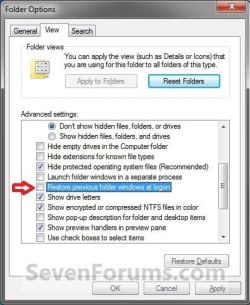
Restore Previous Folder Windows at Logon-folder_options.jpg


OPTION TWO
Turn "Restore previous opened folder windows at logon" On or Off using REG File
1. Do step 2 or 3 below for what you would like to do.

2. To Turn On "Restore Previous Folder Windows at Logon"
A) Click/tap on the Download button below to download the file below, and go to step 4 below.
Turn_On_Restore_Prvious_Folder_Windows_at_Logon.reg
download
3. To Turn Off "Restore Previous Folder Windows at Logon"
NOTE: This is the default setting.
A) Click/tap on the Download button below to download the file below, and go to step 4 below
Turn_Off_Restore_Prvious_Folder_Windows_at_Logon.reg
download
3. Save the .reg file to your Desktop.

4. Double click/tap on the downloaded .reg file to merge it.

5. If prompted, click/tap on Run, Yes (UAC-Windows 7/8) OR Continue (UAC-Vista), Yes, and then OK.

6. When finished, you can delete the downloaded .reg file if you like.
That's it,
Shawn

Need more help? Try searching our extensive help and support site.
Loading
30 Jul 2009  
anykey


I know this is frightfully simple "when you know how" but this is one of the best tutorials you have done. Many thanks

My System SpecsSystem Spec

30 Jul 2009  
Brink


Hello Anykey,

Simple is best I suppose.
My System SpecsSystem Spec
21 Mar 2010  
dougfontaine99

 
Error Not Fixed

I can't get Explorer to resume at the folder (directory) that I last had open after switching the computer off, nor will it open the previous viewed window if I restart Explorer after closing it down.

Another problem is that it won't go back to the previous view format that I'd set.

I've done the Tools folder option bit.

I've ensured that the value 1 is entered in the "PersistBrowsers" of the registry.

I've done a DOS command prompt check for OS faults.

Any help will be appreciated.
My System SpecsSystem Spec
.


21 Mar 2010  
Brink


Hello Doug, and welcome to Seven Forums.

Did you log off or shut down from the Start Menu, and not flip the switch on the computer case to turn off the computer?

This will only reopen Windows Explorer windows that were open when you logged off or Shut down the computer.
My System SpecsSystem Spec
Comment

 Restore Previous Folder Windows at Logon problems?


Tutorial Tools


Similar help and support threads for: Restore Previous Folder Windows at Logon
Windows 7 Tutorial Category
restore from previous windows before video card update Graphic Cards
will a restore point restore windows to previous version? Backup and Restore
Solved Logon Screen changed after Factory Restore - Windows 7 Customization
how to restore pc from windows image, of a previous windows 7 version Backup and Restore
Windows 7 Won't Restore to previous point Backup and Restore


All times are GMT -5. The time now is 06:22 AM.


Windows 7 Forums is an independent web site and has not been authorized,
sponsored, or otherwise approved by Microsoft Corporation.
"Windows 7" and related materials are trademarks of Microsoft Corp.
© Designer Media Ltd