
How to Change Mouse Hover Time before Pop-up Displays in Windows 7 and Windows 8
Information
Warning
- This may also override your MenuShowDelay setting.
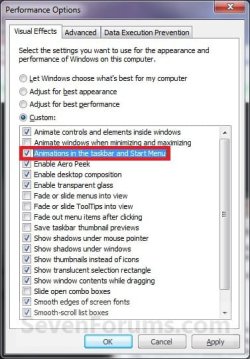
- If you have the Animations in the taskbar and Start Menu option checked in Visual Effects, then you may not see much or any difference. You should uncheck this option first before doing the tutorial below for the maximum effect.
OPTION ONE
Change Mouse Hover Time using a REG File Download
1. To Have a Fast Mouse Hover Time
NOTE: This changes the mouse hover delay time to 30 milliseconds.
A) Click on the download button below to download the file below.
30ms_Mouse_Hover_Time.zip
Download
B) Go to step 3.
2. To Restore the Default Mouse Hover Time
NOTE: This changes the mouse hover delay time back to 400 milliseconds.
A) Click on the download button below to download the file below.
Default_Mouse_Hover_Time.zip
Download
3. Click on Save, and save the .zip file to the Desktop.
4. Open the downloaded .zip file and extract the .reg file to the Desktop.
5. Right click the extracted .reg file and click on Merge.
6. Click on Run, Yes, Yes, and OK when prompted.
7. Log off and log on, or restart the computer to apply the changes.
8. When done, you can delete the .zip and .reg files if you like.
OPTION TWO
Change Mouse Hover Time Manually Through Registry Editor
1. Open the Start Menu, then type regedit in the search box and press Enter.
2. If prompted by UAC, then click on Yes.
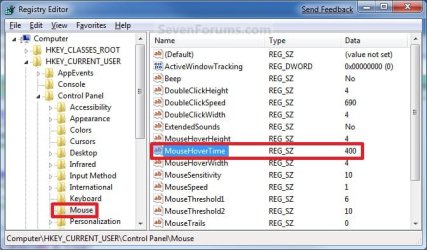
3. In regedit, navigate to the location below:
HKEY_CURRENT_USER\Control Panel\Mouse
4. In the right pane, right click MouseHoverTime and click on Modify. (See screenshot below)
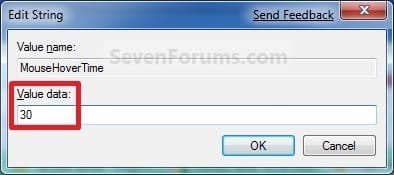
5. Type in a number between 0 to 4000 (400 is default, I use 30) for how many milliseconds, and click on OK. (See screenshot below)
NOTE: The lower the number, the faster the response time. If you use an entry of 0, there is no delay before the tooltip opens.
6. Close regedit.
7. Log off and log on, or restart the computer to apply the changes.
NOTE: As a test, hover the mouse pointer over a tooltip or Start Menu All Programs and see how much faster it opens.
That's it,
Shawn
Related Tutorials
- How to Speed up the Menu Show Delay Time in XP, Vista, Windows 7, and Windows 8
- How to Enable or Disable Windows 7 Pop-up Descriptions
- How to Change Start Menu Descriptive Text Pop-up Information in Vista and Windows 7
- How to Change the Windows 7 Aero Peek Mouse Hover Delay Time to Preview Desktop
- How to Change How Long Windows 7 Notifications Stay Open
- How to Change the Windows 7 Taskbar Thumbnail Live Preview Delay Time
- How to Change Windows 7 Taskbar Thumbnail Previews Display Delay Time
Attachments
Last edited:


