| | Welcome to Windows 7 Forums. Our forum is dedicated to helping you find solutions with any problems, errors or issues you are experiencing with Windows 7. The Windows 7 forum also covers news and updates and has an extensive Windows 7 tutorial section that covers a wide range of tips and tricks. | Windows 7 - Mouse Hover Time - Change Mouse Hover Time - Change How to Change the Mouse Hover Time before Pop-up Displays in Windows 7
Published by Brink
01-12-2009
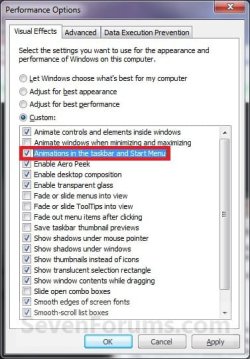
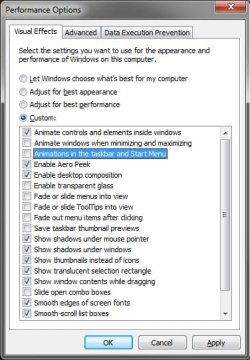
| Mouse Hover Time - Change How to Change the Mouse Hover Time before Pop-up Displays in Windows 7 Information | | This will show you how to change the delay time, in milliseconds, that the mouse pointer has to stay hovered on a item before tooltip popups display in Windows 7. | | Warning | | If you have the Animations in the taskbar and Start Menu option checked in Visual Effects, then you may not see much or any difference. You will need to uncheck this option first before doing the tutorial below.
| | | OPTION ONE: |
|---|
| Through a Download |
1. To Have a Fast Mouse Hover Time - NOTE: This changes the mouse hover delay time to 30 milliseconds.A) Click on the download button below to download the 30ms_Mouse_Hover_Time.zip file.
B) Go to step 3.
2. To Restore the Default Mouse Hover Time - NOTE: This changes the mouse hover delay time back to 400 milliseconds.A) Click on the download button below to download the Default_Mouse_Hover_Time.zip file.
3. Click on Save, and save the .zip file to the Desktop. 4. Open the .zip file and extract the .reg file to the Desktop. 5. Right click the .reg file and click on Merge. 6. Click on Run, Yes, Yes, and OK when prompted. 7. Log off and log on, or restart the computer to apply the changes. 8. When done, you can delete the .zip and .reg files on the Desktop if you like. | OPTION TWO: |
|---|
| Manually Through the Registry |
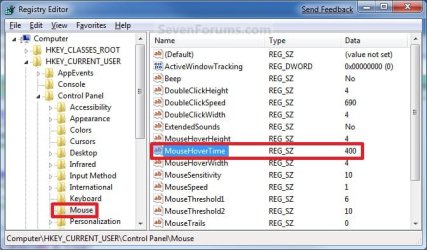
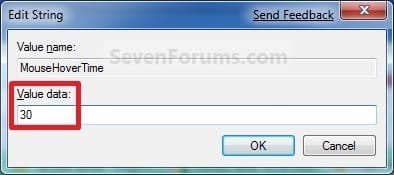
1. Open the Start Menu. 2. In the white line (Start Search) area, type regedit and press Enter. 3. If prompted by UAC, click on Yes to allow. 4. In regedit, go to HKEY_CURRENT_USER\Control Panel\Mouse 5. In the right pane, right click MouseHoverTime and click on Modify. (See screenshot below) 6. Type in a number between 0 to 4000 (400 is default, I use 30) for how many milliseconds, and click on OK. (See screenshot below) NOTE: The lower the number, the faster the response time. If you use an entry of 0, there is no delay before the tooltip opens.  7. Close regedit. 8. Log off and log on, or restart the computer to apply the changes. NOTE: As a test, hover the mouse pointer over a tooltip or Start Menu All Programs and see how much faster it opens. That's it,
Shawn . |  Published by | | Administrator Join Date: Oct 2008 Location: Texas Posts: 12,762 | |
 Tutorial Tools | | | | | | | | | |
01-12-2009
|
#1 | | Windows 7 Ultimate Vista Ultimate x64 QLD, Cairns |
| My System Specs | | System Manufacturer/Model Number Home Brew OS Windows 7 Ultimate Vista Ultimate x64 CPU Core 2 Duo E8500 3.16Ghz @ 3.8Ghz Motherboard eVGA 750i FTW Memory 2x2Gigs Patriot PC2-6400 LL Graphics Card Inno3D GeForce GTX260 216 SP Monitor(s) Displays ASUS VW222U 22" 2ms Response time Screen Resolution 1680x1050 Keyboard Logitech G15 Gaming Keyboard Mouse Logitech G9 Gaming Mouse PSU HYTEC 600W & Thermaltake 650W Toughpower Power Exp Case Thermaltake Armor LCS (Liquid Cooling System) Cooling Liquid Cooling System Hard Drives SATA 150GB
SATA II 250GB
USB IDE 750GB Ext. |
01-12-2009
|
#2 | | Windows 7 Ultimate x64 Retail Texas |
| My System Specs | | OS Windows 7 Ultimate x64 Retail CPU Core2 Quad Q9450 2.66GHz 12MB Motherboard Gigabyte X48-DQ6 Memory 8 GB (4x2) DDR2 PC2-8500 1066 MHz Patriot Extreme Graphics Card BFG GeForce 9600 GT OC 512MB Sound Card Realtek HD Audio ALC889A Integrated Chip Monitor(s) Displays 28" Hanns-G HG281DJB and 17" eMachines E17T4 Screen Resolution 28" 1920x1200 and 23" 1920x1080 Keyboard Logitech Cordless Desktop MX 5500 Revolution Mouse Logitech Cordless Desktop MX 5500 Revolution PSU OCZ Series Gold OCZZ1000M 1000W Case Tagan El-Diablo Full Tower w/ 250 mm Front & 120 mm Rear fan Cooling Thermalright Ultra 120 Extreme Copper CPU heat sink w/120 MM Hard Drives 2 x 750GB (RAID 0) Samsung HDD HD753LJ SATA 32MB Internet Speed 10.58 Mb/s Download and 1.12 Mb/s Upload Other Info Microsoft LifeCam Cinema
** Samsung CLX-3175FW Printer
** D-Link DIR-855 Router
** Motorola SB6120 Cable Modem
** ASRock ION 330 server |
01-13-2009
|
#3 | | Windows 7 Build 7100 32-bit, Windows Vista 32-bit |
You made me wonder: what happens if I set it to 0? | My System Specs | | System Manufacturer/Model Number Dell Vostro 1510 OS Windows 7 Build 7100 32-bit, Windows Vista 32-bit CPU Intel Core Duo T8100 2,1GHz Memory 3GB Graphics Card NVIDIA GeForce 8400M GS Screen Resolution 1440x900 Hard Drives 250GB |
01-13-2009
|
#4 | | Windows 7 Ultimate x64 Retail Texas |
LOL, hello Hethoofd.
You will get smoke.
If you use 0, then you will have no delay time for when the thumbnail pop-ups. However, it may be so fast that navigating through them may prove difficult to do with them flashing so quickly. | My System Specs | | OS Windows 7 Ultimate x64 Retail CPU Core2 Quad Q9450 2.66GHz 12MB Motherboard Gigabyte X48-DQ6 Memory 8 GB (4x2) DDR2 PC2-8500 1066 MHz Patriot Extreme Graphics Card BFG GeForce 9600 GT OC 512MB Sound Card Realtek HD Audio ALC889A Integrated Chip Monitor(s) Displays 28" Hanns-G HG281DJB and 17" eMachines E17T4 Screen Resolution 28" 1920x1200 and 23" 1920x1080 Keyboard Logitech Cordless Desktop MX 5500 Revolution Mouse Logitech Cordless Desktop MX 5500 Revolution PSU OCZ Series Gold OCZZ1000M 1000W Case Tagan El-Diablo Full Tower w/ 250 mm Front & 120 mm Rear fan Cooling Thermalright Ultra 120 Extreme Copper CPU heat sink w/120 MM Hard Drives 2 x 750GB (RAID 0) Samsung HDD HD753LJ SATA 32MB Internet Speed 10.58 Mb/s Download and 1.12 Mb/s Upload Other Info Microsoft LifeCam Cinema
** Samsung CLX-3175FW Printer
** D-Link DIR-855 Router
** Motorola SB6120 Cable Modem
** ASRock ION 330 server |
12-10-2009
|
#5 | | |
So I can make the thumbnail popup faster by doing this, now, the annoying part is, how do I make it fadeaway faster when I move my mouse away. | My System Specs | | |
12-10-2009
|
#6 | | Windows 7 Ultimate x64 Retail Texas |
Hello Biatche, and welcome to Seven Forums.
For taskbar thumbnails, you would want to use this tutorial instead. Taskbar Thumbnail Previews - Change Delay Time
Unchecking the Animations in the taskbar and Start Menu Visual Effects option should help the taskbar thumbnails close faster.
Hope this helps,
Shawn | My System Specs | | OS Windows 7 Ultimate x64 Retail CPU Core2 Quad Q9450 2.66GHz 12MB Motherboard Gigabyte X48-DQ6 Memory 8 GB (4x2) DDR2 PC2-8500 1066 MHz Patriot Extreme Graphics Card BFG GeForce 9600 GT OC 512MB Sound Card Realtek HD Audio ALC889A Integrated Chip Monitor(s) Displays 28" Hanns-G HG281DJB and 17" eMachines E17T4 Screen Resolution 28" 1920x1200 and 23" 1920x1080 Keyboard Logitech Cordless Desktop MX 5500 Revolution Mouse Logitech Cordless Desktop MX 5500 Revolution PSU OCZ Series Gold OCZZ1000M 1000W Case Tagan El-Diablo Full Tower w/ 250 mm Front & 120 mm Rear fan Cooling Thermalright Ultra 120 Extreme Copper CPU heat sink w/120 MM Hard Drives 2 x 750GB (RAID 0) Samsung HDD HD753LJ SATA 32MB Internet Speed 10.58 Mb/s Download and 1.12 Mb/s Upload Other Info Microsoft LifeCam Cinema
** Samsung CLX-3175FW Printer
** D-Link DIR-855 Router
** Motorola SB6120 Cable Modem
** ASRock ION 330 server |
12-10-2009
|
#7 | | |
Thanks for introducing that setting to me, will talk more about it in the correct topic. So what does this setting ACTUALLY do? I've set it to 30ms, and when i move my mouse over desktop icons, taskbar items, system tray icons, the tooltip seem to appear 1000-2000ms to appear. OK, actually after just testing it, it's not at all about the tooltip, but what it seems to affect is the start menu "All Programs" hover. Please enlighten if it affects anything else
Update: MouseHoverTime includes ExtendedUIHoverTime. Only if there's ExtendedUIHoverTime in the registry it overrides mousehovertime for thumbnail preview delay.
Last edited by biatche; 12-10-2009 at 11:58 AM..
| My System Specs | | |
12-10-2009
|
#8 | | Windows 7 Ultimate x64 Retail Texas |
That's the main one that it affects, but it should affect the other hover items as well. It also depends on what you have set in Visual Effects as well. | My System Specs | | OS Windows 7 Ultimate x64 Retail CPU Core2 Quad Q9450 2.66GHz 12MB Motherboard Gigabyte X48-DQ6 Memory 8 GB (4x2) DDR2 PC2-8500 1066 MHz Patriot Extreme Graphics Card BFG GeForce 9600 GT OC 512MB Sound Card Realtek HD Audio ALC889A Integrated Chip Monitor(s) Displays 28" Hanns-G HG281DJB and 17" eMachines E17T4 Screen Resolution 28" 1920x1200 and 23" 1920x1080 Keyboard Logitech Cordless Desktop MX 5500 Revolution Mouse Logitech Cordless Desktop MX 5500 Revolution PSU OCZ Series Gold OCZZ1000M 1000W Case Tagan El-Diablo Full Tower w/ 250 mm Front & 120 mm Rear fan Cooling Thermalright Ultra 120 Extreme Copper CPU heat sink w/120 MM Hard Drives 2 x 750GB (RAID 0) Samsung HDD HD753LJ SATA 32MB Internet Speed 10.58 Mb/s Download and 1.12 Mb/s Upload Other Info Microsoft LifeCam Cinema
** Samsung CLX-3175FW Printer
** D-Link DIR-855 Router
** Motorola SB6120 Cable Modem
** ASRock ION 330 server |
1 Week Ago
|
#9 | | |
Great tutorials and love affording user comments. One thing I notice about tooltip notices, popups, whatever one should call them (for desktop icons, systems tray icons, and of course, start menu items, is that by default (even though I've unticked/deselected "Animations in the taskbar and Start Menu" and have yet to tweak the hover timing), I've noticed a difference in hover time for my desktop icons, etc., (about a full second) and the sys tray icons (which instantly display the tooltip 'pop-ups'). Maybe users might appreciate knowing why there are differences in hovered icon timings (between sys tray icons and all other hovered Windows items) eg; I suspect sys tray icons can't have their timing changed. | My System Specs | | System Manufacturer/Model Number HP DV4-1030ee OS Windows 7 Pro CPU 7350@2.00GHz, 2 Core Logical Processors Motherboard Compal 30F8 99.74 Memory Total Physical Memory 2.00 GB Graphics Card NVIDIA GeForce9200M GS Sound Card NVIDIA HDMI Audio with IDT High Definition Audio CODEC Monitor(s) Displays Generic PnP Monitor (14.0"vis) Screen Resolution 1200 X 800 recommended, but set to 1074 X 768 Keyboard Stock Mouse Logitech M-UV96 PSU High Performance Case Stock Cooling Stock Hard Drives FUJITSU MHY2160BH 160.04 GB drive 0 Internet Speed down 2.89 Mb/s & up 0.73 Mb/s Other Info Acer Aspire One, XPH SP3, x86, 'Windows NT', 2.0 Ghz CPU, 2 Gb RAM, Mobile Intel 945 Express Chipset Family graphics
'card', RealtekHD Audio Driver v5.10.0.5628 audio 'card', and USB 2.0. All times are GMT -5. The time now is 06:35 AM. |  |