
 |
Welcome to Windows 7 Forums. Our forum is dedicated to helping you find solutions with any problems, errors or issues you are experiencing with Windows 7. The Windows 7 forum also covers news and updates and has an extensive Windows 7 tutorial section that covers a wide range of tips and tricks.
Windows 7 - Play all - Add to Context Menu in Windows 7 Play all - Add to Context Menu in Windows 7 How to Add "Play all" to the Context Menu in Windows 7
Published by Brink
10-10-2011
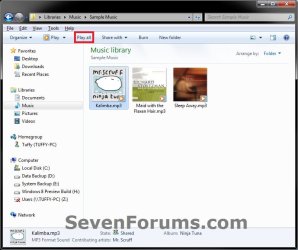
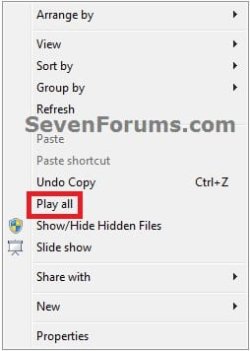
| Play all - Add to Context Menu in Windows 7 How to Add "Play all" to the Context Menu in Windows 7  Information This will show you how to add Play all to the context menu for when users right click on a empty area in a opened folder or library window in Windows 7 to play all music, audio, and video files in the folder or library with Windows Media Player.
You must be logged in as an administrator to be able to add "Play all" to the context menu.  Note You could also use these options to play all music, audio, and video files in a folder or library. - Right click on a folder that contains what you want to play, then click on either Add to Windows Media Player list or Play with Windows Media Player.
- Select one or more music, audio, and video files in a opened folder or library that you would like to have all played, right click on them, and click on Add to Windows Media Player list.
- Open a folder or library that contains what you want to play, and click on the Play all command bar (toolbar) button.

 Warning If the folder or library does not have any music, audio, or video files in it that are playable with Windows Media Player, then you will get the error below when you click on Play all to indicate so. EXAMPLE: "Play all" added to context menu Here's How:1. To Add "Play all" to the Context Menu A) Click on the Download button below to download the file below.Add-Play-all_to_Context_Menu.reg  B) Go to step 3. 2. To Remove "Play all" from the Context Menu NOTE: This is the default setting.A) Click on the Download button below to download the file below.Remove-Play-all_to_Context_Menu.reg 

3. Click on Save, and save the .reg file to the desktop. 4. Right click on the downloaded .reg file and click on Merge. 5. Click on Run, Yes, Yes, and OK when prompted. 6. When done, you can delete the downloaded .reg file if you like. That's it,
Shawn |  Published by | | Administrator Join Date: Oct 2008 Location: Texas Posts: 37,304 | |
 Tutorial Tools | | | | | | | | | |
10-10-2011
|
#1 | | Windows 7 Home Premium x64 SP1 |
Thank you very much
but sir can you help i'm figuring out how to do this only in music libraries and music folder in explorer and put a wmp icon in side like HasLUAShield
Last edited by sfjmdsp; 10-10-2011 at 03:38 AM..
| My System Specs | | System Manufacturer/Model Number Custom Built OS Windows 7 Home Premium x64 SP1 CPU AMD Phenom II x4 B55 Motherboard ASRock 890GX Extreme3 Memory G.skill Trident DDR3 1600 2x2GB CL8 Graphics Card Sapphire Radeon HD 5870 (Game Edition) Sound Card VIA High Definition Audio Monitor(s) Displays AOC e2236vw 21.5" LED Screen Resolution 1920x1080p Keyboard A4TECH X7 G800 Mouse A4TECH X-755FS PSU Tacens SUPERO 700w (Modular) Case Cooler Master 690 Advanced II Cooling Cooler Master V6-GT, Red Led Silent 120mm 90cfm Fan x8 Hard Drives WDC Caviar Black 1TB Internet Speed PLDT myDSL 1 MBPS |
10-10-2011
|
#2 | | Windows 7 Ultimate x64 SP1 |
You're most welcome sfjmdsp,
Sorry, but this will be added to all root directory's context menu. The only way I know to do that is to enable your Windows Explorer command bar (toolbar) back to use the "Play all" button on it instead. | My System Specs | | System Manufacturer/Model Number Self built custom OS Windows 7 Ultimate x64 SP1 CPU Intel i7-980X 3.3 Ghz (3.48 Ghz OC'd) Motherboard ASUS P6X58D Premium Memory 12 GB (2GBx6) DDR3 PC3-16000 2000 MHz Kingston HyperX Graphics Card Sapphire HD5870 Eyefinity 6 2GB Sound Card Realtek HD Audio ALC889 Integrated Chip Monitor(s) Displays 3x 27" Asus VE278Q Screen Resolution 1920x1080 Keyboard Logitech Cordless Desktop MX 5500 Revolution Mouse Logitech Cordless Desktop MX 5500 Revolution PSU OCZ Series Gold OCZZ1000M 1000W Case Corsair Obsidian 800D Cooling Thermalright Ultra 120 Extreme Copper CPU heat sink w/120 MM Hard Drives 160GB OCZ RevoDrive X2
** 2 x 1TB Samsung HDD HD154UI SATA Internet Speed 50 Mb/s Download and 2 Mb/s Upload Other Info Microsoft LifeCam Cinema
** Lite-On iHBS212 12x BD Writer
** Samsung CLX-3175FW Printer
** Netgear WNDR3800 Router
** Motorola SBG6580 Cable Modem
** 2x APC Back-UPS XS 1500 |
10-10-2011
|
#3 | | Microsoft Windows 7 Professional 64-bit 7600 Multiprocessor Free |
thnx brink...yet another good one from u....would be more glad if u teach us how to do it without downloading these .reg file...wanna play in regedit LOL:P | My System Specs | | System Manufacturer/Model Number sony vaio/Y series VPCYA17GG OS Microsoft Windows 7 Professional 64-bit 7600 Multiprocessor Free CPU Intel(R) Core(TM) i3 CPU U 380 @ 1.33GHz Motherboard Sony Corporation VAIO Memory 2.00 GB Graphics Card VideoController1 Intel(R) HD Graphics (Core i3) Sound Card (1) Realtek High Definition Audio (2) Intel(R) Display Audio Monitor(s) Displays mobile pc display Screen Resolution 1366*768 Hard Drives (1) SAMSUNG HM321HI (2) Generic 2.0 Reader -MS USB Device (3) Generic 2.0 Reader -SD USB Device (4) HUAWEI SD Storage USB Device |
10-10-2011
|
#4 | | Windows 7 Ultimate x64 SP1 |
You're most welcome Thomas.
I try to have a manual option when able to, but I usually find that it's less problematic to have a REG file available to have it done automatically to avoid costly mistakes from being made.
This one is a bit to specific and complicated to have a manual option, but you can right click on the REG file and click on Edit to see what it adds to the registry to do it manually though. For real basic info about this one though, it uses the registry entries from the registry location below for the specific command bar button (ex: Windows.playmusic) that would like to be used to add to the "Directory" and "LibraryFolder" "shell" entries. Do not try this if you do not know what you are doing though. It will mess up Windows 7 if a mistake is made. HKEY_LOCAL_MACHINE\SOFTWARE\Microsoft\Windows\CurrentVersion\Explorer\CommandStore\shell | My System Specs | | System Manufacturer/Model Number Self built custom OS Windows 7 Ultimate x64 SP1 CPU Intel i7-980X 3.3 Ghz (3.48 Ghz OC'd) Motherboard ASUS P6X58D Premium Memory 12 GB (2GBx6) DDR3 PC3-16000 2000 MHz Kingston HyperX Graphics Card Sapphire HD5870 Eyefinity 6 2GB Sound Card Realtek HD Audio ALC889 Integrated Chip Monitor(s) Displays 3x 27" Asus VE278Q Screen Resolution 1920x1080 Keyboard Logitech Cordless Desktop MX 5500 Revolution Mouse Logitech Cordless Desktop MX 5500 Revolution PSU OCZ Series Gold OCZZ1000M 1000W Case Corsair Obsidian 800D Cooling Thermalright Ultra 120 Extreme Copper CPU heat sink w/120 MM Hard Drives 160GB OCZ RevoDrive X2
** 2 x 1TB Samsung HDD HD154UI SATA Internet Speed 50 Mb/s Download and 2 Mb/s Upload Other Info Microsoft LifeCam Cinema
** Lite-On iHBS212 12x BD Writer
** Samsung CLX-3175FW Printer
** Netgear WNDR3800 Router
** Motorola SBG6580 Cable Modem
** 2x APC Back-UPS XS 1500 |
10-10-2011
|
#5 | | Microsoft Windows 7 Professional 64-bit 7600 Multiprocessor Free |
thnx again brink....i understand the reason y u added the reg file there....just asked out of curiosity.Your reply was more than suffiecient..n yes indeed a special thnx on that editing the .reg file tip...repped u. | My System Specs | | System Manufacturer/Model Number sony vaio/Y series VPCYA17GG OS Microsoft Windows 7 Professional 64-bit 7600 Multiprocessor Free CPU Intel(R) Core(TM) i3 CPU U 380 @ 1.33GHz Motherboard Sony Corporation VAIO Memory 2.00 GB Graphics Card VideoController1 Intel(R) HD Graphics (Core i3) Sound Card (1) Realtek High Definition Audio (2) Intel(R) Display Audio Monitor(s) Displays mobile pc display Screen Resolution 1366*768 Hard Drives (1) SAMSUNG HM321HI (2) Generic 2.0 Reader -MS USB Device (3) Generic 2.0 Reader -SD USB Device (4) HUAWEI SD Storage USB Device |
10-10-2011
|
#6 | | Windows 7 Ultimate x64 SP1 |
It's no problem, anytime mate. | My System Specs | | System Manufacturer/Model Number Self built custom OS Windows 7 Ultimate x64 SP1 CPU Intel i7-980X 3.3 Ghz (3.48 Ghz OC'd) Motherboard ASUS P6X58D Premium Memory 12 GB (2GBx6) DDR3 PC3-16000 2000 MHz Kingston HyperX Graphics Card Sapphire HD5870 Eyefinity 6 2GB Sound Card Realtek HD Audio ALC889 Integrated Chip Monitor(s) Displays 3x 27" Asus VE278Q Screen Resolution 1920x1080 Keyboard Logitech Cordless Desktop MX 5500 Revolution Mouse Logitech Cordless Desktop MX 5500 Revolution PSU OCZ Series Gold OCZZ1000M 1000W Case Corsair Obsidian 800D Cooling Thermalright Ultra 120 Extreme Copper CPU heat sink w/120 MM Hard Drives 160GB OCZ RevoDrive X2
** 2 x 1TB Samsung HDD HD154UI SATA Internet Speed 50 Mb/s Download and 2 Mb/s Upload Other Info Microsoft LifeCam Cinema
** Lite-On iHBS212 12x BD Writer
** Samsung CLX-3175FW Printer
** Netgear WNDR3800 Router
** Motorola SBG6580 Cable Modem
** 2x APC Back-UPS XS 1500 |
10-16-2011
|
#7 | | |
Boohbah & I just had an exchange about this!  I like this more sophisticated way much better. Love all your Tut's, and the .reg files. They're easy for me to toss on thumbdrives when helping others IRL. | My System Specs | | OS Windows 7 Pro x64 SP1 CPU AMD Phenom II x6 1090T Black Edition 3.2GHz Motherboard ASUS M4A88TD-V EVO/USB3 Memory Patriot G ‘Sector 5’ Edition 8GB (2 x 4GB) 1600MHz Graphics Card XFX Radeon HD 6850 Black Edition Sound Card (onboard) Realtek® ALC 892 8-Channel High Definition Audio Monitor(s) Displays ViewSonic VX2253 22", Dell circa-2002 CRT Screen Resolution 1920x1080, 1024x768 Keyboard Verbatim 97472 Mini Wireless Slim Mouse bundled Verbatim 97472 Wireless PSU CORSAIR TX Series 950W ATX12V 80 Plus Bronze Case Cooler Master HAF X NVidia Edition; 6 fans Cooling CORSAIR A70 120mm Dual-Fan Hard Drives OCZ Vertex2 3.5" 120GB SSD; Western Digital Caviar Green WD20EARS 2TB 64MB 3.5" HDD
LG WH10LS30 10X Blu-ray Burner with LightScribe Other Info Ultraportable/Desktop Replacement Laptop:
circa Oct 2006,
Dell XPS M1210,
Windows XP sp3 Media Center Edition 2005 32-bit,
Intel Core 2 Duo T7200 2.0GHz,
3.25 (4) GB of RAM,
NVidia GeForce Go 7400,
500GB Seagate Momentus 7200RPM HDD -- IT'S ALIVE AGAIN! |
10-16-2011
|
#8 | | Win7 Home Premium x64 SP1/Windows 8 Consumer Preview x64 |
Handy one this Shawn
Thankyou | My System Specs | | System Manufacturer/Model Number acer aspire 5935g OS Win7 Home Premium x64 SP1/Windows 8 Consumer Preview x64 CPU intel(R)core(TM)2 duo CPU T6600 @ 2.20GHz Motherboard intel gm45/gm47 revision 07 Memory 3 gb ddr3 Graphics Card ati radeon hd4570/512mb Monitor(s) Displays lop156wh2-tle1 15.3 flat Screen Resolution 1366x768 Mouse Optical Hard Drives 320gb hdd
500gb external hdd Internet Speed 10Mbps Down/2Mbps Up |
10-16-2011
|
#9 | | Windows 7 Ultimate x64 SP1 |
Thank you Denise and Danny. | My System Specs | | System Manufacturer/Model Number Self built custom OS Windows 7 Ultimate x64 SP1 CPU Intel i7-980X 3.3 Ghz (3.48 Ghz OC'd) Motherboard ASUS P6X58D Premium Memory 12 GB (2GBx6) DDR3 PC3-16000 2000 MHz Kingston HyperX Graphics Card Sapphire HD5870 Eyefinity 6 2GB Sound Card Realtek HD Audio ALC889 Integrated Chip Monitor(s) Displays 3x 27" Asus VE278Q Screen Resolution 1920x1080 Keyboard Logitech Cordless Desktop MX 5500 Revolution Mouse Logitech Cordless Desktop MX 5500 Revolution PSU OCZ Series Gold OCZZ1000M 1000W Case Corsair Obsidian 800D Cooling Thermalright Ultra 120 Extreme Copper CPU heat sink w/120 MM Hard Drives 160GB OCZ RevoDrive X2
** 2 x 1TB Samsung HDD HD154UI SATA Internet Speed 50 Mb/s Download and 2 Mb/s Upload Other Info Microsoft LifeCam Cinema
** Lite-On iHBS212 12x BD Writer
** Samsung CLX-3175FW Printer
** Netgear WNDR3800 Router
** Motorola SBG6580 Cable Modem
** 2x APC Back-UPS XS 1500 Play all - Add to Context Menu in Windows 7 problems? All times are GMT -5. The time now is 01:39 AM. |  |