
Add "Take Ownership" to Context Menu of Files, Folders, and Drives in Windows
Information
This tutorial will show you how to add Take Ownership to the context menu of all files, folders, and drives for all users in Windows.
This will allow you to be able to instantly take ownership of a file, folder (and all contents), or drive (and all contents) by changing the owner to the current user and grant the Owner_Rights SID (current owner) full access permission.
You must be an administrator to be able to add, remove, and use the "Take Ownership" context menu.
This will allow you to be able to instantly take ownership of a file, folder (and all contents), or drive (and all contents) by changing the owner to the current user and grant the Owner_Rights SID (current owner) full access permission.
You must be an administrator to be able to add, remove, and use the "Take Ownership" context menu.
Note
Application files (ex: EXE, CMD, MSI) will continue to have Run as administrator instead of Take Ownership in their context menu.
When you right click or press and hold on a file, folder, or drive, and click/tap on Take Ownership, you may be prompted by UAC for permission to do so first.
If a user is logged in as an administrator, then the user would just click/tap on Yes to approve and take ownership. The owner of the file, folder, or drive would be changed to the current administrator user account. Permissions would be set to allow the Owner_Rights SID (current owner) full control of the file, folder, or drive.
If a user is logged in as a standard user, then the user would need to enter a selected administrator's password to approve and take ownership. The owner of the file, folder, or drive would be changed to the selected administrator account, and not the standard user. Permissions would be set to allow the Owner_Rights SID (current owner) full control of the file, folder, or drive.
The Take Ownership context menu will not be available when you right click on the C: drive, C:\Program Files folder, C:\Program Files (x86) folder, C:\ProgramData folder, C:\Users folder, and C:\Windows folder. This was done because taking ownership of these system folders can make Windows unstable since it would also take ownership of all the folder's content at the same time.
You will still be able to use the Take Ownership context menu of files inside the folder locations above.
If you would like to have a custom location(s) of your own to not have the context menu, then please feel free to post a request in this tutorial thread. I'll be happy to post back with a custom .reg file for it.
When you right click or press and hold on a file, folder, or drive, and click/tap on Take Ownership, you may be prompted by UAC for permission to do so first.
If a user is logged in as an administrator, then the user would just click/tap on Yes to approve and take ownership. The owner of the file, folder, or drive would be changed to the current administrator user account. Permissions would be set to allow the Owner_Rights SID (current owner) full control of the file, folder, or drive.
If a user is logged in as a standard user, then the user would need to enter a selected administrator's password to approve and take ownership. The owner of the file, folder, or drive would be changed to the selected administrator account, and not the standard user. Permissions would be set to allow the Owner_Rights SID (current owner) full control of the file, folder, or drive.
The Take Ownership context menu will not be available when you right click on the C: drive, C:\Program Files folder, C:\Program Files (x86) folder, C:\ProgramData folder, C:\Users folder, and C:\Windows folder. This was done because taking ownership of these system folders can make Windows unstable since it would also take ownership of all the folder's content at the same time.
You will still be able to use the Take Ownership context menu of files inside the folder locations above.
If you would like to have a custom location(s) of your own to not have the context menu, then please feel free to post a request in this tutorial thread. I'll be happy to post back with a custom .reg file for it.
Warning
This context menu will only work with English Windows installations.
If you have a different language, then please post a reply with what language you have instead. I'll be happy to post back a translated version for you.
If you have a different language, then please post a reply with what language you have instead. I'll be happy to post back a translated version for you.
EXAMPLE: Take Ownership in Context Menu
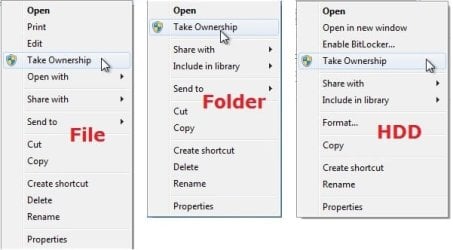
Here's How:
1. Do step 2, 3, or 4 below for what you would like to do.
2. To Add "Take Ownership" to Context Menu
Note
Application files (ex: EXE, CMD, MSI) will still have Run as administrator instead of Take Ownership in the context menu when you use this step.
A) Click/tap on the Download button below to download the file below, and go to step 5 below.
Add_Take_Ownership_to_context_menu
Download
3. To Add "Take Ownership" with Pause to Context Menu
Note
This option pauses the command when you use the "Take Ownership" context menu to be able to see the command results. This can be handy to verify setting ownership and permissions was successful or not.
Application files (ex: EXE, CMD, MSI) will still have Run as administrator instead of Take Ownership in the context menu when you use this step.
Application files (ex: EXE, CMD, MSI) will still have Run as administrator instead of Take Ownership in the context menu when you use this step.
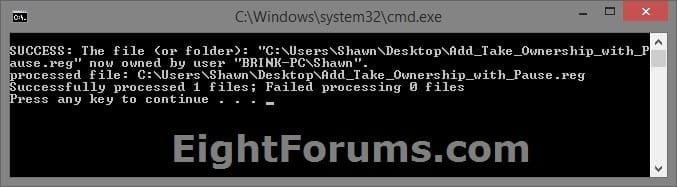
A) Click/tap on the Download button below to download the file below, and go to step 5 below.
Add_Take_Ownership_with_Pause_to_context_menu.reg
Download
4. To Remove "Take Ownership" from Context Menu
Note
A) Click/tap on the Download button below to download the file below, and go to step 5 below.
Remove_Take_Ownership_from_context_menu.reg
Download
5. Save the .reg file to your Desktop.
6. Double click on the downloaded .reg file to merge it.
7. If prompted, click on Run, Yes (UAC), Yes, and OK to approve the merge.
8. When finished, you can delete the downloaded .reg file if you like.
That's it,
Shawn
Related Tutorials
- How to Add or Remove the Security Tab from Properties in Windows 7
- How to Restore TrustedInstaller as Owner of a File in Vista and Windows 7
- How to Allow or Deny Permissions to Users and Groups
- How to Add or Remove Users and Groups from "User Rights Assignment"
- How to Allow or Prevent Users and Groups to Take Ownership
- How to Add Reset Permissions to Context Menu in Windows
- Enable or Disable Inherited Permissions for Files and Folders in Windows
Related Windows 10 Tutorials
- How to Add View Owner to Context Menu in Windows
- Change Permissions of File, Folder, Drive, or Registry Key for Users and Groups in Windows 10
- How to Change Owner of File, Folder, Drive, or Registry Key in Windows 10
- How to Add Advanced security to context menu in Windows 8 and Windows 10
- How to Add a File Attributes context menu in Windows 10
- How to Remove Security tab from Drives, Files, and Folders Properties in Windows 10
- How to Add Reset Permissions to Context Menu in Windows
- Enable or Disable Inherited Permissions for Files and Folders in Windows
- How to Add Inherited Permissions Context Menu in Windows
- How to Add List Permissions Context Menu in Windows
- How to Backup and Restore Permissions of Files, Folders, or Drives in Windows 10
- How to Add Change Owner to Context Menu in Windows 10
Attachments
Last edited:


