
Take Ownership Shortcut

Add "Take Ownership" to Context Menu of Files, Folders, and Drives in Windows


   Information
This tutorial will show you how to add Take Ownership to the context menu of all files, folders, and drives for all users in Windows.

This will allow you to be able to instantly take ownership of a file, folder (and all contents), or drive (and all contents) by changing the owner to the current user and grant the Owner_Rights SID (current owner) full access permission.

You must be an administrator to be able to add, remove, and use the "Take Ownership" context menu.

   Note
Application files (ex: EXE, CMD, MSI) will continue to have Run as administrator instead of Take Ownership in their context menu.


When you right click or press and hold on a file, folder, or drive, and click/tap on Take Ownership, you may be prompted by UAC for permission to do so first.

If a user is logged in as an administrator, then the user would just click/tap on Yes to approve and take ownership. The owner of the file, folder, or drive would be changed to the current administrator user account. Permissions would be set to allow the Owner_Rights SID (current owner) full control of the file, folder, or drive.

If a user is logged in as a standard user, then the user would need to enter a selected administrator's password to approve and take ownership. The owner of the file, folder, or drive would be changed to the selected administrator account, and not the standard user. Permissions would be set to allow the Owner_Rights SID (current owner) full control of the file, folder, or drive.


The Take Ownership context menu will not be available when you right click on the C: drive, C:\Program Files folder, C:\Program Files (x86) folder, C:\ProgramData folder, C:\Users folder, and C:\Windows folder. This was done because taking ownership of these system folders can make Windows unstable since it would also take ownership of all the folder's content at the same time.

You will still be able to use the Take Ownership context menu of files inside the folder locations above.

If you would like to have a custom location(s) of your own to not have the context menu, then please feel free to post a request in this tutorial thread. I'll be happy to post back with a custom .reg file for it.

   Warning
This context menu will only work with English Windows installations.

If you have a different language, then please post a reply with what language you have instead. I'll be happy to post back a translated version for you.


EXAMPLE: Take Ownership in Context Menu
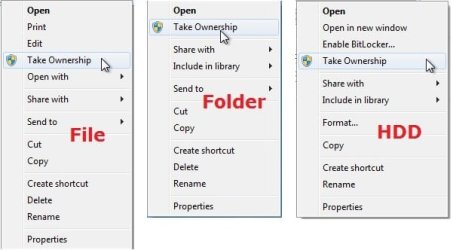
example.jpg


Here's How:

1. Do step 2, 3, or 4 below for what you would like to do.


2. To Add "Take Ownership" to Context Menu

   Note
Application files (ex: EXE, CMD, MSI) will still have Run as administrator instead of Take Ownership in the context menu when you use this step.

A) Click/tap on the Download button below to download the file below, and go to step 5 below.

Add_Take_Ownership_to_context_menu


Download


3. To Add "Take Ownership" with Pause to Context Menu

   Note
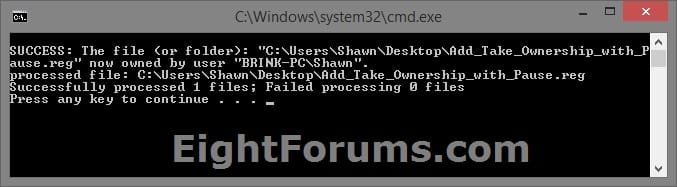
This option pauses the command when you use the "Take Ownership" context menu to be able to see the command results. This can be handy to verify setting ownership and permissions was successful or not.

Application files (ex: EXE, CMD, MSI) will still have Run as administrator instead of Take Ownership in the context menu when you use this step.


Take_Ownership_Pause.jpg


A) Click/tap on the Download button below to download the file below, and go to step 5 below.

Add_Take_Ownership_with_Pause_to_context_menu.reg


Download


4. To Remove "Take Ownership" from Context Menu

   Note
This is the default setting, and will also restore the default Run as administrator for .exe files.


A) Click/tap on the Download button below to download the file below, and go to step 5 below.

Remove_Take_Ownership_from_context_menu.reg


Download


5. Save the .reg file to your Desktop.

6. Double click on the downloaded .reg file to merge it.

7. If prompted, click on Run, Yes (UAC), Yes, and OK to approve the merge.

8. When finished, you can delete the downloaded .reg file if you like.


That's it,
Shawn


Attachments

Last edited:
I know this is an old thread, but could you tell me what exactly happens re: tutorial, the warning about having to re-install windows. I have used the "take ownership" and now am having trouble with losing my admin privilege. I have been fighting this for awhile now and would like to know if this is the problem.

Hope to hear from you, thanks


Hello Bob,

The warning is just to not take ownership of your Windows 7 C: drive since there is a chance that it could mess up access permission for Windows 7 and causing Windows 7 to not work properly.

What did you take ownership of?
 
Last edited:

My Computer

Computer type
PC/Desktop
Computer Manufacturer/Model Number
Self built custom
OS
64-bit Windows 11 Pro for Workstations
CPU
Intel i7-8700K OC'd to 5 GHz
Motherboard
ASUS ROG Maximus XI Formula Z390
Memory
64 GB (4x16GB) G.SKILL TridentZ RGB DDR4 3600 MHz
Graphics Card(s)
ASUS ROG-STRIX-GTX1080TI-O11G-GAMING
Sound Card
Integrated
Monitor(s) Displays
2 x Samsung Odyssey G7 27"
Screen Resolution
2560x1440
Hard Drives
1TB Samsung 990 PRO M.2,
4TB Samsung 990 PRO PRO M.2,
TerraMaster F8 SSD Plus NAS
PSU
Seasonic Prime Titanium 850W
Case
Thermaltake Core P3
Cooling
Corsair Hydro H115i
Keyboard
Logitech wireless K800
Mouse
Logitech MX Master 4
Internet Speed
2 Gb/s Download and 100 Mb/s Upload
Antivirus
Malwarebyte Anti-Malware Premium
Browser
Google Chrome
Other Info
Logitech Z625 speaker system,
Logitech BRIO 4K Pro webcam,
HP Color LaserJet Pro MFP M477fdn,
APC SMART-UPS RT 1000 XL - SURT1000XLI,
Galaxy S23 Plus phone
Yikes, maybe I did screw up and do that. It seems that I have lost all admin privilege on my machine. I am totally a guest, not able to run anything that requires admin privilege. Not even sure when it started as only recently noticed problem. Can't even do a restore. Running out of ideas when I came here to post problem and just happened to re-read the "take ownership" instructions. If what is happening to me sounds like what you were warning of, then I must have done it.
bob
 

My Computer

Computer Manufacturer/Model Number
Home Built
OS
Windows 7 Pro x64
CPU
I-7 870 @2.93GHz (LGA 1156)
Motherboard
Intel DH55HC
Memory
16 GB Patriot G Series
Graphics Card(s)
ATI Radeon HD 5770
Sound Card
N/A-M/B only
Monitor(s) Displays
Acer H213H
Screen Resolution
1920x1080
Hard Drives
WD Caviar Blue 500GB
Samsung 2TB
Hitachi 1TB
PSU
Cooler Master Silent Pro M 700w
Case
Azza Orion 202
Cooling
Stock Intel
Keyboard
Logitech Illuminated
Mouse
Logitech G9X
Internet Speed
7Mbps

My Computer

Computer type
PC/Desktop
Computer Manufacturer/Model Number
Self built custom
OS
64-bit Windows 11 Pro for Workstations
CPU
Intel i7-8700K OC'd to 5 GHz
Motherboard
ASUS ROG Maximus XI Formula Z390
Memory
64 GB (4x16GB) G.SKILL TridentZ RGB DDR4 3600 MHz
Graphics Card(s)
ASUS ROG-STRIX-GTX1080TI-O11G-GAMING
Sound Card
Integrated
Monitor(s) Displays
2 x Samsung Odyssey G7 27"
Screen Resolution
2560x1440
Hard Drives
1TB Samsung 990 PRO M.2,
4TB Samsung 990 PRO PRO M.2,
TerraMaster F8 SSD Plus NAS
PSU
Seasonic Prime Titanium 850W
Case
Thermaltake Core P3
Cooling
Corsair Hydro H115i
Keyboard
Logitech wireless K800
Mouse
Logitech MX Master 4
Internet Speed
2 Gb/s Download and 100 Mb/s Upload
Antivirus
Malwarebyte Anti-Malware Premium
Browser
Google Chrome
Other Info
Logitech Z625 speaker system,
Logitech BRIO 4K Pro webcam,
HP Color LaserJet Pro MFP M477fdn,
APC SMART-UPS RT 1000 XL - SURT1000XLI,
Galaxy S23 Plus phone
I haven't tried that at boot. When I try it now I get the message "The service cannot be started because it is disabled or because it has no enabled devices associated with it."
I will dig out the original installation disk and do the system restore from there. I'll post results tomorrow.

And thanks for pointing me to a course of action.
bob
 

My Computer

Computer Manufacturer/Model Number
Home Built
OS
Windows 7 Pro x64
CPU
I-7 870 @2.93GHz (LGA 1156)
Motherboard
Intel DH55HC
Memory
16 GB Patriot G Series
Graphics Card(s)
ATI Radeon HD 5770
Sound Card
N/A-M/B only
Monitor(s) Displays
Acer H213H
Screen Resolution
1920x1080
Hard Drives
WD Caviar Blue 500GB
Samsung 2TB
Hitachi 1TB
PSU
Cooler Master Silent Pro M 700w
Case
Azza Orion 202
Cooling
Stock Intel
Keyboard
Logitech Illuminated
Mouse
Logitech G9X
Internet Speed
7Mbps
You're welcome Bob. I hope it goes well.
 

My Computer

Computer type
PC/Desktop
Computer Manufacturer/Model Number
Self built custom
OS
64-bit Windows 11 Pro for Workstations
CPU
Intel i7-8700K OC'd to 5 GHz
Motherboard
ASUS ROG Maximus XI Formula Z390
Memory
64 GB (4x16GB) G.SKILL TridentZ RGB DDR4 3600 MHz
Graphics Card(s)
ASUS ROG-STRIX-GTX1080TI-O11G-GAMING
Sound Card
Integrated
Monitor(s) Displays
2 x Samsung Odyssey G7 27"
Screen Resolution
2560x1440
Hard Drives
1TB Samsung 990 PRO M.2,
4TB Samsung 990 PRO PRO M.2,
TerraMaster F8 SSD Plus NAS
PSU
Seasonic Prime Titanium 850W
Case
Thermaltake Core P3
Cooling
Corsair Hydro H115i
Keyboard
Logitech wireless K800
Mouse
Logitech MX Master 4
Internet Speed
2 Gb/s Download and 100 Mb/s Upload
Antivirus
Malwarebyte Anti-Malware Premium
Browser
Google Chrome
Other Info
Logitech Z625 speaker system,
Logitech BRIO 4K Pro webcam,
HP Color LaserJet Pro MFP M477fdn,
APC SMART-UPS RT 1000 XL - SURT1000XLI,
Galaxy S23 Plus phone
Did a boot with system disk and then a restore. -SUCCESS- The restore point wasn't very long ago, last week of 2011, now I am wondering if the Windows updates installed very recently had anything to do with it. Some of the updates had "Framework" or Frame something in title. must have been 3 or 4 of them. Didn't pay much attention just let them fly.
Well I'm sure the machine will try to pick up those again, I'll just have to watch what happens.
I would like to set this up with better user accounts management. Do you have any links to correct way to do it.

I really want to thank you for your help....................................appreciate it. bob

Went to tutorials for user account management, should provide what I'm looking for.
thanks again, bob
 
Last edited by a moderator:

My Computer

Computer Manufacturer/Model Number
Home Built
OS
Windows 7 Pro x64
CPU
I-7 870 @2.93GHz (LGA 1156)
Motherboard
Intel DH55HC
Memory
16 GB Patriot G Series
Graphics Card(s)
ATI Radeon HD 5770
Sound Card
N/A-M/B only
Monitor(s) Displays
Acer H213H
Screen Resolution
1920x1080
Hard Drives
WD Caviar Blue 500GB
Samsung 2TB
Hitachi 1TB
PSU
Cooler Master Silent Pro M 700w
Case
Azza Orion 202
Cooling
Stock Intel
Keyboard
Logitech Illuminated
Mouse
Logitech G9X
Internet Speed
7Mbps
You're most welcome Bob. To be safe you can create a restore point in case there's a problem after installing the updates again.

Usually, it's recommended to only install the updates that are selected automatically first, and keep checking for updates to install the ones checked. Afterwards, install the ones that are not checked one at a time. This way you will not have to worry about one update possibly conflicting with another.
 

My Computer

Computer type
PC/Desktop
Computer Manufacturer/Model Number
Self built custom
OS
64-bit Windows 11 Pro for Workstations
CPU
Intel i7-8700K OC'd to 5 GHz
Motherboard
ASUS ROG Maximus XI Formula Z390
Memory
64 GB (4x16GB) G.SKILL TridentZ RGB DDR4 3600 MHz
Graphics Card(s)
ASUS ROG-STRIX-GTX1080TI-O11G-GAMING
Sound Card
Integrated
Monitor(s) Displays
2 x Samsung Odyssey G7 27"
Screen Resolution
2560x1440
Hard Drives
1TB Samsung 990 PRO M.2,
4TB Samsung 990 PRO PRO M.2,
TerraMaster F8 SSD Plus NAS
PSU
Seasonic Prime Titanium 850W
Case
Thermaltake Core P3
Cooling
Corsair Hydro H115i
Keyboard
Logitech wireless K800
Mouse
Logitech MX Master 4
Internet Speed
2 Gb/s Download and 100 Mb/s Upload
Antivirus
Malwarebyte Anti-Malware Premium
Browser
Google Chrome
Other Info
Logitech Z625 speaker system,
Logitech BRIO 4K Pro webcam,
HP Color LaserJet Pro MFP M477fdn,
APC SMART-UPS RT 1000 XL - SURT1000XLI,
Galaxy S23 Plus phone
Hi

I tried both methods but nothing is working, I keep getting "access denied" everytime I try to change ownership. Its a folder that I had previously shared on the home network. I moved the content to a different drive but I'm still left with the folder - cant rename it, delete it, un-share it - so its a bit of a pain as its showing up on the network. I even tried "stopping the network" in task manager - still nothing. I'd format the drive if it was empty, but there is nearly 2tb of files on it so thats not really an option. Any help?
 

My Computer

OS
Windows 7 Home Premium
Hello Leftygt, and welcome to Seven Forums.

You might see if using the free program Unlocker on it may be able to allow you to delete it. :)

Hope this helps,
Shawn
 

My Computer

Computer type
PC/Desktop
Computer Manufacturer/Model Number
Self built custom
OS
64-bit Windows 11 Pro for Workstations
CPU
Intel i7-8700K OC'd to 5 GHz
Motherboard
ASUS ROG Maximus XI Formula Z390
Memory
64 GB (4x16GB) G.SKILL TridentZ RGB DDR4 3600 MHz
Graphics Card(s)
ASUS ROG-STRIX-GTX1080TI-O11G-GAMING
Sound Card
Integrated
Monitor(s) Displays
2 x Samsung Odyssey G7 27"
Screen Resolution
2560x1440
Hard Drives
1TB Samsung 990 PRO M.2,
4TB Samsung 990 PRO PRO M.2,
TerraMaster F8 SSD Plus NAS
PSU
Seasonic Prime Titanium 850W
Case
Thermaltake Core P3
Cooling
Corsair Hydro H115i
Keyboard
Logitech wireless K800
Mouse
Logitech MX Master 4
Internet Speed
2 Gb/s Download and 100 Mb/s Upload
Antivirus
Malwarebyte Anti-Malware Premium
Browser
Google Chrome
Other Info
Logitech Z625 speaker system,
Logitech BRIO 4K Pro webcam,
HP Color LaserJet Pro MFP M477fdn,
APC SMART-UPS RT 1000 XL - SURT1000XLI,
Galaxy S23 Plus phone
Hi Shawn

Thanks for your help.I tried unlocker, but its telling me there is no "unlocking handle"?
 

My Computer

OS
Windows 7 Home Premium
Hi Shawn

Thanks for your help.I tried unlocker, but its telling me there is no "unlocking handle"?

You might see if temporarily moving the contents back to the original location may allow you to then be able to un-share and delete it.

If not, then I would recommend to go ahead and post this issue in the Network & Sharing forum area to see what we may be able to do to help with there it since it's not related with this tutorial. This way you will get more specific help with it. :)
 
Last edited:

My Computer

Computer type
PC/Desktop
Computer Manufacturer/Model Number
Self built custom
OS
64-bit Windows 11 Pro for Workstations
CPU
Intel i7-8700K OC'd to 5 GHz
Motherboard
ASUS ROG Maximus XI Formula Z390
Memory
64 GB (4x16GB) G.SKILL TridentZ RGB DDR4 3600 MHz
Graphics Card(s)
ASUS ROG-STRIX-GTX1080TI-O11G-GAMING
Sound Card
Integrated
Monitor(s) Displays
2 x Samsung Odyssey G7 27"
Screen Resolution
2560x1440
Hard Drives
1TB Samsung 990 PRO M.2,
4TB Samsung 990 PRO PRO M.2,
TerraMaster F8 SSD Plus NAS
PSU
Seasonic Prime Titanium 850W
Case
Thermaltake Core P3
Cooling
Corsair Hydro H115i
Keyboard
Logitech wireless K800
Mouse
Logitech MX Master 4
Internet Speed
2 Gb/s Download and 100 Mb/s Upload
Antivirus
Malwarebyte Anti-Malware Premium
Browser
Google Chrome
Other Info
Logitech Z625 speaker system,
Logitech BRIO 4K Pro webcam,
HP Color LaserJet Pro MFP M477fdn,
APC SMART-UPS RT 1000 XL - SURT1000XLI,
Galaxy S23 Plus phone
Thanks... it worked... was trying for since million years... ( I think So) thanks again...
 

My Computer

OS
WINDOWS 7 HOME EDITION 32 BIT
THANKS A MILLION

I had problems with iTunes showing the error message (-42404) part of iTunes not installed correctly etc.
I was advised to look at your posting re this problem - I downloaded the TAKE OWNERSHIP prog, followed your instructions and PROBLEM SOLVED.
Many, many thanks - Apple offered no such advice - I was tearing my hair out.
WELL DONE ONCE AGAIN.
Regards
Signman3
:)
 

My Computer

OS
Windows 7 Home Premium 64 bit
via cmd

Code:
 [MENTION=353699]echo[/MENTION] off
reg query "HKU\S-1-5-19\Environment"
If Not %ERRORLEVEL% EQU 0 (
 cls & echo Schadenfreude..
 Pause & Exit
)
Cls

echo  Take Ownership:
reg delete "HKCR\*\shell\runas" /f
reg add "HKCR\*\shell\runas"         /ve                        /d "Take Ownership" /f
reg add "HKCR\*\shell\runas"         /v "HasLUAShield"          /d ""               /f
reg add "HKCR\*\shell\runas"         /v "NoWorkingDirectory"    /d ""               /f
reg add "HKCR\*\shell\runas"         /v "Position"              /d "middle"         /f
reg add "HKCR\*\shell\runas\command" /ve                        /d "cmd.exe /c takeown /f \"%%1\" && icacls \"%%1\" /grant *S-1-3-4:F /c /l & pause" /f
reg add "HKCR\*\shell\runas\command" /v "IsolatedCommand"       /d "cmd.exe /c takeown /f \"%%1\" && icacls \"%%1\" /grant *S-1-3-4:F /c /l & pause" /f
 reg delete "HKCR\Directory\shell\runas" /f
 reg add "HKCR\Directory\shell\runas"         /ve                     /d "Take Ownership" /f
 reg add "HKCR\Directory\shell\runas"         /v "AppliesTo"          /d "NOT (System.ItemPathDisplay:=\"C:\Users\" OR System.ItemPathDisplay:=\"C:\ProgramData\" OR System.ItemPathDisplay:=\"C:\Windows\" OR System.ItemPathDisplay:=\"C:\Windows\System32\" OR System.ItemPathDisplay:=\"C:\Program Files\" OR System.ItemPathDisplay:=\"C:\Program Files (x86)\")" /f
 reg add "HKCR\Directory\shell\runas"         /v "HasLUAShield"       /d ""       /f
 reg add "HKCR\Directory\shell\runas"         /v "NoWorkingDirectory" /d ""       /f
 reg add "HKCR\Directory\shell\runas"         /v "Position"           /d "middle" /f
 reg add "HKCR\Directory\shell\runas\command" /ve                     /d "cmd.exe /c takeown /f \"%%1\" /r /d y && icacls \"%%1\" /grant *S-1-3-4:F /t /c /l /q & pause" /f
 reg add "HKCR\Directory\shell\runas\command" /v "IsolatedCommand"    /d "cmd.exe /c takeown /f \"%%1\" /r /d y && icacls \"%%1\" /grant *S-1-3-4:F /t /c /l /q & pause" /f
reg delete "HKCR\dllfile\shell\runas" /f
reg add "HKCR\dllfile\shell\runas"         /ve                     /d "Take Ownership" /f
reg add "HKCR\dllfile\shell\runas"         /v "HasLUAShield"       /d ""               /f
reg add "HKCR\dllfile\shell\runas"         /v "NoWorkingDirectory" /d ""               /f
reg add "HKCR\dllfile\shell\runas"         /v "Position"           /d "middle"         /f
reg add "HKCR\dllfile\shell\runas\command" /ve                     /d "cmd.exe /c takeown /f \"%%1\" && icacls \"%%1\" /grant *S-1-3-4:F /c /l & pause" /f
reg add "HKCR\dllfile\shell\runas\command" /v "IsolatedCommand"    /d "cmd.exe /c takeown /f \"%%1\" && icacls \"%%1\" /grant *S-1-3-4:F /c /l & pause" /f
 reg delete "HKCR\Drive\shell\runas" /f
 reg add "HKCR\Drive\shell\runas"         /ve                     /d "Take Ownership" /f
 reg add "HKCR\Drive\shell\runas"         /v "AppliesTo"          /d "NOT C:"         /f
 reg add "HKCR\Drive\shell\runas"         /v "HasLUAShield"       /d ""               /f
 reg add "HKCR\Drive\shell\runas"         /v "NoWorkingDirectory" /d ""               /f
 reg add "HKCR\Drive\shell\runas"         /v "Position"           /d "middle"         /f
 reg add "HKCR\Drive\shell\runas\command" /ve                     /d "cmd.exe /c takeown /f \"%%1\" /r /d y && icacls \"%%1\" /grant *S-1-3-4:F /t /c /l /q & pause" /f
 reg add "HKCR\Drive\shell\runas\command" /v "IsolatedCommand"    /d "cmd.exe /c takeown /f \"%%1\" /r /d y && icacls \"%%1\" /grant *S-1-3-4:F /t /c /l /q & pause" /f
reg delete "HKCR\exefile\shell\runas" /f
reg add "HKCR\exefile\shell\runas"         /v "HasLUAShield"    /d ""            /f
reg add "HKCR\exefile\shell\runas\command" /ve                  /d "\"%%1\" %%*" /f
reg add "HKCR\exefile\shell\runas\command" /v "IsolatedCommand" /d "\"%%1\" %%*" /f
:: or "/grant administrators:F" instead "/grant *S-1-3-4:F"

pause & exit
 
Last edited:

My Computer

OS
windows7 ultimate x32
CPU
DualCore Intel Core 2 Duo E8400, 3000 MHz (9 x 333)
Motherboard
ASRock 4Core1333-GLAN (3 PCI,1 PCI-E x16,4 DDR2 DIMM...)
Memory
4Gb (1x4 DDR2-800 DDR2 SDRAM)
Graphics Card(s)
NVIDIA GeForce 9600 GT (512 mb)
Sound Card
onboard
Monitor(s) Displays
lg flatron w2242t
Screen Resolution
1680 x 1050
Hard Drives
WDC WD5000AAJS-00YFA0 ATA Device
PSU
-
Case
-
Cooling
-
Other Info
d-link dir100
This is truly wonderful.

For a while I was dual booting windows but the "older" version of Windows 7 was no longer needed.

Getting rid of the disk space was nearly impossible until I found this.

Thanks!
 

My Computer

Computer Manufacturer/Model Number
Home built
OS
Windows 7 Professional X64
CPU
AMD A6-3650
Motherboard
BioStar TA75M
Memory
8 GB
Graphics Card(s)
NVIDIA
Monitor(s) Displays
HP HD, eMachines, SyncMaster 941BW
Hard Drives
1.5TB WD
1.5TB Seagate
Hey guys, any idea where the reg file / install is and how one may go about altering the value for the maximum number of folders to perform Take Ownership on at once? I know your can just do a whole drive and wait that way, but its just a bunch of cmd operations, shouldn't be capped like that :/
 

My Computer

OS
Win 7

My Computer

Computer type
PC/Desktop
Computer Manufacturer/Model Number
Self built custom
OS
64-bit Windows 11 Pro for Workstations
CPU
Intel i7-8700K OC'd to 5 GHz
Motherboard
ASUS ROG Maximus XI Formula Z390
Memory
64 GB (4x16GB) G.SKILL TridentZ RGB DDR4 3600 MHz
Graphics Card(s)
ASUS ROG-STRIX-GTX1080TI-O11G-GAMING
Sound Card
Integrated
Monitor(s) Displays
2 x Samsung Odyssey G7 27"
Screen Resolution
2560x1440
Hard Drives
1TB Samsung 990 PRO M.2,
4TB Samsung 990 PRO PRO M.2,
TerraMaster F8 SSD Plus NAS
PSU
Seasonic Prime Titanium 850W
Case
Thermaltake Core P3
Cooling
Corsair Hydro H115i
Keyboard
Logitech wireless K800
Mouse
Logitech MX Master 4
Internet Speed
2 Gb/s Download and 100 Mb/s Upload
Antivirus
Malwarebyte Anti-Malware Premium
Browser
Google Chrome
Other Info
Logitech Z625 speaker system,
Logitech BRIO 4K Pro webcam,
HP Color LaserJet Pro MFP M477fdn,
APC SMART-UPS RT 1000 XL - SURT1000XLI,
Galaxy S23 Plus phone
You're most welcome Jobo. :)
 

My Computer

Computer type
PC/Desktop
Computer Manufacturer/Model Number
Self built custom
OS
64-bit Windows 11 Pro for Workstations
CPU
Intel i7-8700K OC'd to 5 GHz
Motherboard
ASUS ROG Maximus XI Formula Z390
Memory
64 GB (4x16GB) G.SKILL TridentZ RGB DDR4 3600 MHz
Graphics Card(s)
ASUS ROG-STRIX-GTX1080TI-O11G-GAMING
Sound Card
Integrated
Monitor(s) Displays
2 x Samsung Odyssey G7 27"
Screen Resolution
2560x1440
Hard Drives
1TB Samsung 990 PRO M.2,
4TB Samsung 990 PRO PRO M.2,
TerraMaster F8 SSD Plus NAS
PSU
Seasonic Prime Titanium 850W
Case
Thermaltake Core P3
Cooling
Corsair Hydro H115i
Keyboard
Logitech wireless K800
Mouse
Logitech MX Master 4
Internet Speed
2 Gb/s Download and 100 Mb/s Upload
Antivirus
Malwarebyte Anti-Malware Premium
Browser
Google Chrome
Other Info
Logitech Z625 speaker system,
Logitech BRIO 4K Pro webcam,
HP Color LaserJet Pro MFP M477fdn,
APC SMART-UPS RT 1000 XL - SURT1000XLI,
Galaxy S23 Plus phone
Back
Top