
How to Enable or Disable Search "Indexer Backoff" in Windows 7
Information
This will show you how to enable or disable the search indexer backoff feature in Windows 7.
If enabled, backoff logic will be used to throttle back indexing activity when system activity is high.
If disabled, indexing will continue at full speed even when system activity is high.
You must be logged in as an administrator to be able to do this tutorial.
If enabled, backoff logic will be used to throttle back indexing activity when system activity is high.
If disabled, indexing will continue at full speed even when system activity is high.
You must be logged in as an administrator to be able to do this tutorial.
Note
If you have a decent performing computer, and do not run a lot at once often, then you might consider disabling the indexer backoff feature to allow indexing to be able to finish faster. For example, when you manually rebuild the index.
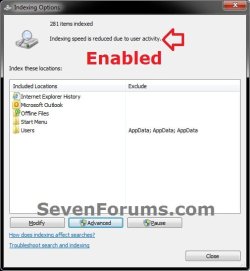
EXAMPLE: Indexing Activity with "indexer backoff" Enable and Disabled with high system activity

OPTION ONE
Using a REG File Download
1. To Enable Search "Indexer Backoff"
NOTE: This is the default setting.
A) Click on the Download button below to download the file below.
Enable_Indexer_Backoff.reg
Download
B) Go to step 3.
2. To Disable Search Indexer Backoff"
A) Click on the Download button below to download the file below.
Disable_Indexer_Backoff.reg
Download
3. Click on Save, and save the .reg file to the desktop.
4. Right click the downloaded .reg file and click on Merge.
5. Click on Run, Yes, Yes, and OK when prompted.
6. Log off and log on, or restart the computer to fully apply.
7. When done, you can delete the downloaded .reg file if you like.
OPTION TWO
Through the Local Group Policy Editor
1. Open the Local Group Policy Editor.
2. In the left pane, click on to expand Computer Configuration, Administrative Templates, Windows Components, and Search. (see screenshot below)
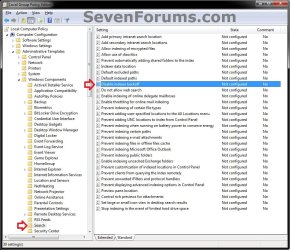
3. In the right pane, double click on Disable indexer backoff. (see screenshot above)
4. To Enable Search "Indexer Backoff"
A) Select (dot) either Not Configured or Disabled. (see screenshot below step 6)
NOTE: Not Configured is the default setting.
B) Go to step 6.
5. To Disable Search "Indexer Backoff"
A) Select (dot) Enabled. (see screenshot below step 6)
6. Click on OK. (see screenshot below)

7. Close the Local Group Policy Editor window.
That's it,
Shawn


