
How to Mark a Partition as Inactive in Windows 7 and Vista
Information
Marking a partition as active on a basic disk means that the computer will use the loader (an operating system tool) on that partition to start the operating system. Marking a partition as active if it doesn't contain the loader for an operating system may cause your computer to become unbootable.
This tutorial will show you how to mark a partition as inactive in Windows 7 and Vista in case you marked it as active by mistake.
This tutorial will show you how to mark a partition as inactive in Windows 7 and Vista in case you marked it as active by mistake.
Tip
If you mark the wrong active partition as inactive by mistake and can no longer boot from it, then you can do a startup repair to fix it.
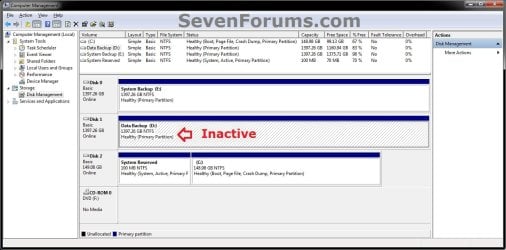
EXAMPLE: Partition Marked as Active and Inactive
NOTE: This is an example of my D: data partition shown as active by mistake in Disk Management (diskmgmt.msc). I used the steps in this tutorial to mark it as inactive since my System Reserved partition is my true active partition instead.

Here's How:
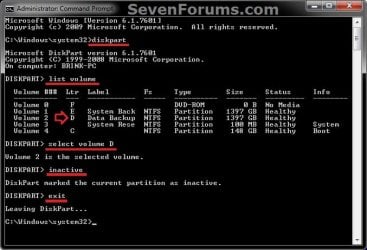
1. Open a elevated command prompt, or a command prompt at boot.
2. In the command prompt, type diskpart and press Enter. (see screenshot below step 6)
3. In the command prompt, type list volume and press Enter. (see screenshot below step 6)
NOTE: Make note of the volume number or letter that you wanted to mark as inactive. At boot, the drive letters may not be the same as they are in Windows.
4. In the command prompt, type select volume # or select volume letter and press Enter. (see screenshot below step 6)
NOTE: You would substitute # for the volume number listed, or letter for the volume/partition letter. For example, I want to mark my D: partition as inactive, so I would type either select volume 2 or select volume D and press Enter.
5. In the command prompt, type inactive and press Enter. (see screenshot below step 6)
6. In the command prompt, type exit and press Enter. (see screenshot below)
7. Close the elevated command prompt in Windows, or restart the computer if at boot.
That's it,
Shawn
Related Tutorials
- How to Mark a Partition as Active in Windows 7
- How to Delete a Partition or Volume in Windows 7
- How to Extend a Partition or Volume in Windows 7
- How to Create a New Partition or Volume in Windows 7
- How to Shrink a Partition or Volume in Windows 7
- How to Run a Startup Repair in Windows 7
- Startup Repair - Run 3 Separate Times to Repair Boot Issues
- Bootmgr is missing - Fix
Last edited:


