
 |
Welcome to Windows 7 Forums. Our forum is dedicated to helping you find solutions with any problems, errors or issues you are experiencing with Windows 7. The Windows 7 forum also covers news and updates and has an extensive Windows 7 tutorial section that covers a wide range of tips and tricks.
Windows 7 - Windows 7 Installation - Prepare PC to be Sold Windows 7 Installation - Prepare PC to be Sold How to Prepare a Windows 7 PC to be Sold
Published by Kari
11-14-2011
| Windows 7 Installation - Prepare PC to be Sold  Information Giving away or selling your old PC with OS can be tricky. Should I leave my software, do I lose my licence, can the buyer see my files even if I delete them, is it OK to install some extras for that cousin of mine I'm giving this rig as a Christmas present?
This tutorial shows you how to prepare a PC to be given away or sold. My main purpose is to show what to do when selling / giving away a used Windows 7 computer, but you can also use this method if you (like me  ) got some nice laptops or PC's almost free to be given as presents but they came without OS.
Giving away or selling a PC with everything intact is -sorry to say it- dumb. Not only can it bring a lot of problems and annoyances due to wrongly named user profiles and folders but it's also a security risk. Whatever you think, however careful you think you have been, there's always enough personal information available on a used PC to really make you suffer, if the new owner so decides. If you are giving away a used PC please wipe the hard disk first to ensure your privacy. Then install Windows 7 without any personal user related information. This is what you need:- A Windows 7 Install Media of your chosen edition
- A disk wipe utility. If you do not know any, I recommend using Windows 7 built-in DISKPART command line utility
- A PC, of course
 - Windows 7 Product Key, which you can normally find on a sticker at the bottom or back of the PC. This, of course, is up to you: you can also sell or give away a PC with preinstalled Windows 7 without product key, in which case the buyer / receiver has to produce one
Skills / tutorials needed to manage this procedure:Phase 1: Wiping the disk- Backup your personal files and folders to an external destination
- Use DISKPART Clean All command as told in this tutorial to securely erase (wipe) your hard disk(s)
Phase 2: Installing Seven- Beginn installation of Windows 7 as told in this tutorial. If preparing a used computer which came with a pre-installed Windows 7, remember to use the original edition to ensure OEM product key can be used to activate it
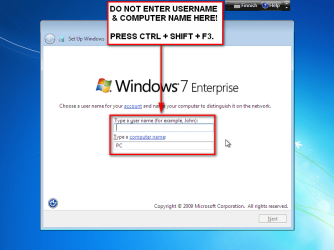
- When you reach step 11 in above mentioned installation tutorial, DO NOT ENTER USERNAME AND COMPUTER NAME! Instead press CTRL + SHIFT + F3:
.  . - This boots Windows 7 in so called Audit Mode using built-in administrator profile. There's no need to set up user accounts for now
- Continue installation from installation tutorial's step 15
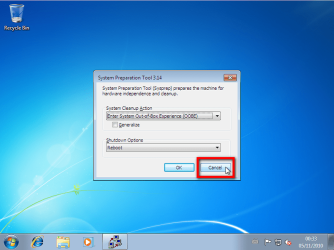
- Finally Windows 7 starts in Audit Mode. Click Cancel to close System Preparation Tool for now:
.  . - Install all the drivers and software you want to. When installing software remember to use only valid, legal installation media
- Modify Windows 7 theme and appearance as you wish
- If selling or giving away the PC equipped with Windows 7 Ultimate, install language packs needed if PC is going to be used in another language than that of your install media
- When done, browse to and right click C:\Windows\System32\Sysprep\Sysprep.exe and choose Run as administrator to open System Preparation Tool (sysprep):
.  . - Select Out-of-Box Experience in System Cleanup Action
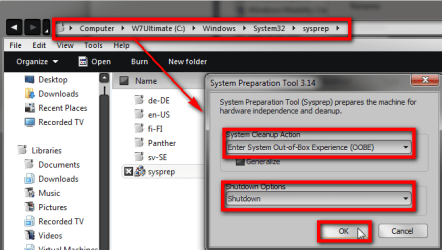
- Select Shutdown in Shutdown Options
- Click OK
Computer shuts down, and next time it is booted it is so called first boot (Out-of-Box Experience), stopping to ask initial user profile name and computer name. If language packs are installed (Ultimate or Enterprise), initial first boot also asks user in what language he / she wants Windows to be set up. This way you can prepare the PC without creating any user accounts or naming the PC, letting the end user to do that. Easy and quite fast (not counting DISKPART ). Kari |  Published by | | An angry old man Join Date: Jun 2009 Location: A Finnish immigrant in Leipzig, Germany Posts: 9,722 | |
 Tutorial Tools | | | | | | | | | |
11-14-2011
|
#1 | | Windows 7 Professional SP1 - x64 |
Excellent Tutorial!
This method is a killer thread for thieves ( Out-of-Box Experience)! | My System Specs | | System Manufacturer/Model Number Under Construction [mid-2012] - I'm building a brand new mid-tower (half way done!) OS Windows 7 Professional SP1 - x64 |
11-14-2011
|
#2 | | |

Quote: Originally Posted by NoN Excellent Tutorial! This method is a killer thread for thieves( Out-of-Box Experience)!  As so many other things around software in general and Windows in particular, it can also be used with criminal intention.
However, thieves do not need this method. They simply clean install new OS, not caring if new owner can recover old owners files.
Method described in this tutorial is legal and valid. Using the argument I highlighted in your quote we could also say we should not have tutorials describing the installation process in general because the criminals can also learn how to install a new OS on a stolen PC.
Kari
Last edited by Kari; 11-20-2011 at 05:57 AM..
Reason: Fixed a typo
| My System Specs | | System Manufacturer/Model Number HP ENVY 17-1150eg OS Windows 7 x64 Ultimate CPU 1.6 GHz Intel Core i7-720QM Processor Memory 6 GB Graphics Card ATI Mobility Radeon HD 5850 Graphics Sound Card Beats sound system with integrated subwoofer Monitor(s) Displays 17" laptop display, 22" LCD and 32" Full HD TV through HDMI Screen Resolution 1600*900, 1680*1050 and 1920*1080 Keyboard Logitech diNovo Media Desktop Laser (bluetooth) Mouse Logitech MX1000 Laser (Bluetooth) Hard Drives Internal: 2 x 500 GB SATA Hard Disk Drive 7200 rpm
External: 2TB for backups, 3TB USB3 network drive for media Internet Speed 50/10 Mbps VDSL Other Info Windows 7 Ultimate Retail Full in English, additional Guest-user accounts in Finnish, German and Swedish (Working languages English & Swedish, Family language German, my own language, mother tongue, Finnish. I really need Ultimate to get to use Language Packs!) |
11-15-2011
|
#3 | | Windows 7 Ult x64 - SP1/ Windows 8 CP x64 |
Great tutorial Kari, thanks.
Will use this if I can ever manage to part with my older machines. | My System Specs | | System Manufacturer/Model Number 76~1.4 OS Windows 7 Ult x64 - SP1/ Windows 8 CP x64 CPU Intel Core i5-750 3.84GHz Motherboard Gigabyte GA-P55A-UD4P, SATA 6Gb/s USB 3, f14 Memory 8GB (2X4GB) DDR3 1600 Corsair Vengeance CL8 1.5v Graphics Card XFX HD 5770 1GB DDR5 Sound Card Realtek HD Audio ALC889 Integrated Chip Monitor(s) Displays 22" LCD Dell Screen Resolution 1680x1050 Keyboard Logitech Wave Mouse CM Sentinel PSU Corsair HX650W Case Cooler Master Storm Scout Cooling Corsair H80 2x12cm Noctua NF P12 , 2x14cm case fans Hard Drives Intel X25 M 120GB SSD,
Seagate Barracuda 500GB SATA2 7200rpm 32MB cache, Seagate Barracuda 1TB SATA2 7200rpm 32MB cache, Internet Speed Dismal Other Info eSATA ports,
External eSATA Seagate 500GB SATA2 7200rpm,
External USB WD 500GB |
11-15-2011
|
#4 | | windows 7 Home Premium 64 Bit SP 1 |
Great Job as always, Kari !
I should have waited for this tutorial to be published before I have sold my older PC as hardware a couple of months ago | My System Specs | | System Manufacturer/Model Number Self Assembled OS windows 7 Home Premium 64 Bit SP 1 CPU Intel Core i3 Motherboard Intel DH55TC Media Series Memory Corsair 2GB x2 Graphics Card Onboard Sound Card Onboard Monitor(s) Displays LG Flatron E2040T Screen Resolution 1600x900 Keyboard iBall Mouse Logitech Case iBall Hard Drives Western Digital 1 TB
Seagate 500 GB Internet Speed BSNL Broadband Other Info Dell Studio 15" Laptop |
11-15-2011
|
#5 | | Windows 7 Ultimate SP1 64-Bit |
Thanks a lot Kari, I'm about to get rid of a Dell desktop I no longer use. | My System Specs | | System Manufacturer/Model Number HP Pavilion Elite 495UK OS Windows 7 Ultimate SP1 64-Bit CPU Intel Core i7 870 @ 2.93GHz Motherboard MSI 2A9C (CPU1) Memory 8Gb Dual-Channel DDR3 @ 664MHz Graphics Card nVidia GeForce GTX 460 1024MB dedicated RAM Sound Card Realtek HD Audio Monitor(s) Displays HP2310i Screen Resolution 1920 x 1080 Keyboard Logitech K750 solar-powered keyboard Mouse Logitech Wireless M180 mouse PSU 460W Case HP Elite Cooling Air cooled Hard Drives 1x1954GB Hitachi HDS22020ALA 330 (RAID), 1x1954GB Hitachi External for backup and storage Internet Speed 2Mb Other Info Pure Avanti Flow Internet Radio with iPod Dock, 64Gb iPod, HP USB Speakers, Sony MDR-V500 Headphones, Sony Vaio F-Series Laptop |
11-15-2011
|
#6 | | |
Thanks, geeks. I find this method of preparing a computer to be given away or sold quite practical and wanted to share the know-how.
Kari | My System Specs | | System Manufacturer/Model Number HP ENVY 17-1150eg OS Windows 7 x64 Ultimate CPU 1.6 GHz Intel Core i7-720QM Processor Memory 6 GB Graphics Card ATI Mobility Radeon HD 5850 Graphics Sound Card Beats sound system with integrated subwoofer Monitor(s) Displays 17" laptop display, 22" LCD and 32" Full HD TV through HDMI Screen Resolution 1600*900, 1680*1050 and 1920*1080 Keyboard Logitech diNovo Media Desktop Laser (bluetooth) Mouse Logitech MX1000 Laser (Bluetooth) Hard Drives Internal: 2 x 500 GB SATA Hard Disk Drive 7200 rpm
External: 2TB for backups, 3TB USB3 network drive for media Internet Speed 50/10 Mbps VDSL Other Info Windows 7 Ultimate Retail Full in English, additional Guest-user accounts in Finnish, German and Swedish (Working languages English & Swedish, Family language German, my own language, mother tongue, Finnish. I really need Ultimate to get to use Language Packs!) |
11-15-2011
|
#7 | | Windows 7 Ultimate x64 SP1, LinuxMint 9 LTS x64, Debian 6, Ubuntu 10.04 LTS x64 |
Very nicely done Kari. A very valuable tutorial.
Regards,
Golden | My System Specs | | System Manufacturer/Model Number Golden Mk. I.3 OS Windows 7 Ultimate x64 SP1, LinuxMint 9 LTS x64, Debian 6, Ubuntu 10.04 LTS x64 CPU Intel i7 860 @ 2.80 GHz Motherboard Gigabyte P55A-UD3R Rev.1. Award BIOS F13 Memory 16GB Corsair Vengance DDR3 @ 661 MHz Dual Channel (9-9-9-24) Graphics Card EVGA NVidia GTX 560 1024MB Sound Card Realtek Integrated Monitor(s) Displays Dual Samsung SyncMaster 2494HS Screen Resolution 1920*1080 and 1920*1080 Keyboard Logitech G110 Mouse Logitech MX518 PSU Thermaltake ToughPower QFan 750W Case Thermaltake Element S VK60001W2Z Cooling Corsair H60 Water Cooling, 2*230mm and 2*80mm case fans Hard Drives 1*OCZ Vertex 2 60GB SSD;
2*Samsung F3 SpinPoint 1TB in RAID0;
2*Samsung F1 SpinPoint 1TB in RAID1;
1*Western Digital WD10EARS 1TB
1*Western Digital 500GB External USB 3.0
1*Seagate 500GB External USB 2.0 Internet Speed Not fast enough!!! |
11-30-2011
|
#8 | | |
Kari, excellent tut. Been looking for this forever. I had no idea how people did it.
Question though. I'm selling to an elderly lady... and don't know if she'd be capable of inputting the activation number herself. Can I, during audit mode, activate windows with the key on the bottom of the computer?
Also, wireless networks that are connected to during audit mode - are the passkeys remembered after creating a new user and logging in?
Last question: If I change the wallpaper in Audit mode, does the customer see that wallpaper when they finally log in as their new user?
Thanks! | My System Specs | | System Manufacturer/Model Number Custom Build OS Windows 7 x64 CPU Phenom II x2 (Unlocked and OC'ed) Memory 8GB DDR3 Graphics Card Radeon HD 6850 Screen Resolution 1920x1080p Case Storm Sniper Cooling Hella lot of it. Hard Drives 60gb SSD, 4x 1TB HDDs Internet Speed 20Mbp/s |
11-30-2011
|
#9 | | |
All modifications on appearance like wallpaper, theme, sounds etc. done on Audit Mode do of course only apply to the built-in administrator account, the user account used when in Audit Mode. If you want to set Windows completely up to someone else, you need to create user accounts and modify those accounts. In this case I recommend you ask the old lady which username she wants to use and go through OOBE welcome phase, creating that account.
Activation can be done on Audit Mode. Also the network or domain credentials are saved but, as with wallpapers, only to built-in administrator account. Each user account most have the initial first time login to network or domain to set and save credentials.
Kari | My System Specs | | System Manufacturer/Model Number HP ENVY 17-1150eg OS Windows 7 x64 Ultimate CPU 1.6 GHz Intel Core i7-720QM Processor Memory 6 GB Graphics Card ATI Mobility Radeon HD 5850 Graphics Sound Card Beats sound system with integrated subwoofer Monitor(s) Displays 17" laptop display, 22" LCD and 32" Full HD TV through HDMI Screen Resolution 1600*900, 1680*1050 and 1920*1080 Keyboard Logitech diNovo Media Desktop Laser (bluetooth) Mouse Logitech MX1000 Laser (Bluetooth) Hard Drives Internal: 2 x 500 GB SATA Hard Disk Drive 7200 rpm
External: 2TB for backups, 3TB USB3 network drive for media Internet Speed 50/10 Mbps VDSL Other Info Windows 7 Ultimate Retail Full in English, additional Guest-user accounts in Finnish, German and Swedish (Working languages English & Swedish, Family language German, my own language, mother tongue, Finnish. I really need Ultimate to get to use Language Packs!) Windows 7 Installation - Prepare PC to be Sold problems? All times are GMT -5. The time now is 01:42 AM. |  |