Custom Install Windows 7

How to Do a Custom Installation of Windows 7

   Information
This will show you how to do custom installation of Windows 7 to have a new clean install of Windows 7, but with everything from your current Windows installation backed up into the Windows.old folder during this custom installation. After the custom installation, you can copy any files you wanted back from within the C:\Windows.old folder back into your new installation of Windows 7 and delete the Windows.old folder when finished.

Like with a clean install, you will need to install all of your drivers and programs again after doing a custom install of Windows 7.
   Warning
Windows 7 Minimum Hardware Requirements:

NOTE: See also: Windows 7 system requirements
  • 1 GHz 32-bit or 64-bit processor
  • 1 GB RAM for 32-bit Windows 7 OR 2 GB RAM for 64-bit Windows 7
  • 16 GB available disk space 32-bit Windows 7 OR 20 GB for 64-bit Windows 7
  • Support for DirectX 9 graphics with 128 MB memory (in order to enable Aero theme)
  • DVD-R/W Drive, or bootable USB port with Windows 7 USB flash drive
  • Internet access (to download the Beta and get updates)


Here's How:


1. To Install from Within Current Windows Installation
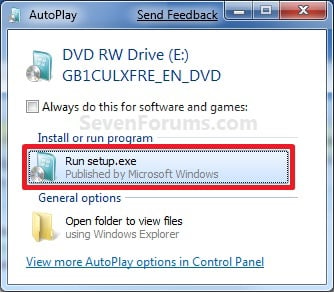
A) Place your Windows 7 installation DVD into the DVD drive and click on the Run setup.exe option in the AutoPlay window from within Vista SP1. (See screenshot below)
NOTE: If the AutoPlay window does not open, then open the drive folder in Computer and run the setup.exe file. AutoPlay.jpg
B) Go to step 3 below.
2. To Install from Boot A) Boot the computer from your Windows 7 installation DVD.
NOTE: Make sure that the CD/DVD drive is selected first in the boot order in the BIOS.

B) When prompted, press any key to boot from the installation DVD. (See screenshot below)
NOTE: You will only have about 8 seconds to press this key. If you miss it, you will have to restart the computer. Step1.jpg
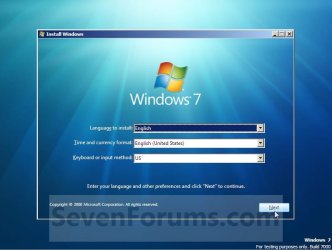
C) Select your language preferences and click on the Next button. (See screeshot below). Step3.jpg
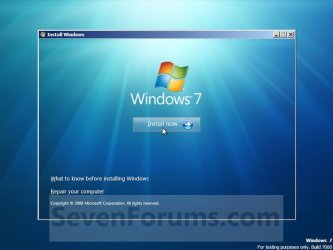
3. Click on the Install Now button to start the installation. (See screenshot below) Step4.jpg
4. If you did step 1, then uncheck the I want to help make Windows installation better box (unless you want to), and click on the Go online to get the latest updates for installation option. (See screenshot below) Step4A.jpg
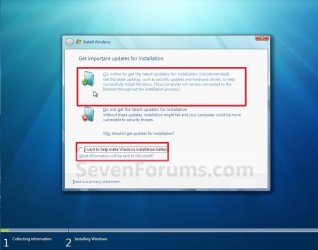
5. If you did step 1, Windows 7 will now check online for and install any available installation updates. (See screenshot below) Step4B.jpg
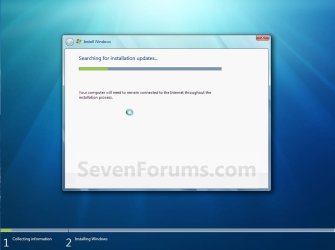
6. Check the I accept the license terms box and click on Next. (See screenshot below) Step5.jpg
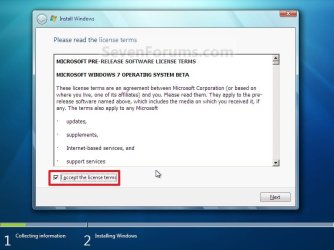
7. Click on the Custom (advanced) option. (See screenshot below) Step6.jpg
8. Select the hard drive or partition for the currently installed Windows installation that you want to install Windows 7 on and click on the Next button. (See screenshot below)
NOTE: If you have a RAID setup, then connect your USB key with the RAID drivers on it, click on Load Driver, select the folder on the USB key that contains the RAID drivers to install them. Afterwards, your RAID drives will be available to select from to install Windows 7 on.

   Warning
DO NOT click on the Drive options (advanced) link and Format or Delete this partition. That would be for a clean install of Windows 7 instead of a custom install for what this tutorial is for.
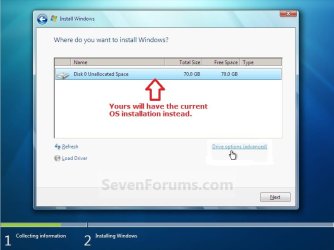
Step7.jpg
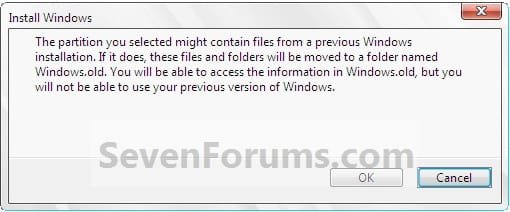
9. Click on OK. (See screenshot below) Step7A.jpg
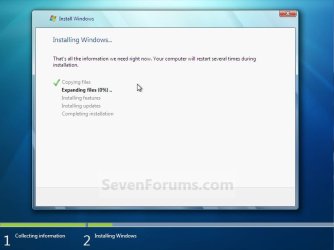
10. The installation of Windows 7 will now begin. (See screenshot below)
NOTE: During the installation process, your screen may flash and computer will restart a few times. Step9.jpg
11. After the final restart, you will see this screen for a moment. (See screenshot below) step10.jpg
12. Type in any user name that you want for your default administrator account and any computer name, then click on the Next button. (See screenshot below) Step12A.jpg
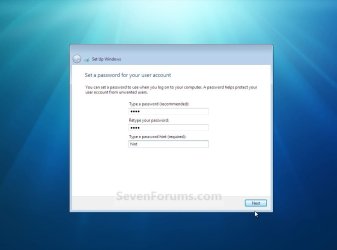
13. Type in a password you want for your default administrator account. Type it in again to confirm it, then type in a hint for your password. Click on the Next button. (See screenshots below)
WARNING: The password will be case sensitive. The hint will be seen by all users on the computer, so do not type your password as the hint.
NOTE: If you do not want your your user account password protected at this time or do not want to have to type in a hint, then leave this blank and click on the Next button. You can create a password later for your user account in the Control Panel User Accounts after installing Windows 7 without having to type in a hint. Step12B.jpg
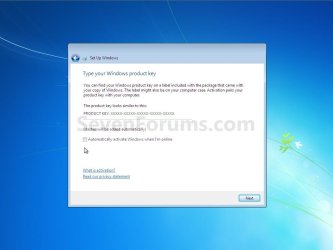
14. Type in your Windows 7 product key number. (See screenshot below step 15)

15. Uncheck the Automatically activate Windows when I'm online box unchecked, then click on the Next button. (See screenshot below)
NOTE: You can activate Windows 7 later after you make sure it is running properly. (See step 23 below)
If you chose to automatically activate Windows 7 online when you set up your computer, automatic activation begins trying to activate your copy of Windows three days after you log on for the first time. Step13.jpg
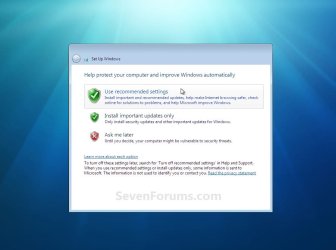
16. Click on Use recommended settings to allow automatic Windows Updates and proper security settings. (See screenshot below)
NOTE: For more information about these recommended settings, click on the Learn more about each option link in this window. Step14.jpg
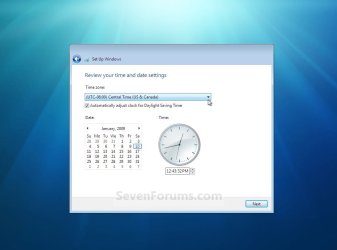
17. Select your time zone and set your time and date settings, then click on the Next button. (See screenshot below) Step15.jpg
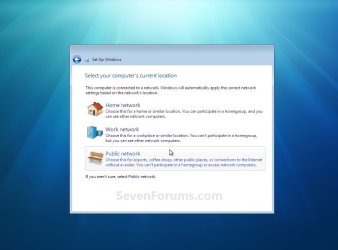
18. Click on your computer's correct network location type location to select it and have the settings for that location automatically applied. (See screenshot below) Step16.jpg
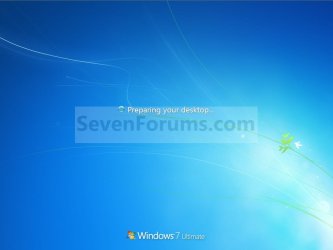
19. Windows 7 will now prepare your desktop to startup. (See screenshots below) Step17.jpg
Desktop.jpg

20. Install all of your device drivers, Windows Updates, and programs.

21. Refresh your Windows Experience Index (WEI) score.

22. Copy anything you want back from inside the C:\Windows.old folder back into the new installation. (See screenshot below)
NOTE: When done, you can delete the Windows.old folder to save hard drive space. Step19.jpg
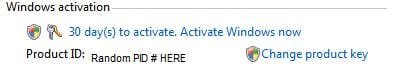
23. When done, all you will need to do is to activate Windows 7. (See screenshot below) Activate.jpg
That's it,
Shawn


Attachments

  • Step11.jpg
    Step11.jpg
    179.7 KB · Views: 64
Last edited:
Hello Andy, and welcome to Seven Forums.

With a clean install, you will not have a windows.old folder. This is a completely clean fresh formatted install.

You would want to do a custom install instead if you would like a C:\Windows.old folder. The Windows.old folder contains a complete copy of your current installation with all files in it. While you can copy any file from withing the Windows.old folder back into your new installation, you will still have to reinstall all drivers and programs. Those cannot be copied back.

Hope this helps,
Shawn
 

My Computer

Computer type
PC/Desktop
Computer Manufacturer/Model Number
Self built custom
OS
64-bit Windows 11 Pro for Workstations
CPU
Intel i7-8700K OC'd to 5 GHz
Motherboard
ASUS ROG Maximus XI Formula Z390
Memory
64 GB (4x16GB) G.SKILL TridentZ RGB DDR4 3600 MHz
Graphics Card(s)
ASUS ROG-STRIX-GTX1080TI-O11G-GAMING
Sound Card
Integrated
Monitor(s) Displays
2 x Samsung Odyssey G7 27"
Screen Resolution
2560x1440
Hard Drives
1TB Samsung 990 PRO M.2,
4TB Samsung 990 PRO PRO M.2,
TerraMaster F8 SSD Plus NAS
PSU
Seasonic Prime Titanium 850W
Case
Thermaltake Core P3
Cooling
Corsair Hydro H115i
Keyboard
Logitech wireless K800
Mouse
Logitech MX Master 4
Internet Speed
2 Gb/s Download and 100 Mb/s Upload
Antivirus
Malwarebyte Anti-Malware Premium
Browser
Google Chrome
Other Info
Logitech Z625 speaker system,
Logitech BRIO 4K Pro webcam,
HP Color LaserJet Pro MFP M477fdn,
APC SMART-UPS RT 1000 XL - SURT1000XLI,
Galaxy S23 Plus phone
is it posible to install 64 bit windows 7 from within 32 bit windows 7 without neccessary install from boot?
like your tuttorial(You gave example as Vista.I ask windows 7 32 bit instead of Vista)
22297d1249849742t-custom-install-windows-7-autoplay.jpg
 

My Computer

Computer Manufacturer/Model Number
asus f3sv240dr
OS
vista
CPU
t7700
Memory
2 gb
Graphics Card(s)
8600M
Hard Drives
250 GB
Hello Nonpasaran,

Sorry, but no. You can only do a clean install when going from 32-bit to 64-bit, or the other way around. :(
 

My Computer

Computer type
PC/Desktop
Computer Manufacturer/Model Number
Self built custom
OS
64-bit Windows 11 Pro for Workstations
CPU
Intel i7-8700K OC'd to 5 GHz
Motherboard
ASUS ROG Maximus XI Formula Z390
Memory
64 GB (4x16GB) G.SKILL TridentZ RGB DDR4 3600 MHz
Graphics Card(s)
ASUS ROG-STRIX-GTX1080TI-O11G-GAMING
Sound Card
Integrated
Monitor(s) Displays
2 x Samsung Odyssey G7 27"
Screen Resolution
2560x1440
Hard Drives
1TB Samsung 990 PRO M.2,
4TB Samsung 990 PRO PRO M.2,
TerraMaster F8 SSD Plus NAS
PSU
Seasonic Prime Titanium 850W
Case
Thermaltake Core P3
Cooling
Corsair Hydro H115i
Keyboard
Logitech wireless K800
Mouse
Logitech MX Master 4
Internet Speed
2 Gb/s Download and 100 Mb/s Upload
Antivirus
Malwarebyte Anti-Malware Premium
Browser
Google Chrome
Other Info
Logitech Z625 speaker system,
Logitech BRIO 4K Pro webcam,
HP Color LaserJet Pro MFP M477fdn,
APC SMART-UPS RT 1000 XL - SURT1000XLI,
Galaxy S23 Plus phone
What if you get stuck on Step 5, my system hung on repair install at this part for over 2 hours, should you then try Do not go online for updates? How long should this take before you know somethings wrong, any ideas why it would hang? My computer is beyond slow now, can't uninstall, run cmd's, event viewer doesn't work, everything hangs and will not complete. Don't know what to do, but this Custom install would be great if it works.
 

My Computer

Computer Manufacturer/Model Number
Custom Built
OS
Windows 7 Home Premium 64bit
CPU
AMD Phenom II X4 955 Black Edition Deneb 3.2GHz Socket AM3
Motherboard
GIGABYTE GA-770TA-UD3 AM3 AMD 770 SATA 6Gb/s USB 3.0 ATX AMD
Memory
G.SKILL 4GB (2 x 2GB) 240-Pin DDR3 SDRAM DDR3 1600 (PC3 1280
Graphics Card(s)
SAPPHIRE 100283-3L Radeon HD 5770 1GB 128-bit GDDR5 PCI Expr
Sound Card
Onboard
Monitor(s) Displays
Samsung 50" Plasma
Hard Drives
2X 1TB Western Digital Caviar Black Internal Drives
PSU
CORSAIR CMPSU-550VX 550W ATX12V V2.2 SLI Ready CrossFire Rea
Case
nMEDIAPC Red Wood Wood/Steel HTPC 8000 ATX Media Center / HT
Cooling
COOLER MASTER Intel Core i5 compatible GeminII S RR-CCH-PBU1
A repair install (in-place upgrade) is done from within your current installation, while a custom install is done at boot with your Windows 7 installation disc. A custom install is more like a clean install instead, except that you have a copy of your current installation placed in the Windows.old folder in the new clean installation.
 

My Computer

Computer type
PC/Desktop
Computer Manufacturer/Model Number
Self built custom
OS
64-bit Windows 11 Pro for Workstations
CPU
Intel i7-8700K OC'd to 5 GHz
Motherboard
ASUS ROG Maximus XI Formula Z390
Memory
64 GB (4x16GB) G.SKILL TridentZ RGB DDR4 3600 MHz
Graphics Card(s)
ASUS ROG-STRIX-GTX1080TI-O11G-GAMING
Sound Card
Integrated
Monitor(s) Displays
2 x Samsung Odyssey G7 27"
Screen Resolution
2560x1440
Hard Drives
1TB Samsung 990 PRO M.2,
4TB Samsung 990 PRO PRO M.2,
TerraMaster F8 SSD Plus NAS
PSU
Seasonic Prime Titanium 850W
Case
Thermaltake Core P3
Cooling
Corsair Hydro H115i
Keyboard
Logitech wireless K800
Mouse
Logitech MX Master 4
Internet Speed
2 Gb/s Download and 100 Mb/s Upload
Antivirus
Malwarebyte Anti-Malware Premium
Browser
Google Chrome
Other Info
Logitech Z625 speaker system,
Logitech BRIO 4K Pro webcam,
HP Color LaserJet Pro MFP M477fdn,
APC SMART-UPS RT 1000 XL - SURT1000XLI,
Galaxy S23 Plus phone
The custom install got my system back up, it took about 2:30hrs, but it works! Could anyone point me to which drivers exactly I need to update for my mobo chipset. I tried to download a few but they just extract files, don't know what to do with them.
 

My Computer

Computer Manufacturer/Model Number
Custom Built
OS
Windows 7 Home Premium 64bit
CPU
AMD Phenom II X4 955 Black Edition Deneb 3.2GHz Socket AM3
Motherboard
GIGABYTE GA-770TA-UD3 AM3 AMD 770 SATA 6Gb/s USB 3.0 ATX AMD
Memory
G.SKILL 4GB (2 x 2GB) 240-Pin DDR3 SDRAM DDR3 1600 (PC3 1280
Graphics Card(s)
SAPPHIRE 100283-3L Radeon HD 5770 1GB 128-bit GDDR5 PCI Expr
Sound Card
Onboard
Monitor(s) Displays
Samsung 50" Plasma
Hard Drives
2X 1TB Western Digital Caviar Black Internal Drives
PSU
CORSAIR CMPSU-550VX 550W ATX12V V2.2 SLI Ready CrossFire Rea
Case
nMEDIAPC Red Wood Wood/Steel HTPC 8000 ATX Media Center / HT
Cooling
COOLER MASTER Intel Core i5 compatible GeminII S RR-CCH-PBU1
NokComputer,

That's great news. I'm happy to hear that the custom install went well. :)

If you got your chipset driver at the Gigabyte linke below for your motherboard, then when you run the downloaded EXE file, extract it to your desktop, open the extracted folder, and run the ASetup.exe file to install the driver.

GA-770TA-UD3 (rev. 1.0) - GIGABYTE
 

My Computer

Computer type
PC/Desktop
Computer Manufacturer/Model Number
Self built custom
OS
64-bit Windows 11 Pro for Workstations
CPU
Intel i7-8700K OC'd to 5 GHz
Motherboard
ASUS ROG Maximus XI Formula Z390
Memory
64 GB (4x16GB) G.SKILL TridentZ RGB DDR4 3600 MHz
Graphics Card(s)
ASUS ROG-STRIX-GTX1080TI-O11G-GAMING
Sound Card
Integrated
Monitor(s) Displays
2 x Samsung Odyssey G7 27"
Screen Resolution
2560x1440
Hard Drives
1TB Samsung 990 PRO M.2,
4TB Samsung 990 PRO PRO M.2,
TerraMaster F8 SSD Plus NAS
PSU
Seasonic Prime Titanium 850W
Case
Thermaltake Core P3
Cooling
Corsair Hydro H115i
Keyboard
Logitech wireless K800
Mouse
Logitech MX Master 4
Internet Speed
2 Gb/s Download and 100 Mb/s Upload
Antivirus
Malwarebyte Anti-Malware Premium
Browser
Google Chrome
Other Info
Logitech Z625 speaker system,
Logitech BRIO 4K Pro webcam,
HP Color LaserJet Pro MFP M477fdn,
APC SMART-UPS RT 1000 XL - SURT1000XLI,
Galaxy S23 Plus phone
Hi brink,

If i custom install means after installation my comp would be like a new computer with no files or programmes in it?What are in the C:\Windows.old file? Is there anyway to dl all the driver in 1 go? Im using a compaq presario cq40.
 

My Computer

OS
Windows 7 Ultimate 32bit
Hello Charlot, and welcome to Seven Forums.

A custom install is almost the same as a clean install, but with your current Windows installation backed up to the Windows.old folder during this custom installation. After the custom installation, you can copy any files you wanted back in the C:\Windows.old folder back into your new installation of Windows 7.

Like with a clean install, you will need to install all of your drivers and programs again after doing a custom install of Windows 7.

You could download all of your drivers and etc... before doing the custom install, then copy them to a USB flash drive to have them handy after finishing the custom install.

Hope this helps,
Shawn
 

My Computer

Computer type
PC/Desktop
Computer Manufacturer/Model Number
Self built custom
OS
64-bit Windows 11 Pro for Workstations
CPU
Intel i7-8700K OC'd to 5 GHz
Motherboard
ASUS ROG Maximus XI Formula Z390
Memory
64 GB (4x16GB) G.SKILL TridentZ RGB DDR4 3600 MHz
Graphics Card(s)
ASUS ROG-STRIX-GTX1080TI-O11G-GAMING
Sound Card
Integrated
Monitor(s) Displays
2 x Samsung Odyssey G7 27"
Screen Resolution
2560x1440
Hard Drives
1TB Samsung 990 PRO M.2,
4TB Samsung 990 PRO PRO M.2,
TerraMaster F8 SSD Plus NAS
PSU
Seasonic Prime Titanium 850W
Case
Thermaltake Core P3
Cooling
Corsair Hydro H115i
Keyboard
Logitech wireless K800
Mouse
Logitech MX Master 4
Internet Speed
2 Gb/s Download and 100 Mb/s Upload
Antivirus
Malwarebyte Anti-Malware Premium
Browser
Google Chrome
Other Info
Logitech Z625 speaker system,
Logitech BRIO 4K Pro webcam,
HP Color LaserJet Pro MFP M477fdn,
APC SMART-UPS RT 1000 XL - SURT1000XLI,
Galaxy S23 Plus phone
Thanks Shawn n sorry for the late reply. If i do a custom install in my C:\ partition will my data in my D:\ partition be erased?
 

My Computer

OS
Windows 7 Ultimate 32bit
No problem Charlot. The D: partition will not be touched as long as you do not select it during installation.
 

My Computer

Computer type
PC/Desktop
Computer Manufacturer/Model Number
Self built custom
OS
64-bit Windows 11 Pro for Workstations
CPU
Intel i7-8700K OC'd to 5 GHz
Motherboard
ASUS ROG Maximus XI Formula Z390
Memory
64 GB (4x16GB) G.SKILL TridentZ RGB DDR4 3600 MHz
Graphics Card(s)
ASUS ROG-STRIX-GTX1080TI-O11G-GAMING
Sound Card
Integrated
Monitor(s) Displays
2 x Samsung Odyssey G7 27"
Screen Resolution
2560x1440
Hard Drives
1TB Samsung 990 PRO M.2,
4TB Samsung 990 PRO PRO M.2,
TerraMaster F8 SSD Plus NAS
PSU
Seasonic Prime Titanium 850W
Case
Thermaltake Core P3
Cooling
Corsair Hydro H115i
Keyboard
Logitech wireless K800
Mouse
Logitech MX Master 4
Internet Speed
2 Gb/s Download and 100 Mb/s Upload
Antivirus
Malwarebyte Anti-Malware Premium
Browser
Google Chrome
Other Info
Logitech Z625 speaker system,
Logitech BRIO 4K Pro webcam,
HP Color LaserJet Pro MFP M477fdn,
APC SMART-UPS RT 1000 XL - SURT1000XLI,
Galaxy S23 Plus phone
what if i want to completely erase my data from C: and D: during custom installation is it possible?

(BTW the C::) and D::( looks like a happy n sad face.. HAHA)
 

My Computer

OS
Windows 7 Ultimate 32bit
Charlot,

In that case, you can do a clean install instead and format or delete both partitions (step 8 at link) during the installation.
 

My Computer

Computer type
PC/Desktop
Computer Manufacturer/Model Number
Self built custom
OS
64-bit Windows 11 Pro for Workstations
CPU
Intel i7-8700K OC'd to 5 GHz
Motherboard
ASUS ROG Maximus XI Formula Z390
Memory
64 GB (4x16GB) G.SKILL TridentZ RGB DDR4 3600 MHz
Graphics Card(s)
ASUS ROG-STRIX-GTX1080TI-O11G-GAMING
Sound Card
Integrated
Monitor(s) Displays
2 x Samsung Odyssey G7 27"
Screen Resolution
2560x1440
Hard Drives
1TB Samsung 990 PRO M.2,
4TB Samsung 990 PRO PRO M.2,
TerraMaster F8 SSD Plus NAS
PSU
Seasonic Prime Titanium 850W
Case
Thermaltake Core P3
Cooling
Corsair Hydro H115i
Keyboard
Logitech wireless K800
Mouse
Logitech MX Master 4
Internet Speed
2 Gb/s Download and 100 Mb/s Upload
Antivirus
Malwarebyte Anti-Malware Premium
Browser
Google Chrome
Other Info
Logitech Z625 speaker system,
Logitech BRIO 4K Pro webcam,
HP Color LaserJet Pro MFP M477fdn,
APC SMART-UPS RT 1000 XL - SURT1000XLI,
Galaxy S23 Plus phone
Alright, thanks man.

BTW how do i reformat my D:\ partition? And is there any negative effect towards my comp if i keep reformatting and clean installing?
 

My Computer

OS
Windows 7 Ultimate 32bit
Charlot,

You would just do the same as in the post above to format each drive/partition letter during installation.

The really only negative effect to reformating and doing a clean install is the longer installation time of also having to reinstall all of your drivers and programs again.
 

My Computer

Computer type
PC/Desktop
Computer Manufacturer/Model Number
Self built custom
OS
64-bit Windows 11 Pro for Workstations
CPU
Intel i7-8700K OC'd to 5 GHz
Motherboard
ASUS ROG Maximus XI Formula Z390
Memory
64 GB (4x16GB) G.SKILL TridentZ RGB DDR4 3600 MHz
Graphics Card(s)
ASUS ROG-STRIX-GTX1080TI-O11G-GAMING
Sound Card
Integrated
Monitor(s) Displays
2 x Samsung Odyssey G7 27"
Screen Resolution
2560x1440
Hard Drives
1TB Samsung 990 PRO M.2,
4TB Samsung 990 PRO PRO M.2,
TerraMaster F8 SSD Plus NAS
PSU
Seasonic Prime Titanium 850W
Case
Thermaltake Core P3
Cooling
Corsair Hydro H115i
Keyboard
Logitech wireless K800
Mouse
Logitech MX Master 4
Internet Speed
2 Gb/s Download and 100 Mb/s Upload
Antivirus
Malwarebyte Anti-Malware Premium
Browser
Google Chrome
Other Info
Logitech Z625 speaker system,
Logitech BRIO 4K Pro webcam,
HP Color LaserJet Pro MFP M477fdn,
APC SMART-UPS RT 1000 XL - SURT1000XLI,
Galaxy S23 Plus phone
Will you be able to do a Custom Install on a Windows 7 Machine with an Upgrade Disk?
 

My Computer

Computer type
PC/Desktop
Computer Manufacturer/Model Number
Custom Built
OS
Windows 7 Professional x64 SP1 ; Windows Server 2012 R2 Standard
CPU
Intel Core i5 2400 @ 3.10GHz
Motherboard
Foxconn H67MP-S/-V/H67MP
Memory
8.0GB DDR3 @ 665MHz (2GBx4)
Graphics Card(s)
AMD Radeon HD 6870
Sound Card
Realtek High Definition Audio
Monitor(s) Displays
AOC 2243W & SMB1930NW
Screen Resolution
1440x900 & 1920x1080
Hard Drives
977GB Seagate ST31000524AS ATA Drive (SATA)
250GB WD iSCSI attached Drive
PSU
750W Gaming PSU
Case
Novatech Night
Cooling
Fan
Keyboard
Dell Standard PS/2 Keyboard
Mouse
R.A.T 07 Gaming Mouse
Internet Speed
Download: 10 Mbps Ping: 30ms Upload: 0.81 Mbps
Browser
Google Chrome
Other Info
Optiarc DVD RW AD-5260S ATA Device

My Computer

Computer type
PC/Desktop
Computer Manufacturer/Model Number
Self built custom
OS
64-bit Windows 11 Pro for Workstations
CPU
Intel i7-8700K OC'd to 5 GHz
Motherboard
ASUS ROG Maximus XI Formula Z390
Memory
64 GB (4x16GB) G.SKILL TridentZ RGB DDR4 3600 MHz
Graphics Card(s)
ASUS ROG-STRIX-GTX1080TI-O11G-GAMING
Sound Card
Integrated
Monitor(s) Displays
2 x Samsung Odyssey G7 27"
Screen Resolution
2560x1440
Hard Drives
1TB Samsung 990 PRO M.2,
4TB Samsung 990 PRO PRO M.2,
TerraMaster F8 SSD Plus NAS
PSU
Seasonic Prime Titanium 850W
Case
Thermaltake Core P3
Cooling
Corsair Hydro H115i
Keyboard
Logitech wireless K800
Mouse
Logitech MX Master 4
Internet Speed
2 Gb/s Download and 100 Mb/s Upload
Antivirus
Malwarebyte Anti-Malware Premium
Browser
Google Chrome
Other Info
Logitech Z625 speaker system,
Logitech BRIO 4K Pro webcam,
HP Color LaserJet Pro MFP M477fdn,
APC SMART-UPS RT 1000 XL - SURT1000XLI,
Galaxy S23 Plus phone
Okay Thanks ,

It is just a Friend of mine Installed Windows 7 Ultimate 64-bit on his Laptop but he used an OEM Disk And he borrowed it from someone now he cannot Activate it since it is already used so I have Extended it for 120 Days but He will need to Buy a Windows 7 Copy to Fix this since he Deleted all the Partitions on his Laptop

If he got another OEM Disk would you have to do a Clean Install?

Josh
 

My Computer

Computer type
PC/Desktop
Computer Manufacturer/Model Number
Custom Built
OS
Windows 7 Professional x64 SP1 ; Windows Server 2012 R2 Standard
CPU
Intel Core i5 2400 @ 3.10GHz
Motherboard
Foxconn H67MP-S/-V/H67MP
Memory
8.0GB DDR3 @ 665MHz (2GBx4)
Graphics Card(s)
AMD Radeon HD 6870
Sound Card
Realtek High Definition Audio
Monitor(s) Displays
AOC 2243W & SMB1930NW
Screen Resolution
1440x900 & 1920x1080
Hard Drives
977GB Seagate ST31000524AS ATA Drive (SATA)
250GB WD iSCSI attached Drive
PSU
750W Gaming PSU
Case
Novatech Night
Cooling
Fan
Keyboard
Dell Standard PS/2 Keyboard
Mouse
R.A.T 07 Gaming Mouse
Internet Speed
Download: 10 Mbps Ping: 30ms Upload: 0.81 Mbps
Browser
Google Chrome
Other Info
Optiarc DVD RW AD-5260S ATA Device
Josh,

If they were the same edition, then he might be able to change the product key number in the one he has installed to the new one and hopefully be able to activate it. If not, then a clean install it will be.
 

My Computer

Computer type
PC/Desktop
Computer Manufacturer/Model Number
Self built custom
OS
64-bit Windows 11 Pro for Workstations
CPU
Intel i7-8700K OC'd to 5 GHz
Motherboard
ASUS ROG Maximus XI Formula Z390
Memory
64 GB (4x16GB) G.SKILL TridentZ RGB DDR4 3600 MHz
Graphics Card(s)
ASUS ROG-STRIX-GTX1080TI-O11G-GAMING
Sound Card
Integrated
Monitor(s) Displays
2 x Samsung Odyssey G7 27"
Screen Resolution
2560x1440
Hard Drives
1TB Samsung 990 PRO M.2,
4TB Samsung 990 PRO PRO M.2,
TerraMaster F8 SSD Plus NAS
PSU
Seasonic Prime Titanium 850W
Case
Thermaltake Core P3
Cooling
Corsair Hydro H115i
Keyboard
Logitech wireless K800
Mouse
Logitech MX Master 4
Internet Speed
2 Gb/s Download and 100 Mb/s Upload
Antivirus
Malwarebyte Anti-Malware Premium
Browser
Google Chrome
Other Info
Logitech Z625 speaker system,
Logitech BRIO 4K Pro webcam,
HP Color LaserJet Pro MFP M477fdn,
APC SMART-UPS RT 1000 XL - SURT1000XLI,
Galaxy S23 Plus phone
This is a little tough, your options 1 and 2 does not work

I have gotten into a situation where,

The computer can only run in Safe Mode:(
The winBio.dll is corrupted:(

Is it possible to do a fdisk (recalling from my memory) and run the files from a command prompt?

Little history of the computer:

Windows 7 Ultimate (x32)
The computer[Aspire 4810TZ-4011] got corrupted and one of the user profile files was over 12.5GB. Started normally it will just hang for days. It can only start in the safe mode. It does start in safe mode with network support. I obtained a copy of the Windows 7 software from Microsoft store which came in the form of a download of some three files listed here:

Windows7_Ultimate_2011_sp1x86exe_v2setup2.box
Windows7_Ultimate_2011_sp1x86exe_v2setup1.box
Windows7_Ultimate_2011_sp1x86exe_v2

I copied them to a DVD and tried to run from my laptop but the bios is corrupted (I did try to set to boot from DVD). The exe cannot install from safe mode.

What other options are there? I just want to flatten this laptop.

Windows 7 presented various problems during the time it was used:
Cursor jumping
erratic search behavior
absense of language configuration in control panel, etc.
 

My Computer

OS
Windows 7 (x32) Umltimate
Back
Top