
How to Do a Custom Installation of Windows 7
Information
This will show you how to do custom installation of Windows 7 to have a new clean install of Windows 7, but with everything from your current Windows installation backed up into the Windows.old folder during this custom installation. After the custom installation, you can copy any files you wanted back from within the C:\Windows.old folder back into your new installation of Windows 7 and delete the Windows.old folder when finished.
Like with a clean install, you will need to install all of your drivers and programs again after doing a custom install of Windows 7.
Like with a clean install, you will need to install all of your drivers and programs again after doing a custom install of Windows 7.
Warning
Windows 7 Minimum Hardware Requirements:
NOTE: See also: Windows 7 system requirements
NOTE: See also: Windows 7 system requirements
- 1 GHz 32-bit or 64-bit processor
- 1 GB RAM for 32-bit Windows 7 OR 2 GB RAM for 64-bit Windows 7
- 16 GB available disk space 32-bit Windows 7 OR 20 GB for 64-bit Windows 7
- Support for DirectX 9 graphics with 128 MB memory (in order to enable Aero theme)
- DVD-R/W Drive, or bootable USB port with Windows 7 USB flash drive
- Internet access (to download the Beta and get updates)
Here's How:
1. To Install from Within Current Windows Installation
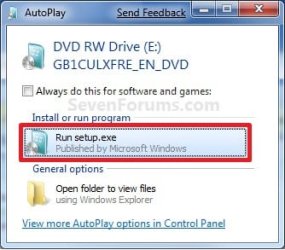
A) Place your Windows 7 installation DVD into the DVD drive and click on the Run setup.exe option in the AutoPlay window from within Vista SP1. (See screenshot below)
NOTE: If the AutoPlay window does not open, then open the drive folder in Computer and run the setup.exe file.
B) Go to step 3 below.
2. To Install from Boot A) Boot the computer from your Windows 7 installation DVD.
NOTE: Make sure that the CD/DVD drive is selected first in the boot order in the BIOS.
B) When prompted, press any key to boot from the installation DVD. (See screenshot below)
NOTE: You will only have about 8 seconds to press this key. If you miss it, you will have to restart the computer.

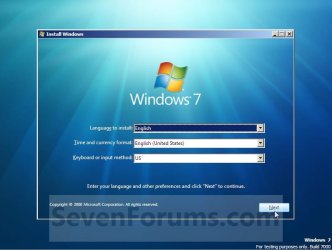
C) Select your language preferences and click on the Next button. (See screeshot below).
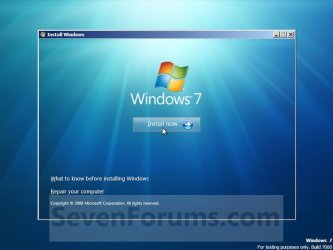
3. Click on the Install Now button to start the installation. (See screenshot below)
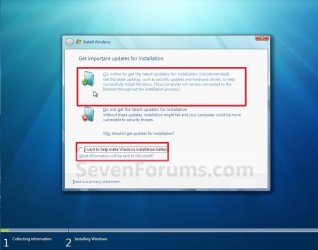
4. If you did step 1, then uncheck the I want to help make Windows installation better box (unless you want to), and click on the Go online to get the latest updates for installation option. (See screenshot below)
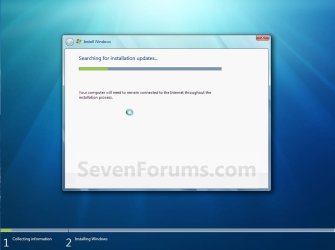
5. If you did step 1, Windows 7 will now check online for and install any available installation updates. (See screenshot below)
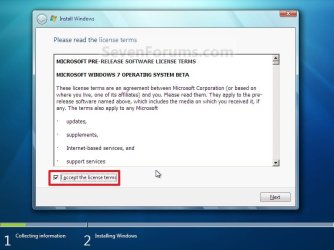
6. Check the I accept the license terms box and click on Next. (See screenshot below)
7. Click on the Custom (advanced) option. (See screenshot below)

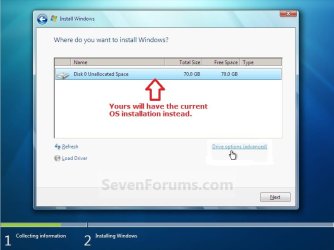
8. Select the hard drive or partition for the currently installed Windows installation that you want to install Windows 7 on and click on the Next button. (See screenshot below)
NOTE: If you have a RAID setup, then connect your USB key with the RAID drivers on it, click on Load Driver, select the folder on the USB key that contains the RAID drivers to install them. Afterwards, your RAID drives will be available to select from to install Windows 7 on.
Warning
DO NOT click on the Drive options (advanced) link and Format or Delete this partition. That would be for a clean install of Windows 7 instead of a custom install for what this tutorial is for.
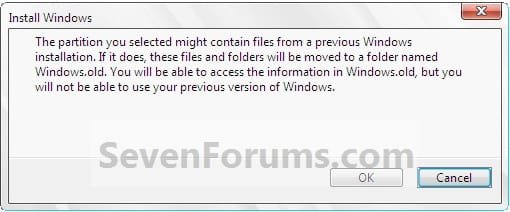
9. Click on OK. (See screenshot below)
10. The installation of Windows 7 will now begin. (See screenshot below)
NOTE: During the installation process, your screen may flash and computer will restart a few times.
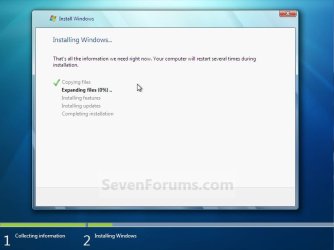
11. After the final restart, you will see this screen for a moment. (See screenshot below)

12. Type in any user name that you want for your default administrator account and any computer name, then click on the Next button. (See screenshot below)

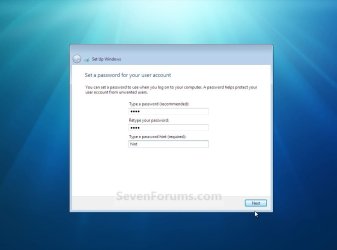
13. Type in a password you want for your default administrator account. Type it in again to confirm it, then type in a hint for your password. Click on the Next button. (See screenshots below)
WARNING: The password will be case sensitive. The hint will be seen by all users on the computer, so do not type your password as the hint.
NOTE: If you do not want your your user account password protected at this time or do not want to have to type in a hint, then leave this blank and click on the Next button. You can create a password later for your user account in the Control Panel User Accounts after installing Windows 7 without having to type in a hint.
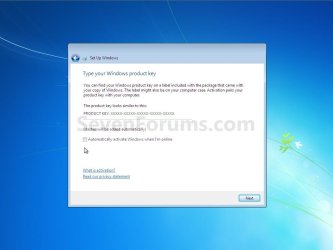
14. Type in your Windows 7 product key number. (See screenshot below step 15)
15. Uncheck the Automatically activate Windows when I'm online box unchecked, then click on the Next button. (See screenshot below)
NOTE: You can activate Windows 7 later after you make sure it is running properly. (See step 23 below)
If you chose to automatically activate Windows 7 online when you set up your computer, automatic activation begins trying to activate your copy of Windows three days after you log on for the first time.
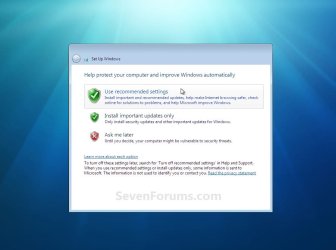
16. Click on Use recommended settings to allow automatic Windows Updates and proper security settings. (See screenshot below)
NOTE: For more information about these recommended settings, click on the Learn more about each option link in this window.
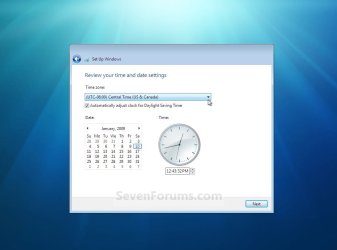
17. Select your time zone and set your time and date settings, then click on the Next button. (See screenshot below)
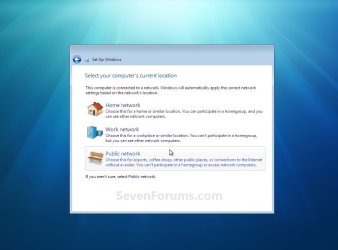
18. Click on your computer's correct network location type location to select it and have the settings for that location automatically applied. (See screenshot below)
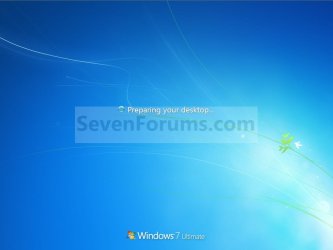
19. Windows 7 will now prepare your desktop to startup. (See screenshots below)

20. Install all of your device drivers, Windows Updates, and programs.
21. Refresh your Windows Experience Index (WEI) score.
22. Copy anything you want back from inside the C:\Windows.old folder back into the new installation. (See screenshot below)
NOTE: When done, you can delete the Windows.old folder to save hard drive space.

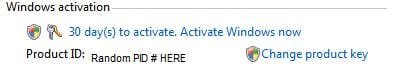
23. When done, all you will need to do is to activate Windows 7. (See screenshot below)
That's it,
Shawn
Related Tutorials
- How to Delete the Windows.old Folder in Windows 7
- How to Restore your Windows.old Folder into a New Installation
- How to Do a Clean Installation with Windows 7
- How to Do a Upgrade Installation with Windows 7
- How to Setup Windows 7 to Boot from a VHD (Virtual Hard Disk)
- How to Do a Repair Install to Fix Windows 7
- How to Create a Windows 7 Installation USB Key
- How to Install Windows 7 from USB Pen Drive Using Grub4Dos
- How to Setup a Dual Boot Installation with Windows 7 and Vista
- How to Setup a Dual Boot Installation with Windows 7 and XP
- How to Install Windows 7 FAST without a DVD or USB Device
- Install Windows 7 Without Using Any External Device
- How to Do a Clean Install with a Upgrade Windows 7 Version
- How to Partition the Hard Drive in a Windows 7 Install
- How to Install Windows 7 on Computer with Less than 512MB RAM
- How to Slipstream Windows 7 SP1 and Updates to Create a Bootable USB, Installation DVD, or ISO File
Attachments

Last edited:


