Windows 7 Forums Search
Welcome to Windows 7 Forums. Our forum is dedicated to helping you find solutions with any problems, errors or issues you are experiencing with Windows 7. The Windows 7 forum also covers news and updates and has an extensive Windows 7 tutorial section that covers a wide range of tips and tricks.


Windows 7 - Presentation Mode - Change


01-14-2009   #9
Brink


Windows 7 Ultimate x64 SP1


Presentation Mode - Change

How to Change the Windows 7 Display Presentation Mode

...


Last edited by Brink; 04-25-2011 at 11:16 AM..
My System SpecsSystem Spec
12-27-2009   #10
Brink


Windows 7 Ultimate x64 SP1


Catdog,

What happens when you use the tutorial to select Computer only?

Could you post a screenshot of your Screen Resolution window to see if it may help?

My System SpecsSystem Spec
12-29-2009   #11
sadhuka


Windows 7 Ultimate 64-Bit


i'm having the same issue. the tv and computer monitors are swapped. windows 7 identifies my tv as the "computer only" and my monitor as "projector only". its not really a problem but its pretty annoying. does anyone know how to change the setting?
My System SpecsSystem Spec
12-30-2009   #12
sanriver12


windows ultimate 7 x64


i also have this annoying problem, no solutions?
My System SpecsSystem Spec
12-30-2009   #13
Brink


Windows 7 Ultimate x64 SP1


Ok guys,

See if this may help.

If you have a NIVIDIA graphics card or chip, then see if you can do this from the NVIDIA Control Panel (right click on desktop) below. I'm not sure what it would with ATI though.
Presentation Mode - Change-nvidia.jpg
If not, then try this:
  • Unplug the TV cable from the back of the computer.
  • Restart the computer with only the monitor connected and running.
  • While the monitor is running, connect the TV to see if it will make it the second monitor and not the primary one.
My System SpecsSystem Spec
.


01-03-2010   #14
sanriver12


windows ultimate 7 x64


@Brink
your suggestin works... until the pc is restarted, then the pc monitor goes back to being the secondary display.
I think the problem is windows lists the displays in alphabetical order, that's why Panasonic-tv is number one and Syncmaster monitor is two. very anoying when you use the winkey+p menu.
thanks for your help
My System SpecsSystem Spec
01-04-2010   #15
Brink


Windows 7 Ultimate x64 SP1


Um, back to the drawing board.
My System SpecsSystem Spec
01-05-2010   #16
sadhuka


Windows 7 Ultimate 64-Bit


it seems when theres a dual monitor setup with both digital and analog hookups, the identity # of the digital monitor is by default set to 1, regardless of which monitor is set as the primary. in windows 7 id#1 is labeled as the computer and id#2 as projector. for now there doesn't seem to be a way of changing the setting. digital is like a dominant gene over analog in the dna of windows 7.

if it's really bothering you the only solution would be to get a video card that supports 2 digital connections. the onboard geforce 8300 on my asus m3n78em motherboard has hdmi, dvi, and vga outputs, but doesn't support 2 digital connections at the same time. i threw in an old asus gts250dk that i'm not really able to use because after a couple days of use, reason unknown, it dies out. for the time that it did work however, i was able to correctly identify my monitors, and i have to say i enjoyed seeing the proper labels hehe.
My System SpecsSystem Spec
02-02-2010   #17
seomantor


7 x64 (well that's what they claim)


The display switch has the ability to actualy switch to a certain setting.

C:\Windows\System32\DisplaySwitch.exe /external
C:\Windows\System32\DisplaySwitch.exe /internal
C:\Windows\System32\DisplaySwitch.exe /clone
C:\Windows\System32\DisplaySwitch.exe /extend

Were in my case external is the screen wich is active during boot.
and internal the TV

@sadhuka
Changing videocards (geforce 8800GTS) is not realy an option!
My System SpecsSystem Spec
05-13-2010   #18
homamkeh


windows 7


i have used (win + p) to toggle between my dual monitor setup and my hd forever. now all of a sudden, the console for choosing the display config (disconnect, duplicate, extended, projector only) only shows for a split second then disappears. i have no idea how this happened. i tried restarting, disconnecting... ddnt work. any ideas?
My System SpecsSystem Spec
05-13-2010   #19
Brink


Windows 7 Ultimate x64 SP1


Hello Homamkeh,

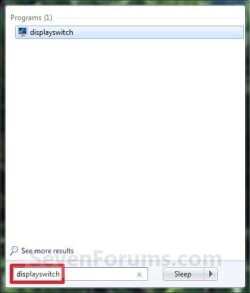
Does it work when opening the displayswitch.exe file? If so, you might see if creating a shortcut of it, then assigning your own keyboard shortcut to open this shortcut may work for you instead.

Hope this helps,
Shawn
My System SpecsSystem Spec
Comment

Presentation Mode - Change problems?


Tutorial Tools


Similar Threads for: Presentation Mode - Change
Windows 7 Tutorial Category
How to change the master slide in a whole presentation Microsoft Office
sharing Windows 7 screen (presentation mode) from XP mode Network & Sharing
Change resolution from Safe mode? Graphic Cards
HOW TO: change path in batch mode General Discussion
DVD device can't change to DMA mode Drivers


All times are GMT -5. The time now is 09:08 PM.


Windows 7 Forums is an independent web site and has not been authorized,
sponsored, or otherwise approved by Microsoft Corporation.
"Windows 7" and related materials are trademarks of Microsoft Corp.
© Designer Media Ltd
  

1 2 3 4 5 6 7 8 9 10 11 12 13 14 15 16 17 18 19 20 21 22 23 24 25 26 27 28 29 30