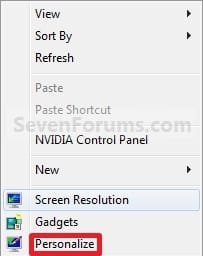
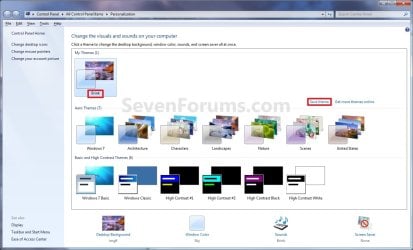
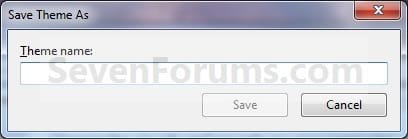
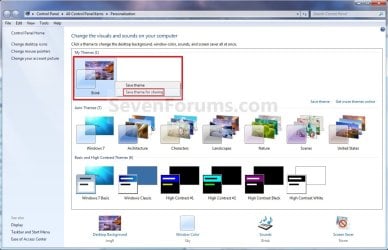
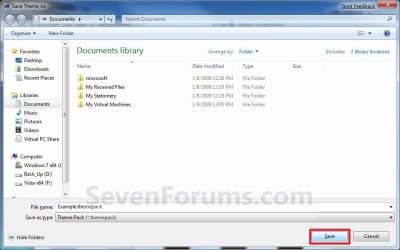
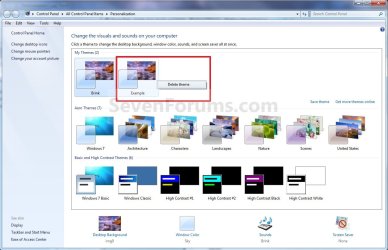
| Windows 7: Theme Pack - Create, Save, Install, and Delete |
14 Jan 2009
|
#19 | | 64-bit Windows 7 Ultimate SP1 & Windows 8 Enterprise Texas |
Theme Pack - Create, Save, Install, and Delete How to Make your own Windows 7 Theme Pack
Last edited by Brink; 18 Jan 2013 at 11:02 AM..
| My System Specs |
| Computer type PC/Desktop System Manufacturer/Model Number Self built custom OS 64-bit Windows 7 Ultimate SP1 & Windows 8 Enterprise CPU Intel i7-3930K 3.2 Ghz (O/C 4 Ghz) Motherboard ASRock X79 Extreme11 Memory 32 GB (8GBx4) G.SKILL DDR3 Quad PC3-19200 2400MHz Graphics Card Sapphire HD5870 Eyefinity 6 2GB Sound Card SB Recon 3Di Integrated Chip Monitor(s) Displays 3x 27" Asus VE278Q Screen Resolution 1920x1080 Keyboard Logitech Cordless Desktop MX 5500 Revolution Mouse Logitech Cordless Desktop MX 5500 Revolution PSU OCZ Series Gold OCZZ1000M 1000W Case Thermaltake Level 10 GT Snow Edition Cooling Corsair Hydro H100 Hard Drives 256GB OCZ Vector
160GB OCZ RevoDrive X2
2 x 1TB Samsung HDD HD154UI SATA Internet Speed 50 Mb/s Download and 2 Mb/s Upload Other Info Microsoft LifeCam Cinema
Lite-On iHBS212 12x BD Writer
Samsung CLX-3175FW Printer
Netgear WNDR3800 Router
Motorola SBG6580 Cable Modem
2x APC Back-UPS XS 1500 |
21 Oct 2009
|
#20 | | 64-bit Windows 7 Ultimate SP1 & Windows 8 Enterprise Texas |
It's because of the RSS wallpaper. When I install you themepack file, it asks to "Download Attachments" to setup and configure the RSS feed. The RSS feed will have to be configured on the computer first before it will work. Not sure about the screen saver unless it's part of the RSS as well.
The themepack would work automatically if it was just a normal desktop background image instead of one through a RSS though. | My System Specs |
| Computer type PC/Desktop System Manufacturer/Model Number Self built custom OS 64-bit Windows 7 Ultimate SP1 & Windows 8 Enterprise CPU Intel i7-3930K 3.2 Ghz (O/C 4 Ghz) Motherboard ASRock X79 Extreme11 Memory 32 GB (8GBx4) G.SKILL DDR3 Quad PC3-19200 2400MHz Graphics Card Sapphire HD5870 Eyefinity 6 2GB Sound Card SB Recon 3Di Integrated Chip Monitor(s) Displays 3x 27" Asus VE278Q Screen Resolution 1920x1080 Keyboard Logitech Cordless Desktop MX 5500 Revolution Mouse Logitech Cordless Desktop MX 5500 Revolution PSU OCZ Series Gold OCZZ1000M 1000W Case Thermaltake Level 10 GT Snow Edition Cooling Corsair Hydro H100 Hard Drives 256GB OCZ Vector
160GB OCZ RevoDrive X2
2 x 1TB Samsung HDD HD154UI SATA Internet Speed 50 Mb/s Download and 2 Mb/s Upload Other Info Microsoft LifeCam Cinema
Lite-On iHBS212 12x BD Writer
Samsung CLX-3175FW Printer
Netgear WNDR3800 Router
Motorola SBG6580 Cable Modem
2x APC Back-UPS XS 1500 |
21 Oct 2009
|
#21 | | Windows 7 Ultimate x64 [Signature Edition] Michigan, USA |
I created the theme so that people who like my photography can install it and their wallpaper will be a slideshow of my photographs which automatically update with new photos and their screensaver will be a screensaver I created with my photographs.
Is there any way I can get it working with the RSS feed?
Thanks for your help. | My System Specs | | System Manufacturer/Model Number Gateway E-295C OS Windows 7 Ultimate x64 [Signature Edition] CPU Intel Core 2 Duo T7700 (2.40GHz, 800MHz FSB, 4MB L2 Cache) Memory 4GB 667MHz DDR2 Dual-Channel Graphics Card ATI Radeon X2300 HD 256MB (128MB GDDR3 Dedicated) Hard Drives HITACHI 500GB 5400 RPM 8MB Cache SATA 3.0Gb/s HDD |
21 Oct 2009
|
#22 | | 64-bit Windows 7 Ultimate SP1 & Windows 8 Enterprise Texas |
I never used a RSS feed, but it looks like if you clicked on the "Download Attachments" option, it should start working. | My System Specs | | Computer type PC/Desktop System Manufacturer/Model Number Self built custom OS 64-bit Windows 7 Ultimate SP1 & Windows 8 Enterprise CPU Intel i7-3930K 3.2 Ghz (O/C 4 Ghz) Motherboard ASRock X79 Extreme11 Memory 32 GB (8GBx4) G.SKILL DDR3 Quad PC3-19200 2400MHz Graphics Card Sapphire HD5870 Eyefinity 6 2GB Sound Card SB Recon 3Di Integrated Chip Monitor(s) Displays 3x 27" Asus VE278Q Screen Resolution 1920x1080 Keyboard Logitech Cordless Desktop MX 5500 Revolution Mouse Logitech Cordless Desktop MX 5500 Revolution PSU OCZ Series Gold OCZZ1000M 1000W Case Thermaltake Level 10 GT Snow Edition Cooling Corsair Hydro H100 Hard Drives 256GB OCZ Vector
160GB OCZ RevoDrive X2
2 x 1TB Samsung HDD HD154UI SATA Internet Speed 50 Mb/s Download and 2 Mb/s Upload Other Info Microsoft LifeCam Cinema
Lite-On iHBS212 12x BD Writer
Samsung CLX-3175FW Printer
Netgear WNDR3800 Router
Motorola SBG6580 Cable Modem
2x APC Back-UPS XS 1500 |
21 Oct 2009
|
#23 | | Windows 7 Ultimate x64 [Signature Edition] Michigan, USA |
It doesn't :/
The RSS it points to is ClaytonJamesPhotography's Photobucket Wallpapers 1280x768 album media
Does anyone know if this feed should work? I know almost nothing about RSS feeds...
Has anyone successfully created an rss feed? Can anyone else help me? Thanks a bunch! | My System Specs | | System Manufacturer/Model Number Gateway E-295C OS Windows 7 Ultimate x64 [Signature Edition] CPU Intel Core 2 Duo T7700 (2.40GHz, 800MHz FSB, 4MB L2 Cache) Memory 4GB 667MHz DDR2 Dual-Channel Graphics Card ATI Radeon X2300 HD 256MB (128MB GDDR3 Dedicated) Hard Drives HITACHI 500GB 5400 RPM 8MB Cache SATA 3.0Gb/s HDD |
21 Oct 2009
|
#24 | | 64-bit Windows 7 Ultimate SP1 & Windows 8 Enterprise Texas |
You might post this as a separate post in the Customization forum to see what you may get there for suggestions. | My System Specs | | Computer type PC/Desktop System Manufacturer/Model Number Self built custom OS 64-bit Windows 7 Ultimate SP1 & Windows 8 Enterprise CPU Intel i7-3930K 3.2 Ghz (O/C 4 Ghz) Motherboard ASRock X79 Extreme11 Memory 32 GB (8GBx4) G.SKILL DDR3 Quad PC3-19200 2400MHz Graphics Card Sapphire HD5870 Eyefinity 6 2GB Sound Card SB Recon 3Di Integrated Chip Monitor(s) Displays 3x 27" Asus VE278Q Screen Resolution 1920x1080 Keyboard Logitech Cordless Desktop MX 5500 Revolution Mouse Logitech Cordless Desktop MX 5500 Revolution PSU OCZ Series Gold OCZZ1000M 1000W Case Thermaltake Level 10 GT Snow Edition Cooling Corsair Hydro H100 Hard Drives 256GB OCZ Vector
160GB OCZ RevoDrive X2
2 x 1TB Samsung HDD HD154UI SATA Internet Speed 50 Mb/s Download and 2 Mb/s Upload Other Info Microsoft LifeCam Cinema
Lite-On iHBS212 12x BD Writer
Samsung CLX-3175FW Printer
Netgear WNDR3800 Router
Motorola SBG6580 Cable Modem
2x APC Back-UPS XS 1500 |
21 Oct 2009
|
#25 | | windows 7 enterprise 32 bit |
dear Brink,
i've installed this attached theme, and i can uninstall/delete it from "My Themes"
by the method that you showed me in earlier page in this thread
but when i click the "Desktop Background" and "Picture Location"
there still a location/menu that create by this theme
the location/menu called DesktopBackground
could you help me how to remove this location/menu from my "Picture Location"
thanks | My System Specs | | System Manufacturer/Model Number Benq Joybook S32B OS windows 7 enterprise 32 bit CPU intel core 2 duo T7250 Motherboard benq Memory 2GB PC2-5300 Graphics Card intel 965 |
21 Oct 2009
|
#26 | | 64-bit Windows 7 Ultimate SP1 & Windows 8 Enterprise Texas |
Hello Bonggo, and welcome to Seven Forums.
They are listed in this registry location: HKEY_CURRENT_USER\Software\Microsoft\Windows\CurrentVersion\Explorer\Wallpapers\Images
The default ones are coded, but you should see the extra ones listed in the right pane of "Images".
Hope this helps,
Shawn | My System Specs | | Computer type PC/Desktop System Manufacturer/Model Number Self built custom OS 64-bit Windows 7 Ultimate SP1 & Windows 8 Enterprise CPU Intel i7-3930K 3.2 Ghz (O/C 4 Ghz) Motherboard ASRock X79 Extreme11 Memory 32 GB (8GBx4) G.SKILL DDR3 Quad PC3-19200 2400MHz Graphics Card Sapphire HD5870 Eyefinity 6 2GB Sound Card SB Recon 3Di Integrated Chip Monitor(s) Displays 3x 27" Asus VE278Q Screen Resolution 1920x1080 Keyboard Logitech Cordless Desktop MX 5500 Revolution Mouse Logitech Cordless Desktop MX 5500 Revolution PSU OCZ Series Gold OCZZ1000M 1000W Case Thermaltake Level 10 GT Snow Edition Cooling Corsair Hydro H100 Hard Drives 256GB OCZ Vector
160GB OCZ RevoDrive X2
2 x 1TB Samsung HDD HD154UI SATA Internet Speed 50 Mb/s Download and 2 Mb/s Upload Other Info Microsoft LifeCam Cinema
Lite-On iHBS212 12x BD Writer
Samsung CLX-3175FW Printer
Netgear WNDR3800 Router
Motorola SBG6580 Cable Modem
2x APC Back-UPS XS 1500 |
21 Oct 2009
|
#27 | | windows 7 enterprise 32 bit |

Quote: Originally Posted by Brink Hello Bonggo, and welcome to Seven Forums.
They are listed in this registry location: HKEY_CURRENT_USER\Software\Microsoft\Windows\CurrentVersion\Explorer\Wallpapers\Images
The default ones are coded, but you should see the extra ones listed in the right pane of "Images".
Hope this helps,
Shawn thanks for welcoming me here
but forgive me i'm not quite understand what you mean
due to english is not my mother tongue
here's the screen shot from my registry
so is it safe for me to delete "ID0", "ID1", "ID-1", "ID2", and "ID3"
to delete the location/menu called DesktopBackground
fyi, i've installed a couple of the themes like the one i gave to you | My System Specs | | System Manufacturer/Model Number Benq Joybook S32B OS windows 7 enterprise 32 bit CPU intel core 2 duo T7250 Motherboard benq Memory 2GB PC2-5300 Graphics Card intel 965 |
21 Oct 2009
|
#28 | | Windows 7 Ultimate x64 [Signature Edition] Michigan, USA |
I was able to get the theme working with the RSS. I guess the way the RSS is in Photobucket isn't compatible but when I did it through frameit it worked. Now my only problem is that the screensaver isn't working. For some reason it seems like the screensaver line doesn't work unless it's one of the Windows defaults. Any user-installed screensavers don't seem to work. If anyone is able to figure out how to get a custom screensaver to work please let me know.
Either way, I'm just happy I got the RSS to work. Thanks again for all the help! | My System Specs | | System Manufacturer/Model Number Gateway E-295C OS Windows 7 Ultimate x64 [Signature Edition] CPU Intel Core 2 Duo T7700 (2.40GHz, 800MHz FSB, 4MB L2 Cache) Memory 4GB 667MHz DDR2 Dual-Channel Graphics Card ATI Radeon X2300 HD 256MB (128MB GDDR3 Dedicated) Hard Drives HITACHI 500GB 5400 RPM 8MB Cache SATA 3.0Gb/s HDD |
21 Oct 2009
|
#29 | | 64-bit Windows 7 Ultimate SP1 & Windows 8 Enterprise Texas |

Quote: Originally Posted by bonggo 
Quote: Originally Posted by Brink Hello Bonggo, and welcome to Seven Forums.
They are listed in this registry location: HKEY_CURRENT_USER\Software\Microsoft\Windows\CurrentVersion\Explorer\Wallpapers\Images
The default ones are coded, but you should see the extra ones listed in the right pane of "Images".
Hope this helps,
Shawn thanks for welcoming me here
but forgive me i'm not quite understand what you mean
due to english is not my mother tongue
here's the screen shot from my registry
so is it safe for me to delete "ID0", "ID1", "ID-1", "ID2", and "ID3"
to delete the location/menu called DesktopBackground
fyi, i've installed a couple of the themes like the one i gave to you Err, it looks like they are all coded now. There's no way to tell which one is for what folder by looking at it now. I'm not sure how to remove a listed "Picture Location" now. | My System Specs | | Computer type PC/Desktop System Manufacturer/Model Number Self built custom OS 64-bit Windows 7 Ultimate SP1 & Windows 8 Enterprise CPU Intel i7-3930K 3.2 Ghz (O/C 4 Ghz) Motherboard ASRock X79 Extreme11 Memory 32 GB (8GBx4) G.SKILL DDR3 Quad PC3-19200 2400MHz Graphics Card Sapphire HD5870 Eyefinity 6 2GB Sound Card SB Recon 3Di Integrated Chip Monitor(s) Displays 3x 27" Asus VE278Q Screen Resolution 1920x1080 Keyboard Logitech Cordless Desktop MX 5500 Revolution Mouse Logitech Cordless Desktop MX 5500 Revolution PSU OCZ Series Gold OCZZ1000M 1000W Case Thermaltake Level 10 GT Snow Edition Cooling Corsair Hydro H100 Hard Drives 256GB OCZ Vector
160GB OCZ RevoDrive X2
2 x 1TB Samsung HDD HD154UI SATA Internet Speed 50 Mb/s Download and 2 Mb/s Upload Other Info Microsoft LifeCam Cinema
Lite-On iHBS212 12x BD Writer
Samsung CLX-3175FW Printer
Netgear WNDR3800 Router
Motorola SBG6580 Cable Modem
2x APC Back-UPS XS 1500 Theme Pack - Create, Save, Install, and Delete problems? All times are GMT -5. The time now is 05:15 AM. | |