
How to Change the Windows 7 Aero Peek Mouse Hover Delay Time to Preview Desktop
Information
Windows 7 Aero Peek allows you to temporarily view the desktop when you move your mouse to the Show desktop button at the end of the taskbar, or pressing the Windows Key + Spacebar.
This will show you how to change the delay time, in milliseconds, that the mouse pointer has to stay hovered on the Show desktop button before you preview the desktop.
This will show you how to change the delay time, in milliseconds, that the mouse pointer has to stay hovered on the Show desktop button before you preview the desktop.
Note
The default delay time is 1000 milliseconds (1 second).
OPTION ONE
Through a Download
1. To Restore the Default Aero Peek Delay Time
A) Click on the download button below to download the file below.
Default_Aero_Peek_Time.zip
Download
B) Go to step 3.
2. To Have a 3 Second Aero Peek Delay Time
A) Click on the download button below to download the file below.
3_Sec_Aero_Peek_Time.zip
Download
3. Click on Save, and save the .zip file to the desktop.
4. Open the .zip file and extract the .reg file to the desktop.
5. Right click the .reg file (On Desktop) and click on Merge.
6. Click on Run, Yes, Yes, and OK when prompted.
7. Log off and log on, or restart the computer to apply the changes.
8. When done, you can delete the downloaded .reg and .zip files on the desktop if you like.
OPTION TWO
Manually in Registry Editor
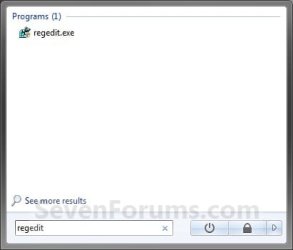
1. Open the Start Menu, then type regedit and press Enter. (See screenshot below)
2. If prompted by UAC, then click on Yes.
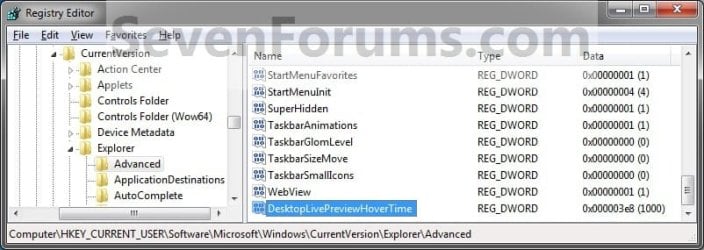
3. In regedit, go to: (See screenshot below step 4)
HKEY_CURRENT_USER\Software\Microsoft\Windows\CurrentVersion\Explorer\Advanced
4. In the right pane, right click on a empty space and click on New and DWORD (32-bit) Value. Type DesktopLivePreviewHoverTime and press enter. (See screenshot below)

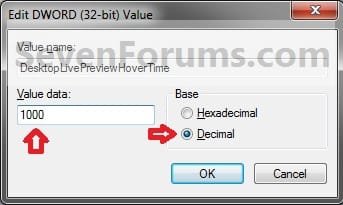
5. In the right pane, right click on DesktopLivePreviewHoverTime and click on Modify, then select (dot) Decimal. (See screenshot above)
6. Type in how many milliseconds (1000 miliseconds = 1 second) you want the delay time to be, then click on OK. (See screenshot below)
NOTE: 3000 miliseconds may be a good delay time to help prevent viewing the desktop by mistake. Adjust the delay time to your needs though.
7. You will now see the time changed now in the registry. (See screenshot below)
8. Close regedit.
9. Log off and log on, or restart the computer to apply the changes.
That's it,
Shawn
Related Tutorials
- How to Use Show Desktop in Windows 7
- How to Turn Aero Peek On or Off in Windows 7
- How to Speed up the Menu Show Delay Time in Windows 7
- How to Change the Mouse Hover Time before Pop-up Displays in Windows 7
- How to Change How Long Windows 7 Notifications Stay Open
- How to Change the Windows 7 Taskbar Thumbnail Live Preview Delay Time
- How to Change Windows 7 Taskbar Thumbnail Previews Display Delay Time
- Turn On Windows 7 Aero with a Incompatible Graphics Card
- How to Enable Aero in Unsupported Editions of Windows 7
Attachments
Last edited:


