Windows 7 Forums


Windows 7: "What U Hear" Recording - Enable

12 Aug 2009   #9
Corpsecrank

Win7 64bit Ultimate
 
 
"What U Hear" Recording - Enable

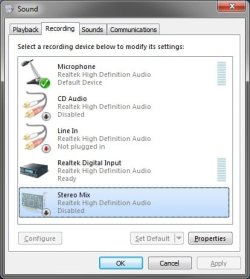
How to Enable What U Hear Recording

For those of you who want to record what you are hearing over your speakers/headset.

You will need to un-hide and enable recording options. If you are using a Creative Sound Blaster sound...


Last edited by Brink; 28 Oct 2011 at 11:30 PM..
My System SpecsSystem Spec

07 Nov 2009   #10
Saltgrass

Windows 7 x64


It looks this ability has been removed from the RC and RTM. Anyone know how to restore the Stereo Mix as a disabled device?
My System SpecsSystem Spec

07 Nov 2009   #11
Brink

64-bit Windows 7 Ultimate SP1 & Windows 8 Enterprise
Texas


Hello Saltgrass,

This feature is still in Windows 7. It is dependant on what you audio card/chip and driver supports though.

My System SpecsSystem Spec
13 Nov 2009   #12
jrlinder

windows 7


Got it done. Thanks.
My System SpecsSystem Spec
27 Nov 2009   #13
Raargh

Windows 7 Pro x64 (dual-booting XPSP3 and Win7)
Earth/SolSys/OrionSpur/MilkyWay/BigU


Hi;

I've got everything enabled as per this great how-to but still can't record "what-u-hear" . I posted the details here:

Audacity will not record what-u-hear SB X-Fi

Raargh
My System SpecsSystem Spec
.


15 Jan 2010   #14
jitiwin7

windows 7 ultimate


(excuse my english, i usually speak french...) This solution did not work for me at first time. Then I found that the driver of my audio integrated card (ASUS ALC1200) was from Microsoft. I then looked to found the real driver for my integrated card (who was name before "High definition audio" and found the driver on the Web. Only after installing the good driver (after three times...), the Stereo Mix appeared (the name appear as Realtek High definition audio now). But I've still had to tried some input options in Audacity to get it works. But now it works great.
My System SpecsSystem Spec
25 Jan 2010   #15
Ritter197

windows 7
Gaithersburg,MD.


I constantly get the Language Configurator window and that is after I ran all the tests of speaking and passed them with more than 99% accuracy. I chose English-US and also tried English-British and the language configurator still comes up.It gives also no Help, just a stupid OK.
What is wrong with this Speech recognition program in Windows 7?
My System SpecsSystem Spec
25 Jan 2010   #16
valtonray

Windows 7 Ultimate Signature Edition
FL


i was actually just thinking earlier today that i needed to look this up.
My System SpecsSystem Spec
06 Feb 2010   #17
morrisson

windows 7 ultimate


thank you very much for the tutorial, quite easy to follow
My System SpecsSystem Spec
14 May 2010   #18
Thinkerer

W7 ---> W3.1 (really)
 
 
Thanks!

Been swotting at this for hours - works like a charm. #()%& Bill Gates anyway.

Thanks Man!
My System SpecsSystem Spec
10 Sep 2010   #19
groove2love

Windows Seven Ultimate 32 bit
 
 
What you hear / and Mic

Do you know, if anyone had figure out how to use: both the "What U Hear"/"Stereo Mix" while still using the mic. on Windows seven, 32 bit system.

Thanks
Groove2love
My System SpecsSystem Spec
Comment

 "What U Hear" Recording - Enable problems?


Tutorial Tools


Similar help and support threads for: "What U Hear" Recording - Enable
Windows 7 Tutorial Category
Solved Audigy 2 echo and low volume in "What You Hear" Windows 7 64 bit Sound & Audio
Stereo Mixer "What U Hear" Suddenly Stopped Working Sound & Audio
"What u hear" - Low sound volume Sound & Audio
No "What u Hear" recording option. Sound & Audio
Windows 7 Can't record "What you Hear" Sound & Audio


All times are GMT -5. The time now is 08:11 PM.


Seven Forums Android App Seven Forums IOS App Follow us on Facebook

Windows 7 Forums is an independent web site and has not been authorized,
sponsored, or otherwise approved by Microsoft Corporation.
"Windows 7" and related materials are trademarks of Microsoft Corp.
© Designer Media Ltd
  

1 2 3 4 5 6 7 8 9 10 11 12 13 14 15 16 17 18 19 20 21 22 23 24 25 26 27 28 29 30 31 32