Windows 7 Forums Search
Welcome to Windows 7 Forums. Our forum is dedicated to helping you find solutions with any problems, errors or issues you are experiencing with Windows 7. The Windows 7 forum also covers news and updates and has an extensive Windows 7 tutorial section that covers a wide range of tips and tricks.


Windows 7 - "What U Hear" Recording - Enable

 
08-12-2009   #19
Corpsecrank


Win7 64bit Ultimate


"What U Hear" Recording - Enable

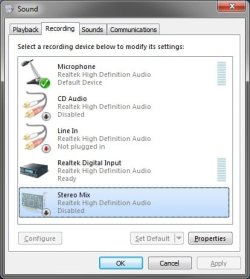
How to Enable What U Hear Recording

For those of you who want to record what you are hearing over your speakers/headset.

You will need to un-hide and enable recording options. If you are using a Creative Sound Blaster sound...


Last edited by Brink; 10-28-2011 at 11:30 PM..
My System SpecsSystem Spec
09-11-2010   #20
morrisson


windows 7 ultimate


Quote   Quote: Originally Posted by groove2love View Post
Do you know, if anyone had figure out how to use: both the "What U Hear"/"Stereo Mix" while still using the mic. on Windows seven, 32 bit system.

Thanks
Groove2love
Groove2love, i think your problem can be solved by: go to 'audio devices' / 'sound' -> 'recording' tab -> click with the right button on your default recording device and then click on 'properties' -> search for a 'listen' tab, or something similar lurking around, possibly in the properties (in the 'stereo mix' properties you can see this 'listen' tab, go there and check 'listen to this device'; this should fix your problem).

if that doesnt work: try going to 'sound manager' and search for any listen options... good luck!

My System SpecsSystem Spec
09-19-2010   #21
Trenny


Windows 7 Home Premium


"What U Hear - Recording"

The URL "www.sevenforums.com/tutorials/20595-what-u-hear-recording-enable.html" shows me exactly what I wish do acheive with my PC. Problem is on my "Sound" "Recording" Tab I do not have the options to enable "Stereo Mix" or "What U Hear" even though "Show Disabled Devices" & "Show Disconnected Devices" are both ticked. How can I add these options to my PC? I have the original OS installation disks. My technical expertise with PCs is probably around 2/5 (5/5 being brilliant PC wizard).

Sincerely hope someone can set me on the right path quickly.

Thanks & Regards
Trenny
My System SpecsSystem Spec
10-16-2010   #22
Marimba


Windows 7 Home Premium 64 bit


no "What U Hear" or "Steoro Mix"

I am using Windows 7 64 bit & a Sound Blaster audigy 4 with new drivers. There is no "What U Hear". Has anyone tried using a split lead from line out with one lead going to speakers and the other going to line in then recording using line in as the feed? Does this damage the sound card and does this give a feed back which precludes this work around? Any help would be appreciated. I can't use the methods described in the tutorials because the drivers for this sound card don't support any of the options described in them.
My System SpecsSystem Spec
12-27-2010   #23
deise67


windowsXP


Enable "what you hear2 by Corpsecrank

Corpsecrank This is the single most valuable piece of info I "got" on the net for a long long while well done and thanks.

Déise 67
My System SpecsSystem Spec
.


04-07-2011   #24
slade12


64 bit windows ultimate


Recording what you hear

Hi there,

Gosh thanks for that, i have been trying to figure out how to record what you hear on my Gigabyte Motherboard with on board sound its a real pain and i know they are trying to protect high def recording but Just for my Teaching and need to record the sounds from what i see ON Screen this was frustrating me and i was going to buy a separate Audio card to get around this, so thank you i think there's allot of people out there that are having the same problems with the Propriety Audio rules realtek are leading the way with this i have always been able to record what i hear so buying a new computer has had its headaches as well.

slade12
My System SpecsSystem Spec
06-07-2011   #25
scandisk


Windows 7,Windows xp


useful the tutorial but in my soundblaster audigy SE do not even appear stereo Mix and in my older computer with XP had stereo mix and what u heard i run windows 7 Home premium

best regards
Francisco
My System SpecsSystem Spec
06-28-2011   #26
onepost


Windows 7 Ultimate x32


I updated my audio Driver and now I can see the Stereo-mix Device and play/record sound.Unfortunately Now my audio is lower compared to my old driver and when I edit Videos the sound is ahead of the frames.I have learned that Disabling Stereo-Mix Device corrects the Lag on video editing.

I have a microsoft audio Device I quess its a Onboard instead of a Sound Card.I also notice that when I record ScreenCapture vids with the StereoMix it also lags sound.I have the latest HD RealTek driver.Looks like its the equipment im using.
My System SpecsSystem Spec
01-10-2012   #27
MadJackxD


Windows 7 ultimate 64bit


Hi, sorry for posting in this old thread but im hoping someone can help

i have this card: "Creative Labs SB0790 PCI Sound Blaster X-Fi Xtreme Audio Sound Card". From what ive read about, i know that its not really an X-fi series chip but Audigy 2 SE chipset. That being said, it should still work with these workaround, but it doesnt.

I do everything but I still cant see "What U hear" device in the list. It is weird because, I have FRAPS and it has an option that says "Record Windows 7 sound", and when i record SWTOR with it, IT DOES record the sound and music, it records also winamp. So that means my card is able to record PC sound, it just doesnt give me the option to control the functionality. Also, no other video recorder (gamecam, bandicam, xsplit, etc) picks the sound, only FRAPS.

Has anyone had the same problem and solved it ? or am I just screwed with this card? ty
My System SpecsSystem Spec
03-21-2012   #28
Xcotty


windows 7 premium


I just bought a new dell desktop, with Windows 7 installed. I was having the same problems with "What U Hear". I'm using the Creative Sound Blaster
X-Fi Surround 5.1 PRO Sound Card

Sorry didn't mean to create a link there.


Anyway, I have been using it with XP for about 6 months, and when I got the new desktop, I hoped it would work on that. It didn't.
But then I went into the Creative program "Update Software", and found that you can update drivers online. Which I did. Then I opened Audacity, checked to see if "What U Hear" was there. Lo, and behold, it was. So now I can record again.


I know it's quite an expensive sound card, but for me, it was worth it.
I hope this helps someone.
My System SpecsSystem Spec
Comment

 "What U Hear" Recording - Enable problems?


Tutorial Tools


Similar Threads for: "What U Hear" Recording - Enable
Windows 7 Tutorial Category
Solved Cannot enable "Search suggestions" in "Google Search Provider" Browsers & Mail
"What u hear" - Low sound volume Sound & Audio
No "What u Hear" recording option. Sound & Audio
No "What U Hear/Stereo Mix" on new computer? Sound & Audio
Windows 7 Can't record "What you Hear" Sound & Audio


All times are GMT -5. The time now is 02:18 AM.


Windows 7 Forums is an independent web site and has not been authorized,
sponsored, or otherwise approved by Microsoft Corporation.
"Windows 7" and related materials are trademarks of Microsoft Corp.
© Designer Media Ltd
  

1 2 3 4 5 6 7 8 9 10 11 12 13 14 15 16 17 18 19 20 21 22 23 24 25 26 27 28 29 30