
"What U Hear" Recording - Enable

How to Enable What U Hear Recording

For those of you who want to record what you are hearing over your speakers/headset.

You will need to un-hide and enable recording options. If you are using a Creative Sound Blaster sound card this option will be called "What U Hear" if you are using another audio device such as Realtek on-board or generic sound devices this option will be called "Stereo Mix".

For the tutorial I am going to show how to un-hide and enable the "What U Hear" option. The same steps may be followed for the "Stereo Mix" option also.


Here's How:

1. First open your audio options. "Start/Control Panel/Sound"

2. Now go to the "Recording" tab.

3. You will need to right click and check the following options:
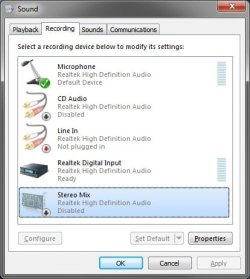
Stereo_Mix1.jpg

4. Now that the hidden options are visible, right click on each of them and click on enable.

5. Right click on the What U Hear option (Stereo Mix for non Sound Blaster devices) and click on Set as default device.
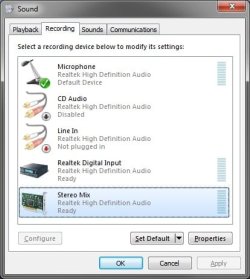
Stereo_Mix2.jpg

6. Once the device is set as default you will be able to use the "What U Hear"/"Stereo Mix" option in your applications to record the audio you are currently hearing over your speakers/headset.
If you wish to record from the mic or use it in a game you can come back to this tab in the audio options and right click the mic and set it as default again.

I am sure there is probably a way to use both the "What U Hear"/"Stereo Mix" while still using the mic but I have not gotten that far since I only need to record audio once in a while. So I generally just leave the mic default until I am ready to record audio then I switch for that operation.

I hope this helps all of those who have had issues recording audio being played back over the speakers/headset.


Last edited by a moderator:
Do you know, if anyone had figure out how to use: both the "What U Hear"/"Stereo Mix" while still using the mic. on Windows seven, 32 bit system.

Thanks
Groove2love

Groove2love, i think your problem can be solved by: go to 'audio devices' / 'sound' -> 'recording' tab -> click with the right button on your default recording device and then click on 'properties' -> search for a 'listen' tab, or something similar lurking around, possibly in the properties (in the 'stereo mix' properties you can see this 'listen' tab, go there and check 'listen to this device'; this should fix your problem).

if that doesnt work: try going to 'sound manager' and search for any listen options... good luck!
 

My Computer

OS
windows 7 ultimate
Motherboard
intel
Memory
kingston ddr3 2 gb, 2x
"What U Hear - Recording"

The URL "www.sevenforums.com/tutorials/20595-what-u-hear-recording-enable.html" shows me exactly what I wish do acheive with my PC. Problem is on my "Sound" "Recording" Tab I do not have the options to enable "Stereo Mix" or "What U Hear" even though "Show Disabled Devices" & "Show Disconnected Devices" are both ticked. How can I add these options to my PC? I have the original OS installation disks. My technical expertise with PCs is probably around 2/5 (5/5 being brilliant PC wizard).

Sincerely hope someone can set me on the right path quickly.

Thanks & Regards
Trenny:confused:
 

My Computer

OS
Windows 7 Home Premium
CPU
Pentium E5400 Dual Core
Motherboard
Asus P5P41D
Memory
2.0 GB
no "What U Hear" or "Steoro Mix"

I am using W7 64 bit & a Sound Blaster audigy 4 with new drivers. There is no "What U Hear". Has anyone tried using a split lead from line out with one lead going to speakers and the other going to line in then recording using line in as the feed? Does this damage the sound card and does this give a feed back which precludes this work around? Any help would be appreciated. I can't use the methods described in the tutorials because the drivers for this sound card don't support any of the options described in them.
 

My Computer

Computer Manufacturer/Model Number
Built it myself
OS
Windows 7 Home Premium 64 bit
CPU
Intel I7 870
Motherboard
giggabyte
Memory
8 GB
Graphics Card(s)
Sapphire
Sound Card
Creative Sound Blaster Audigy 4
Monitor(s) Displays
Acer 24"
Hard Drives
2 Samsung 500 GB internal
1 Maxtor 750 GB external
PSU
650 W PC Power
Cooling
Thermaltake cooler
Enable "what you hear2 by Corpsecrank

Corpsecrank This is the single most valuable piece of info I "got" on the net for a long long while well done and thanks. :D

Déise 67
 

My Computer

OS
windowsXP
Recording what you hear

Hi there,

Gosh thanks for that, i have been trying to figure out how to record what you hear on my Gigabyte Motherboard with on board sound its a real pain and i know they are trying to protect high def recording but Just for my Teaching and need to record the sounds from what i see ON Screen this was frustrating me and i was going to buy a separate Audio card to get around this, so thank you i think there's allot of people out there that are having the same problems with the Propriety Audio rules realtek are leading the way with this i have always been able to record what i hear so buying a new computer has had its headaches as well.

slade12
 

My Computer

Computer Manufacturer/Model Number
vtech industries
OS
64 bit windows ultimate
CPU
i7-960
Motherboard
gigabyte x58A-ud7
Memory
corsair xms3-pc12800 ddr3 6gigs
Graphics Card(s)
GIGABYTE nVIDIA G-FORCE GTX 470 128RPM Sata 11
Sound Card
onboard
Monitor(s) Displays
vewsonic-21 inch 3 years old
Hard Drives
2 western digital caviar black 2 tb 720rpm
Case
thermaltake Armor +black case- tough power 775 watt
Cooling
thermaltake isgc300 multi socket
useful the tutorial but in my soundblaster audigy SE do not even appear stereo Mix and in my older computer with XP had stereo mix and what u heard i run windows 7 Home premium

best regards
Francisco
 

My Computer

Computer Manufacturer/Model Number
Olidata Vassant AMD series
OS
Windows 7,Windows xp
CPU
AMD Athlon x2 64 4400+
Motherboard
Biostar MCP6PB M2+
Memory
Unknown
Graphics Card(s)
Nvidia G forces 6150, nvidia 6200
Sound Card
Soundblaster Audigy, Realtek HD , Cmedia 9738
Monitor(s) Displays
LG 1942s
Hard Drives
seagate,Samsung
PSU
unknown
Case
Unknown
Cooling
by default
I updated my audio Driver and now I can see the Stereo-mix Device and play/record sound.Unfortunately Now my audio is lower compared to my old driver and when I edit Videos the sound is ahead of the frames.I have learned that Disabling Stereo-Mix Device corrects the Lag on video editing.

I have a microsoft audio Device I quess its a Onboard instead of a Sound Card.I also notice that when I record ScreenCapture vids with the StereoMix it also lags sound.I have the latest HD RealTek driver.Looks like its the equipment im using.:mad:
 

My Computer

OS
Windows 7 Ultimate x32
Hi, sorry for posting in this old thread but im hoping someone can help

i have this card: "Creative Labs SB0790 PCI Sound Blaster X-Fi Xtreme Audio Sound Card". From what ive read about, i know that its not really an X-fi series chip but Audigy 2 SE chipset. That being said, it should still work with these workaround, but it doesnt.

I do everything but I still cant see "What U hear" device in the list. It is weird because, I have FRAPS and it has an option that says "Record Win7 sound", and when i record SWTOR with it, IT DOES record the sound and music, it records also winamp. So that means my card is able to record PC sound, it just doesnt give me the option to control the functionality. Also, no other video recorder (gamecam, bandicam, xsplit, etc) picks the sound, only FRAPS.

Has anyone had the same problem and solved it ? or am I just screwed with this card? :D ty
 

My Computer

OS
Windows 7 ultimate 64bit
I just bought a new dell desktop, with Windows 7 installed. I was having the same problems with "What U Hear". I'm using the Creative Sound Blaster
X-Fi Surround 5.1 PRO Sound Card

Sorry didn't mean to create a link there. :shock:


Anyway, I have been using it with XP for about 6 months, and when I got the new desktop, I hoped it would work on that. It didn't.
But then I went into the Creative program "Update Software", and found that you can update drivers online. Which I did. Then I opened Audacity, checked to see if "What U Hear" was there. Lo, and behold, it was. So now I can record again. ;)


I know it's quite an expensive sound card, but for me, it was worth it.
I hope this helps someone. :cool:
 

My Computer

OS
windows 7 premium
I don't have another sound card in addition to the one that came with my hard drive. I don't have "Sound Mixer" as a choice of "Recording Devices". All I have is "Line-in". What can I do? Would I need to get a different sound card?
 

My Computer

OS
Windows 7 64 bit
I Can Rercord 'What You Hear' Again

Thanks! The secret was right-clicking to enable "Stereo Mix" in the Control Panel--Sound window. I wonder why this was disabled by default?
 

My Computer

Computer Manufacturer/Model Number
ibuypower
OS
Windows 7 64bit
CPU
Intel i-7 3930k @ 3.20 GHz
Motherboard
ASUS Rampage 4 Extreme (Water Cooled)
Memory
32 GB DDR3-1600 G.Skill Ripjaws X
Graphics Card(s)
NVidia GTX690 (Water Cooled)
Sound Card
None (built-in Realtek HD Audio)
Monitor(s) Displays
Samsung 27" SyncMaster 275T
Hard Drives
Hitachi HDS5C404, ST3000DM001, and WD2002FAEX-0
PSU
1500 Watt Thermaltake Toughpower
Case
Erebus Full Tower Custom Liquid Cooling
Cooling
Custom Liquid Cooling with Quad + 3 Dual Radiators
What you hear for Audacity

Install the latest Audacity. Just above the recording panel in the first drop down list select "Windows WASAP". In the second drop down list select "Digital Audio Interface (SB Audigy)". In the third drop down list select "Speakers (SB Audigy) (loopback)". With these settings you should be able to record what you hear.
 

My Computer

Computer type
PC/Desktop
Computer Manufacturer/Model Number
Dell
OS
windows 7 professional
CPU
quad
Audacity

I my previous post I should have said the instructions are for an Audigy sound card.
 

My Computer

Computer type
PC/Desktop
Computer Manufacturer/Model Number
Dell
OS
windows 7 professional
CPU
quad
Back
Top