| | Welcome to Windows 7 Forums. Our forum is dedicated to helping you find solutions with any problems, errors or issues you are experiencing with Windows 7. The Windows 7 forum also covers news and updates and has an extensive Windows 7 tutorial section that covers a wide range of tips and tricks. | Windows 7 - MBR - Restore Windows 7 Master Boot Record
|
08-14-2009
|
#179 | | 7 Home Pre x64, Windows XP Pro, Ubuntu 9.04 |
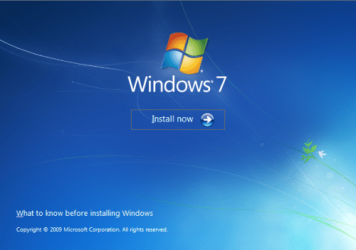
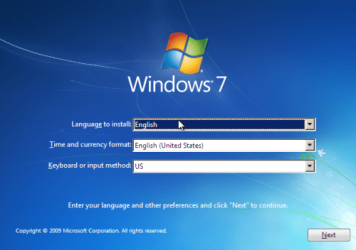
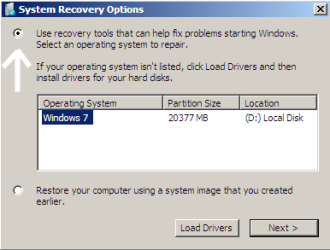
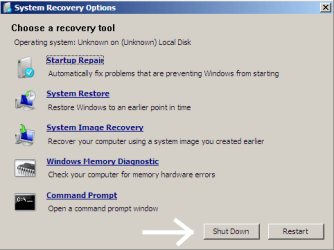
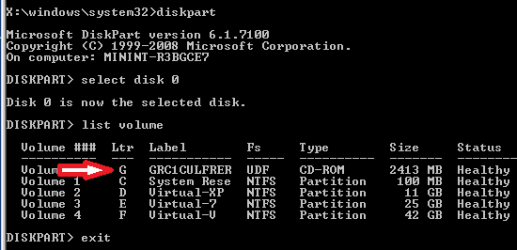
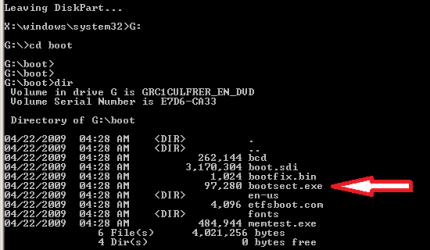
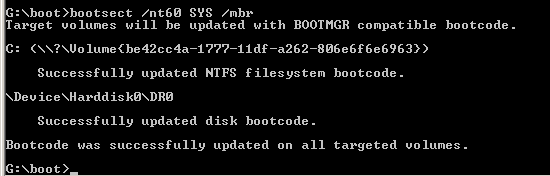
MBR - Restore Windows 7 Master Boot Record How to Restore the Windows 7 MBR (Master Boot Record)
Last edited by Brink; 10-22-2011 at 12:04 AM..
| My System Specs | | System Manufacturer/Model Number Custom OS 7 Home Pre x64, Windows XP Pro, Ubuntu 9.04 CPU AMD Athlon 64 3400+ (single core) Motherboard Foxconn NF4UK8AA Memory 2 X 1GB OCZ Platinum DDR400 Dual Channel Graphics Card PNY GeForce 7300 256MB PCIE Sound Card NVIDIA nForce4 Ultra Onboard Chipset Monitor(s) Displays 2 x Acer AL1716 Screen Resolution 1280 x 1024 PSU Antec Earthwatts EA-430D Hard Drives Maxtor 6Y060L0, WD 1600JS Internet Speed 3M Cable Other Info Windows Experience Index: 3.3 |
03-23-2010
|
#180 | | |

Quote: Originally Posted by Joro Hey there guys! Thank you very much for the great forum, even-though I guess I've ****ed up my Windows 7 completely.
So, I know that I seem to be quite dumb, but I am not Bill Gates
I had three partitions -
200 GB with my music, movies and documents ( which i should not screw up)
20 GB where I have installed windows 7 32 bit
but then i decided to upgrade to 64 bit, so I installed a second wind 7 64 bit on a third partition. So far so good, until i formatted the second partition (with the win 32 bit) and my lovely machine turned me down (not surprising, duh)
I was prepared with an installation disc and went though all the steps till the 8th one (the start up repair did not work out) and got this:
The system partition was not found:
The requested system device cannot be found.
any ideas?  As you have format the partition, this would be right. | My System Specs | | |
03-23-2010
|
#181 | | 7 Home Pre x64, Windows XP Pro, Ubuntu 9.04 |

Quote: Originally Posted by Joro Hey there guys! Thank you very much for the great forum, even-though I guess I've ****ed up my Windows 7 completely.
So, I know that I seem to be quite dumb, but I am not Bill Gates
I had three partitions -
200 GB with my music, movies and documents ( which i should not screw up)
20 GB where I have installed windows 7 32 bit
but then i decided to upgrade to 64 bit, so I installed a second wind 7 64 bit on a third partition. So far so good, until i formatted the second partition (with the win 32 bit) and my lovely machine turned me down (not surprising, duh)
I was prepared with an installation disc and went though all the steps till the 8th one (the start up repair did not work out) and got this:
The system partition was not found:
The requested system device cannot be found.
any ideas?  Hello Joro, and welcome to Windows Seven Forums.
I do not think you are dumb ... as you have come to the smart place to get help! The first time I visit a new city I feel dumb, but it is just because I haven't learned my way around yet! Give it time and a chance to learn a little ... OK?
You have not given us a lot of information ... so I will have to guess at a few things ... since your x32 partition was there when installed x64, most likely the boot code went into the x32 partition, because unless you changed it, it was marked as the "Active" partition. This also assumes you do not use the 100MB "System Reserved" partition as a boot partition? So when you deleted the x32 data, you deleted all your boot code.
Most likely, the x32 partition is still the "Active" partition, but since there is nothing there for Windows to repair, the repairs fail. If you just want to be able to boot to the x64 partition, you would need a third party partitioning utility like Partition Wizard. You would boot to the CD and use the utility to mark your x64 partition as "Active". Then the Windows 7 DVD should be able to run its "Startup Repair" and restore your boot code.
However since I do not know what you want to do after that, I can not offer any further suggestions ...
Cheers!
Robert | My System Specs | | System Manufacturer/Model Number Custom OS 7 Home Pre x64, Windows XP Pro, Ubuntu 9.04 CPU AMD Athlon 64 3400+ (single core) Motherboard Foxconn NF4UK8AA Memory 2 X 1GB OCZ Platinum DDR400 Dual Channel Graphics Card PNY GeForce 7300 256MB PCIE Sound Card NVIDIA nForce4 Ultra Onboard Chipset Monitor(s) Displays 2 x Acer AL1716 Screen Resolution 1280 x 1024 PSU Antec Earthwatts EA-430D Hard Drives Maxtor 6Y060L0, WD 1600JS Internet Speed 3M Cable Other Info Windows Experience Index: 3.3 |
05-31-2010
|
#182 | | |
hi.. guys this si the 1st time iv asked help at a Forum..andi think all the admin n supporters are helping here in a big way..
WEll lets come to my Problem, basically which I,MYSELF have doubled and im hitting n cursin myslef for the same..
1) One Nite i come home frm wrk, switched on my PC, and i am welcomed wit the "BCD corrupt error, which u are aware of....the typical long one which states the BCD error"
2) I happen to have a Clients PC which fortunately i had got home to repair n which had Windows 7 Installed on it..nw i connect my Hard-Disk which is in this form:
1000GB Seagate Baracuda - in 5 Partitions - Windows/Games/Music/Movies/Trash
3) So i go ahead n connect my HDD along to the clients PC which tis the 1st Bootbale HDD,however windows does nt start and the CLeints PC gets stuck at the Windows Starting LOGO..and does nt go ahead..SO i remove my HDDD and the PC startsNormaly..
4) Tried the same again, to no avail the same problem is faced..
5) Nw icome to ur Forum (this thread) and da 1st ting i try is the WIndows Recovery Options..
6) Windows just does nt get detected as i get no WIndows Installed option, its just blank..so i go ahead n try a system restore, bt since no windows is detected how wil it restore..and i dnt have any ghost or drive img backup as well..so i try the command Promt options u all have given right from the
bootsect / nt60 c:\
bootsect / nt60 SYS
bootsect / nt60 ALL to da very bootrec/rebuildbcd..
the computer just goes on and gives sm error at da end or it just goes on and on till nothing happens
7) and then i try smting wat my frnd was telling me in a long while and dats to INstall Ubuntu 9.10...did that on a frnds spare 160GB HDD n then connected my HDD to it..Booted Ubuntu and then Ununtu - Viola!! everythin showed up all my drvies like a beauty including the Windows..bt smhow when i went to the windows drive, there was nothing showing up all the folders were empty..even though it showed Space Occupied in Properties..i dnt understand this part?
8) so i gave up and then Tried to format da WINDOWS drive on my HDD, the Authentication options came up..enterd the passwrod twice, and then it gave an error saying it cannot format..went to the Drive utitliy of Ubuntu..and the drive showed Alot of Bad sectors..bt somehow all the other drives were showing up,with all my data safe in it..im so HAPPY here..
9) ....and then i act STUPID!! and somehow chose to delete the Windows Partition,that happnd and then another small partiotion got created and none of my other drives were now accesible..in fact they showd up as "UNRECOGNISE or UNKNOWN"... the same is stil happinin...pLS HELP!!
10) i can frgt the Windows data....bt all i want to know is can i get my data from the other Drives safely backed up to another HDD and if YES!! how and after that i shall get the HDD replaced at the Seagate service Centre.... i dnt want to loose all MY LIFES HARD WRK, in just a jiffy or my Stupidity...
PLS Need sm help and fast.. thanks... i hpe i have explained the problem and matter clearly..if any1 needs a clarification im ready to do anythin to HELp get my Data Back.. | My System Specs | | |
05-31-2010
|
#183 | | 7 Home Pre x64, Windows XP Pro, Ubuntu 9.04 |

Quote: Originally Posted by fernandesjude hi.. guys this si the 1st time iv asked help at a Forum..andi think all the admin n supporters are helping here in a big way.. Hello fernandesjude and welcome to Windows Seven Forums.
Many of us here have experienced hard drive failures also, so you are not alone. It does sound like the failing hard drive corrupted your Windows installation causing it to not boot.
Sorry about the deleted hard drive partition. Software (or services that restore hard drive data) capable of restoring your Windows partition are expensive, but it can be done.
However, what might help you now is to go to this Seagate web site: Obrigado por registrar o SeaTools! | Seagate
Download the utility and burn it to a bootable CD. Boot to the CD and allow the utility to run. It may be able to make some repairs, but you can also use the report it creates to prove to Seagate that the drive should be replaced by them.
Cheers!
Robert
Last edited by iseeuu; 06-03-2010 at 06:26 PM..
| My System Specs | | System Manufacturer/Model Number Custom OS 7 Home Pre x64, Windows XP Pro, Ubuntu 9.04 CPU AMD Athlon 64 3400+ (single core) Motherboard Foxconn NF4UK8AA Memory 2 X 1GB OCZ Platinum DDR400 Dual Channel Graphics Card PNY GeForce 7300 256MB PCIE Sound Card NVIDIA nForce4 Ultra Onboard Chipset Monitor(s) Displays 2 x Acer AL1716 Screen Resolution 1280 x 1024 PSU Antec Earthwatts EA-430D Hard Drives Maxtor 6Y060L0, WD 1600JS Internet Speed 3M Cable Other Info Windows Experience Index: 3.3 |
05-31-2010
|
#184 | | |
You may be able to undelete the partitions on your other HD - try this free bootable app. Free Partition Wizard Bootable CD allows user to boot computer directly ...
Burn it to cd and boot it up.
Click the Disk at the top of the main window.
Click Partition Recovery. Do a quick scan.
Tick ALL partitions you want to keep then click Apply. | My System Specs | | OS Vista x64 / 7 X64 CPU E8400 Motherboard ASRock 1333 GLAN R2.0 Memory 2x1 gb 800mhz Graphics Card 9500gt 1gb Case Coolermaster Cooling Winpower 500w Hard Drives Maxtor 160gb-2mb cache |
06-02-2010
|
#185 | | |
THANKS iseeuu! My set up was like this:
HP laptop, Centrino 2, Windows Vista
Had the machine for well over a year.
Shortly after Windows 7 came out I Upgraded to Windows 7
I'm really liking Windows 7 a lot. Like really like, like.
So for reasons unbeknownst to even me I decided to do a dual boot with Ubuntu.
I was ready to remove it in less than a month.
I found this site and your thread via Google.
I brought my laptop upstairs to the main (Windows XP) machine....
Put the laptop next to me.
Got on this messageboard with your instructions.
Followed them EXACTLY from top to bottom.
Hot damn! Worked like a charm
I'm impressed.
And THANKS! Again | My System Specs | | |
06-02-2010
|
#186 | | 7 Home Pre x64, Windows XP Pro, Ubuntu 9.04 |

Quote: Originally Posted by Hobie Lapatka My set up was like this:
HP laptop, Centrino 2, Windows Vista
Had the machine for well over a year.
Shortly after Windows 7 came out I Upgraded to Windows 7
I'm really liking Windows 7 a lot. Like really like, like.
So for reasons unbeknownst to even me I decided to do a dual boot with Ubuntu.
I was ready to remove it in less than a month.
I found this site and your thread via Google.
I brought my laptop upstairs to the main (Windows XP) machine....
Put the laptop next to me.
Got on this messageboard with your instructions.
Followed them EXACTLY from top to bottom.
Hot damn! Worked like a charm
I'm impressed.
And THANKS! Again Thank you, Hobie Lapatka, for lettings us know you were helped by Windows Seven Forums. And you are most welcome.
Cheers!
Robert | My System Specs | | System Manufacturer/Model Number Custom OS 7 Home Pre x64, Windows XP Pro, Ubuntu 9.04 CPU AMD Athlon 64 3400+ (single core) Motherboard Foxconn NF4UK8AA Memory 2 X 1GB OCZ Platinum DDR400 Dual Channel Graphics Card PNY GeForce 7300 256MB PCIE Sound Card NVIDIA nForce4 Ultra Onboard Chipset Monitor(s) Displays 2 x Acer AL1716 Screen Resolution 1280 x 1024 PSU Antec Earthwatts EA-430D Hard Drives Maxtor 6Y060L0, WD 1600JS Internet Speed 3M Cable Other Info Windows Experience Index: 3.3 |
08-13-2010
|
#187 | | |
Repair MBR Tutorial Just used this tutorial now and it works perfect!
I wanted to give Ubuntu a little test run and set up a dual boot with Windows 7.
I gave it a go and I still don't think it anywhere near as polished and useable as Windows 7 especially with regard to drivers. Sounds on youtube are horrendous.
I'll always be a Windows/MS guy but I just wanted to see what the fuss was about.
Glad to get back to a solely Windows 7 PC.
Thanks!!! | My System Specs | | |
08-13-2010
|
#188 | | 7 Home Pre x64, Windows XP Pro, Ubuntu 9.04 |

Quote: Originally Posted by bnpguy Just used this tutorial now and it works perfect!
I wanted to give Ubuntu a little test run and set up a dual boot with Windows 7.
I gave it a go and I still don't think it anywhere near as polished and useable as Windows 7 especially with regard to drivers. Sounds on youtube are horrendous.
I'll always be a Windows/MS guy but I just wanted to see what the fuss was about.
Glad to get back to a solely Windows 7 PC.
Thanks!!! Hello bnpguy, and welcome to Windows Seven Forums.
Thanks for letting us know the tutorial was helpful to you!
The last Ubuntu version I found useful was v9. This latest release will not work on any of my old test computers. I guess, for me anyway, it is time to find another Linux distro to use. Like you I find that Linux cannot hold a candle to Windows 7, but we all can be glad we have choices!
Cheers!
Robert | My System Specs | | System Manufacturer/Model Number Custom OS 7 Home Pre x64, Windows XP Pro, Ubuntu 9.04 CPU AMD Athlon 64 3400+ (single core) Motherboard Foxconn NF4UK8AA Memory 2 X 1GB OCZ Platinum DDR400 Dual Channel Graphics Card PNY GeForce 7300 256MB PCIE Sound Card NVIDIA nForce4 Ultra Onboard Chipset Monitor(s) Displays 2 x Acer AL1716 Screen Resolution 1280 x 1024 PSU Antec Earthwatts EA-430D Hard Drives Maxtor 6Y060L0, WD 1600JS Internet Speed 3M Cable Other Info Windows Experience Index: 3.3 |
08-15-2010
|
#189 | | MS Windows 7 Ultimate SP1 64-bit |
Excellent tutorial with easy-to-read snapshots.
A suggestion would be to modify so that people understand that they also do this using a System Repair Disc. | My System Specs | | System Manufacturer/Model Number Toshiba Satellite L305D laptop OS MS Windows 7 Ultimate SP1 64-bit CPU AMD Athlon X2 Dual-Core QL-64, 2100 Mhz, 2 Cores Motherboard TOSHIBA Portable PC (Socket M2/S1G1) Memory 4.0GB (2x2GB) DDR2 @ 333MHz 5-5-5-15 Graphics Card ATI Radeon 3100 Graphics (Toshiba) Sound Card Realtek High Definition Audio Monitor(s) Displays Generic PnP Monitor @ 1280x800 Screen Resolution 1280 x 800 Keyboard standard PS/2 Keyboard Mouse HP Wireless Optical Mobile Mouse Model FHA-3410 Hard Drives 125.03GB Corsair CSSD-V128GB2 ATA Device (IDE)
Depending upon testing, organized as 1,2, or 3 partitions with/without a 100mb system partition at the front. Internet Speed What the local pub, local coffee shop offers. Other Info Optical Drives HL-DT-ST DVDRAM GSA-T50N ATA Device
Synaptics PS/2 Port TouchPad
Speakers (Realtek High Definition Audio)
Atheros AR5007EG Wireless Network Adapter
Also have an Asus ha1002xp netbook with Win 7 Ultimate installed. MBR - Restore Windows 7 Master Boot Record problems? All times are GMT -5. The time now is 03:21 AM. |  |