| | Welcome to Windows 7 Forums. Our forum is dedicated to helping you find solutions with any problems, errors or issues you are experiencing with Windows 7. The Windows 7 forum also covers news and updates and has an extensive Windows 7 tutorial section that covers a wide range of tips and tricks. | Windows 7 - MBR - Restore Windows 7 Master Boot Record
|
08-14-2009
|
#9 | | 7 Home Pre x64, Windows XP Pro, Ubuntu 9.04 |
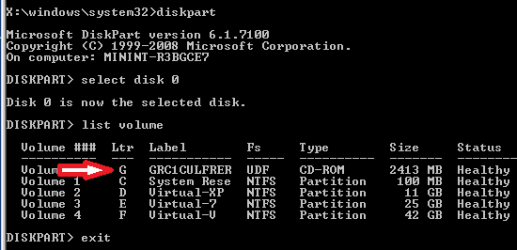
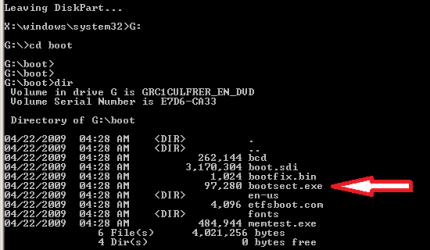
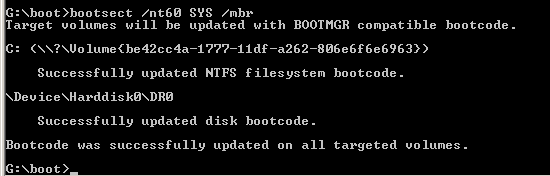
MBR - Restore Windows 7 Master Boot Record How to Restore the Windows 7 MBR (Master Boot Record)
Last edited by Brink; 10-22-2011 at 12:04 AM..
| My System Specs | | System Manufacturer/Model Number Custom OS 7 Home Pre x64, Windows XP Pro, Ubuntu 9.04 CPU AMD Athlon 64 3400+ (single core) Motherboard Foxconn NF4UK8AA Memory 2 X 1GB OCZ Platinum DDR400 Dual Channel Graphics Card PNY GeForce 7300 256MB PCIE Sound Card NVIDIA nForce4 Ultra Onboard Chipset Monitor(s) Displays 2 x Acer AL1716 Screen Resolution 1280 x 1024 PSU Antec Earthwatts EA-430D Hard Drives Maxtor 6Y060L0, WD 1600JS Internet Speed 3M Cable Other Info Windows Experience Index: 3.3 |
11-07-2009
|
#10 | | 7 Home Pre x64, Windows XP Pro, Ubuntu 9.04 |

Quote: Originally Posted by fly790420 this way did not work on my case. i have a laptop installed windows 7, it was okay. until today i saw a article about removing the 100MB of "system reserved" partition.......and yeah...i did removed it by using my Windows 7 installation dvd.. now my laptop wouldnt boot...it shows only operating systen not found"
i tried the method above but at Step 3, mine did not show up any operating system..all blank so i just clicked next
then at Step 9
it couldnt restore the bootsector code.
it only shows "the system partition was not found: the requested system device cannot be found"
and then everything remain the same, still cannot boot.
i know i am stupid to remove the system reserved partiton..
but i really need help here, i have imporant data in the laptop so i dont want to format and reinstall...
if anyone can help, i really appreciate I would suggest a "startup repair" or a "repair install" to restore your computer: Startup Repair Repair Install
If that doesn't do it, you can always install 7 again on a separate hard drive or partition which will give you access to your data on your current 7 partition?
Cheers!
Robert | My System Specs | | System Manufacturer/Model Number Custom OS 7 Home Pre x64, Windows XP Pro, Ubuntu 9.04 CPU AMD Athlon 64 3400+ (single core) Motherboard Foxconn NF4UK8AA Memory 2 X 1GB OCZ Platinum DDR400 Dual Channel Graphics Card PNY GeForce 7300 256MB PCIE Sound Card NVIDIA nForce4 Ultra Onboard Chipset Monitor(s) Displays 2 x Acer AL1716 Screen Resolution 1280 x 1024 PSU Antec Earthwatts EA-430D Hard Drives Maxtor 6Y060L0, WD 1600JS Internet Speed 3M Cable Other Info Windows Experience Index: 3.3 |
12-09-2009
|
#11 | | win7 over vista with grub |
mbr recovery from grub dual boot About to follow instructions, thanks. | My System Specs | | OS win7 over vista with grub |
12-09-2009
|
#12 | | 7 Home Pre x64, Windows XP Pro, Ubuntu 9.04 |

Quote: Originally Posted by jes About to follow instructions, thanks. Welcome to Windows Seven Forums, jes! Please let us know how it goes?
Cheers,
Robert | My System Specs | | System Manufacturer/Model Number Custom OS 7 Home Pre x64, Windows XP Pro, Ubuntu 9.04 CPU AMD Athlon 64 3400+ (single core) Motherboard Foxconn NF4UK8AA Memory 2 X 1GB OCZ Platinum DDR400 Dual Channel Graphics Card PNY GeForce 7300 256MB PCIE Sound Card NVIDIA nForce4 Ultra Onboard Chipset Monitor(s) Displays 2 x Acer AL1716 Screen Resolution 1280 x 1024 PSU Antec Earthwatts EA-430D Hard Drives Maxtor 6Y060L0, WD 1600JS Internet Speed 3M Cable Other Info Windows Experience Index: 3.3 |
12-10-2009
|
#13 | | |
I'm having a similar issue.
I have three hard drives. One old (6years) 150gig, a new 1TB which has XP Pro installed, and a even newer 1.5TB that I have Windows 7 installed on a 100gig partition.
I was fooling around in the BIOS trying to overclock my CPU when I reverted the BIOS back to "stock" settings.
When I did that, I forgot to go back in and make sure that my Windows 7 partition was first on the list.
Therefore, it loaded up my XP. I didn't think it was a big deal, so I restarted the computer, went back into BIOS, and chose the HDD with Windows 7 on it.
During the restart I got an error message saying that the "NTDLR is missing" error message, and it won't boot!
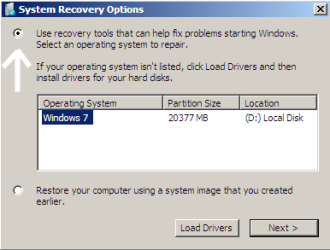
I have the full install disk and have gone into the repair area but when I get to this part:
I don't have any disks that show up. I says if none are showing, to click the "load drivers". I can get into my Windows 7 partition when that screen pops up, but I have no idea what or where the drivers are located????
I need to figure out this step so I can actuall fix Windows 7!
Any help is greatly appreciated!
Thanks,
Jay | My System Specs | | |
12-10-2009
|
#14 | | 7 Home Pre x64, Windows XP Pro, Ubuntu 9.04 |

Quote: Originally Posted by jaymac10 During the restart I got an error message saying that the "NTDLR is missing" error message, and it won't boot!
Jay Jay;
The "NTDLR" message means to me that the BIOS is still looking for XP. Windows 7 uses "bootmgr" so it would appear to me that the XP hard drive is set as the "Primary" in the bios. This would not alter the boot code in the MBR and would not likely need to be repaired. You might try shutting down your computer and unplug all but the Window 7 hard drive to see if it will boot. Then make sure that hard drive is set as the "Primary" in the BIOS?
Cheers!
Robert | My System Specs | | System Manufacturer/Model Number Custom OS 7 Home Pre x64, Windows XP Pro, Ubuntu 9.04 CPU AMD Athlon 64 3400+ (single core) Motherboard Foxconn NF4UK8AA Memory 2 X 1GB OCZ Platinum DDR400 Dual Channel Graphics Card PNY GeForce 7300 256MB PCIE Sound Card NVIDIA nForce4 Ultra Onboard Chipset Monitor(s) Displays 2 x Acer AL1716 Screen Resolution 1280 x 1024 PSU Antec Earthwatts EA-430D Hard Drives Maxtor 6Y060L0, WD 1600JS Internet Speed 3M Cable Other Info Windows Experience Index: 3.3 |
12-11-2009
|
#15 | | |

Quote: Originally Posted by iseeuu 
Quote: Originally Posted by jaymac10 During the restart I got an error message saying that the "NTDLR is missing" error message, and it won't boot!
Jay Jay;
The "NTDLR" message means to me that the BIOS is still looking for XP. Windows 7 uses "bootmgr" so it would appear to me that the XP hard drive is set as the "Primary" in the bios. This would not alter the boot code in the MBR and would not likely need to be repaired. You might try shutting down your computer and unplug all but the Window 7 hard drive to see if it will boot. Then make sure that hard drive is set as the "Primary" in the BIOS?
Cheers!
Robert Tried unpluging all the other hard drives and still getting a "boot failure"
Trying a couple other things to restore the MBR but haven't had much luck so far...
Jay | My System Specs | | |
12-11-2009
|
#16 | | |
I went through the process. I unpluged all the other HDD's so only the one with Windows 7 was listed.
I did the command prompt throught the install DVD.
I did the "bootsect/nt60 all" and it says that it fixed 1 boot.
Took DVD out, restarted the computer...
Still getting the "Boot disk failure" and asking to boot from DVD....
Not sure what else to do/try??? | My System Specs | | |
12-11-2009
|
#17 | | |
OK got some more info...
I figured out that my D: drive is the partition with Windows 7 installed on it.
When I went in and did a "bootsect/nt60 all" I got the following error message regarding the D: Drive
"Update may be unrealiable since the volume could not be locked during update. Access is denied"
WTF does that mean? and how do I fix it?
Thanks,
Jay | My System Specs | | |
12-11-2009
|
#18 | | |
Since the bootsect doesn't seem to be working as "access is denied" I'm sure if I could get my disk drive to show up in the picture below, I could fix this real quick!
Can someone please help me with the "load drivers" section so I can get it to see the drive with Windows 7 installed on it... so I can fix it!
Thanks,
Jay 
Quote: Originally Posted by jaymac10 I'm having a similar issue.
I have three hard drives. One old (6years) 150gig, a new 1TB which has XP Pro installed, and a even newer 1.5TB that I have Windows 7 installed on a 100gig partition.
I was fooling around in the BIOS trying to overclock my CPU when I reverted the BIOS back to "stock" settings.
When I did that, I forgot to go back in and make sure that my Windows 7 partition was first on the list.
Therefore, it loaded up my XP. I didn't think it was a big deal, so I restarted the computer, went back into BIOS, and chose the HDD with Windows 7 on it.
During the restart I got an error message saying that the "NTDLR is missing" error message, and it won't boot!
I have the full install disk and have gone into the repair area but when I get to this part:
I don't have any disks that show up. I says if none are showing, to click the "load drivers". I can get into my Windows 7 partition when that screen pops up, but I have no idea what or where the drivers are located????
I need to figure out this step so I can actuall fix Windows 7!
Any help is greatly appreciated!
Thanks,
Jay
Last edited by jaymac10; 12-11-2009 at 11:54 AM..
| My System Specs | | |
12-11-2009
|
#19 | | 7 Home Pre x64, Windows XP Pro, Ubuntu 9.04 |

Quote: Originally Posted by jaymac10 OK got some more info...
I figured out that my D: drive is the partition with Windows 7 installed on it.
When I went in and did a "bootsect/nt60 all" I got the following error message regarding the D: Drive
"Update may be unrealiable since the volume could not be locked during update. Access is denied"
WTF does that mean? and how do I fix it?
Thanks,
Jay Good afternoon, Jay!
I would recommend to you to try a "repair install" from the 7 DVD: System Recovery Options
Follow this tutorial ... take note that step 5 says " If Windows 7 is not listed here, or it is blank, then it is ok. Click on Next anyway." Then do the "startup repair." Please let us know if this restores access to your Windows 7?
Cheers! | My System Specs | | System Manufacturer/Model Number Custom OS 7 Home Pre x64, Windows XP Pro, Ubuntu 9.04 CPU AMD Athlon 64 3400+ (single core) Motherboard Foxconn NF4UK8AA Memory 2 X 1GB OCZ Platinum DDR400 Dual Channel Graphics Card PNY GeForce 7300 256MB PCIE Sound Card NVIDIA nForce4 Ultra Onboard Chipset Monitor(s) Displays 2 x Acer AL1716 Screen Resolution 1280 x 1024 PSU Antec Earthwatts EA-430D Hard Drives Maxtor 6Y060L0, WD 1600JS Internet Speed 3M Cable Other Info Windows Experience Index: 3.3 MBR - Restore Windows 7 Master Boot Record problems? All times are GMT -5. The time now is 02:38 AM. |  |