|
Welcome to Windows 7 Forums. Our forum is dedicated to helping you find solutions with any problems, errors or issues you are experiencing with Windows 7. The Windows 7 forum also covers news and updates and has an extensive Windows 7 tutorial section that covers a wide range of tips and tricks.
Windows 7 - MBR - Restore Windows 7 Master Boot Record |
08-14-2009
|
#249 | | 7 Home Pre x64, Windows XP Pro, Ubuntu 9.04 |
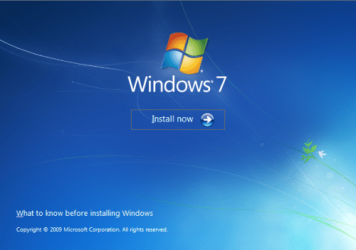
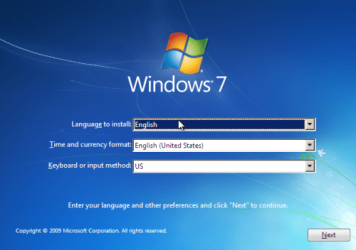
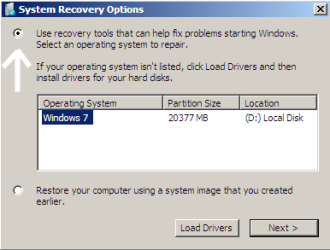
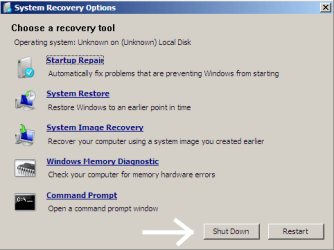
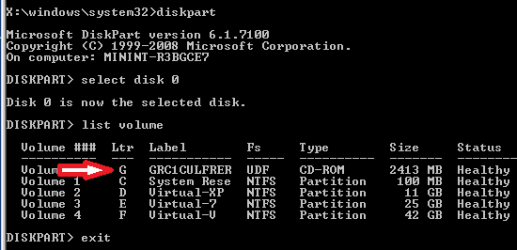
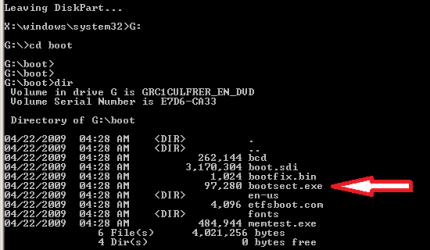
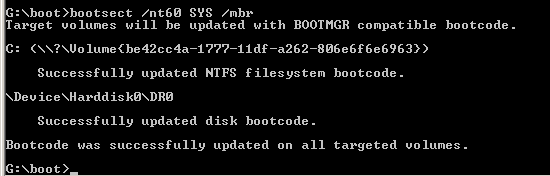
MBR - Restore Windows 7 Master Boot Record How to Restore the Windows 7 MBR (Master Boot Record)
Last edited by Brink; 10-22-2011 at 12:04 AM..
| My System Specs | | System Manufacturer/Model Number Custom OS 7 Home Pre x64, Windows XP Pro, Ubuntu 9.04 CPU AMD Athlon 64 3400+ (single core) Motherboard Foxconn NF4UK8AA Memory 2 X 1GB OCZ Platinum DDR400 Dual Channel Graphics Card PNY GeForce 7300 256MB PCIE Sound Card NVIDIA nForce4 Ultra Onboard Chipset Monitor(s) Displays 2 x Acer AL1716 Screen Resolution 1280 x 1024 PSU Antec Earthwatts EA-430D Hard Drives Maxtor 6Y060L0, WD 1600JS Internet Speed 3M Cable Other Info Windows Experience Index: 3.3 |
02-02-2012
|
#250 | | 7 Home Pre x64, Windows XP Pro, Ubuntu 9.04 |

Quote: Originally Posted by robohamid my mean of "system" was that "System Reserved"
but i dont have any active partition.
and install Open Suse 12 after it i uSe from Suse boot loader to start my windows
with this condition,is it necessary to mark each partition as active ? No. Only one partition can be "Active" at a time.
In simple language, "Boot Loader" software changes the "Active" partition when you select the Operating System you want to start. So when you select "Suse" from the boot menu, the software marks the "Suse" partition "Active" so the computer can boot to it. Then after, if you now want to start Windows, the "Boot Loader" software marks the Windows System partition active so the computer can boot to Windows.
If you have removed "Suse" and/or its "Boot Loader" and the "System Reserved" is not marked "Active", then as the warning message said: you do not have any "Active" partition to boot to. You must mark the "System Reserved" partition "Active" so Windows can boot.
When you select a different partition and mark it as "Active", then the first partition is no longer the active one. There can only be one "Active" partition on a hard drive.
Cheers!
Robert | My System Specs | | System Manufacturer/Model Number Custom OS 7 Home Pre x64, Windows XP Pro, Ubuntu 9.04 CPU AMD Athlon 64 3400+ (single core) Motherboard Foxconn NF4UK8AA Memory 2 X 1GB OCZ Platinum DDR400 Dual Channel Graphics Card PNY GeForce 7300 256MB PCIE Sound Card NVIDIA nForce4 Ultra Onboard Chipset Monitor(s) Displays 2 x Acer AL1716 Screen Resolution 1280 x 1024 PSU Antec Earthwatts EA-430D Hard Drives Maxtor 6Y060L0, WD 1600JS Internet Speed 3M Cable Other Info Windows Experience Index: 3.3 |
03-07-2012
|
#251 | | Windows 7 Professional 64bit |
MBR Just found your website. A lifesaver, easyBCD really messed things up. Now realize that I don't need it to dual boot Win 7 and 8. Thanks again. Now going to check out the Windows 8 forum. | My System Specs | | System Manufacturer/Model Number HP P6 OS Windows 7 Professional 64bit |
03-07-2012
|
#252 | | 7 Home Pre x64, Windows XP Pro, Ubuntu 9.04 |

Quote: Originally Posted by anglicus Just found your website. A lifesaver, easyBCD really messed things up. Now realize that I don't need it to dual boot Win 7 and 8. Thanks again. Now going to check out the Windows 8 forum. Welcome to Windows Seven Forums! Glad you found some help here and for letting us know.
Cheers!
Robert | My System Specs | | System Manufacturer/Model Number Custom OS 7 Home Pre x64, Windows XP Pro, Ubuntu 9.04 CPU AMD Athlon 64 3400+ (single core) Motherboard Foxconn NF4UK8AA Memory 2 X 1GB OCZ Platinum DDR400 Dual Channel Graphics Card PNY GeForce 7300 256MB PCIE Sound Card NVIDIA nForce4 Ultra Onboard Chipset Monitor(s) Displays 2 x Acer AL1716 Screen Resolution 1280 x 1024 PSU Antec Earthwatts EA-430D Hard Drives Maxtor 6Y060L0, WD 1600JS Internet Speed 3M Cable Other Info Windows Experience Index: 3.3 |
03-21-2012
|
#253 | | Australian Capital Territory |
iseeuu you saved my sanity.. I have been banging my head against a "TPM measurement is missing" issue for AGES and I restored my bootloader following your instructions and bam it worked. http://answers.microsoft.com/en-us/w...7-95642214af71
Either way it's working now so I suspect this was it.
I also forced a BIOS update but I had not received any update prompts (Gigabyte) and I updated only a month or so ago (when I built the PC) so I doubt that was the issue.
Although I DID select 'clear DMI data pool' at the same time, so maybe I can't be sure... | My System Specs | | OS Australian Capital Territory |
03-21-2012
|
#254 | | 7 Home Pre x64, Windows XP Pro, Ubuntu 9.04 |

Quote: Originally Posted by canberraplanner iseeuu you saved my sanity.. I have been banging my head against a "TPM measurement is missing" issue for AGES and I restored my bootloader following your instructions and bam it worked. Win7 BitLocker - Required TPM Measurement is Missing - Microsoft Answers
Either way it's working now so I suspect this was it.
I also forced a BIOS update but I had not received any update prompts (Gigabyte) and I updated only a month or so ago (when I built the PC) so I doubt that was the issue.
Although I DID select 'clear DMI data pool' at the same time, so maybe I can't be sure... Welcome to Windows seven Forums, canberraplanne!
Thanks for letting us know you found a fix here!
Cheers!
Robert | My System Specs | | System Manufacturer/Model Number Custom OS 7 Home Pre x64, Windows XP Pro, Ubuntu 9.04 CPU AMD Athlon 64 3400+ (single core) Motherboard Foxconn NF4UK8AA Memory 2 X 1GB OCZ Platinum DDR400 Dual Channel Graphics Card PNY GeForce 7300 256MB PCIE Sound Card NVIDIA nForce4 Ultra Onboard Chipset Monitor(s) Displays 2 x Acer AL1716 Screen Resolution 1280 x 1024 PSU Antec Earthwatts EA-430D Hard Drives Maxtor 6Y060L0, WD 1600JS Internet Speed 3M Cable Other Info Windows Experience Index: 3.3 |
04-01-2012
|
#255 | | |
MBR - Restore Windows 7 Master Boot Record Iseeuu,
Just want to say a million thanks for this piece!!! It did save my skin. | My System Specs | | OS Windows 7 Ultimate x32 |
04-01-2012
|
#256 | | Australian Capital Territory |
| My System Specs | | OS Australian Capital Territory |
04-01-2012
|
#257 | | 7 Home Pre x64, Windows XP Pro, Ubuntu 9.04 |

Quote: Originally Posted by OsaSim Iseeuu,
Just want to say a million thanks for this piece!!! It did save my skin.  Thank you, OsaSim, and welcome to Windows Seven Forums!
Cheers!
Robert | My System Specs | | System Manufacturer/Model Number Custom OS 7 Home Pre x64, Windows XP Pro, Ubuntu 9.04 CPU AMD Athlon 64 3400+ (single core) Motherboard Foxconn NF4UK8AA Memory 2 X 1GB OCZ Platinum DDR400 Dual Channel Graphics Card PNY GeForce 7300 256MB PCIE Sound Card NVIDIA nForce4 Ultra Onboard Chipset Monitor(s) Displays 2 x Acer AL1716 Screen Resolution 1280 x 1024 PSU Antec Earthwatts EA-430D Hard Drives Maxtor 6Y060L0, WD 1600JS Internet Speed 3M Cable Other Info Windows Experience Index: 3.3 |
04-01-2012
|
#258 | | 7 Home Pre x64, Windows XP Pro, Ubuntu 9.04 |

Quote: Originally Posted by canberraplanner Here here Where? Where? | My System Specs | | System Manufacturer/Model Number Custom OS 7 Home Pre x64, Windows XP Pro, Ubuntu 9.04 CPU AMD Athlon 64 3400+ (single core) Motherboard Foxconn NF4UK8AA Memory 2 X 1GB OCZ Platinum DDR400 Dual Channel Graphics Card PNY GeForce 7300 256MB PCIE Sound Card NVIDIA nForce4 Ultra Onboard Chipset Monitor(s) Displays 2 x Acer AL1716 Screen Resolution 1280 x 1024 PSU Antec Earthwatts EA-430D Hard Drives Maxtor 6Y060L0, WD 1600JS Internet Speed 3M Cable Other Info Windows Experience Index: 3.3 |
04-02-2012
|
#259 | | Windows 7 Ultimate (32 bit) |
Thanks! I registered to thank you for this, saved my life  Thanks a bunch! | My System Specs | | OS Windows 7 Ultimate (32 bit) MBR - Restore Windows 7 Master Boot Record problems? All times are GMT -5. The time now is 02:19 AM. |  |