Windows 7 Forums Search
Welcome to Windows 7 Forums. Our forum is dedicated to helping you find solutions with any problems, errors or issues you are experiencing with Windows 7. The Windows 7 forum also covers news and updates and has an extensive Windows 7 tutorial section that covers a wide range of tips and tricks.


Windows 7 - MBR - Restore Windows 7 Master Boot Record


08-14-2009   #19
iseeuu


7 Home Pre x64, Windows XP Pro, Ubuntu 9.04


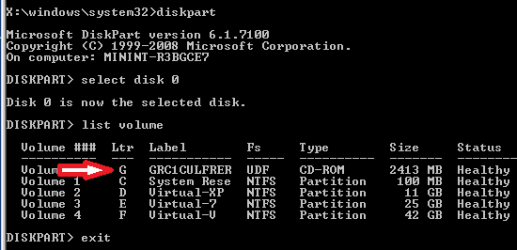
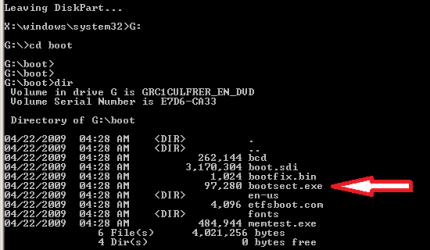
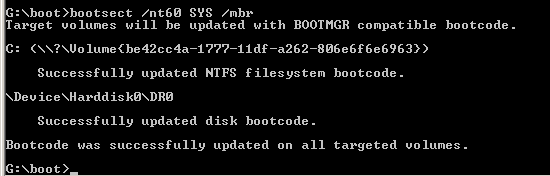
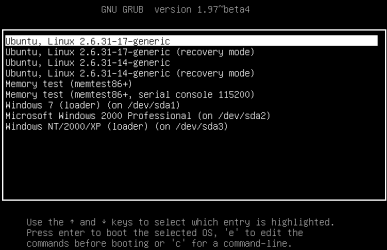
MBR - Restore Windows 7 Master Boot Record

How to Restore the Windows 7 MBR (Master Boot Record)

...


Last edited by Brink; 10-22-2011 at 12:04 AM..
My System SpecsSystem Spec
12-11-2009   #20
jaymac10


Windows 7


Quote   Quote: Originally Posted by iseeuu View Post
Quote   Quote: Originally Posted by jaymac10 View Post
OK got some more info...

I figured out that my D: drive is the partition with Windows 7 installed on it.

When I went in and did a "bootsect/nt60 all" I got the following error message regarding the D: Drive

"Update may be unrealiable since the volume could not be locked during update. Access is denied"

WTF does that mean? and how do I fix it?

Thanks,
Jay
Good afternoon, Jay!

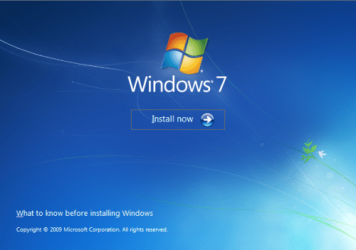
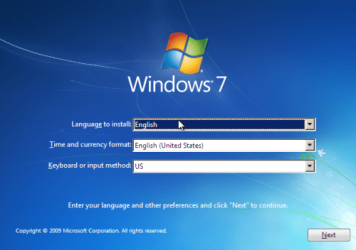
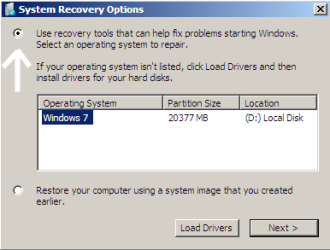
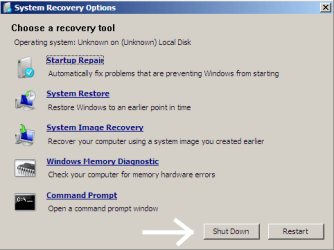
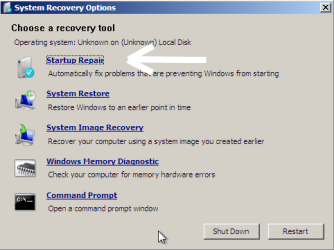
I would recommend to you to try a "repair install" from the 7 DVD: System Recovery Options

Follow this tutorial ... take note that step 5 says "If Windows 7 is not listed here, or it is blank, then it is ok. Click on Next anyway." Then do the "startup repair." Please let us know if this restores access to your Windows 7?

Cheers!
Thanks, however, I'm pretty sure I have already done this process. And it did not work!

I'll maybe try running it again with all my other hard drives disconnected and see if that does anything...

Jay

My System SpecsSystem Spec
12-11-2009   #21
iseeuu


7 Home Pre x64, Windows XP Pro, Ubuntu 9.04


Quote   Quote: Originally Posted by jaymac10 View Post
Thanks, however, I'm pretty sure I have already done this process. And it did not work!

I'll maybe try running it again with all my other hard drives disconnected and see if that does anything...

Jay
Yes, please try with the Windows 7 hard drive connected and let us know?
My System SpecsSystem Spec
12-11-2009   #22
jaymac10


Windows 7


Ok so I diconnected all of my other hard drives so only the one with Windows 7 was on.

Went through the process of startup repair and got the following details:

Root Cause Found: The Partition Table does not have a valid system partition.
Repair Action: Partition Table Repair
Result: Completed Sucessfully Error Code = 0x0

If I attach my other HDD with XP (what I'm on now) I can go into disk management and see my Windows 7 partition. It says it's "Healthy"

Ideas on how to fix??

Thanks,

Jay
My System SpecsSystem Spec
12-11-2009   #23
iseeuu


7 Home Pre x64, Windows XP Pro, Ubuntu 9.04


Quote   Quote: Originally Posted by jaymac10 View Post
Ok so I diconnected all of my other hard drives so only the one with Windows 7 was on.

Went through the process of startup repair and got the following details:

Root Cause Found: The Partition Table does not have a valid system partition.

Repair Action: Partition Table Repair
Result: Completed Sucessfully
Error Code = 0x0
OK ... so did the partition table get repaired and are you able to boot to Windows 7?

.
My System SpecsSystem Spec
.


12-11-2009   #24
jaymac10


Windows 7


Quote   Quote: Originally Posted by iseeuu View Post
Quote   Quote: Originally Posted by jaymac10 View Post
Ok so I diconnected all of my other hard drives so only the one with Windows 7 was on.

Went through the process of startup repair and got the following details:

Root Cause Found: The Partition Table does not have a valid system partition.

Repair Action: Partition Table Repair
Result: Completed Sucessfully
Error Code = 0x0
OK ... so did the partition table get repaired and are you able to boot to Windows 7?

.
I removed the Windows 7 install disk... restarted... get Boot Failure...
My System SpecsSystem Spec
12-11-2009   #25
jaymac10


Windows 7


I also did a C:bootsec /fixmbr and it said it completed successfully....

I could not however, do a /bootfix. Said (something) could not be found???

Also tried a /rebuildbcd. It was thinking for a while and then came up with a bunch of stuff but can't remember if it worked...


Still get boot failure at startup...
My System SpecsSystem Spec
12-11-2009   #26
jaymac10


Windows 7


Quote   Quote: Originally Posted by iseeuu View Post
Quote   Quote: Originally Posted by jaymac10 View Post
Ok so I diconnected all of my other hard drives so only the one with Windows 7 was on.

Went through the process of startup repair and got the following details:

Root Cause Found: The Partition Table does not have a valid system partition.

Repair Action: Partition Table Repair
Result: Completed Sucessfully
Error Code = 0x0
OK ... so did the partition table get repaired and are you able to boot to Windows 7?

.
I attach my other HDD with XP (what I'm on now) I can go into disk management and see my Windows 7 partition. It says it's "Healthy"
My System SpecsSystem Spec
12-11-2009   #27
jaymac10


Windows 7


Is there a way that I can fix/repair the boot directory or the install of Windows 7, or partition while I'm on my other HDD??

That would be really nice if I could just copy and paste new files into the Windows 7 partition....

Possible??
My System SpecsSystem Spec
12-11-2009   #28
iseeuu


7 Home Pre x64, Windows XP Pro, Ubuntu 9.04


Quote   Quote: Originally Posted by jaymac10 View Post
I also did a C:bootsec /fixmbr and it said it completed successfully....

I could not however, do a /bootfix. Said (something) could not be found???

Also tried a /rebuildbcd. It was thinking for a while and then came up with a bunch of stuff but can't remember if it worked...


Still get boot failure at startup...
Before you proceed, lets consider your options. I re-read your initial post and can not see how booting to your XP hard drive would damage your 7 partition table. Doesn't mean it couldn't happen, just I don't see how.

Damage to the partition table could be the result of defects in the hard drive platter in the area where the partition table resides, so it might save a lot of effort to verify the hard drive is, or is not the cause. I would suggest to you to go the manufacturer's web site and get a copy of their diagnostic software and check the physicial condition of the hard drive before continuing. A few defects does not mean the hard drive will need to be replaced, but the surface of a platter failing will continue to cause corrupted data. You need to know!

If the diagnostic software can adequately repair (block off the failing area so no data can be stored there) the hard drive, then we may be able to repair the MBR / partition table and resume using it. If not, you should be able to RMA the drive.

In the mean time, one option you might consider is to install 7 in a separate partition on one of your other drives. If you do, I suggest shrinking the XP partition, moving it to the "end" (right) of the hard drive and installing 7 including its 100 MB system partition. With a working 7 OS you may be able to rescue your files and settings from the damaged drive, maybe ...

If no defects are found in the 7 hard drive, or if it can be repaired (as mentioned above) the tutorial referes to this MS site where you can use the command:

bootrec (not bootsec, as you posted)

"The /FixBoot option writes a new boot sector to the system partition by using a boot sector that is compatible with Windows Vista or Windows 7. Use this option if one of the following conditions is true:
  • The boot sector has been replaced with a non-standard Windows Vista or Windows 7 boot sector.
  • The boot sector is damaged.
  • An earlier Windows operating system has been installed after Windows Vista or Windows 7 was installed. In this scenario, the computer starts by using Windows NT Loader (NTLDR) instead of Windows Boot Manager (Bootmgr.exe)."
Please consider your options and let us know if we may assist?

Cheers!
My System SpecsSystem Spec
12-11-2009   #29
jaymac10


Windows 7


Quote   Quote: Originally Posted by iseeuu View Post
Before you proceed, lets consider your options. I re-read your initial post and can not see how booting to your XP hard drive would damage your 7 partition table. Doesn't mean it couldn't happen, just I don't see how.
The boot of Windows 7 got messed up when I was playing around in the BIOS settings trying to overclock my CPU.

I re-set the BIOS to "standard" settings, then re-started my computer.

However, I did not change the disk order before doing that.

When the computer re-started, it booted to my XP drive as it was listed first.

So I went back into BIOS, changed it to my Windows 7 disk, and re-started.

That's when the problems started.

I originally got an "NTDLR is missing" error.

In my efforts to fix the problem, it wasn't giving me the NTDLR error anymore, just a "Boot Failure".... Which is what it's still giving me...

I've already transfered over all of my "data" on the Windows 7 partition as I am able to access it in Disk Management when running my XP drive....


SO I'm probably just going to re-format the hard drive, then re-install Windows 7 and be done with this CRAP!

But I do thank everyone for their help! But I'm not sure I can fix it any faster than just re-installing!
My System SpecsSystem Spec
Comment

MBR - Restore Windows 7 Master Boot Record problems?


Tutorial Tools


Similar Threads for: MBR - Restore Windows 7 Master Boot Record
Windows 7 Tutorial Category
HDD Master Boot Record (MBR) - How important to delete this? Hardware & Devices
Solved How do I restore the Master Boot Record? General Discussion
Master Boot Record re-creation Installation & Setup
wrong "Master boot record" info Hardware & Devices
Formated Drive and erased Master Boot Record Installation & Setup


All times are GMT -5. The time now is 02:38 AM.


Windows 7 Forums is an independent web site and has not been authorized,
sponsored, or otherwise approved by Microsoft Corporation.
"Windows 7" and related materials are trademarks of Microsoft Corp.
© Designer Media Ltd
  

1 2 3 4 5 6 7 8 9 10 11 12 13 14 15 16 17 18 19 20 21 22 23 24 25 26 27 28 29 30