|
Welcome to Windows 7 Forums. Our forum is dedicated to helping you find solutions with any problems, errors or issues you are experiencing with Windows 7. The Windows 7 forum also covers news and updates and has an extensive Windows 7 tutorial section that covers a wide range of tips and tricks.
Windows 7 - MBR - Restore Windows 7 Master Boot Record |
08-14-2009
|
#79 | | 7 Home Pre x64, Windows XP Pro, Ubuntu 9.04 |
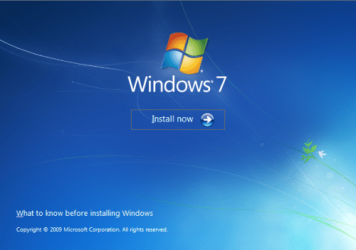
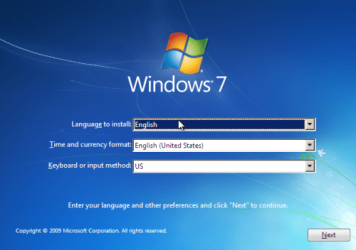
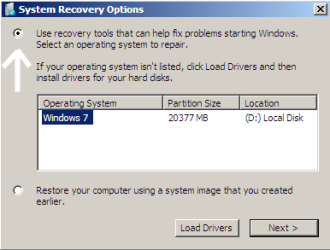
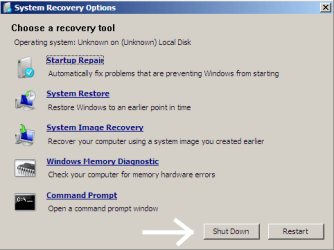
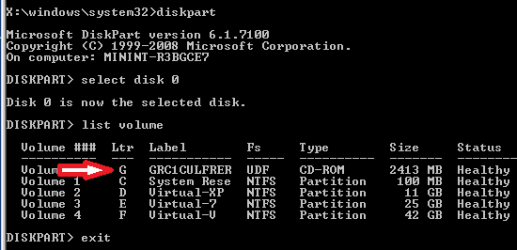
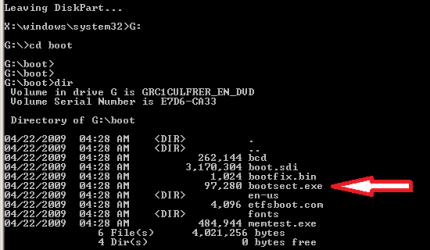
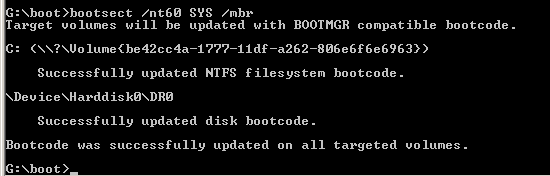
MBR - Restore Windows 7 Master Boot Record How to Restore the Windows 7 MBR (Master Boot Record)
Last edited by Brink; 10-22-2011 at 12:04 AM..
| My System Specs | | System Manufacturer/Model Number Custom OS 7 Home Pre x64, Windows XP Pro, Ubuntu 9.04 CPU AMD Athlon 64 3400+ (single core) Motherboard Foxconn NF4UK8AA Memory 2 X 1GB OCZ Platinum DDR400 Dual Channel Graphics Card PNY GeForce 7300 256MB PCIE Sound Card NVIDIA nForce4 Ultra Onboard Chipset Monitor(s) Displays 2 x Acer AL1716 Screen Resolution 1280 x 1024 PSU Antec Earthwatts EA-430D Hard Drives Maxtor 6Y060L0, WD 1600JS Internet Speed 3M Cable Other Info Windows Experience Index: 3.3 |
01-22-2010
|
#80 | | Windows 7 Professional x64 |
And? 
Quote: Originally Posted by iseeuu 
Quote: Originally Posted by Acc1999 So I can delete the last two in Windows? Yes. Windows doesn't recognize anthing but NTFS and Fat32 and the last two partitions are not recognized by Windows so ...
But you can verify this before you delete them ... HOW? | My System Specs | | System Manufacturer/Model Number Sony OS Windows 7 Professional x64 CPU Intel Pentium Dual-Core Screen Resolution 1366 x 768 Other Info Splashtop |
01-22-2010
|
#81 | | 7 Home Pre x64, Windows XP Pro, Ubuntu 9.04 |

Quote: Originally Posted by Acc1999 
Quote: Originally Posted by iseeuu 
Quote: Originally Posted by Acc1999 So I can delete the last two in Windows? Yes. Windows doesn't recognize anthing but NTFS and Fat32 and the last two partitions are not recognized by Windows so ...
But you can verify this before you delete them ... HOW? By booting to your Ubuntu Live CD, opening GParted, and looking to see if the last two partitions are labeled at "ext4" and "swap." If they are labeled "ext4" and "swap" then they are Ubuntu and not Windows. | My System Specs | | System Manufacturer/Model Number Custom OS 7 Home Pre x64, Windows XP Pro, Ubuntu 9.04 CPU AMD Athlon 64 3400+ (single core) Motherboard Foxconn NF4UK8AA Memory 2 X 1GB OCZ Platinum DDR400 Dual Channel Graphics Card PNY GeForce 7300 256MB PCIE Sound Card NVIDIA nForce4 Ultra Onboard Chipset Monitor(s) Displays 2 x Acer AL1716 Screen Resolution 1280 x 1024 PSU Antec Earthwatts EA-430D Hard Drives Maxtor 6Y060L0, WD 1600JS Internet Speed 3M Cable Other Info Windows Experience Index: 3.3 |
01-22-2010
|
#82 | | Windows 7 Professional x64 |
GParted Ok, lemme try. I will have to reboot, as I am using the same laptop. | My System Specs | | System Manufacturer/Model Number Sony OS Windows 7 Professional x64 CPU Intel Pentium Dual-Core Screen Resolution 1366 x 768 Other Info Splashtop |
01-22-2010
|
#83 | | Windows 7 Professional x64 |
DONE OK, it was the same as Windows.
So now I remove them from Disk Management?
EDIT:
There were less items in the list than yours. Why is this? | My System Specs | | System Manufacturer/Model Number Sony OS Windows 7 Professional x64 CPU Intel Pentium Dual-Core Screen Resolution 1366 x 768 Other Info Splashtop |
01-22-2010
|
#84 | | 7 Home Pre x64, Windows XP Pro, Ubuntu 9.04 |

Quote: Originally Posted by Acc1999 OK, it was the same as Windows.
So now I remove them from Disk Management? Yes, delete those two "Partitions" or "Volumes" and Ubuntu is gone ... | My System Specs | | System Manufacturer/Model Number Custom OS 7 Home Pre x64, Windows XP Pro, Ubuntu 9.04 CPU AMD Athlon 64 3400+ (single core) Motherboard Foxconn NF4UK8AA Memory 2 X 1GB OCZ Platinum DDR400 Dual Channel Graphics Card PNY GeForce 7300 256MB PCIE Sound Card NVIDIA nForce4 Ultra Onboard Chipset Monitor(s) Displays 2 x Acer AL1716 Screen Resolution 1280 x 1024 PSU Antec Earthwatts EA-430D Hard Drives Maxtor 6Y060L0, WD 1600JS Internet Speed 3M Cable Other Info Windows Experience Index: 3.3 |
01-22-2010
|
#85 | | Windows 7 Professional x64 |
:) YAY! I'm all done! NOW:
Tell me how to take the screenshots during boot. I know in Windows, you use the Snipping Tool or the Print Screen button, but in boot before Windows... You said you would tell me. | My System Specs | | System Manufacturer/Model Number Sony OS Windows 7 Professional x64 CPU Intel Pentium Dual-Core Screen Resolution 1366 x 768 Other Info Splashtop |
01-22-2010
|
#86 | | 7 Home Pre x64, Windows XP Pro, Ubuntu 9.04 |

Quote: Originally Posted by Acc1999 YAY! I'm all done! NOW:
Tell me how to take the screenshots during boot. I know in Windows, you use the Snipping Tool or the Print Screen button, but in boot before Windows... You said you would tell me. Ctrl + Prt Scr (keyboard keys Control and Print Screen) will capture the desktop image to the clipboard. Open Paint and paste, and you can edit the image and save it as you wish.
This software Sun's VirtualBox allow you to install an OS like a program. The OS boots up in a window on the desktop and Ctrl + Prt Scr will capture the boot screens.
Cheers!
Robert | My System Specs | | System Manufacturer/Model Number Custom OS 7 Home Pre x64, Windows XP Pro, Ubuntu 9.04 CPU AMD Athlon 64 3400+ (single core) Motherboard Foxconn NF4UK8AA Memory 2 X 1GB OCZ Platinum DDR400 Dual Channel Graphics Card PNY GeForce 7300 256MB PCIE Sound Card NVIDIA nForce4 Ultra Onboard Chipset Monitor(s) Displays 2 x Acer AL1716 Screen Resolution 1280 x 1024 PSU Antec Earthwatts EA-430D Hard Drives Maxtor 6Y060L0, WD 1600JS Internet Speed 3M Cable Other Info Windows Experience Index: 3.3 |
01-22-2010
|
#87 | | Windows 7 Professional x64 |
:( Nevermind. I don't want to reinstall. I will keep that link incase someone wants it before they put on their OS. My website is at: www.computersrule.net and some people ask me in person, so I can tell them about it. | My System Specs | | System Manufacturer/Model Number Sony OS Windows 7 Professional x64 CPU Intel Pentium Dual-Core Screen Resolution 1366 x 768 Other Info Splashtop |
01-22-2010
|
#88 | | Windows 7 Professional x64 |
Thanks! I just want to thank you for aall your help! I mean, I have been on Google for 2 days trying to find an answer to this, and I came here after Ubuntu Forums told me to. You have been a big help to me.
--Acc1999 | My System Specs | | System Manufacturer/Model Number Sony OS Windows 7 Professional x64 CPU Intel Pentium Dual-Core Screen Resolution 1366 x 768 Other Info Splashtop |
01-22-2010
|
#89 | | 7 Home Pre x64, Windows XP Pro, Ubuntu 9.04 |

Quote: Originally Posted by Acc1999 Nevermind. I don't want to reinstall. I will keep that link incase someone wants it before they put on their OS. My website is at: www.computersrule.net and some people ask me in person, so I can tell them about it. 
Quote: Originally Posted by Acc1999 I just want to thank you for aall your help! I mean, I have been on Google for 2 days trying to find an answer to this, and I came here after Ubuntu Forums told me to. You have been a big help to me.
--Acc1999  You are most welcome, Andy! I think you will find all the folks here at Windows Seven Forums very helpful and very friendly. You are welcome here any time.
Might I suggest you go back to Ubuntu Forums and thank Michy99 for posting that link for you? I bet it would be appreciated!!
Cheers!
Robert | My System Specs | | System Manufacturer/Model Number Custom OS 7 Home Pre x64, Windows XP Pro, Ubuntu 9.04 CPU AMD Athlon 64 3400+ (single core) Motherboard Foxconn NF4UK8AA Memory 2 X 1GB OCZ Platinum DDR400 Dual Channel Graphics Card PNY GeForce 7300 256MB PCIE Sound Card NVIDIA nForce4 Ultra Onboard Chipset Monitor(s) Displays 2 x Acer AL1716 Screen Resolution 1280 x 1024 PSU Antec Earthwatts EA-430D Hard Drives Maxtor 6Y060L0, WD 1600JS Internet Speed 3M Cable Other Info Windows Experience Index: 3.3 MBR - Restore Windows 7 Master Boot Record problems? All times are GMT -5. The time now is 02:19 AM. |  |