|
|
|
||||||||||||||||||||||||||||||||||||||||||||||||||||||||||||||||||||||||||||||||||||||||||||||||||||
MBR - Restore Windows 7 Master Boot Record |
|||||
|
|||||
|
|
|||||
| 28 Aug 2009 | #1 |
|
|
handy tip, thanks,
|
| My System Specs |
| 28 Aug 2009 | #2 |
|
|
|
| My System Specs |
| 27 Sep 2009 | #3 |
|
|
Just wondering. I currently have a dual boot with XP. If I want to delete the XP partition can I use this method to fix the mbr after I have deleted the XP partition and resized the Win 7 partition? Or do I need to fix the mbr first and then delete the Xp partition?
|
| My System Specs |
| . |
|
|
| 27 Sep 2009 | #4 |
|
|
Just wondering. I currently have a dual boot with XP. If I want to delete the XP partition can I use this method to fix the mbr after I have deleted the XP partition and resized the Win 7 partition? Or do I need to fix the mbr first and then delete the Xp partition?
I can not give an accurate answer to your question until I know more about how your OSs are arranged on your hard drive(s). However, if you installed 7 after XP and now want to remove XP then the MBR probably does not need any repair in order to boot to 7. If you just want to remove the XP choice from the boot menu, you can use "msconfig" to delete the XP entry, no MBR fix necessary. (Thanks to Snuffy for this tip!) Cheers! Robert |
| My System Specs |
| 23 Oct 2009 | #5 |
|
|
Hi
Wonder if you could help on a little problem I have. I have got Windows 7 Ultimate and installed it on a new hard drive. After installation I partitioned the drive in Windows creating a 400GB, 100GB, 500GB. After this completed I also noticed a 100MB System Reserved section but just ignored it. Everything worked fine. Then I think I did wrong. I wanted to create a dual boot system to also have XP on my PC and tried installing it on the 100GB partition but during instal everything crashed and now I get "Error Loading Operating System" when booting up. I have tried to repair using the Windows 7 DVD but no luck and when I look at the drives in Command Prompt they show as follows: C: System Reserved D: Spare Partition E: Spare (my 2nd hard drive) F: Windows 7 Partition Have tried following the instructions on here and it said succesful but still will not boot. Anyone have any ideas? Cheers |
| My System Specs |
| 01 Nov 2009 | #6 |
|
|
Hi
Wonder if you could help on a little problem I have. I have got Windows 7 Ultimate and installed it on a new hard drive. After installation I partitioned the drive in Windows creating a 400GB, 100GB, 500GB. After this completed I also noticed a 100MB System Reserved section but just ignored it. Everything worked fine. Then I think I did wrong. I wanted to create a dual boot system to also have XP on my PC and tried installing it on the 100GB partition but during instal everything crashed and now I get "Error Loading Operating System" when booting up. I have tried to repair using the Windows 7 DVD but no luck and when I look at the drives in Command Prompt they show as follows: C: System Reserved D: Spare Partition E: Spare (my 2nd hard drive) F: Windows 7 Partition Have tried following the instructions on here and it said succesful but still will not boot. Anyone have any ideas? Cheers I am not sure what caused your booting problem. However, Windows 2000 and XP use NTLDR for their boot manager and Vista and Seven use Bootmgr. So by installing XP after installing 7 the Bootmgr has probably been overwritten breaking the boot path to 7. I would suggest you install XP first and then 7 because the 7 Bootmgr will include XP in the boot menu. Here is a link to some tutorials for dual booting: Dual Boot Installation with Windows 7 and XP If you are still having issues I can have this post moved to its own thread to get more help for you? Cheers! Robert |
| My System Specs |
| 02 Nov 2009 | #7 |
|
|
Hi Robert
Thanks for the reply. What I ended up doing for the moment was to buy a new hard drive to install Windows 7, is it possible to multi boot from two different drives or do the two OS need to be on the same physical drive? Thanks Dave |
| My System Specs |
| 02 Nov 2009 | #8 |
|
|
When you are installing an OS, just unplug all other hard drives and only work with one at a time. Also, I like to set the current OS partition to C:, and give the other partitions different letters. That way the running OS is always drive C:. There are a few Window's utilities that help edit the Window's boot manager so you can add and remove OSs from its menu, if you need them. Later! Robert |
| My System Specs |
| 07 Nov 2009 | #9 |
|
|
this way did not work on my case. i have a laptop installed windows 7, it was okay. until today i saw a article about removing the 100MB of "system reserved" partition.......and yeah...i did removed it by using my win7 installation dvd.. now my laptop wouldnt boot...it shows only operating systen not found"
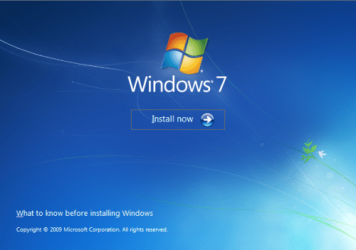
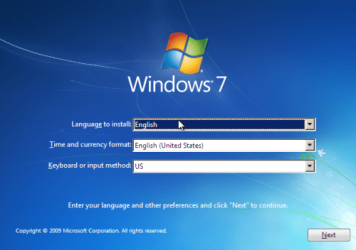
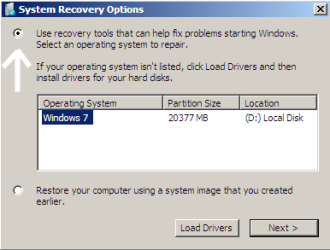
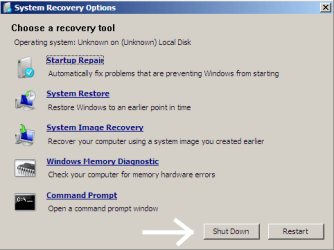
i tried the method above but at Step 3, mine did not show up any operating system..all blank so i just clicked next then at Step 9 it couldnt restore the bootsector code. it only shows "the system partition was not found: the requested system device cannot be found" and then everything remain the same, still cannot boot. i know i am stupid to remove the system reserved partiton.. but i really need help here, i have imporant data in the laptop so i dont want to format and reinstall... if anyone can help, i really appreciate |
| My System Specs |
| Similar help and support threads | ||||
| Windows 7 Tutorial | Category | |||
|
How do I restore the Master Boot Record? I deleted Ubuntu Linux from my computer by deleting the partitions that contained it, but this also deleted GRUB and now my computer can't boot into Windows. I looked online and it said I needed the Windows 7 disk to restore the Master Boot Record. I do not have the Windows 7 disk. People... |
General Discussion | |||
|
Master Boot Record question ~ My desktop crashes overnight ... sometimes. It attempts to reboot, but halts at 'Verifying DMI pool data'. (No idea why it crashes - it isn't consistent - it doesn't crash during daily use, and most likely a power flicker issue.) ~ I reboot using MiniTool Partition Wizard boot disc, rebuild... |
General Discussion | |||
|
Windows 7 boot issue with master boot record Hello, My Old hard drive has Windows Vista Ultimate 64 bit installed on it. I purchased the Windows 7 Home Premium upgrade and ran the upgrade. Removed the Vista hard drive, and can not start Windows 7. Only issue on this system, I have upgraded two other systems without any problem. SSD... |
Installation & Setup | |||
|
Master Boot Record re-creation Hi Have a PC with Windows 7 on it. First hard disk with Master Boot Record failed (had an install of windows xp on it) - have now removed faulty disk, but PC will not boot due to Master Boot Record not being on second disk. How do I go about re-creating the MBR on this Windows 7 install disk... |
Installation & Setup | |||
|
Master Boot Record needed from one HDD to another I've recently installed a Vertex 4 in my computer and along with that, my old primary HDD started to fail - So I copied all that I needed and formatted it in windows 7 via disk-management. Earlier today I wanted to remove it from my PC, because I had no use for it but when I did, windows would not... |
Installation & Setup | |||
| Our Sites |
Site Links |
About Us |
Find Us |
|
Windows 7 Forums is an independent web site and has not been authorized,
sponsored, or otherwise approved by Microsoft Corporation.
"Windows 7" and related materials are trademarks of Microsoft Corp.
© Designer Media Ltd All times are GMT -5. The time now is 04:03. |
|